
1. Produk Lebihview
The SCANGRIP NOVA R is a versatile, rechargeable COB LED floodlight designed for professional use. It offers powerful illumination, a compact design, and practical features for various work environments.

Rajah 1: Depan view of the SCANGRIP NOVA R floodlight, showcasing reka bentuknya yang padat dan teguh.
Ciri-ciri Utama:
- Rechargeable COB LED work light, providing up to 2000 lumens.
- Slim and compact design for portability and ergonomic handling.
- 5-step dimming function to adjust light output.
- Integrated magnetic bracket for flexible positioning.
- Built-in power bank with USB outlet for charging mobile devices.
- Waterproof (IP67) for use in challenging conditions.

Figure 2: The floodlight stored compactly within a tool bag, highlighting its portability.

Figure 3: The floodlight positioned on a workbench in a garage setting, ready for use.
2. Maklumat Keselamatan
Please read these safety instructions carefully before using the SCANGRIP NOVA R floodlight. Failure to follow these instructions may result in electric shock, fire, or serious injury.
- Do not look directly into the light source when it is active. The intense light can cause eye damage.
- Jauhkan peranti daripada kanak-kanak.
- Do not attempt to open, modify, or repair the device. Refer all servicing to qualified personnel.
- Use only the provided charging cable and charger, or a compatible certified charger.
- Do not expose the device to extreme temperatures, direct sunlight for prolonged periods, or open flames.
- Ensure the charging port cover is securely closed when not charging to maintain IP67 waterproof rating.
- Dispose of the battery responsibly according to local regulations. Do not incinerate.
3. Komponen dan Kawalan Produk
Familiarize yourself with the different parts and controls of your NOVA R floodlight.

Figure 4: Annotated diagram highlighting key features such as the COB LED, battery indicator, dimming controls, built-in power bank, powerful magnets, and flexible stand.
Control Panel (Refer to Figure 4 and Figure 5):
- Butang Kuasa: Menghidupkan/mematikan lampu.
- Dimming Buttons (+/-): Adjusts light intensity through 5 steps.
- Penunjuk Bateri: Displays current battery charge level.
- Port Keluaran USB: Untuk mengecas peranti luaran.
- Charging Input Port: For recharging the floodlight.
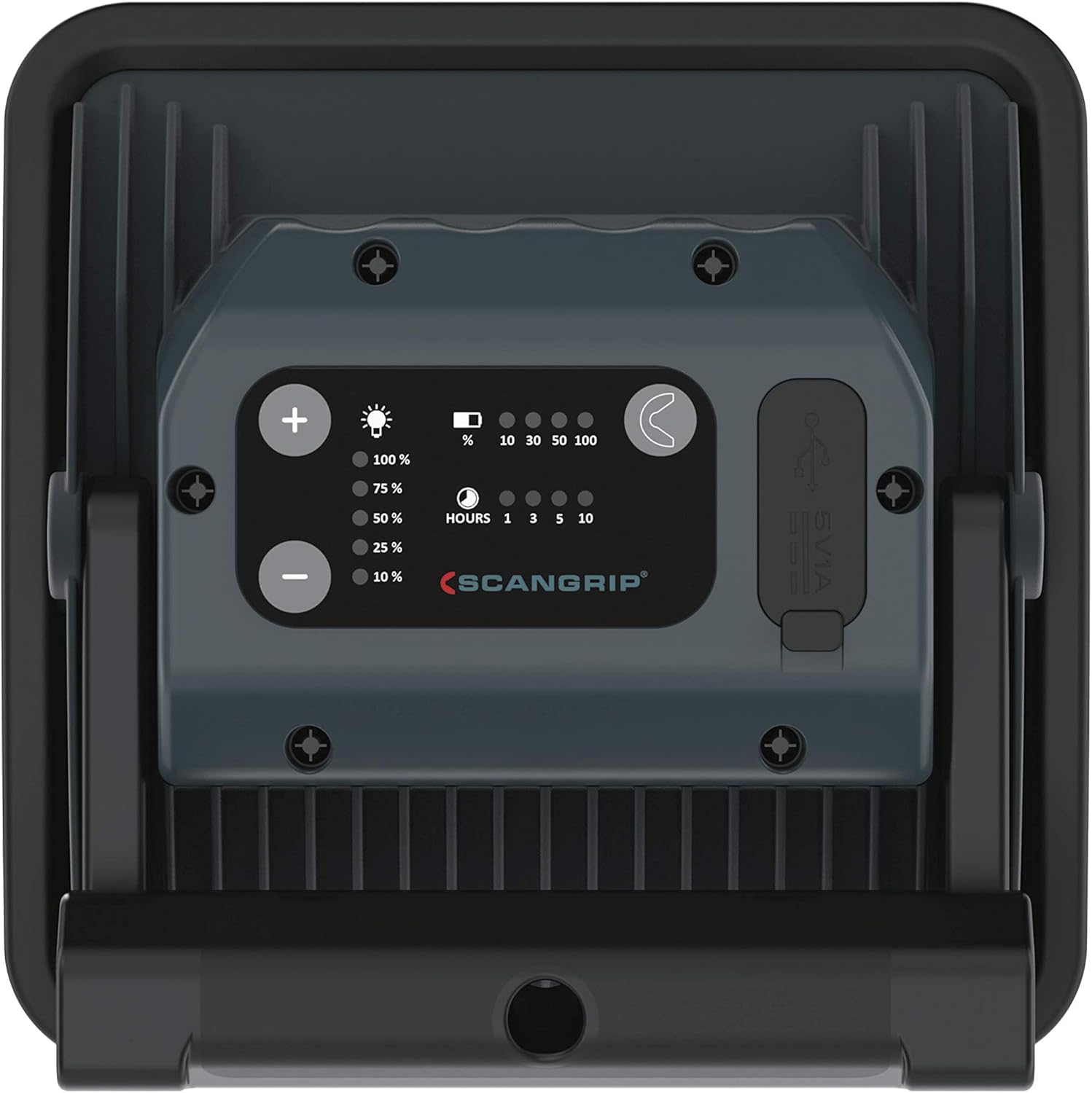
Figure 5: Close-up of the rear control panel, showing the power, dimming buttons, battery indicators, and USB ports.
4. Persediaan
4.1 Pengecasan Awal
Before first use, fully charge the NOVA R floodlight. This ensures optimal battery performance and longevity.
- Locate the charging input port on the rear of the floodlight.
- Connect the provided charging cable to the floodlight and a suitable power source (e.g., wall adapter, USB port).
- The battery indicator lights will illuminate, showing the charging progress. All lights will be solid when fully charged.
- Once fully charged, disconnect the charging cable and ensure the port cover is sealed.
4.2 Positioning the Floodlight
The NOVA R features a flexible stand and powerful built-in magnets for versatile positioning.
- Pendirian Fleksibel: Adjust the stand to tilt the light up to 160 degrees, directing illumination precisely where needed.
- Magnet terbina dalam: Attach the floodlight to any magnetic surface for hands-free operation. Ensure the surface is stable enough to support the light's weight.

Figure 6: The floodlight magnetically attached to a metal workbench, demonstrating its flexible positioning capabilities.
5. Arahan Operasi
5.1 Turning On/Off and Dimming
- Press the power button once to turn the floodlight on.
- Use the '+' and '-' buttons to cycle through the 5 dimming steps to achieve the desired light intensity.
- Press the power button again to turn the floodlight off.

Figure 7: A hand holding the floodlight, illustrating its ergonomic design for handheld use.

Figure 8: A user holding the floodlight to inspect a wall, demonstrating its handheld use and illumination capabilities.
5.2 Menggunakan Fungsi Power Bank
The NOVA R can be used as a power bank to charge your mobile devices.
- Open the cover of the USB output port on the rear of the floodlight.
- Connect your device's USB charging cable to the floodlight's USB output port.
- Charging will begin automatically. Monitor your device's charging status.
- Once charging is complete, disconnect the cable and securely close the USB port cover.

Figure 9: The floodlight actively charging a smartphone via its built-in USB power bank function.
6. Penyelenggaraan
6.1 Pembersihan
- Pastikan peranti dimatikan dan diputuskan sambungannya daripada sebarang sumber kuasa sebelum membersihkannya.
- Wipe the exterior of the floodlight with a soft, damp kain.
- Jangan gunakan pembersih yang melelas, pelarut atau bahan kimia yang keras, kerana ini boleh merosakkan permukaan.
- Ensure all port covers are closed after cleaning to maintain water resistance.
6.2 Penjagaan dan Penyimpanan Bateri
- Untuk memanjangkan hayat bateri, elakkan daripada menyahcas sepenuhnya bateri dengan kerap.
- If storing the floodlight for an extended period, charge it to approximately 50-70% every few months.
- Simpan peranti di tempat yang sejuk dan kering, jauh dari cahaya matahari langsung dan suhu yang melampau.
7. Penyelesaian masalah
| Masalah | Kemungkinan Punca | Penyelesaian |
|---|---|---|
| Cahaya tidak menyala. | Bateri dinyahcas. | Charge the floodlight fully. |
| Keluaran cahaya adalah malap. | Low battery or dimming setting. | Recharge the battery or increase brightness using the '+' button. |
| Device not charging from USB output. | Floodlight battery is low or cable is faulty. | Ensure floodlight is sufficiently charged. Try a different USB cable. |
| Water ingress despite IP67 rating. | Port covers not properly sealed. | Always ensure all port covers are securely closed before exposure to water. If damage occurred, discontinue use and contact support. |
8. Spesifikasi
| Ciri | Perincian |
|---|---|
| Nombor Model | 03.5456AS |
| Sumber Cahaya | LED COB |
| Fluks Bercahaya | Sehingga 2000 lumen |
| Suhu Warna | 6000 Kelvin |
| Dimming Steps | 5 langkah |
| Sumber Kuasa | Dikuasakan Bateri (termasuk 1 bateri Lithium Ion) |
| Bateri Voltage | 7.3 Volt |
| Masa Operasi | Up to 20 hours (depending on dimming level) |
| Fungsi Pengecasan | Built-in power bank with USB output |
| bahan | aluminium |
| Perlindungan Ingress | IP67 (kalis air) |
| Dimensi Produk | 6.42 x 2.48 x 6.42 inci |
| Berat Barang | 1.74 paun |
| Suhu Operasi | 14 to 104 Degrees Fahrenheit (-10 to 40 Degrees Celsius) |
9. Waranti dan Sokongan
For warranty information, technical support, or service inquiries, please refer to the official SCANGRIP webtapak atau hubungi pengedar sah anda.
Simpan resit pembelian anda sebagai bukti pembelian untuk tuntutan waranti.
Pengeluar: ScanGrip
Webtapak: www.scangrip.com