
UBISHENG 753326608008
UBISHENG Digital TV Converter Box with Antenna - Instruction Manual
Model: 753326608008
1. Pengenalan
This manual provides essential information for the proper installation, operation, and maintenance of your UBISHENG Digital TV Converter Box with Antenna. Please read this manual thoroughly before using the device to ensure optimal performance and safety. This converter box allows older analog televisions to receive digital broadcast signals (ATSC) and offers features such as PVR recording, playback, and timer settings.
2. Kandungan Pakej
Sahkan bahawa semua item yang disenaraikan di bawah disertakan dalam pakej anda. Jika ada item yang hilang atau rosak, sila hubungi sokongan pelanggan.
- Digital TV Converter Box
- Digital TV Antenna with Amplebih hidup
- Alat Kawalan Jauh
- Penyesuai Kuasa
- Kabel AV (RCA)
- Manual Pengguna (dokumen ini)

Image 2.1: Included items: Digital TV Converter Box, Antenna, Remote Control, AV Cable, and Power Adapter.
3. Arahan Persediaan
Follow these steps to connect your Digital TV Converter Box to your television and begin receiving digital channels.
3.1. Sambungan Antena
- Connect the coaxial cable from the digital TV antenna to the 'ANT IN' port on the back of the converter box.
- Sambungkan antena amplifier's USB cable to the USB port on the converter box or a separate USB power adapter.
- Position the antenna for optimal signal reception. Consider placing it near a window or high on a wall.
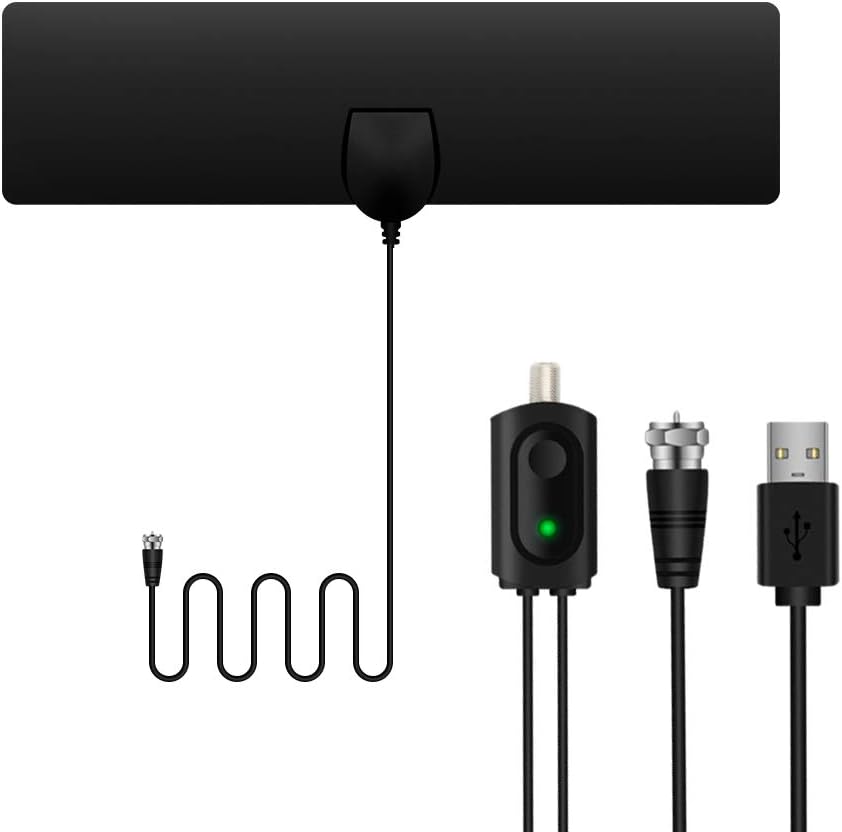
Image 3.1: Digital TV antenna with amplifier and coaxial connector.

Image 3.2: Various placement options for the digital TV antenna to optimize signal reception.
3.2. Menyambung ke Televisyen Anda
The converter box supports both HDMI and AV (RCA) connections to your television.
Sambungan HDMI (Disyorkan untuk TV HD):
- Connect an HDMI cable (not included) from the 'HDMI OUT' port on the converter box to an available HDMI input on your television.
- Pilih input HDMI yang sepadan pada TV anda menggunakan alat kawalan jauh TV anda.
AV (RCA) Connection (For older TVs):
- Connect the supplied AV cable to the 'CVBS', 'AR', and 'AL' ports on the converter box (Yellow for Video, Red for Right Audio, White for Left Audio).
- Connect the other end of the AV cable to the corresponding 'Video In', 'Audio R', and 'Audio L' ports on your television.
- Select the corresponding AV input on your TV using your TV's remote control.

Image 3.3: Connection options for the converter box to a television using AV (RCA) or HDMI cables.

Image 3.4: Full connection diagram illustrating how to connect the digital antenna, amplifier, converter box, and television.
3.3. Sambungan Kuasa
- Connect the power adapter to the 'DC IN' port on the converter box.
- Palamkan penyesuai kuasa ke soket elektrik standard.
- Turn on the converter box using the power button on the front panel or the remote control.
3.4. Imbasan Saluran Awal
After all connections are made and the devices are powered on, you will need to perform an initial channel scan.
- On your TV remote, select the correct input source (HDMI or AV) where the converter box is connected.
- On the converter box remote, press the 'MENU' button.
- Navigate to the 'Channel Search' or 'Auto Scan' option in the menu.
- Select 'Start Scan' to begin searching for available digital channels. This process may take several minutes.
- Once the scan is complete, the converter box will save the found channels, and you can begin watching TV.
4. Arahan Operasi
This section covers the basic functions and features of your UBISHENG Digital TV Converter Box.
4.1. Channel Navigation
- Use the 'CH+' and 'CH-' buttons on the remote control to change channels sequentially.
- Enter a channel number directly using the numeric keypad on the remote control.
- Press the 'OK' button to view the channel list and select a channel.

Imej 4.1: Cthample of multiple digital channels available through the converter box.
4.2. PVR Recording and Playback
The converter box supports Personal Video Recorder (PVR) functionality, allowing you to record live TV programs to a USB storage device (not included).
- Sambungkan Peranti USB: Insert a USB flash drive or external hard drive (formatted to FAT32 or NTFS) into the USB port on the front of the converter box.
- Rakaman Segera: While watching a program, press the 'REC' button on the remote control to start recording. Press 'STOP' to end the recording.
- Rakaman Berjadual (Pemasa): Access the 'Timer Setting' or 'PVR Schedule' menu to set up recordings for future programs. You can specify channel, start time, end time, and frequency (once, daily, weekly).
- Main balik: Press the 'USB' or 'Media' button on the remote control to access the media player. Navigate to the 'PVR' folder to find and play your recorded programs.

Image 4.2: Visual representation of the PVR recording feature.

Image 4.3: Icons indicating media playback capabilities, including recorded content.
4.3. Panduan Program Elektronik (EPG)
Press the 'EPG' button on the remote control to view the Electronic Program Guide, which displays upcoming program information for available channels.
4.4. Pemain Media
In addition to PVR playback, the converter box can play various media files (video, audio, photos) stored on a connected USB device. Access this feature via the 'USB' or 'Media' button on the remote.
5. Penyelenggaraan
Proper care and maintenance will extend the lifespan of your converter box.
- Pembersihan: Use a soft, dry cloth to clean the exterior of the converter box. Do not use liquid cleaners or abrasive materials.
- Pengudaraan: Ensure the converter box has adequate ventilation. Do not block the ventilation slots.
- Storan: Apabila tidak digunakan untuk tempoh yang lama, cabut penyesuai kuasa dan simpan peranti di tempat yang sejuk dan kering.
- Kuasa: Always disconnect the power before cleaning or moving the device.
6. Penyelesaian masalah
If you encounter issues with your converter box, refer to the following common problems and solutions.
| Masalah | Kemungkinan Punca | Penyelesaian |
|---|---|---|
| Tiada gambar atau bunyi | Incorrect TV input selected; Loose cable connections; Power not connected. | Ensure TV is on correct input (HDMI/AV). Check all cable connections. Verify power adapter is plugged in. |
| Tiada saluran ditemui semasa imbasan | Antenna not connected; Poor antenna signal; Antenna amppenguat tidak dikuasakan. | Ensure antenna is connected. Adjust antenna position. Check if amplifier USB is powered. Rescan channels. |
| Alat kawalan jauh tidak berfungsi | Batteries depleted; Obstruction between remote and box; Remote not pointed at IR sensor. | Replace batteries. Remove any obstructions. Point remote directly at the converter box's IR sensor. |
| PVR recording issues | USB device not connected; Insufficient storage space; USB device not formatted correctly. | Ensure USB device is properly inserted. Check available storage. Format USB device to FAT32 or NTFS. |
| Poor picture quality / Signal pixelation | Weak antenna signal; Interference. | Adjust antenna position for better reception. Try rescanning channels. Minimize interference from other electronic devices. |
7. Spesifikasi
Technical details for the UBISHENG Digital TV Converter Box.
- Nombor Model: 753326608008
- Teknologi Ketersambungan: HDMI
- Jenis Pengawal: Kawalan Jauh IR
- Ciri Khas: PVR Recording & Playback, Digital Signal Conversion
- Peranti Serasi: Televisyen
- Jenis Penyambung: HDMI, 3.5mm Jack (for AV output)
- Mod Output Audio: Stereo, Surround
- Konfigurasi Saluran Bunyi Sekeliling: 5.1
- Pengekodan Video: H.264, H.265/HEVC
- warna: Hitam
- Berat Barang: 1.06 paun
- Dimensi Pakej: 12.48 x 4.45 x 2.13 inci

Image 7.1: The converter box supports various resolutions up to 1080P.
8. Maklumat Waranti
UBISHENG products are covered by a limited warranty from the date of purchase. This warranty covers manufacturing defects in materials and workmanship. It does not cover damage caused by misuse, accident, unauthorized modification, or normal wear and tear. Please retain your proof of purchase for warranty claims. For specific warranty terms and conditions, please refer to the documentation provided with your product or contact customer support.
9. Sokongan Pelanggan
If you have any questions, require technical assistance, or need to report an issue, please contact UBISHENG customer support. Our team is available to help you with any inquiries regarding your Digital TV Converter Box.
Maklumat Hubungan:
- Webtapak: www.ubisheng.com (Placeholder - please refer to actual product documentation for official webtapak)
- e-mel: support@ubisheng.com (Placeholder - please refer to actual product documentation for official email)
Ask a question about this manual
Ask about setup, troubleshooting, compatibility, parts, safety, or missing instructions. Manuals+ will review the question and use this page’s manual context to help answer it.