
pengenalan
The Fostex 6301DT is a compact and versatile 4-inch powered studio monitor, designed for broadcast, production facilities, mobile setups, project studios, and home recording environments. Building upon the legacy of the 6301-series, this model incorporates a D-class power amplifier and a new driver unit, featuring an energy-saving auto stand-by function. The 6301DT integrates Dante network audio capabilities, allowing playback of any two channels of Dante network audio signals, alongside traditional 1/4-inch TS analog inputs. Its ultra-rugged die-cast aluminum enclosure ensures durability for professional use.
Maklumat Keselamatan
- Sumber Kuasa: Sambungkan unit hanya kepada volum bekalan kuasa yang dinyatakantage. Ensure the power cord is securely connected.
- Pengudaraan: Jangan sekat bukaan pengudaraan. Pastikan aliran udara yang mencukupi di sekeliling unit untuk mengelakkan terlalu panas.
- Kelembapan: Do not expose the unit to rain, moisture, or excessive humidity. Avoid placing liquid-filled objects on the unit.
- Objek Asing: Jangan masukkan sebarang objek ke dalam bukaan unit.
- Servis: Rujuk semua servis kepada kakitangan servis yang berkelayakan. Jangan cuba membuka atau membaiki unit itu sendiri.
- penempatan: Place the monitor on a stable surface. Avoid locations with excessive vibration, dust, or direct sunlight.
Kandungan Pakej
Sahkan bahawa semua item terdapat dalam pakej:
- Fostex 6301DT Active Monitor Speaker
- Kord Kuasa IEC
Produk Selesaiview
Panel Depan

Rajah 1: Kawalan Panel Hadapan
- Butang Kuasa: Press to turn the unit ON or OFF. An LED indicator shows the power status.
- Tombol Kelantangan: Adjusts the output level of the monitor.
Panel Belakang
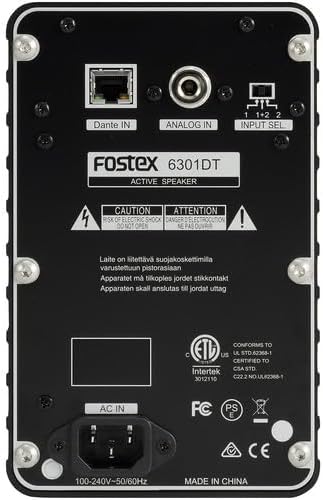
Rajah 2: Sambungan Panel Belakang
- Dante IN (RJ45): Connects to a Dante network for digital audio input.
- Analog IN (1/4" TS): Connects to an analog audio source using a 1/4-inch TS cable.
- Suis Pilih Input: Selects the audio input channel for monitoring (1, 2, or 1+2 mixed).
- AC DALAM: Connects the supplied IEC power cord.
Persediaan
Penempatan
Place the Fostex 6301DT on a stable, flat surface. For optimal sound reproduction, position the monitor at ear level and equidistant from your listening position. An optional EB-6301 mounting bracket (not included) allows for easy surface-mounting at various angles.

Gambar 3: Cthample Persediaan Aplikasi
Sambungan Kuasa
- Ensure the monitor's power button is in the OFF position.
- Connect the supplied IEC power cord to the AC IN port on the rear panel of the monitor.
- Palamkan hujung kord kuasa yang lain ke dalam salur keluar kuasa AC yang sesuai.
Sambungan Audio
The 6301DT supports both analog and Dante network audio inputs.
- Input Analog: Connect your analog audio source (e.g., mixer, audio interface) to the 1/4" TS Analog IN port on the rear panel using a 1/4-inch TS cable.
- Dante Network Input: Connect an RJ45 Ethernet cable from your Dante network switch or device to the Dante IN port on the rear panel.
Beroperasi
Menghidupkan/Mematikan
Press the Power button on the front panel to turn the monitor ON. The power indicator LED will illuminate. Press the button again to turn the monitor OFF.
Pelarasan Kelantangan
Rotate the Volume knob on the front panel clockwise to increase the output level and counter-clockwise to decrease it. Start with a low volume setting and gradually increase it to a comfortable listening level.
Pemilihan Input
Use the Input Select switch on the rear panel to choose the desired audio source:
- Analog: Selects the 1/4" TS analog input.
- Dante Channel 1: Monitors the first Dante audio channel.
- Dante Channel 2: Monitors the second Dante audio channel.
- Dante Channel 1+2 (Mixed): Monitors a mix of both Dante channels.
Konfigurasi Rangkaian Dante
For Dante network operation, you will need to use Audinate's Dante Controller software on a computer connected to the same Dante network. This software allows you to route audio signals to the Fostex 6301DT and configure its network settings. The 6301DT supports sampling frequencies of 44.1 kHz, 48 kHz, 88.2 kHz, and 96 kHz.
Penyelenggaraan
- Pembersihan: Use a soft, dry cloth to clean the exterior of the monitor. Do not use abrasive cleaners, waxes, or solvents.
- Storan: Jika menyimpan unit untuk tempoh yang lama, putuskan sambungannya daripada kuasa dan simpan di tempat yang sejuk dan kering jauh daripada cahaya matahari langsung dan suhu yang melampau.
- Pengudaraan: Ensure that the ventilation openings are kept clear of dust and debris.
Menyelesaikan masalah
| Masalah | Kemungkinan Punca | Penyelesaian |
|---|---|---|
| Tiada keluaran bunyi |
|
|
| Bunyi herot |
|
|
| Dante connection issues |
|
|
Spesifikasi

Rajah 4: Dimensi Produk
| Ciri | Spesifikasi |
|---|---|
| Nombor Model | AMS-6301DT |
| Jenis Pembesar Suara | Monitor Studio Berkuasa |
| Saiz Pembesar Suara | 4 Inci |
| Diameter Woofer | 4 Inci |
| AmpJenis yang lebih hidup | Kelas-D |
| Kuasa Output Maksimum | 20 Watt |
| Mod Keluaran Audio | Stereo |
| Bilangan Saluran Audio | 2.0 |
| Teknologi Ketersambungan | RJ45 (Dante), 1/4" TS (Analog) |
| Protokol Ketersambungan | Dante |
| Disokong Sampling Frequencies | 44.1/48/88.2/96 kHz |
| Nisbah Isyarat-ke-Bunyi | 85 dB |
| Sumber Kuasa | Elektrik Bertali |
| Bahan Kepungan | Aluminium Die-cast |
| warna | Hitam |
| Dimensi Item (D x W x H) | 4.7" x 7.5" x 4.7" |
| Berat Barang | 5.1 paun |
| Ciri-ciri Tambahan | Auto stand-by function, Recessed front-panel controls |
Waranti dan Sokongan
Maklumat Waranti
The Fostex 6301DT is covered by a Waranti terhad pengeluar 1 tahun. Sila simpan bukti pembelian anda untuk tuntutan waranti.
Sokongan Pelanggan
For technical assistance, troubleshooting, or warranty service, please contact American Music and Sound, the manufacturer, or your authorized Fostex dealer. Refer to the Fostex official weblaman web untuk maklumat hubungan sokongan terkini.