
1. Pengenalan
The Ewent EW1538 Dual Monitor Desk Mount is designed to create an ergonomic and space-saving workspace. This gas spring-powered desk mount allows you to position two monitors (13-27 inches, 2-7 kg each) at your ideal height and viewing angle with ease. Its flexible adjustments help reduce strain on your neck, back, and shoulders, promoting a more comfortable and productive environment. The integrated cable management system keeps your workspace tidy.

Image 1.1: Ewent EW1538 Dual Monitor Desk Mount without monitors.
2. Maklumat Keselamatan
Please read all instructions carefully before assembly and use. Failure to follow these instructions may result in property damage, serious injury, or death.
- Kapasiti Berat: Do not exceed the maximum weight capacity of 7 kg (15.4 lbs) per monitor. Ensure your monitors are within the specified weight range.
- Saiz Monitor: This mount is suitable for monitors between 13 and 27 inches.
- Keserasian VESA: Ensure your monitors have VESA mounting patterns (75x75mm or 100x100mm).
- Ketebalan Meja: Verify your desk is thick enough and structurally sound to support the combined weight of the mount and monitors.
- Mata Cubit: Be aware of moving parts and potential pinch points during assembly and adjustment. Keep hands clear.
- Perhimpunan: Assemble the product exactly as described in this manual. Do not modify the mount.
- Kanak-kanak: Jauhkan kanak-kanak dari kawasan perhimpunan. Bahagian kecil mungkin bahaya tercekik.
3. Kandungan Pakej
Before assembly, ensure all parts are present and undamaged. If any parts are missing or damaged, contact your retailer for assistance.
- Pangkalan Meja
- Tiang Utama
- Pemasangan Lengan Dwi Monitor
- VESA Mounting Plates (x2)
- Kit Perkakasan (skru, pencuci, spacer)
- Allen Keys / Wrenches
- Klip Pengurusan Kabel
4. Arahan Persediaan
Follow these steps to assemble and install your Ewent EW1538 Dual Monitor Desk Mount.
4.1. Attach Base to Pole
- Place the desk base on a stable surface.
- Insert the main pole into the designated slot on the desk base.
- Secure the pole to the base using the provided screws and an Allen key from underneath the base. Tighten firmly.
4.2. Attach Monitor Arm Assembly to Pole
- Slide the dual monitor arm assembly onto the main pole.
- Adjust the arm to your desired initial height and secure it by tightening the locking screw on the back of the arm assembly with an Allen key.

Imej 4.1: Selesaiview of the monitor mount components and assembly.
4.3. Attach VESA Plates to Monitors
- Carefully place your monitor face down on a soft, clean surface.
- Attach a VESA mounting plate to the back of each monitor using the appropriate screws and washers from the hardware kit. Ensure the screws are tightened securely but do not overtighten.

Image 4.2: Detail of VESA plate attachment to a monitor.
4.4. Pasangkan Monitor ke Lengan
- With assistance, carefully lift each monitor and slide the VESA plate attached to the monitor onto the corresponding arm bracket.
- Ensure the monitor is securely seated on the bracket. Some brackets may have a quick-release or locking mechanism; engage it if present.
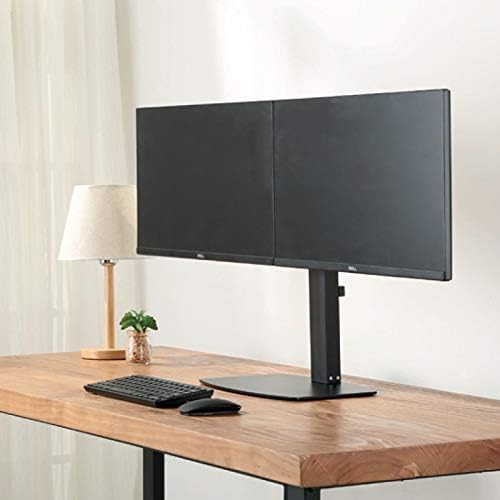
Imej 4.3: Depan view of two monitors mounted on the desk stand.
4.5. Laraskan Ketegangan Spring Gas
- The gas spring tension may need adjustment to properly support your monitor's weight.
- Locate the tension adjustment screw on the arm (usually near the VESA plate or the arm pivot point).
- If the monitor sags, turn the screw clockwise to increase tension. If the monitor floats up too easily, turn the screw counter-clockwise to decrease tension. Adjust until the monitor stays in place when moved.
4.6. Pengurusan Kabel
- Route your monitor cables (power, video) through the integrated cable management clips or channels on the monitor arms and down the main pole.
- This helps keep your workspace organized and prevents cable clutter.
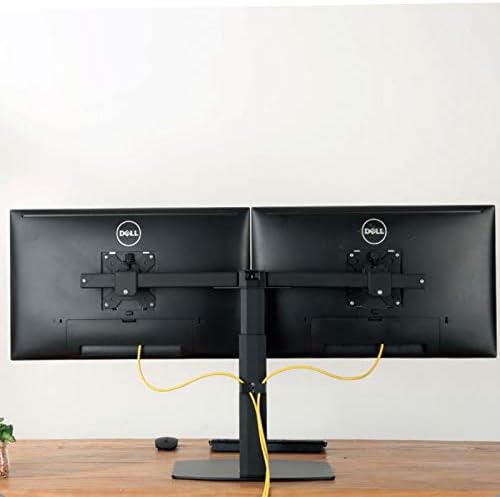
Imej 4.4: Belakang view illustrating cable management with monitors mounted.
5. Arahan Operasi
The Ewent EW1538 offers various adjustments for optimal viewkeselesaan.
- Pelarasan Ketinggian: Gently push or pull the monitor up or down to adjust its height. The gas spring mechanism will hold it in place.
- Pelarasan Kecondongan: Condongkan skrin monitor ke atas atau ke bawah untuk mengurangkan silau dan cari pilihan anda viewsudut ing.
- Pelarasan Pusing: Swivel the monitor left or right to share your screen or adjust your viewkedudukan.
- Putaran: Putar monitor 360 darjah untuk bertukar antara orientasi landskap dan potret.

Image 5.1: Monitors adjusted to different orientations (landscape and portrait).
6. Penyelenggaraan
Regular maintenance ensures the longevity and proper function of your monitor mount.
- Pembersihan: Bersihkan dudukan dengan kain lembut,amp kain. Elakkan pembersih atau pelarut yang melelas.
- Semak Sambungan: Periksa semua skru dan sambungan secara berkala untuk memastikan ia kekal ketat. Ketatkan semula jika perlu.
- Spring Gas: The gas spring is designed for long-term use and generally requires no maintenance. If adjustment becomes difficult, re-check the tension setting.
7. Penyelesaian masalah
If you encounter issues with your monitor mount, refer to the following common solutions:
| Masalah | Kemungkinan Punca | Penyelesaian |
|---|---|---|
| Monitor melorot atau jatuh | Ketegangan spring gas terlalu rendah untuk memantau berat. | Increase gas spring tension by turning the adjustment screw clockwise. |
| Monitor floats up too easily | Ketegangan spring gas terlalu tinggi untuk memantau berat. | Decrease gas spring tension by turning the adjustment screw counter-clockwise. |
| Monitors are not level | Minor height discrepancy between arms or VESA plates. | Adjust the individual VESA plate height or arm tilt to level the monitors. |
| Gunung berasa tidak stabil | Base screws are loose or desk is not sturdy. | Ensure all assembly screws are tightened. Verify desk stability. |
8. Spesifikasi
- model: EW1538
- Jenama: Ewent
- Keserasian Saiz Skrin: 13 - 27 inci
- Kapasiti Berat: 2 - 7 kg (4.4 - 15.4 lbs) per monitor
- Keserasian VESA: 75x75mm, 100x100mm
- Pergerakan: Height adjustment (gas spring), Tilt (up to 15 degrees), Swivel, 360° Rotation
- Bahan: Pembinaan logam dan plastik tahan lama
- warna: Hitam
- Berat produk: Kira-kira 6 kg (13.2 lbs)
9. Waranti dan Sokongan
For warranty information or technical support, please refer to the documentation provided with your purchase or visit the official Ewent weblaman web. Butiran hubungan untuk khidmat pelanggan biasanya boleh didapati di sana.