pengenalan
Terima kasih kerana membeliasing the 1Mii ML300 Bluetooth 5.3 Transmitter & Receiver. This versatile 2-in-1 device allows you to effortlessly stream audio wirelessly, transforming non-Bluetooth devices into Bluetooth-enabled ones. Whether you want to connect your TV to Bluetooth headphones or stream music from your phone to an old stereo system, the ML300 provides a high-quality, low-latency audio experience.

Image: The 1Mii ML300 Bluetooth adapter shown with its accompanying 3.5mm audio cable, RCA to 3.5mm audio cable, USB-C charging cable, and airplane adapter.
Ciri-ciri Utama
- Latest Bluetooth 5.3 Technology: Ensures a more stable wireless connection and backward compatibility with older Bluetooth versions (5.0/4.2/4.0/3.0/2.0).
- Dual Link aptX Low Latency: Provides up to 80% lower latency, ensuring audio and video synchronization for gaming and movies. Supports aptX Low Latency even in dual link mode.
- 2-in-1 Transmitter & Receiver:
- Mod Pemancar (TX): Transforms non-Bluetooth devices (TV, PC, fitness equipment, airplane entertainment) into Bluetooth transmitters.
- Mod Penerima (RX): Enables Bluetooth audio streaming to non-Bluetooth speakers or home/car stereo systems.
- Ultra-Compatible, Plug & Play: Supports 3.5mm AUX and USB-A outputs. Compatible with Windows 7/8/10, Mac OS, Linux, Ubuntu, PS4, and Nintendo Switch via USB-A.
- Hayat Bateri Luar Biasa: Up to 10 hours in Transmitter mode and up to 15 hours in Receiver mode on a single charge. Can be used while charging.
Apa yang ada dalam Kotak?

Imej: Gambaran visual barang-barang yang disertakan dalam pembungkusan produk.
- 1 x 1Mii ML300 2-in-1 Bluetooth Transmitter Receiver
- 1 x Kabel Pengecas USB Jenis-C
- Kabel Audio 1 x 3.5mm
- 1 x 2RCA to 3.5mm AUX Audio Cable
- 1 x Penyesuai Kapal Terbang
Arahan Persediaan
The 1Mii ML300 can operate in two modes: Transmitter (TX) and Receiver (RX). Ensure the mode switch on the device is set correctly for your desired function.
Mod Pemancar (TX).
Use TX mode to send audio from a non-Bluetooth device (e.g., TV, PC, MP3 player) to Bluetooth headphones or speakers.
- Set the mode switch on the ML300 to TX.
- Connect the ML300 to your audio source (e.g., TV, PC) using the 3.5mm audio cable or the 2RCA to 3.5mm AUX audio cable. Ensure the audio output port of your source device is used.
- Power on the ML300. It will automatically enter pairing mode (indicated by a flashing blue light).
- Letakkan fon kepala atau pembesar suara Bluetooth anda ke mod berpasangan.
- Place the ML300 and your Bluetooth audio device close to each other (within 1 meter) for the first pairing. They should connect automatically. Once connected, the blue light on the ML300 will become solid.
- For dual connection, after the first device is connected, press the corresponding pairing button (1 or 2) on the ML300 to pair the second device.
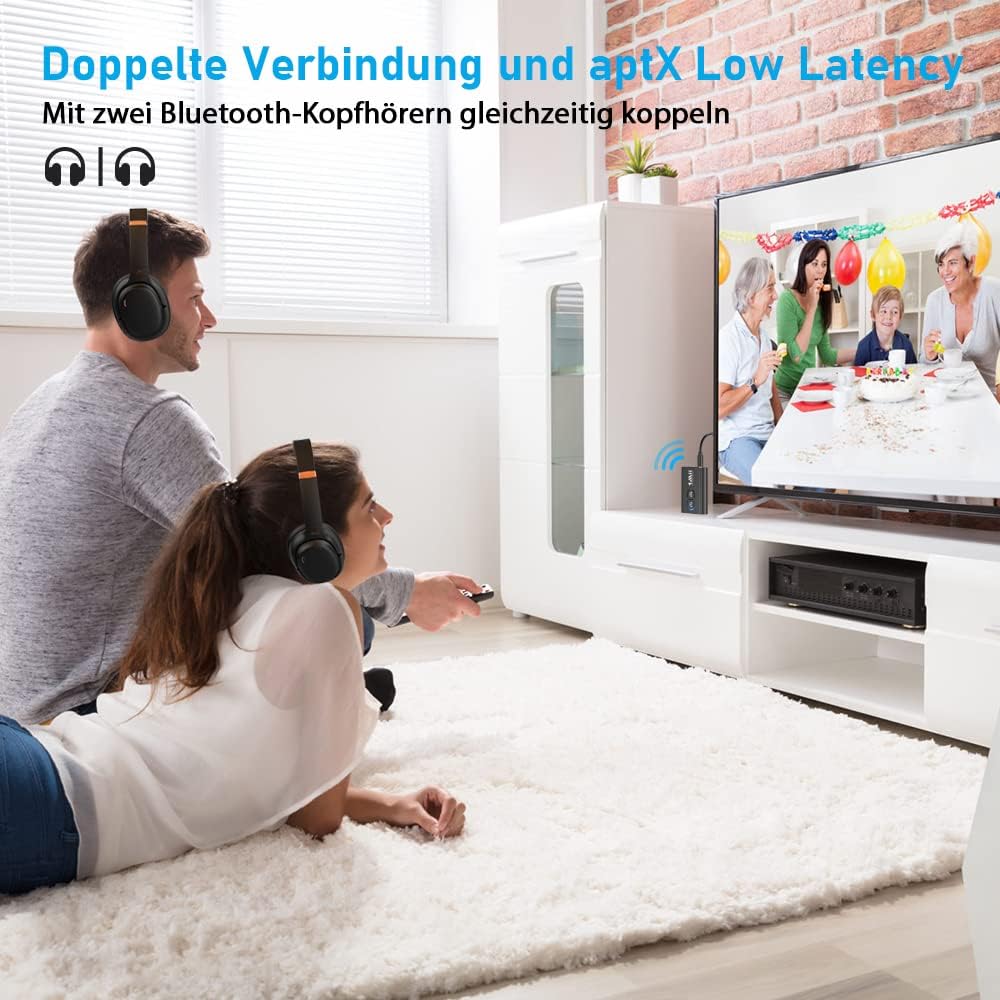
Image: Illustrates the dual connection feature, allowing two Bluetooth headphones to be simultaneously connected to a TV via the 1Mii ML300 for a shared audio experience with aptX Low Latency.
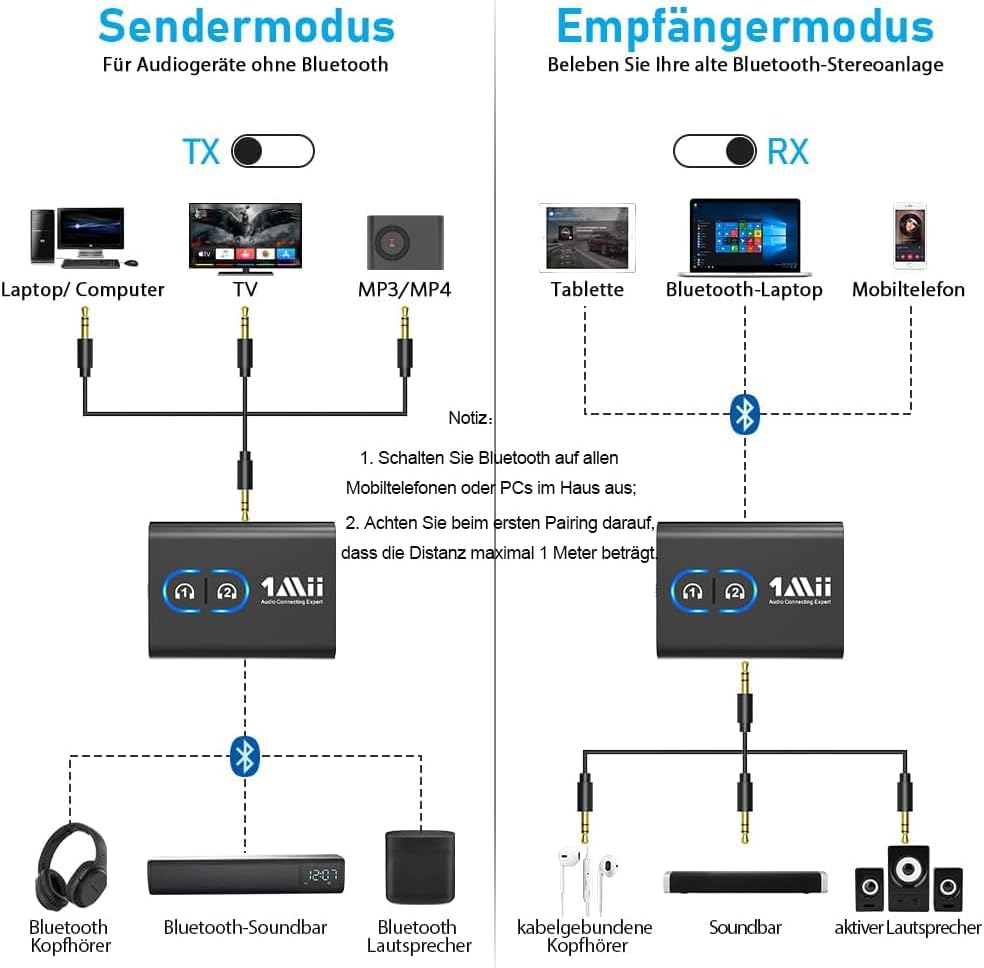
Image: A detailed diagram illustrating how to connect the 1Mii ML300 in both Transmitter (TX) mode for non-Bluetooth audio sources like TVs and PCs, and Receiver (RX) mode for non-Bluetooth speakers or stereo systems.
Mod Penerima (RX).
Use RX mode to receive audio from a Bluetooth-enabled device (e.g., smartphone, tablet, Bluetooth laptop) and play it through a non-Bluetooth speaker or stereo system.
- Set the mode switch on the ML300 to RX.
- Connect the ML300 to your non-Bluetooth speaker or stereo system using the 3.5mm audio cable. Ensure the audio input port of your speaker system is used.
- Power on the ML300. It will automatically enter pairing mode.
- On your Bluetooth-enabled device (e.g., smartphone), enable Bluetooth and search for "ML300" in the list of available devices.
- Select "ML300" to pair. Once connected, the blue light on the ML300 will become solid.
- You can now stream audio from your device to your connected speaker system.
Arahan Operasi
Hidupkan/Mati Kuasa
- Hidupkan kuasa: Press and hold the multi-function button (usually the main power button) for 3 seconds until the indicator light turns on.
- Matikan: Press and hold the multi-function button for 3 seconds until the indicator light turns off.
Pairing and Reconnection
- Berpasangan Kali Pertama: Peranti secara automatik memasuki mod berpasangan apabila dihidupkan buat kali pertama.
- Pemasangan Manual: If the device does not connect automatically, press and hold the pairing button (1 or 2) for 3 seconds to force it into pairing mode.
- Sambungan semula: The ML300 will automatically attempt to reconnect to the last paired device when powered on.
Using the Airplane Adapter
The included airplane adapter allows you to connect the ML300 to in-flight entertainment systems that use dual 3.5mm jacks.
- Plug the airplane adapter into the dual 3.5mm audio output of the in-flight entertainment system.
- Connect the 3.5mm audio cable from the ML300 to the airplane adapter.
- Set the ML300 to TX mode and pair your Bluetooth headphones as described in the TX mode setup.

Image: A user enjoying high-quality audio streaming on an airplane by connecting the 1Mii ML300 to the in-flight entertainment system and pairing it with their wireless earbuds.
Penyelenggaraan
- Pastikan peranti kering. Elakkan pendedahan kepada kelembapan atau cecair.
- Do not disassemble the device. Repairs should only be performed by qualified personnel.
- Bersihkan peranti dengan kain lembut dan kering. Jangan gunakan bahan kimia yang keras atau pembersih yang kasar.
- Simpan peranti di tempat yang sejuk dan kering apabila tidak digunakan untuk tempoh yang lama.
Menyelesaikan masalah
| Masalah | Penyelesaian |
|---|---|
| Peranti tidak dihidupkan. | Ensure the device is fully charged. Connect it to a power source using the USB Type-C cable. |
| Tidak boleh berpasangan dengan peranti Bluetooth. |
|
| Tiada audio atau output audio rendah. |
|
| Audio delay or poor sound quality. |
|
Spesifikasi
| Ciri | Perincian |
|---|---|
| Nombor Model | ML300 |
| Versi Bluetooth | 5.3 |
| Bluetooth Profiles | A2DP, AVRCP |
| Codec Audio | aptX Adaptive, aptX Low Latency, aptX HD, SBC, AAC |
| Mod Pengendalian | Pemancar (TX) & Penerima (RX) |
| Input/Output | 3.5mm AUX, USB-A (for power/data passthrough) |
| Jenis Bateri | Litium-polimer |
| Hayat Bateri (Mod TX) | Sehingga 10 jam |
| Hayat Bateri (Mod RX) | Sehingga 15 jam |
| Port Pengecasan | USB Jenis-C |
| Dimensi | 5L x 3.5W x 0.8H cm (approx.) |
| Compatible OS (USB-A) | Windows 7/8/10, Mac OS, Linux, Ubuntu, PS4, Nintendo Switch |
Waranti dan Sokongan
1Mii products come with a standard manufacturer's warranty. For detailed warranty information, technical support, or customer service inquiries, please visit the official 1Mii webtapak atau hubungi terus pasukan sokongan pelanggan mereka.
Sila simpan bukti pembelian anda untuk tuntutan waranti.