
Produk Selesaiview
The XIAOMI Redmi 9I is a feature-rich smartphone designed for everyday use. This manual provides essential information for setting up, operating, maintaining, and troubleshooting your device.
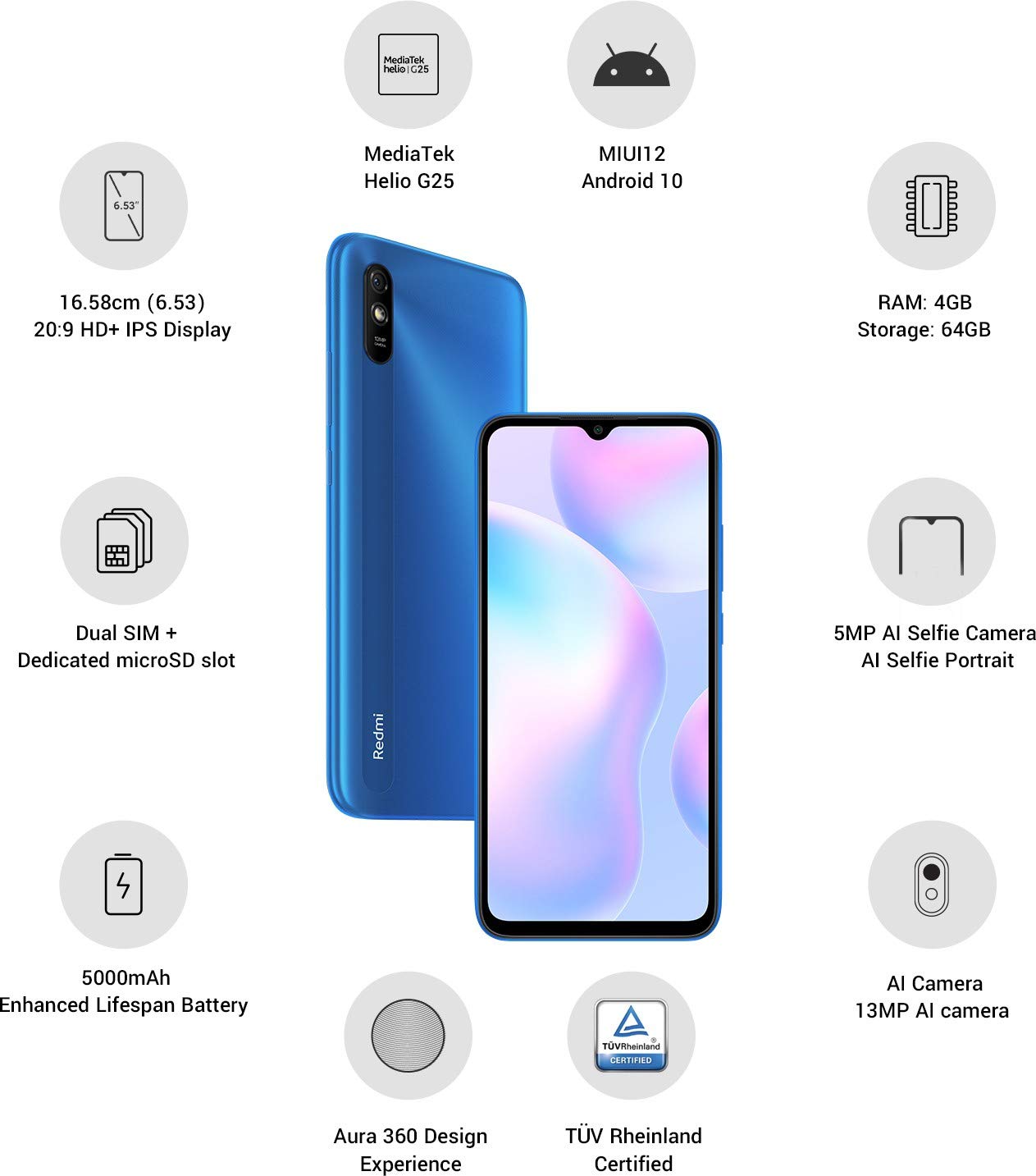
Imej: Selesaiview of the Xiaomi Redmi 9I highlighting key features such as the 6.53-inch HD+ IPS Display, MediaTek Helio G25 processor, MIUI12 Android 10, 4GB RAM, 64GB Storage, Dual SIM + dedicated microSD slot, 5000mAh battery, 5MP AI Selfie Camera, 13MP AI Camera, Aura 360 Design Experience, and TÜV Rheinland Certification.
Panduan Persediaan
1. Unboxing dan Pemeriksaan Awal
Keluarkan semua barang dari pembungkusan dengan berhati-hati. Pastikan komponen berikut ada:
- XIAOMI Redmi 9I Smartphone
- Penyesuai Kuasa
- Kabel Jenis-C USB
- Alat Ejector SIM
- Panduan Mula Pantas (jika disertakan)
2. Memasukkan Kad SIM dan Kad MicroSD
Locate the SIM card tray on the side of your device. Use the provided SIM ejector tool to open the tray. Insert your Nano SIM card(s) and/or a microSD card into the designated slots. Ensure the cards are correctly oriented as shown in the diagram below. Gently push the tray back into the phone until it clicks into place.

Imej: Sisi view of the Xiaomi Redmi 9I, illustrating the location of the SIM card tray. The tray is designed to hold dual Nano SIM cards and a dedicated microSD card.
3. Mengecas Peranti
Before first use, fully charge your Redmi 9I. Connect the USB Type-C cable to the phone's charging port (located at the bottom) and the other end to the power adapter. Plug the adapter into a wall outlet. The charging indicator will appear on the screen.

Imej: Bawah view of the Xiaomi Redmi 9I, showing the USB Type-C charging port and speaker grille.
4. Menghidupkan dan Konfigurasi Awal
Press and hold the Power button (located on the right side of the device) until the XIAOMI logo appears. Follow the on-screen instructions to complete the initial setup, including language selection, Wi-Fi connection, Google account setup, and security settings.

Imej: Sisi view of the Xiaomi Redmi 9I, clearly showing the power button and volume rocker on the right edge of the device.
Arahan Operasi
Navigasi Asas
- Sentuh: Ketik ikon untuk membuka aplikasi, memilih item atau mengesahkan tindakan.
- Leret: Slide your finger across the screen to scroll, switch between home screens, or navigate within apps.
- Cubit: Gunakan dua jari untuk zum masuk atau keluar pada foto dan web muka surat.
- Tekan lama: Press and hold an item for additional options or to move icons.
Membuat Panggilan dan Menghantar Mesej
Tap the Phone icon to access the dialer. Enter a number or select a contact. Tap the Messages icon to compose and send text messages.
Menyambung ke Rangkaian
- Wi-Fi: Pergi ke Tetapan > Wi-Fi, hidupkan Wi-Fi dan pilih rangkaian yang anda inginkan. Masukkan kata laluan jika digesa.
- Bluetooth: Pergi ke Tetapan > Bluetooth, turn Bluetooth on, and pair with compatible devices.
- Data Mudah Alih (4G): Pastikan kad SIM anda aktif dan data mudah alih diaktifkan dalam Settings > SIM cards & mobile networks.
Menggunakan Kamera
Tap the Camera icon to open the camera application. The Redmi 9I features a 13MP rear camera and a 5MP front camera. Switch between modes (Photo, Video, Portrait, etc.) by swiping across the screen. Tap the shutter button to capture photos or start/stop video recording.

Imej: Belakang view of the Xiaomi Redmi 9I, showcasing the 13MP AI camera module and the Redmi branding.
Penyelenggaraan
Membersihkan Peranti Anda
Use a soft, lint-free cloth to clean the screen and body of your phone. Avoid using harsh chemicals or abrasive materials, which can damage the display or finish. For stubborn smudges, slightly dampen kain dengan air atau pembersih skrin yang direka untuk elektronik.
Kemas Kini Perisian
Semak dan pasang kemas kini perisian secara kerap untuk memastikan prestasi optimum, keselamatan dan akses kepada ciri baharu. Pergi ke Tetapan > Perihal telefon > Versi MIUI untuk menyemak kemas kini.
Penjagaan Bateri
The Redmi 9I is equipped with a 5000 mAh Lithium-Polymer battery. To prolong battery life:
- Elakkan suhu yang melampau.
- Jangan biarkan bateri habis sepenuhnya sebelum mengecas semula dengan kerap.
- Gunakan pengecas dan kabel asal.
- Optimize battery usage in Settings > Battery & performance.
Pengurusan Storan
Your device comes with 64GB of internal storage. To manage storage effectively:
- Padam secara kerap yang tidak perlu files, foto dan video.
- Nyahpasang aplikasi yang tidak digunakan.
- Gunakan perkhidmatan storan awan.
- Bergerak besar files to an inserted microSD card.
Menyelesaikan masalah
This section addresses common issues you might encounter with your Redmi 9I.
Peranti Tidak Dihidupkan
- Ensure the battery is charged. Connect the phone to its charger for at least 30 minutes.
- Tekan dan tahan butang Kuasa selama 10-15 saat untuk memaksa mula semula.
Ketersambungan Rangkaian Lemah
- Periksa sama ada kad SIM anda dimasukkan dengan betul.
- Toggle Airplane Mode on and off (swipe down from the top for Quick Settings).
- Mulakan semula peranti anda.
- Verify your mobile data plan is active and you are in an area with network coverage.
Applications Crashing or Freezing
- Tutup dan buka semula apl yang bermasalah.
- Kosongkan cache dan data apl (Settings > Apps > Manage apps > [App Name] > Clear data).
- Pastikan apl dikemas kini kepada versi terkininya.
- Mulakan semula telefon anda.
Skrin Tidak Responsif
- Paksa mulakan semula peranti dengan menekan butang Kuasa.
- If the issue persists, consider a factory reset (Warning: This will erase all data on your phone. Back up important data first. Pergi ke Tetapan > Perihal telefon > Tetapan semula kilang).
Spesifikasi
| Ciri | Perincian |
|---|---|
| Jenama | XIAOMI |
| Model | Redmi 9I |
| Sistem Operasi | Android 9.0 (MIUI12) |
| RAM | 4 GB |
| Storan Dalaman | 64 GB |
| Pemproses | Snapdragon (Kelajuan CPU 2 GHz) |
| Jenis Paparan | LCD |
| Saiz Skrin | 6.53 Inci |
| Kamera Belakang | 13 MP |
| Kamera Depan | 5 MP |
| Kapasiti Bateri | 5000 Miliamp Hours (Lithium-Polymer) |
| Slot Kad SIM | Dual SIM (Nano) |
| Ketersambungan | 4G, Wi-Fi, Bluetooth, USB Type C |
| GPS | GLONASS |
| bahan | plastik |
| Tahap Ketahanan Air | Tahan Air |
Maklumat Waranti
The XIAOMI Redmi 9I comes with a Waranti pengilang selama 1 tahun from the date of purchase. This warranty covers manufacturing defects under normal use. For detailed terms and conditions, please refer to the warranty card included in your product packaging or visit the official XIAOMI support webtapak.
Sokongan Pelanggan
If you encounter issues not covered in this manual or require further assistance, please contact XIAOMI customer support. You can typically find contact information (phone numbers, email, chat support) on the official XIAOMI weblaman web atau melalui bahagian sokongan dalam tetapan peranti anda.
Before contacting support, please have your device's model number (Redmi 9I) and serial number ready. The serial number can usually be found in Tetapan > Perihal telefon > Status.