
BONTEC 110SB-FBA
BONTEC TV Wall Mount Bracket User Manual
Model: 110SB-FBA
pengenalan
This user manual provides comprehensive instructions for the installation, operation, and maintenance of your BONTEC TV Wall Mount Bracket. Designed for 17-45 inch LED, OLED, LCD Flat Screen TVs up to 66lbs, this low-profile, ultra-slim mount offers a secure and aesthetically pleasing solution for mounting your television. Please read this manual thoroughly before installation to ensure safe and correct usage.
Maklumat Keselamatan
- Pastikan struktur dinding dapat menampung berat gabungan dudukan dan televisyen dengan selamat.
- Do not mount on drywall alone. Always mount into wood studs, concrete, or brick walls.
- Verify your TV's VESA pattern and weight are within the mount's specifications (Max VESA 200x200mm, Max 66lbs).
- Use all provided hardware. If any parts are missing or damaged, contact BONTEC customer support.
- Sentiasa gunakan pencari stud untuk mencari stud kayu dengan tepat.
- During installation, ensure no electrical wires or plumbing are behind the drilling area.
- Dua orang disyorkan untuk pemasangan bagi memastikan keselamatan dan kemudahan pengendalian.
- After installation, double-check all connections and ensure the TV is securely fastened to the mount.
Kandungan Pakej
Sila sahkan bahawa semua komponen hadir sebelum memulakan pemasangan:
- TV Wall Mount Bracket (Main Frame)
- TV Mounting Brackets (x2)
- Assorted Screws and Washers for TV attachment
- Lag Bolts and Wall Anchors for wall attachment
- Tahap Semangat
- Ikatan Kabel (x3)
- Manual Pemasangan

Image: All components of the BONTEC TV Wall Mount Bracket, including the main frame, TV brackets, and installation hardware.
Spesifikasi
| Jenama | BONTEC |
| Nombor Model | 110SB-FBA |
| Saiz TV yang Serasi | 17-45 inci |
| Kapasiti Berat Maksimum | 66 paun (30 kg) |
| Keserasian VESA | 50x50mm, 75x75mm, 100x100mm, 200x100mm, 100x200mm, 200x200mm |
| Jarak Dinding (Pro Rendahfile) | 1.18 inci (30mm) |
| Sudut Kecondongan | Up to 10 degrees forward |
| bahan | High-strength Steel |
| warna | Hitam |
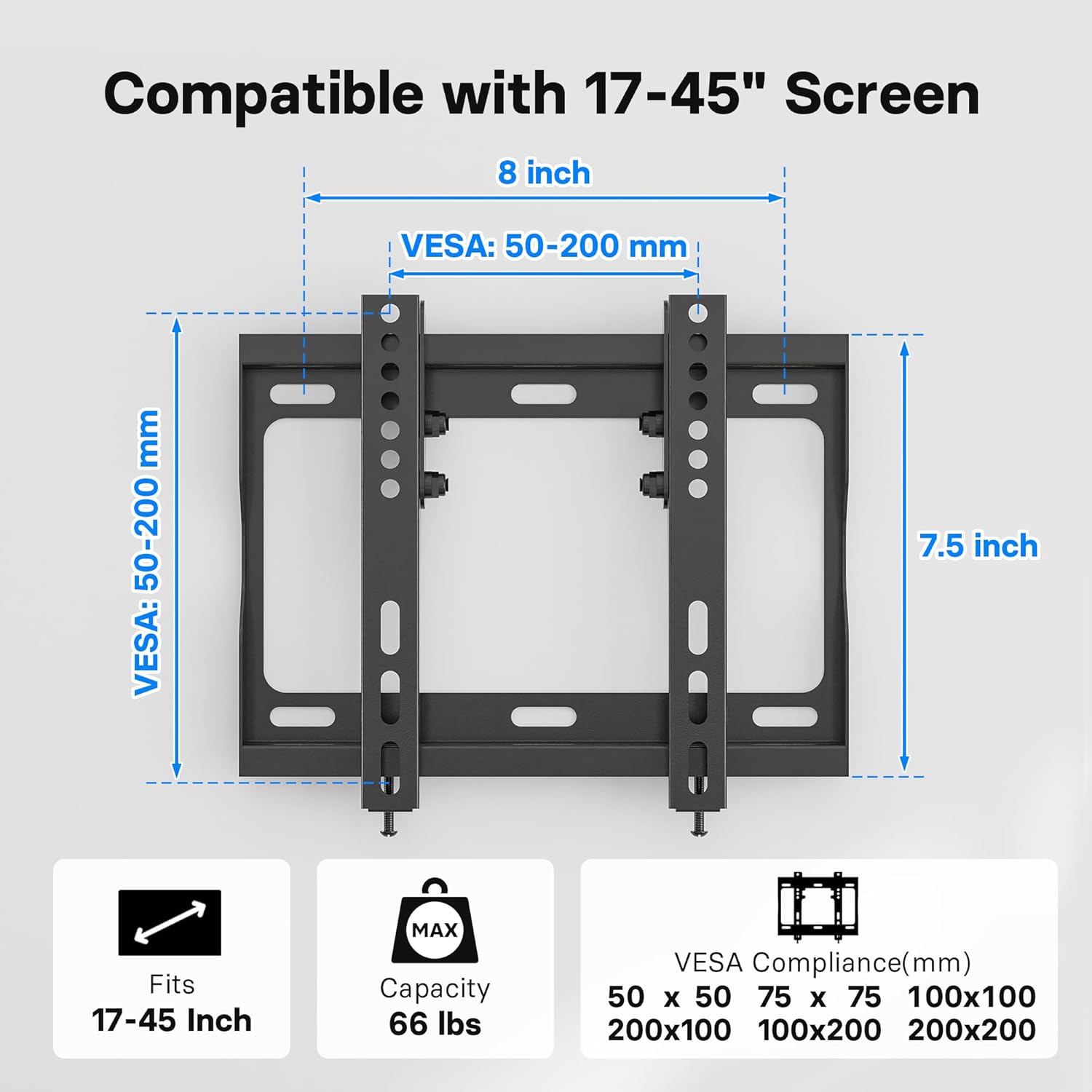
Image: Diagram illustrating the VESA compatibility (50-200mm) and screen size range (17-45 inches) for the mount.
Persediaan dan Pemasangan
Follow these steps carefully to install your BONTEC TV Wall Mount Bracket. It is highly recommended to have two people for this process.
Langkah 1: Pasangkan Kurungan TV pada TV
- Letakkan TV anda dengan berhati-hati menghadap ke bawah di atas permukaan yang lembut dan bersih untuk mengelakkan calar.
- Kenal pasti lubang pelekap VESA di bahagian belakang TV anda.
- Select the appropriate screws and washers from the provided hardware kit that fit your TV's mounting holes.
- Attach the two vertical TV mounting brackets to the back of your TV. Ensure the hooks on the brackets are facing inward, towards the center of the TV.
- Ketatkan skru dengan kukuh, tetapi jangan terlalu ketatkan.

Image: A television mounted flat against a wall, demonstrating the ultra-slim 1.18-inch profile daripada gunung itu.
Step 2: Mark and Drill Holes on Wall
- Tentukan ketinggian yang dikehendaki untuk TV anda.
- Place the wall plate against the wall at the desired height and use the included spirit level to ensure it is perfectly horizontal.
- Mark the drilling points through the holes on the wall plate using a pencil.
- Untuk Kancing Kayu: Use a stud finder to locate the center of the wood studs. Drill pilot holes (recommended size: 7/32" or 5.5mm) at the marked locations.
- Untuk Dinding Konkrit/Bata: Drill pilot holes (recommended size: 3/8" or 10mm) at the marked locations. Insert the plastic wall anchors into the drilled holes. Tap gently with a hammer if needed until flush with the wall surface.

Image: Visual guide demonstrating the applicability of the mount to wood studs, concrete walls, and brick walls. A warning states: "DO NOT MOUNT ON DRYWALL ALONE".
Langkah 3: Lekapkan Plat Dinding ke Dinding
- Align the wall plate with the drilled holes.
- Secure the wall plate to the wall using the lag bolts and washers. For concrete/brick walls, ensure the lag bolts go into the previously inserted wall anchors.
- Tighten all bolts firmly to ensure the wall plate is securely fastened to the wall.
Langkah 4: Gantungkan TV pada Plat Dinding
- Dengan bantuan, angkat TV dengan berhati-hati menggunakan pendakap yang dipasang.
- Sejajarkan cangkuk pada pendakap TV dengan tepi atas plat dinding.
- Turunkan TV dengan perlahan, pastikan pendakap dipasang dengan kukuh pada plat dinding.
- Once the TV is hanging, locate the safety lock bolts at the bottom of the TV brackets. Tighten these bolts to secure the TV to the wall plate and prevent accidental dislodging.

Image: A visual representation of the easy 15-minute installation process, showing the TV being mounted onto the wall plate.

Imej: Dari dekat view of the safety lock bolts, which secure the TV brackets to the wall plate after the TV is hung.
Panduan Video Pemasangan
Video: An official BONTEC video demonstrating the installation process and key features of the Low Profile TV Wall Mount Bracket for 17-45 inch TVs.
Operating the Mount (Tilt Feature)
The BONTEC TV Wall Mount features a 10-degree forward tilt to optimize your viewpengalaman dan mengurangkan silau.
- To adjust the tilt, loosen the tilt adjustment bolts on the side of the TV mounting brackets.
- Carefully tilt the TV to your desired angle (up to 10 degrees forward).
- Once the desired angle is achieved, tighten the tilt adjustment bolts securely to lock the TV in place.

Image: A diagram illustrating the 10-degree tilt capability of the mount and the space provided for cable management behind the TV.

Image: A family enjoying television, demonstrating how the BONTEC TV wall mount allows for optimal viewing angles in a living room setting.
Penyelenggaraan
To ensure the longevity and safe operation of your BONTEC TV Wall Mount Bracket:
- Periksa semua skru dan bolt secara berkala untuk memastikan ia kekal ketat dan kukuh.
- Bersihkan dudukan dengan kain lembut dan kering. Elakkan menggunakan pembersih atau pelarut yang kasar.
- Do not hang anything from the mount other than the specified television.
Menyelesaikan masalah
| Masalah | Kemungkinan Punca | Penyelesaian |
|---|---|---|
| TV tidak rata selepas pemasangan. | Wall plate not perfectly level during installation. | Loosen the wall plate bolts slightly, adjust with a spirit level, then re-tighten. |
| TV feels loose on the mount. | Safety lock bolts not tightened or TV brackets not fully engaged. | Ensure TV brackets are fully seated on the wall plate. Tighten the safety lock bolts at the bottom of the TV brackets. |
| Tidak dapat mencapai sudut kecondongan yang diingini. | Tilt adjustment bolts are too tight. | Loosen the tilt adjustment bolts on the side of the TV brackets, adjust tilt, then re-tighten. |
| Mounting screws for TV do not fit. | Incorrect screw size or type selected. | Refer to your TV's manual for correct screw size. Use the appropriate screws from the provided kit or purchase compatible ones. |
Waranti dan Sokongan
For warranty information and customer support, please refer to the product packaging or visit the official BONTEC webtapak. Simpan resit pembelian anda untuk tuntutan waranti.
If you encounter any issues not covered in this manual, please contact BONTEC customer service for assistance.
Ask a question about this manual
Ask about setup, troubleshooting, compatibility, parts, safety, or missing instructions. Manuals+ will review the question and use this page’s manual context to help answer it.