
1. Pengenalan
Terima kasih kerana membeliasing the Casio IQ-1106J Radio Wave Wall Clock. This clock features an analog display within an octagonal wooden frame, designed to provide accurate timekeeping through radio wave reception. This manual will guide you through the installation, operation, and maintenance of your new clock.
Ciri-ciri Utama:
- Radio Wave Reception: Automatically adjusts time for precision.
- Paparan Analog: Classic and easy-to-read time presentation.
- Octagonal Wooden Frame: Adds a warm and elegant touch to any room.
- Step Second Hand: Provides clear second-by-second movement.

Imej: Jarak dekat view of the clock face, highlighting the warm wooden frame and the step second hand movement.
2. Kandungan Pakej
Sila pastikan semua item berikut disertakan dalam pakej anda:
- Casio IQ-1106J Wall Clock
- AA Alkaline Battery (x1)
- Skru Pemasangan Dinding
- Perkakasan Gantung
- Manual Arahan (dokumen ini)
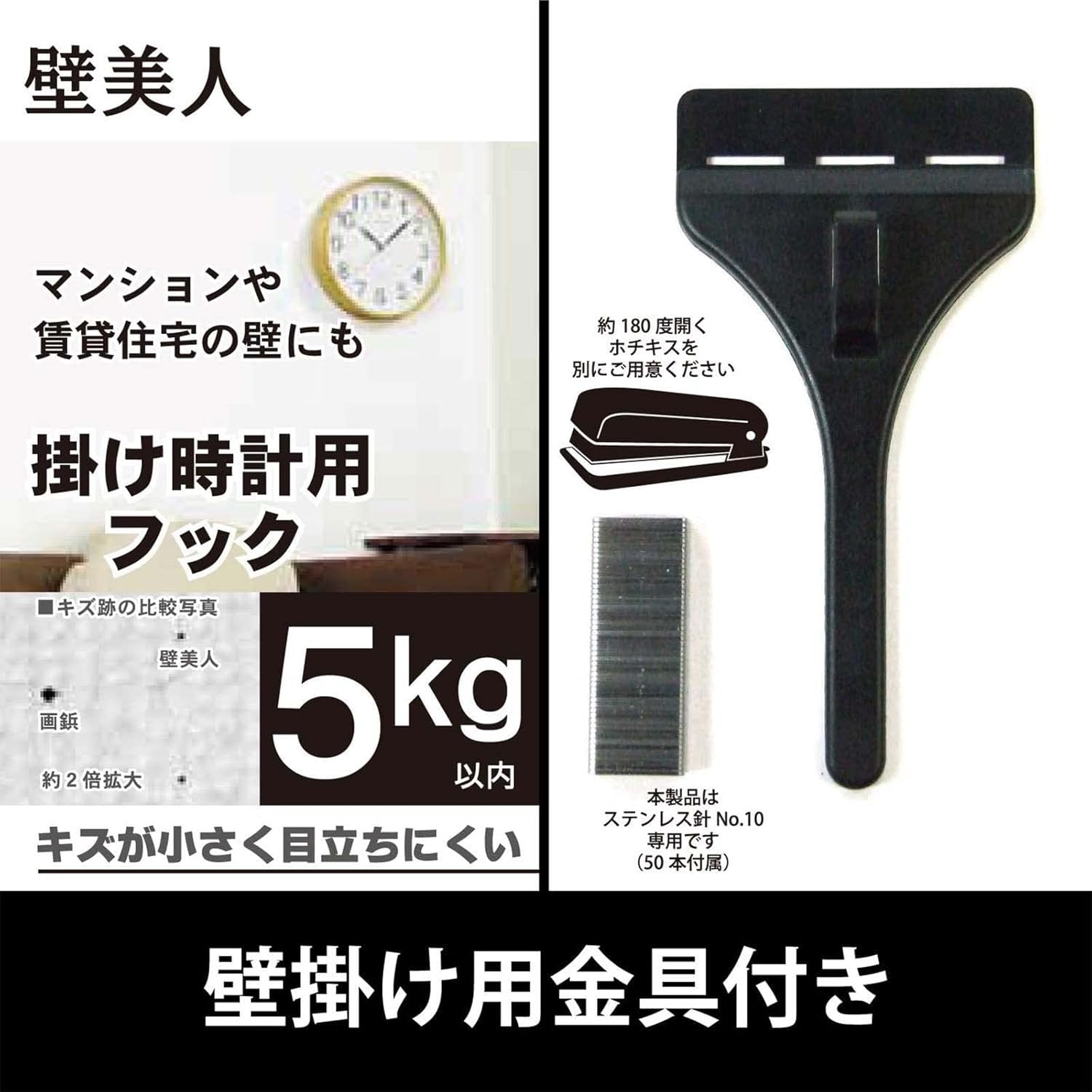
Image: The included wall hanging hardware, designed for secure installation.
3. Maklumat Keselamatan
- Keselamatan Bateri: Use only the specified AA alkaline battery. Do not mix old and new batteries, or different types of batteries. Remove batteries if the clock will not be used for an extended period. Dispose of batteries according to local regulations.
- Keselamatan Pemasangan: Ensure the wall surface is strong enough to support the clock's weight (approximately 940g) and the hanging hardware. Use appropriate tools and follow mounting instructions carefully to prevent the clock from falling.
- penempatan: Avoid placing the clock in direct sunlight, near strong magnetic fields, or in areas with extreme temperatures or high humidity, as this may affect performance and longevity.
4. Persediaan
4.1 Pemasangan Bateri
- Cari petak bateri di belakang jam.
- Buka penutup petak bateri.
- Insert one (1) AA alkaline battery, ensuring the positive (+) and negative (-) terminals are aligned correctly according to the diagram inside the compartment.
- Tutup penutup petak bateri dengan selamat.

Imej: Bahagian belakang view of the clock, indicating the battery compartment and control buttons.
4.2 Initial Time Setting and Radio Wave Reception
After installing the battery, the clock will automatically attempt to receive the time calibration signal. This process may take several minutes. Place the clock in an area with good signal reception, away from electronic devices that may cause interference.
- The clock hands will move to the 12 o'clock position and then begin searching for the radio signal.
- A radio wave reception lamp (if present, refer to the back of the clock) will indicate the status of the reception.
- Sebaik sahaja isyarat berjaya diterima, jam akan menetapkan masa yang betul secara automatik.
4.3 Pemasangan Dinding
Use the provided hanging hardware and screws to securely mount the clock on a wall.
- Choose a suitable location on a sturdy wall.
- Mark the desired position for the hanging hardware.
- Install the wall mounting screws and hanging hardware according to the instructions provided with the hardware, ensuring it is firmly secured. The hook can hold up to approximately 5kg.
- Carefully hang the clock onto the installed hardware, ensuring it is stable and level.
5. Arahan Operasi
5.1 Radio Reception Function
The Casio IQ-1106J clock is equipped with a radio wave reception function to maintain accurate time.
- Penerimaan Automatik: The clock will periodically attempt to receive the time calibration signal to ensure accuracy. This typically occurs overnight.
- Penerimaan Manual: If you need to force a time adjustment, you can initiate manual reception. Refer to the buttons on the back of the clock (e.g., 'WAVE CEPTOR' or 'RECEIVE' button) and press it to start manual reception. The radio wave reception lamp will indicate the reception status.
- Radio Wave Reception ON/OFF Function: Some models may include a switch or button to enable or disable the radio wave reception. If you are in an area with poor reception or wish to conserve battery life, you may turn this function OFF. Remember to turn it ON for automatic time synchronization.

Image: The 'Wave Ceptor' feature, illustrating the clock's ability to receive radio signals for precise timekeeping.
5.2 Paparan Masa
The clock features a clear analog display with hour, minute, and second hands. The time is automatically adjusted via radio wave reception, eliminating the need for manual time setting under normal operating conditions.
6. Penyelenggaraan
6.1 Pembersihan
- Lap permukaan jam dengan kain lembut dan kering.
- Untuk kotoran degil, ringankan dampen kain dengan air dan detergen lembut, kemudian lap kering serta-merta.
- Do not use abrasive cleaners, solvents, or chemical sprays, as these can damage the finish and internal components.
6.2 Penggantian Bateri
When the clock hands stop moving or the time becomes inaccurate despite good radio reception, it is likely time to replace the battery.
- Keluarkan jam dari dinding.
- Buka petak bateri di bahagian belakang.
- Remove the old AA alkaline battery.
- Insert a new AA alkaline battery, observing the correct polarity (+/-).
- Close the battery compartment and re-hang the clock. The clock will then attempt to receive the time signal.
7. Penyelesaian masalah
| Masalah | Kemungkinan Punca | Penyelesaian |
|---|---|---|
| Clock hands do not move or display incorrect time. | Low battery; Poor radio signal reception; Radio reception OFF. | Replace battery. Move clock to a location with better signal (e.g., near a window, away from electronics). Ensure radio reception function is ON. Initiate manual reception. |
| Radio wave reception lamp does not light up or flashes. | Weak or no radio signal. | Relocate the clock to an area with stronger signal. Wait for automatic reception or attempt manual reception. |
| Jam semakin berkurangan atau semakin bertambah masa. | Interference with radio signal; Faulty battery; Malfunction. | Ensure clock is not near strong interference sources. Replace battery. If problem persists, contact customer support. |
8. Spesifikasi
| Ciri | Perincian |
|---|---|
| Nombor Model | IQ-1106J |
| Dimensi Produk (H x W x D) | lebih kurang 11.6 x 11.6 x 2.4 inci (29.5 x 29.5 x 6.0 cm) |
| Berat badan | lebih kurang 32.0 oz (940 g) |
| Bahan | Wood, Resin, Glass |
| Jenis Paparan | Analog |
| Pergerakan | Kuarza |
| Sumber Kuasa | 1 x Bateri Beralkali AA |
| Ciri Khas | Radio reception function (automatic/manual), Radio wave reception ON/OFF function, Radio wave reception lamp |
| Penggunaan Dalaman/Luar | Dalaman |

Image: The clock displaying its physical dimensions and weight for reference.
9. Waranti dan Sokongan
Casio products are manufactured to high-quality standards. For information regarding warranty coverage, please refer to the warranty card included with your purchase or visit the official Casio webtapak.
For further assistance, troubleshooting, or to inquire about replacement parts, please contact Casio customer support or visit the official Casio store online: