
1. Pengenalan
This manual provides instructions for the safe and effective operation of your Wintact WT323C Infrared Surface Thermometer. This device is designed for non-contact temperature measurement, contact temperature measurement via a Type-K thermocouple, and ambient environmental monitoring including humidity, air temperature, and dew point. It also features a mould risk detection function and a UV light.
2. Maklumat Keselamatan
WARNING: Laser Radiation
- Jangan merenung sinar laser.
- Elakkan pendedahan mata secara langsung kepada laser.
- Jangan halakan laser kepada orang atau haiwan.
- Use caution when operating the laser in the presence of reflective surfaces.
Langkah Keselamatan Am:
- Do not use the device near explosive gas, vapor, or dust.
- Jangan rendam unit di dalam air.
- Elakkan daripada menjatuhkan atau menyebabkan peranti ini mengalami hentaman yang teruk.
- Remove batteries if the device is not used for an extended period.
- Peranti ini tidak bertujuan untuk kegunaan perubatan atau mengukur suhu badan manusia.
3. Ciri-ciri Produk
- Mod Pengukuran Dwi: Infrared for non-contact surface temperature and Type-K thermocouple for contact temperature.
- Julat Suhu Luas: Infrared from -58℉ to 1202℉ (-50℃ to 650℃); Type-K from -40℉ to 932℉ (-40℃ to 500℃).
- Ketepatan Tinggi: Up to ±1.5% for infrared measurements.
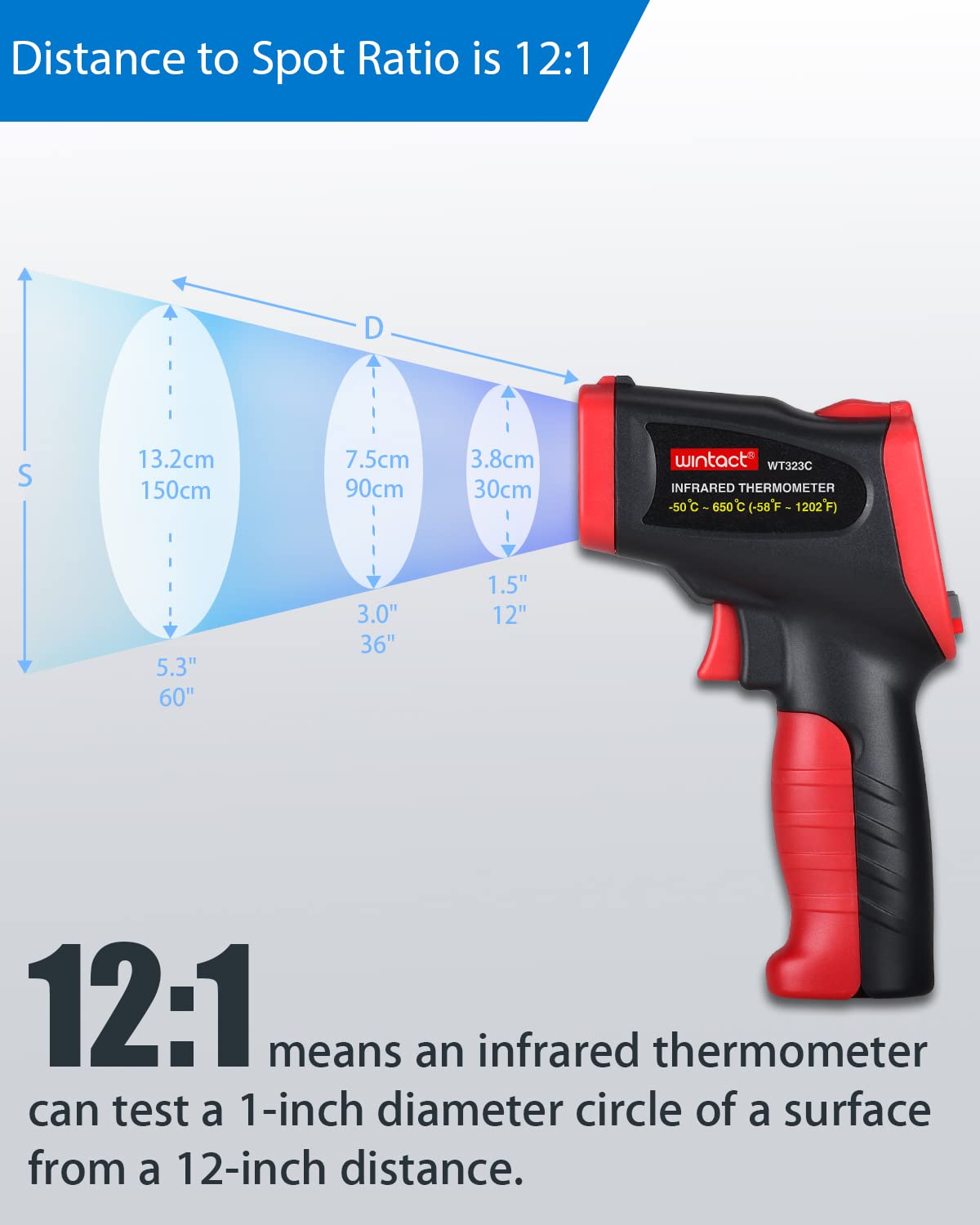
- Distance-to-Spot Ratio (D:S): 12:1 for precise targeting.
- Hygrometer Bersepadu: Measures ambient air temperature, relative humidity, and dew point.
- Mould Risk Detection: Tricolor light indication for dew point proximity.
- Emisiviti boleh laras: From 0.1 to 1.0 for various surfaces.
- 9-Point Laser Pointer: For improved targeting accuracy.
- Cahaya UV: For detecting leaks or stains.
- Paparan LCD dengan lampu latar: Multi-line display for clear readings.
- Convenience Functions: Data hold, low battery indicator, auto-off.
4. Komponen Selesaiview
Familiarize yourself with the various parts of your Wintact WT323C thermometer:

Imej 4.1: Labeled diagram showing the main components of the Wintact WT323C thermometer, including the humidity sensor, laser pointer, UV light, infrared sensor, K-type thermocouple socket, trigger, battery compartment, and control buttons.
- Sensor Kelembapan: Detects ambient relative humidity.
- Penunjuk Laser: Membantu dalam mensasarkan kawasan pengukuran.
- Cahaya UV: Activated by a dedicated button for specific detection tasks.
- Penderia Inframerah: Measures non-contact surface temperature.
- K-Type Thermocouple Socket: Port for connecting the external Type-K probe.
- Pencetus: Activates measurement and laser.
- Petak Bateri: Menempatkan bateri AAA.
- paparan: Shows all measurement readings and indicators.
- Butang Mod: Cycles through different display modes and settings.
- Butang °C/°F: Toggles between Celsius and Fahrenheit units.
- Laser/UV Button: Controls the laser pointer and UV light.
5. Persediaan
5.1 Pemasangan Bateri
- Cari penutup petak bateri pada pemegang termometer.
- Luncurkan penutup terbuka.
- Masukkan dua (2) bateri AAA 1.5V, pastikan kekutuban (+/-) yang betul.
- Tutup penutup petak bateri dengan selamat.

Imej 5.1: The Wintact WT323C thermometer shown with the included AAA batteries and Type-K thermocouple probe.
6. Arahan Operasi
6.1 Hidupkan/Mati Kuasa
- Untuk menghidupkan peranti, tekan butang Pencetus. The display will illuminate.
- The device features an automatic power-off function after approximately 30 seconds of inactivity to conserve battery life.
6.2 Pemilihan Unit (°C/°F)
- Tekan ke ° C / ° F button to toggle between Celsius and Fahrenheit temperature units.
6.3 Laser Pointer Control
- Tekan ke Laser/UV button to turn the laser pointer on or off. The laser assists in targeting the measurement area.
6.4 UV Light Control
- Tekan dan tahan butang Laser/UV button to activate the UV light. Release to turn it off.
6.5 Pegangan Data
- When the trigger is released after a measurement, the reading will automatically be held on the display.
7. Mod Pengukuran
7.1 Infrared (Non-Contact) Temperature Measurement
This mode measures the surface temperature of an object without physical contact.
- Point the infrared sensor towards the target surface.
- Tekan dan tahan butang Pencetus. The laser pointer will activate (if enabled) to indicate the measurement area.
- The surface temperature will be displayed on the screen.
- Lepaskan Pencetus to hold the reading.

Imej 7.1: Illustration of the 12:1 Distance-to-Spot (D:S) ratio, indicating that the measurement area (spot) diameter increases with distance from the target. For example, at 12 inches, the spot diameter is 1 inch.
7.2 Type-K Thermocouple (Contact) Temperature Measurement
For accurate contact temperature measurements, use the included Type-K thermocouple probe.
- Insert the Type-K thermocouple probe into the dedicated socket on the side of the thermometer.
- Tekan ke Mod button until the Type-K measurement mode is indicated on the display (often with a 'K' symbol).
- Place the tip of the thermocouple probe in direct contact with the surface or substance to be measured.
- The temperature reading from the thermocouple will be displayed.

Imej 7.2: The Wintact WT323C thermometer using the Type-K thermocouple to measure the temperature of ice water, demonstrating contact measurement capability.
7.3 Ambient Temperature, Humidity, and Dew Point Measurement
The device continuously monitors ambient conditions.
- The ambient air temperature, relative humidity, and dew point temperature are displayed on the screen automatically.
- These readings are taken by the internal humidity sensor.

Imej 7.3: The Wintact WT323C thermometer displaying ambient temperature, humidity, and dew point readings, shown in a greenhouse environment.
7.4 Mould Risk Detection
The thermometer provides a visual indication of mould risk based on the dew point.
- A tricolor LED light (green, yellow, red) indicates the proximity to the dew point.
- hijau: Low risk, conditions are fine.
- Kuning: Near critical dew point, increased risk of mould growth.
- merah: High risk, conditions are conducive to mould growth.
Imej 7.4: The Wintact WT323C thermometer indicating mould risk on a wall corner, with the tricolor light showing a warning state.
8. Pelarasan Emisiviti
Emissivity (ε) is a measure of an object's ability to emit infrared energy. Different materials have different emissivity values. For accurate infrared temperature measurements, it is important to set the emissivity value on the thermometer to match the target material.
- The WT323C allows adjustment of emissivity from 0.1 to 1.0.
- To adjust emissivity, press the Mod button until the emissivity setting (ε) is displayed.
- Use the up/down arrow buttons (often integrated with °C/°F or Laser/UV buttons in mode settings) to change the value.
- Refer to a standard emissivity table for common materials if precise values are needed.
9. Penyelenggaraan
- Pembersihan: Lap peranti sehingga bersih dengan kain lembut,amp kain. Jangan gunakan pembersih atau pelarut yang melelas.
- Storan: Store the thermometer in a dry, cool place away from direct sunlight and extreme temperatures.
- Penggantian Bateri: Gantikan bateri apabila penunjuk bateri lemah muncul pada paparan.
10. Penyelesaian masalah
| Masalah | Kemungkinan Punca | Penyelesaian |
|---|---|---|
| Tiada paparan/Peranti tidak akan dihidupkan | Bateri mati atau tidak dipasang dengan betul. | Periksa kekutuban bateri; gantikan dengan bateri AAA baharu. |
| Inaccurate infrared readings | Incorrect emissivity setting; distance too far; dirty sensor lens. | Adjust emissivity for the target material; ensure proper D:S ratio; clean the infrared sensor lens. |
| Inaccurate Type-K readings | Poor contact with surface; damaged probe. | Ensure firm contact; inspect probe for damage and replace if necessary. |
| Mould risk indicator always red/yellow | High ambient humidity or low surface temperature. | This indicates actual environmental conditions. Consider ventilation or dehumidification. |
11. Spesifikasi
| Ciri | Spesifikasi |
|---|---|
| Julat Suhu Inframerah | -58℉ hingga 1202℉ (-50℃ hingga 650℃) |
| Type-K Thermocouple Range | -40℉ hingga 932℉ (-40℃ hingga 500℃) |
| Julat Suhu Ambien | -4℉ hingga 140℉ (-20℃ hingga 60℃) |
| Julat Kelembapan Relatif | 0.0% hingga 100% RH |
| Julat Suhu Titik Embun | 14 ℉ hingga 122 ℉ (-10 ℃ hingga 50 ℃) |
| Accuracy (Infrared) | ±1.5% or ±1.5℃/2℉ (whichever is greater) |
| Accuracy (Type-K) | ±2.5℃ or 0.75% rdg |
| Accuracy (Humidity) | ±5% RH |
| Nisbah Jarak ke Titik (D:S) | 12:1 |
| Emisiviti | Boleh laras 0.1 hingga 1.0 |
| Masa Tindak Balas | < 500 ms |
| Bekalan Kuasa | 2 x 1.5V bateri AAA |
| Mati secara automatik | lebih kurang 30 saat |
| Dimensi Produk | 4.28 x 1.93 x 6.96 inci |
| Berat badan | 8.82 auns |
12. Waranti dan Sokongan
Wintact products are designed for reliability and performance. For specific warranty details or technical support, please refer to the warranty card included with your product or visit the official Wintact webtapak. Simpan resit pembelian anda sebagai bukti pembelian untuk sebarang tuntutan waranti.