
1. Pengenalan
Terima kasih kerana membeliasing the UNITED LED43DU58 43-inch 4K UHD HDR10 LED Television. This manual provides essential information for setting up, operating, and maintaining your new television. Please read these instructions carefully before use and retain them for future reference.

The UNITED LED43DU58 television features 4K Ultra HD resolution, DVB-T2/C/S2 tuners, Dolby Audio, HDMI, and HDR10 support.
2. Maklumat Keselamatan
Sentiasa patuhi langkah keselamatan berikut untuk mengelakkan kejutan elektrik, kebakaran atau kerosakan pada televisyen:
- Jangan dedahkan televisyen kepada hujan atau lembapan.
- Jangan buka televisyenasing; merujuk semua perkhidmatan kepada kakitangan yang berkelayakan.
- Pastikan pengudaraan yang betul di sekitar televisyen.
- Keep the television away from direct sunlight, heat sources, and strong magnetic fields.
- Gunakan hanya kord kuasa yang dibekalkan bersama televisyen.
- Cabut plag televisyen semasa ribut petir atau apabila tidak digunakan untuk tempoh yang lama.
3. Kandungan Pakej
Sahkan bahawa semua item terdapat dalam pakej:
- UNITED LED43DU58 Television
- Alat Kawalan Jauh (memerlukan 2x bateri AAA, disertakan)
- Stand (feet)
- Skru untuk pemasangan dirian
- Manual Pengguna
4. Persediaan
4.1 Memasang Stand
- Carefully place the television face down on a soft, flat surface to prevent screen damage.
- Align the stand feet with the corresponding slots on the bottom of the television.
- Secure the stand feet using the provided screws. Do not overtighten.
- Carefully lift the television to an upright position on a stable surface.
4.2 Menyambung Kabel
Connect your external devices to the television's rear ports. Refer to the image below for port locations.

Rear panel connections of the UNITED LED43DU58 television.
- Kuasa: Connect the power cord to the television and then to a wall outlet.
- HDMI: For high-definition devices like Blu-ray players, game consoles, or set-top boxes. The TV has 3 HDMI ports.
- USB: For connecting USB storage devices for media playback or PVR recording. The TV has 2 USB ports.
- Antenna (DVB-T2/C): Connect an aerial cable for terrestrial digital TV channels.
- Satellite (DVB-S2): Connect a satellite dish cable for satellite digital TV channels.
- Slot CI+: Insert a Conditional Access Module (CAM) and smart card for encrypted channels.
- SCART: Untuk peranti analog yang lebih lama.
- VGA: Untuk menyambungkan komputer.
4.3 Kuasa Awal Hidup dan Imbasan Saluran
- Plug in the television and press the power button on the remote control or the TV itself.
- Ikut arahan pada skrin untuk memilih bahasa dan negara anda.
- The television will automatically begin scanning for available channels (DVB-T2/C/S2). This process may take several minutes.
- Once the scan is complete, you can begin watching television.
5. Mengendalikan Televisyen
5.1 Fungsi Kawalan Jauh
The remote control allows you to access all television functions. Familiarize yourself with the buttons for power, volume, channel selection, input source, menu, and navigation.
5.2 Channel Navigation and Input Source
- Gunakan CH +/- butang untuk menukar saluran.
- Tekan ke SUMBER button to switch between connected devices (HDMI 1, HDMI 2, HDMI 3, AV, USB, DTV, ATV, etc.).
- Akses ke Panduan Program Elektronik (EPG) kepada view jadual program dan maklumat.
- The television supports Teleteks for text-based information services.
5.3 Tetapan Gambar dan Bunyi
Your television features 4K Ultra HD resolution and HDR10 support for enhanced picture quality. The Full Matrix LED technology provides exceptional colors, deep blacks, and impressive contrasts.

Experience superior clarity with 4K Ultra HD resolution.

Full Matrix LED technology enhances color and contrast.
Adjust picture modes (e.g., Standard, Dynamic, Movie) and individual settings like brightness, contrast, and color saturation through the TV menu. The integrated Q.BOX sound system with two 8-watt Ultra Stereo RMS speakers delivers clear audio. Sound settings can be adjusted via the audio menu.
5.4 USB Recording (PVR)
The television supports recording of programs to an external USB drive. Connect a USB drive to one of the USB ports. You can program the television to record at a specified time, allowing you to watch your favorite series at your convenience.

Record programs via USB and access various digital tuners.
6. Penyelenggaraan
6.1 Membersihkan Skrin
Lap skrin perlahan-lahan dengan kain lembut yang tidak berbulu. Untuk tanda degil, ringankan dampen kain dengan air atau pembersih skrin khusus. Jangan sekali-kali menyembur cecair terus ke skrin.
6.2 Membersihkan Bahagian Luar
Wipe the television's exterior with a soft, dry cloth. Avoid using abrasive cleaners or solvents.
7. Penyelesaian masalah
Jika anda menghadapi masalah dengan televisyen anda, rujuk kepada penyelesaian biasa berikut:
| Masalah | Penyelesaian yang Mungkin |
|---|---|
| Tiada Kuasa | Check if the power cord is securely connected and the wall outlet is functioning. Press the power button on the TV or remote. |
| Tiada Gambar | Ensure the correct input source is selected. Check cable connections to external devices. Perform a channel scan. |
| Tiada Bunyi | Check the volume level and ensure mute is not activated. Verify audio cable connections. |
| Alat Kawalan Jauh Tidak Berfungsi | Replace the batteries (2x AAA). Ensure there are no obstructions between the remote and the TV's IR sensor. |
| Kualiti Gambar Lemah | Check antenna/cable connection. Adjust picture settings in the menu. Ensure the source content is high quality. |
For more complex issues, please contact customer support or refer to the full service manual.
8. Spesifikasi
The following table details the technical specifications of the UNITED LED43DU58 television:

Physical dimensions of the UNITED LED43DU58 television.
| Ciri | Spesifikasi |
|---|---|
| Nama Model | United 43DU58 |
| Nombor Model | LED43DU58 |
| Saiz Skrin | 43 Inci (109 cm) |
| Teknologi Paparan | LED |
| Resolusi | 4K (3840 x 2160 piksel) |
| Kadar Segar Semula | 60 Hz |
| Teknologi Peningkatan Imej | HDR10 |
| Nisbah Kontras Imej | 3000:1 |
| Masa Tindak Balas | 8.5 milisaat |
| Teknologi Penala | DVB-T2, DVB-S2, DVB-C |
| Teknologi Ketersambungan | HDMI, USB |
| Jumlah Port HDMI | 3 |
| Jumlah Port USB | 2 (USB 2.0) |
| Total VGA Input Ports | 1 |
| Jenis Penyambung | CI+, HDMI, USB |
| Ciri Khas | 3D (Note: This feature is listed in specifications but may require specific content/glasses not included) |
| Display Language Options | English, German, Italian, French, Turkish, Arabic, Polish, Czech, Slovak, Ukrainian |
| Dimensi Produk (D x W x H) | 21.5 x 100 x 61 cm |
| Berat Barang | 10 Kilogram |
| Voltage | 230 Volt |
| Wattage / Penggunaan Tenaga | 55 W / 55 Watts |
| Penggunaan Tenaga Tahunan | 66 Kilowatt-jam |
| Kelas Kecekapan | G |
| Kaedah Kawalan | Alat Kawalan Jauh |
| Bateri Diperlukan untuk Jauh | 2 AAA (termasuk) |
| Jenis Pemasangan | Lekap Meja |
| Tahun Model | 2020 |
8.1 Maklumat Label Tenaga
For detailed energy efficiency information, please refer to the energy label below or visit the EU EPREL database.
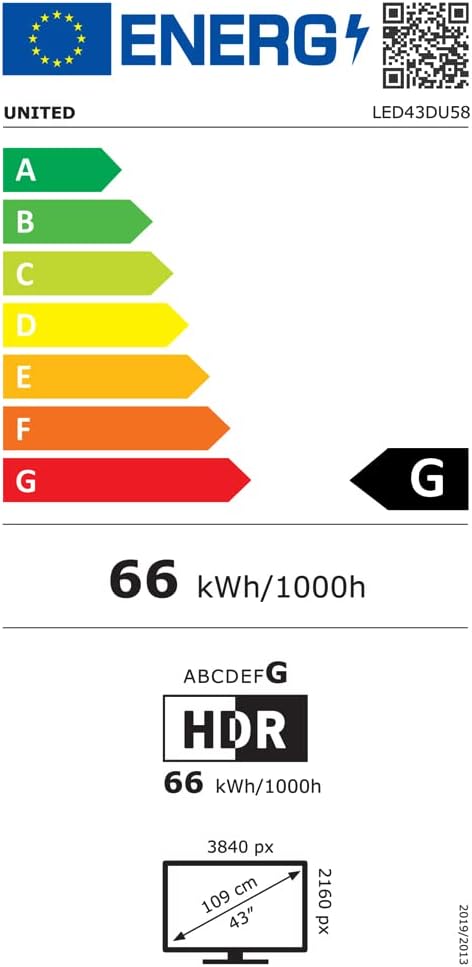
EU Energy Label for UNITED LED43DU58.
Further details available at: https://eprel.ec.europa.eu/qr/498398
9. Waranti dan Sokongan
The manufacturer, DGMC SA, provides a minimum general warranty period. Please refer to your purchase documentation for specific warranty terms and conditions.
- Minimum General Warranty: 2 Tahun
- EU Spare Parts Availability: 5 Tahun
For technical support or service inquiries, please contact your retailer or the manufacturer's customer service department. Ensure you have your model number (LED43DU58) and purchase details available.