
Thsinde TH053
Thsinde 19B Autoranging Digital Multimeter User Manual
Model: TH053
pengenalan
The Thsinde 19B Autoranging Digital Multimeter is a high-performance, high-precision, and highly reliable battery-driven automatic digital multimeter. Designed for professional electrical engineers, hobbyists, and home users, it offers a wide range of measurement capabilities including AC/DC voltage, AC/DC current, resistance, capacitance, frequency, temperature, diode, and continuity tests. Its robust design, large LCD display with backlight, and advanced features like True RMS measurement make it an ideal tool for laboratories, factories, and general electrical troubleshooting.
Maklumat Keselamatan
Sila baca dan fahami semua maklumat keselamatan sebelum mengendalikan multimeter ini. Kegagalan mematuhi arahan ini boleh mengakibatkan kejutan elektrik, kebakaran atau kerosakan pada meter.
- Sentiasa pastikan petunjuk ujian disambungkan dengan betul dan suis fungsi ditetapkan pada julat yang betul sebelum membuat sebarang ukuran.
- Jangan melebihi nilai input maksimum untuk sebarang julat.
- Berhati-hati apabila bekerja dengan voltagadalah melebihi 30V AC RMS, puncak 42V atau 60V DC. Ini voltagia menimbulkan bahaya kejutan.
- Sebelum mengukur arus, pastikan litar dinyahtenagakan dan meter disambung secara bersiri dengan beban.
- Sentiasa putuskan sambungan wayar ujian daripada litar sebelum menukar kedudukan suis fungsi.
- Jangan gunakan meter jika ia kelihatan rosak atau jika wayar ujian rosak.
- Gantikan bateri apabila penunjuk bateri rendah muncul untuk memastikan bacaan yang tepat.
- The multimeter features a ceramic insurance tube for circuit protection. Do not attempt to bypass or modify this safety feature.
Kandungan Pakej
Sahkan bahawa semua item yang disenaraikan di bawah terdapat dalam pakej anda:
- Thsinde 19B Digital Multimeter
- Petunjuk Ujian (Merah dan Hitam)
- Bateri 9V (prapasang atau disertakan)
- Probe Suhu (Termokopel)
- Protective PVC Case / Carrying Pouch
- Manual Pengguna (dokumen ini)

Image: The Thsinde 19B Digital Multimeter shown with its included accessories, including the test leads, 9V battery, and a protective carrying case.
Produk Selesaiview
Familiarize yourself with the components of your Thsinde 19B Digital Multimeter.

Image: A detailed diagram labeling the various parts of the multimeter, including the Bright larger LCD, Range button, Hold/Light button, Select button, Function switch, 10A Jack, uA/mA Jack, COM Jack, Input Jack, Relative button, Hz/Duty button, Max/Min button, and Rubble sleeve.
- Paparan LCD: Large, clear, and backlit display for easy reading of measurements.
- Suis Fungsi: Rotary dial to select the desired measurement function (e.g., Voltage, Arus, Rintangan, Suhu).
- Bicu Input:
- COM (Umum) Jack: For the black test lead.
- Jek VΩHz: For the red test lead when measuring voltage, resistance, frequency, capacitance, diode, and continuity.
- mAµA Jack: For the red test lead when measuring small currents (milliamperes, microamperes).
- Bicu 10A: For the red test lead when measuring large currents (up to 10 Amperes).
- Butang:
- HOLD/Light: Freezes the current display reading; long press activates/deactivates backlight.
- RANGE: Manually selects the measurement range (overrides autoranging).
- RELΔ (Relative): Mengukur perbezaan antara nilai tersimpan dan bacaan semasa.
- Hz/%: Toggles between frequency and duty cycle measurement.
- MAX / MIN: Records maximum and minimum readings.
- PILIH: Toggles between different measurement types within a single function switch position (e.g., AC/DC voltage, diod/kesinambungan).
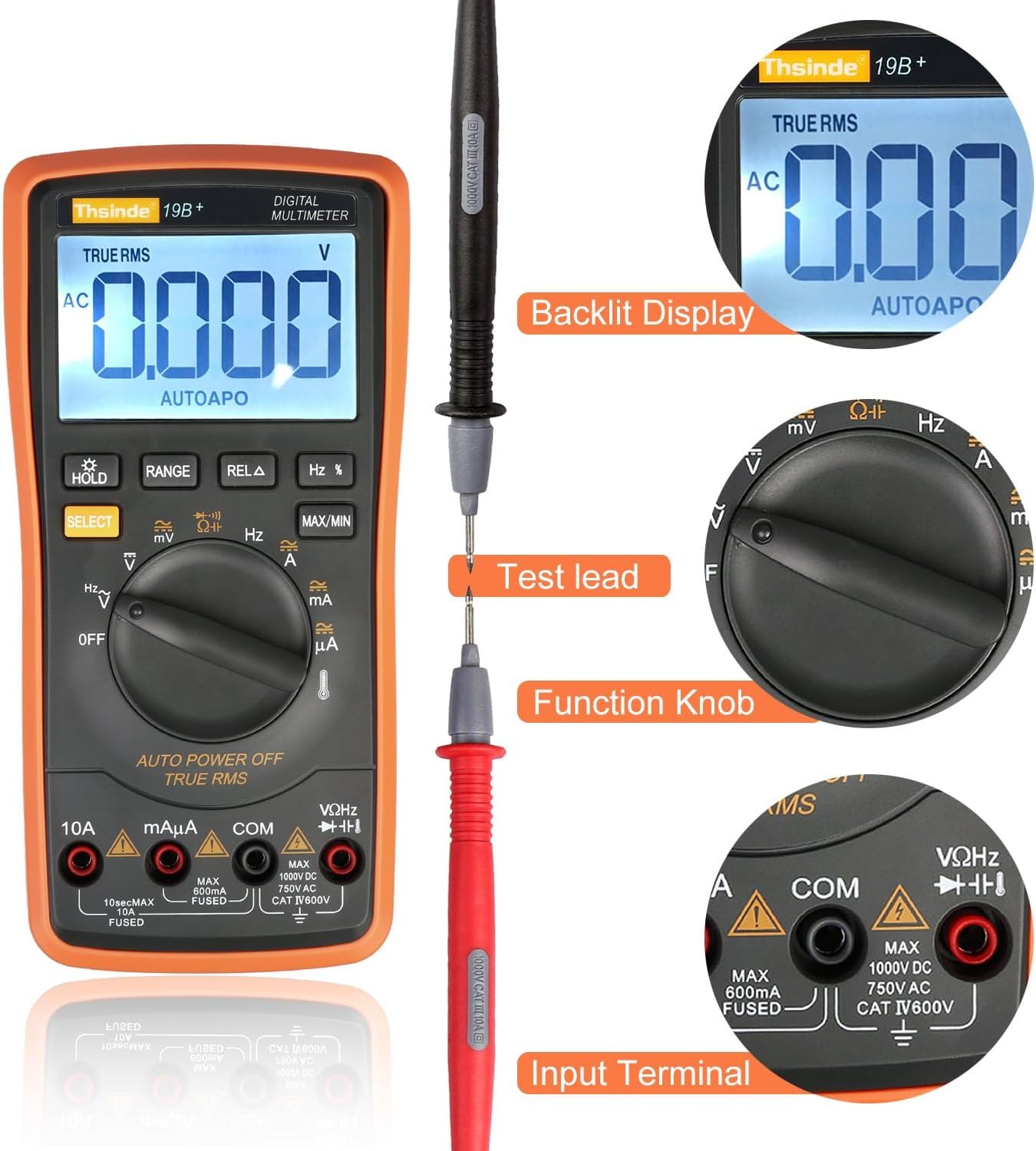
Image: This image highlights the backlit display, the connection of a test lead, the function knob, and the input terminals of the multimeter.

Imej: Satu dalaman view of the multimeter, revealing its double-sided gold plated PCB board, intelligence IC chips, electrolytic capacitors, high-precision manganese copper resistance, double explosion-proof ceramic tube, protection resistors, cell contact point, temperature sensing, and solid tester lead input receptacles.
Persediaan
1. Pemasangan Bateri
The Thsinde 19B Multimeter typically comes with a 9V battery pre-installed or included. If not installed, follow these steps:
- Pastikan multimeter dimatikan.
- Cari penutup petak bateri di belakang meter.
- Gunakan pemutar skru untuk mengeluarkan skru yang menahan penutup.
- Keluarkan penutup dengan berhati-hati.
- Connect the 9V battery to the battery clip, observing correct polarity (+ to + and - to -).
- Letakkan bateri ke dalam petak.
- Gantikan penutup petak bateri dan kencangkannya dengan skru.
2. Menghubungkan Petunjuk Ujian
Always connect the black test lead to the COM (common) input jack. Connect the red test lead to the appropriate input jack based on the measurement you intend to make:
- Untuk Voltage, Resistance, Capacitance, Frequency, Diode, and Continuity measurements: Connect the red lead to the VΩHz jek.
- For Current measurements (mA/µA): Connect the red lead to the mAµA jek.
- For High Current measurements (10A): Connect the red lead to the 10A jek.
Arahan Operasi
This section provides detailed instructions for performing various measurements with your Thsinde 19B Digital Multimeter.
1. Measuring AC/DC Voltage (V)
- Sambungkan plumbum ujian hitam ke COM bicu dan ujian merah membawa kepada VΩHz jek.
- Putar suis fungsi ke V~ (Jilid ACtage) atau V- (DC Voltage) position. If the symbol is combined, press the PILIH button to toggle between AC and DC.
- Sambungkan kuar ujian secara selari merentasi komponen atau litar yang anda ingin ukur.
- Baca voltagnilai e pada paparan LCD.
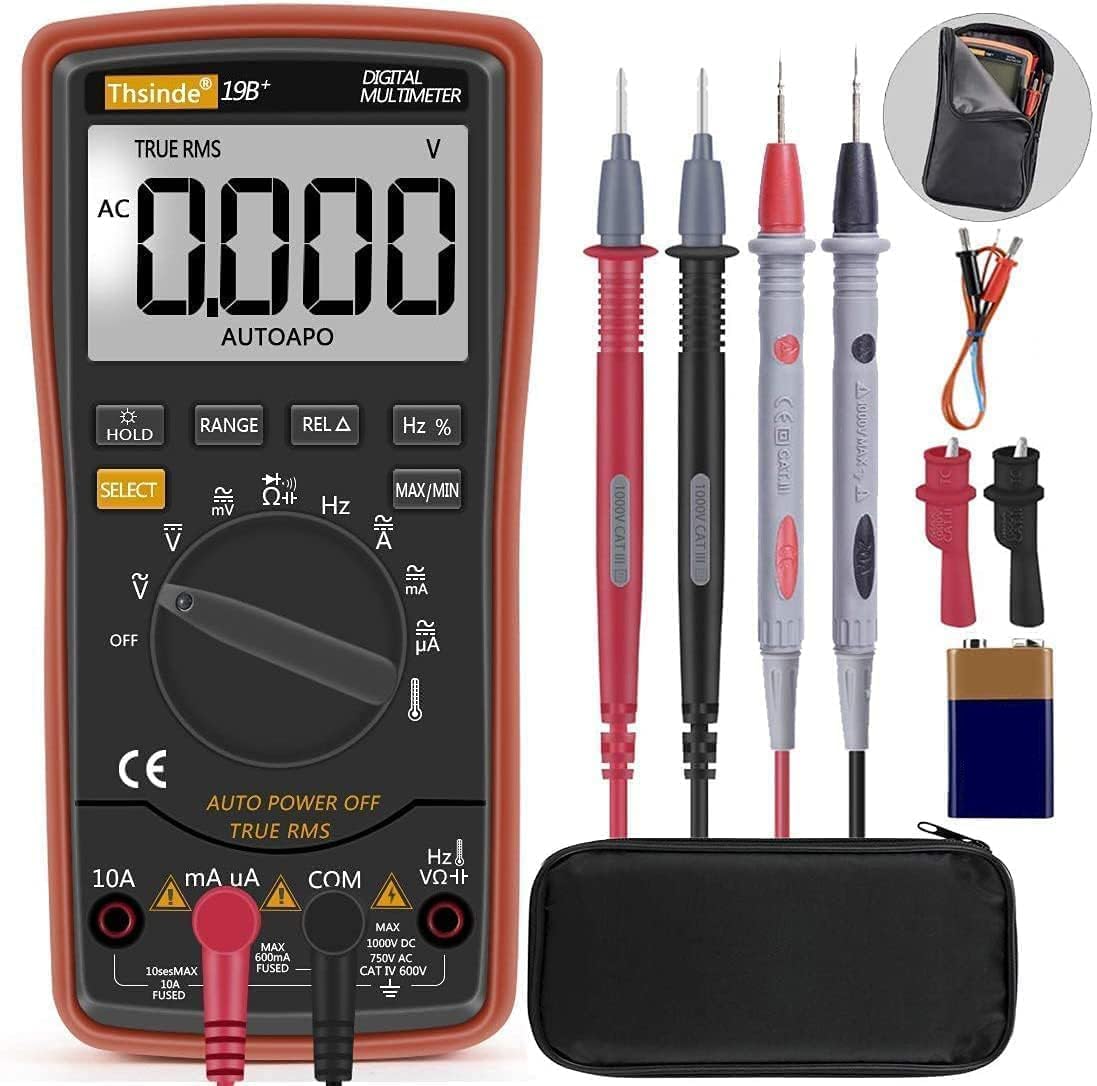
Image: The Thsinde 19B Multimeter displaying an AC voltage reading, demonstrating its capability to measure alternating current voltage.
2. Measuring AC/DC Current (A)
- Penting: De-energize the circuit before connecting the meter.
- Sambungkan plumbum ujian hitam ke COM jek.
- For currents up to 600mA, connect the red test lead to the mAµA jack. For currents up to 10A, connect the red test lead to the 10A jek.
- Turn the function switch to the appropriate A~ (Arus AC) atau A- (DC Current) position. Use the PILIH butang jika perlu.
- Break the circuit and connect the test probes in series with the load.
- Re-energize the circuit and read the current value on the LCD display.
3. Mengukur Rintangan (Ω)
- Sambungkan plumbum ujian hitam ke COM bicu dan ujian merah membawa kepada VΩHz jek.
- Putar suis fungsi ke Ω (Rintangan) kedudukan.
- Ensure the component is de-energized before measuring. Connect the test probes across the component.
- Baca nilai rintangan pada paparan LCD.
4. Ujian Kesinambungan
- Sambungkan plumbum ujian hitam ke COM bicu dan ujian merah membawa kepada VΩHz jek.
- Putar suis fungsi ke Ω (Resistance) position and press PILIH until the continuity symbol (speaker icon) appears.
- Connect the test probes across the circuit or component. A continuous beep indicates a good connection (low resistance).
5. Measuring Capacitance (F)
- Sambungkan plumbum ujian hitam ke COM bicu dan ujian merah membawa kepada VΩHz jek.
- Putar suis fungsi ke Kapasitansi position (often shared with diode/continuity, use PILIH to cycle).
- Ensure the capacitor is fully discharged before testing. Connect the test probes across the capacitor terminals.
- Baca nilai kemuatan pada paparan LCD.
6. Mengukur Kekerapan (Hz)
- Sambungkan plumbum ujian hitam ke COM bicu dan ujian merah membawa kepada VΩHz jek.
- Putar suis fungsi ke Hz position (often shared with voltage atau semasa, gunakan Hz /% button to activate).
- Connect the test probes in parallel with the circuit where you want to measure frequency.
- Baca nilai kekerapan pada paparan LCD.
7. Ujian Diod
- Sambungkan plumbum ujian hitam ke COM bicu dan ujian merah membawa kepada VΩHz jek.
- Putar suis fungsi ke Diod position (often shared with continuity, use PILIH to cycle).
- Sambungkan kuar merah ke anod dan kuar hitam ke katod diod. A ke hadapan voltage drop will be displayed. Reverse the probes; an open circuit (OL) indicates a good diode.
8. Mengukur Suhu
- Sambungkan prob suhu (termokopel) ke VΩHz dan COM jacks, observing polarity if indicated.
- Putar suis fungsi ke Suhu position (indicated by a thermometer symbol).
- The display will show the ambient temperature. Place the tip of the temperature probe on the object or in the environment you wish to measure.
- The multimeter can switch between Fahrenheit and Celsius.
- Baca nilai suhu pada paparan LCD.

Image: The Thsinde 19B Multimeter actively measuring temperature, displaying "0022" degrees Celsius, with a range of -20°C to 1000°C (0°F to 1832°F) indicated.
Penyelenggaraan
Pembersihan
Lap meter casing dengan iklanamp cloth and mild detergent. Do not use abrasives or solvents. Keep the input jacks free of dust and debris.
Penggantian Bateri
When the low battery indicator appears on the display, replace the 9V battery as described in the "Battery Installation" section under Setup. Always use a fresh 9V battery.
Penyimpanan
If the meter is not to be used for an extended period, remove the battery to prevent leakage and damage. Store the meter in its protective case in a cool, dry place, away from direct sunlight and extreme temperatures.
Menyelesaikan masalah
| Masalah | Kemungkinan Punca | Penyelesaian |
|---|---|---|
| Meter tidak dihidupkan. | Bateri mati atau tidak dipasang dengan betul. | Check battery installation; replace battery. |
| "OL" (Lebihan) dipaparkan. | Measurement exceeds selected range or meter's maximum capacity. | Switch to a higher range or ensure measurement is within meter's limits. |
| Bacaan yang tidak tepat. | Low battery; incorrect function/range selected; poor test lead connection. | Replace battery; verify function/range; ensure secure connections. |
| Tiada bip kesinambungan. | Open circuit; meter not in continuity mode. | Check circuit; press SELECT to activate continuity mode. |
Spesifikasi

Image: The Thsinde 19B Multimeter with overlaid dimensions, showing its height of 18.5cm (7.28 inches) and LCD screen dimensions of 6.5cm (2.56 inches) by 4cm (1.57 inches).
| Ciri | Perincian |
|---|---|
| Jenama | Thsinde |
| Model | 19B (TH053) |
| Jenis Pengukuran | Multimeter (Autoranging) |
| Sumber Kuasa | Bateri 9V (termasuk) |
| Paparan | LCD besar dengan Lampu Latar |
| Sampling Kelajuan | 3 kali sesaat |
| RMS sebenar | ya |
| Perlindungan Lebihan | Ceramics Protection Circuit |
| Vol. ACtage Julat | Sehingga 750V AC |
| DC Voltage Julat | Sehingga 1000V DC |
| Julat Suhu | -20°C hingga 1000°C (0°F hingga 1832°F) |
| Berat Barang | 320 Gram (lebih kurang 11.3 auns) |
| Dimensi | 8.78 x 6.38 x 2.44 inci (Pakej) |
| bahan | ABS with PVC protective case |
Waranti dan Sokongan
Thsinde products are designed for reliability and performance. For any technical support or warranty inquiries, please contact Thsinde customer service through the retailer where the product was purchased or refer to the contact information provided on the product packaging or official Thsinde webtapak.
Sila simpan bukti pembelian anda untuk tuntutan waranti.
Ask a question about this manual
Ask about setup, troubleshooting, compatibility, parts, safety, or missing instructions. Manuals+ will review the question and use this page’s manual context to help answer it.