
1. Pengenalan
This manual provides detailed instructions for the IPEGA PG-SW023 Bluetooth Wireless Game Controller. This versatile controller is designed to enhance your gaming experience across multiple platforms, including N-S consoles, PlayStation 3 (PS3), Android devices, and personal computers running Windows 7, 8, or 10.
Sila baca manual ini dengan teliti sebelum menggunakan produk ini bagi memastikan operasi yang betul dan memaksimumkan ciri-cirinya.
2. Ciri-ciri Produk
- Keserasian Pelbagai Platform: Suitable for gaming on N-S consoles, PS3, Android devices, and PCs (Windows 7/8/10).
- Pengalaman Permainan yang Dipertingkatkan: Supports vibration feedback and a six-axis gyroscope function for immersive gameplay and precise control.
- Customizable Macro Function: Rear buttons can be configured as common keys or combination keys for simplified actions.
- Continuous TURBO Function: Features a dedicated TURBO button for rapid-fire actions, compatible with N-S Pro gamepads.
- Reka bentuk ergonomik: Engineered for comfort during extended gaming sessions, fitting securely in the palm.

Image: The IPEGA PG-SW023 Wireless Game Controller highlighting its key features: two vibrating motors, six-axis design, high-sensitive buttons, and Turbo function.
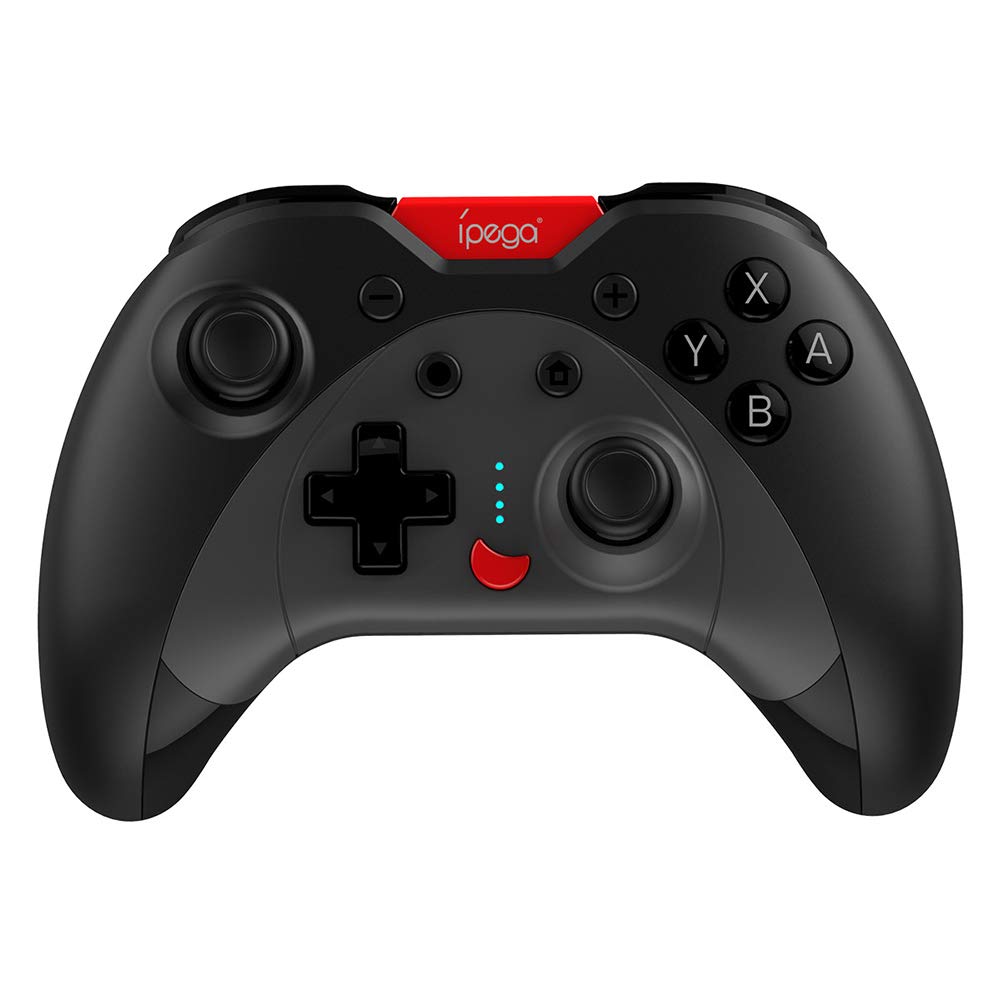
Image: A green IPEGA PG-SW023 controller illustrating its built-in six-axis gyroscope design for improved body feeling and accurate targeting.
3. Kandungan Pakej
Sila sahkan bahawa semua item terdapat dalam pakej:
- 1 x IPEGA PG-SW023 Wireless Game Controller
- 1 x Kabel Pengecas Jenis-C
- 1 x Manual Pengguna
4. Spesifikasi
| Ciri | Spesifikasi |
|---|---|
| Jenama | Ipega |
| Model | PG-SW023 |
| Pilihan Warna | Black, Green, Blue, Yellow |
| Vol Operasitage | DC 3.7V |
| Arus Operasi | <30mA |
| Semasa Statik | <20uA |
| Masa Main Berterusan | lebih kurang 15 jam |
| Input Voltage / Semasa | DC 5V/500mA |
| Masa Mengecas | lebih kurang 2 jam |
| Versi Bluetooth | 3.0 |
| Jarak Penghantaran | ≤8 meter |
| Kapasiti Bateri | 400mAh |
| Dimensi Produk | 15 x 10 x 5.5 cm (5.91 x 3.94 x 2.17 inci) |
| Berat Produk | Lebih kurang 215g (7.58 auns) |
| Peranti Serasi | N-S Console, PS3, Android, PC (Win 7/8/10) |
| Ketersambungan | Wayarles (Bluetooth) |
| Sumber Kuasa | Dikuasakan Bateri |
5. Persediaan
5.1 Mengecas Pengawal
- Connect the provided Type-C charging cable to the controller's charging port.
- Connect the other end of the cable to a USB power source (e.g., PC, USB wall adapter).
- The indicator lights on the controller will show charging status. Once fully charged (approx. 2 hours), the lights will indicate completion or turn off.
5.2 Berpasangan dengan Peranti
The pairing method varies slightly depending on the device. Ensure the controller is sufficiently charged before attempting to pair.

Image: A blue IPEGA PG-SW023 controller positioned in front of a Nintendo Switch, PlayStation 3, and a laptop, illustrating its multi-platform compatibility.
5.2.1 Pairing with N-S Console
- On your N-S console, go to the HOME Menu.
- Pilih 'Pengawal' > 'Tukar Cengkaman/Pesanan'.
- Press and hold the pairing button on the IPEGA controller (refer to controller diagram for exact location) until the indicator lights begin to flash rapidly.
- The console will detect the controller. Once paired, the indicator light will become solid.
5.2.2 Pairing with PS3
- Connect the controller to the PS3 console using the Type-C cable.
- Tekan butang HOME pada pengawal.
- Once recognized, you can disconnect the cable and the controller should remain paired wirelessly.
5.2.3 Berpasangan dengan Peranti Android
- Dayakan Bluetooth pada peranti Android anda.
- On the controller, press and hold the Android pairing button combination (refer to controller diagram or quick start guide for specific button combination, usually 'A' + HOME or 'X' + HOME) until the indicator lights flash rapidly.
- On your Android device, search for new Bluetooth devices and select 'IPEGA PG-SW023' (or similar name) from the list.
- Setelah dipasangkan, lampu penunjuk pada pengawal akan menjadi pepejal.
5.2.4 Pairing with PC (Windows 7/8/10)
- Pastikan PC anda telah mengaktifkan Bluetooth.
- Go to 'Settings' > 'Devices' > 'Bluetooth & other devices' and click 'Add Bluetooth or other device'.
- Pilih 'Bluetooth'.
- On the controller, press and hold the PC pairing button combination (refer to controller diagram or quick start guide for specific button combination, usually 'L1' + HOME or 'Y' + HOME) until the indicator lights flash rapidly.
- Select 'IPEGA PG-SW023' (or similar name) from the list of available devices on your PC.
- Setelah dipasangkan, lampu penunjuk pada pengawal akan menjadi pepejal.
6. Arahan Operasi
6.1 Fungsi Butang Asas
The controller features standard gaming buttons including directional pad, analog sticks, action buttons (A, B, X, Y), shoulder buttons (L1, R1), and triggers (L2, R2). Specific button mapping may vary by game and platform.

Image: Hands comfortably gripping a black IPEGA PG-SW023 controller, showcasing its ergonomic design for comfortable and convenient use.
6.2 Fungsi TURBO
The TURBO function allows for continuous rapid input of a selected button. This can be useful in games requiring fast, repeated button presses.
- To activate TURBO: Press and hold the desired action button (e.g., A, B, X, Y) and then press the TURBO button simultaneously. The button will now continuously input as long as it's held down.
- To deactivate TURBO: Repeat the same process (press the action button and TURBO button simultaneously).

Image: A yellow IPEGA PG-SW023 controller with its prominent TURBO button, shown with a Nintendo Switch console, illustrating the auto-fire feature.
6.3 Fungsi Makro
The macro function allows you to assign a sequence of button presses or a single common button to the programmable rear buttons. This can simplify complex in-game actions.
- Refer to the specific instructions provided in the quick start guide or on the manufacturer's website for detailed steps on programming macro buttons, as this process can vary.
6.4 Vibration and Gyroscope
The controller features dual motors for vibration feedback, providing tactile sensations that correspond to in-game events. The built-in six-axis gyroscope allows for motion control in supported games, offering a more immersive and precise aiming experience.

Image: A blue IPEGA PG-SW023 controller in use, with visual cues indicating its double motor vibrating design for immersive feedback during gameplay.
7. Penyelenggaraan
Penjagaan yang betul akan memanjangkan hayat pengawal anda:
- Pembersihan: Gunakan kain lembut dan kering untuk membersihkan pengawal. Untuk kotoran degil, sedikit dampen kain dengan air atau larutan pembersih lembut. Elakkan bahan kimia yang keras.
- Storan: Simpan pengawal di tempat yang sejuk dan kering jauh dari cahaya matahari langsung dan suhu yang melampau.
- Elakkan Kesan: Jangan jatuhkan atau tundukkan pengawal kepada hentaman kuat, kerana ini boleh merosakkan komponen dalaman.
- Pendedahan Cecair: Keep the controller away from liquids. If it comes into contact with liquid, power it off immediately and allow it to dry completely before attempting to use it again.
8. Penyelesaian masalah
If you encounter issues with your IPEGA PG-SW023 controller, try the following solutions:
- Pengawal Tidak Bersambung:
- Pastikan pengawal dicas sepenuhnya.
- Sahkan bahawa Bluetooth didayakan pada peranti anda.
- Try re-pairing the controller by following the setup instructions for your specific device.
- Move the controller closer to the device to ensure it is within the 8-meter transmission range.
- Restart both the controller and your gaming device.
- Butang Tidak Menjawab:
- Check if the controller is properly connected and paired.
- Test the controller with another game or application to rule out software-specific issues.
- Pastikan tiada serpihan bersarang di bawah butang.
- Getaran Tidak Berfungsi:
- Verify that the game or system settings have vibration enabled.
- Some games may not support vibration feedback.
- Hayat Bateri Pendek:
- Pastikan pengawal dicas sepenuhnya sebelum digunakan.
- Battery life can vary based on usage intensity (e.g., continuous vibration).
- Elakkan mengecas dalam persekitaran yang sangat panas atau sejuk.
9. Waranti dan Sokongan
For warranty information, technical support, or service inquiries regarding your IPEGA PG-SW023 Bluetooth Wireless Game Controller, please refer to the product packaging or contact the manufacturer directly through their official weblaman web atau saluran khidmat pelanggan. Simpan resit pembelian anda sebagai bukti pembelian untuk sebarang tuntutan jaminan.