
meross MSS560
Meross Smart Dimmer Switch (MSS560) User Manual
Model: MSS560
pengenalan
The Meross Smart Dimmer Switch (MSS560) is designed to provide intelligent control over your lighting. This single-pole dimmer switch allows you to remotely control, dim, and schedule your lights using the Meross app, Apple HomeKit, Amazon Alexa, or Google Assistant. It requires a neutral wire for installation and operates on a 2.4GHz Wi-Fi network.
Maklumat Keselamatan
- Wayar Neutral Diperlukan: Ensure your electrical box has a neutral wire (typically white) before installation. If unsure, consult a qualified electrician.
- Matikan Sebelum Pemasangan: Always turn off power at the circuit breaker before installing or servicing the switch to prevent electrical shock.
- Single Pole Setup Only: This switch is designed for single pole configurations only. It is not compatible with 3-way or multi-way switch setups.
- Keserasian Mentol: Works with non-smart dimming bulbs. Maximum wattage: 400W for incandescent (INC), 150W for CFL & LED bulbs. Do not use with smart bulbs.
- Keperluan Wi-Fi: Supports 2.4GHz Wi-Fi networks only. 5GHz Wi-Fi is not supported. No hub is required.
- Bahan Kalis Api: The switch housing is made of PC+ABS fire-retardant material for safety.
- Perlindungan Lebihan: Certified by FCC/ETL, the device includes protection against electrical overload.
Apa yang ada dalam Kotak
- Meross Smart Dimmer Switch (MSS560)
- Panduan Pemasangan Pantas
- Kacang Kawat
- Skru Pemasangan
- Faceplate (standard size)
Persediaan
Senarai Semak Prapemasangan
- Verify your electrical box has a neutral wire (white).
- Ensure you have a 2.4GHz Wi-Fi network.
- Confirm your setup is single pole (not 3-way).
- Check bulb compatibility (non-smart dimmable LED/CFL/INC).

Image: Diagram illustrating the necessity of a neutral wire and compatible bulb types (LED, CFL, INC) with wattage limits, and incompatibility with smart bulbs.

Image: Important notes on switch compatibility, including single pole setup, 2.4GHz Wi-Fi, neutral wire, and non-smart dimming bulb support.
Pemasangan Perkakasan
- Matikan Kuasa: Cari pemutus litar anda dan matikan kuasa pada suis yang anda gantikan. Sahkan kuasa dimatikan menggunakan voltantage penguji.
- Keluarkan Suis Lama: Carefully remove the faceplate and unscrew the existing switch from the electrical box. Pull the switch outward without touching any wires.
- Kenal pasti wayar: Identify the Live (black/red), Load (brown/black), Neutral (white), and Ground (green/bare copper) wires. Label them if necessary.
- Sambungkan Suis Baharu: Use the provided wire nuts to connect the corresponding wires of the Meross Smart Dimmer Switch to your home's electrical wires. Ensure all connections are secure.
- Suis Selamat: Carefully push the wires and the new switch into the electrical box. Screw the switch to the box and attach the faceplate.
- Pulihkan Kuasa: Turn on the power at your circuit breaker.
Video: Official Meross guide on how to install the HomeKit smart dimmer switch, demonstrating the wiring process and safety precautions.
Persediaan & Gandingan Apl
- Muat turun Aplikasi Meross: Muat turun aplikasi Meross daripada App Store atau Google Play.
- Tambah Peranti: Open the Meross app, tap the '+' icon to add a new device, and select the Smart Dimmer Switch. Follow the in-app instructions.
- Sambung ke Wi-Fi: Connect the switch to your 2.4GHz Wi-Fi network.
- HomeKit Setup (Optional): If using Apple HomeKit, scan the HomeKit setup code located on the device or its packaging. You may need to manually enter the 8-digit code.
- Calibrate Dimming Range: Use the app to set the maximum and minimum light levels for optimal dimming performance with your specific bulbs.
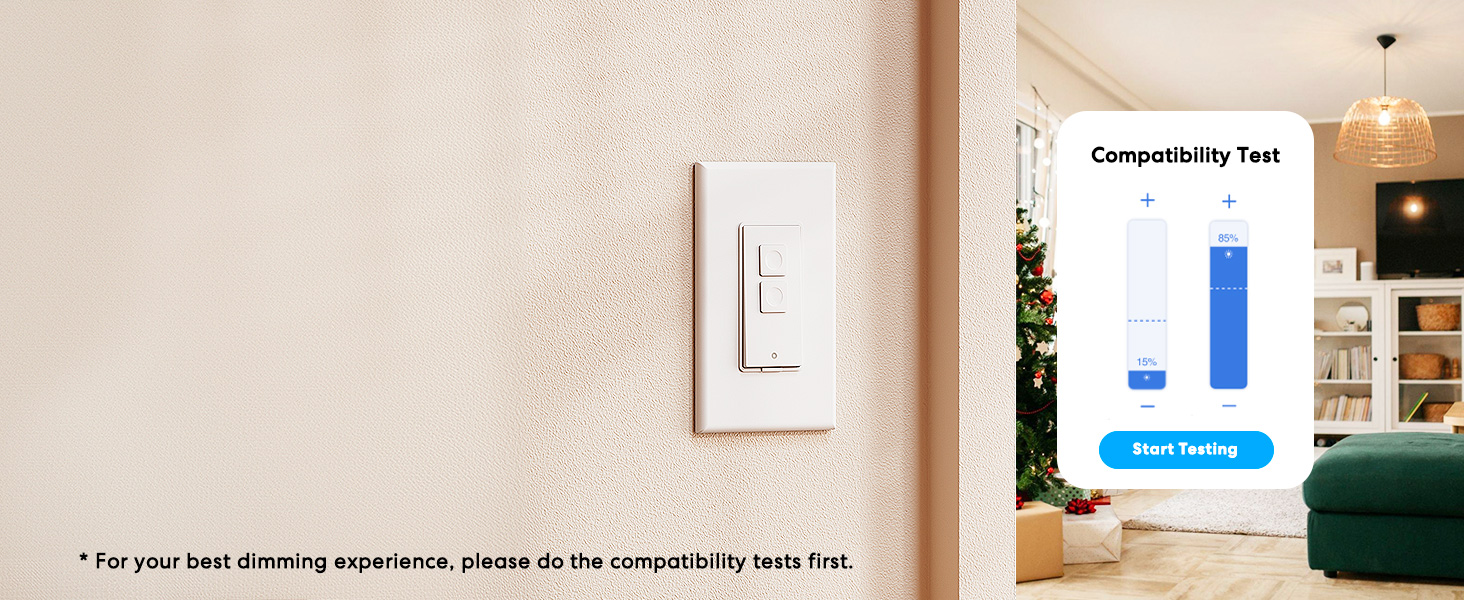
Image: Meross app interface demonstrating the dimming compatibility test to optimize light levels.
Arahan Operasi
Kawalan Manual
The Meross Smart Dimmer Switch features physical buttons for direct control:
- Butang Hidup/Mati: Press the main button to turn lights on or off.
- Dimming Buttons: Use the smaller up/down buttons to adjust brightness levels.
Kawalan Apl
Control your lights from anywhere with internet access using the Meross app:
- Jauh Hidup/Mati: Tap the switch icon in the app to toggle lights.
- Peredupan: Use the slider in the app to precisely adjust brightness from 0% to 100%.

Image: A user controlling lights remotely via the Meross app on a smartphone.
Kawalan Suara
The Meross Smart Dimmer Switch is compatible with leading voice assistants:
- Apple HomeKit/Siri: Say "Hey Siri, turn on the light" or "Hey Siri, dim the light to 50%".
- Amazon Alexa: Say "Alexa, turn on the light" or "Alexa, dim the light to 20%".
- Pembantu Google: Say "Hey Google, turn on the light" or "Hey Google, dim the light to 90%".

Image: Visual representation of voice commands for Siri, Alexa, and Google Assistant to control light brightness.
Scheduling & Scenes
Automate your lighting to suit your lifestyle:
- Jadual: Set specific times for lights to turn on/off or dim automatically. Supports sunrise and sunset settings.
- Adegan: Create custom scenes for different moods or activities (e.g., "Movie Night" with dimmed lights).

Image: Meross app interface displaying options for setting scenes, timers, and schedules for automated lighting control.
Penyelenggaraan
- Pembersihan: Wipe the switch and faceplate with a soft, dry cloth. Do not use liquid cleaners or aerosols.
- Kemas kini Firmware: Semak kemas kini perisian tegar aplikasi Meross secara berkala bagi memastikan prestasi dan keselamatan yang optimum.
Menyelesaikan masalah
- Suis Tidak Memberi Respons: If the switch is unresponsive or the indicator light is red, try pressing the small power reset button located at the bottom of the switch.
- Isu Sambungan Wi-Fi: Ensure your smartphone is connected to a 2.4GHz Wi-Fi network during setup. If the switch loses connection, verify your router is functioning correctly and the switch is within range.
- Masalah Peredupan: If lights flicker or do not dim correctly, re-calibrate the dimming range in the Meross app. Ensure you are using compatible non-smart dimmable bulbs.
- HomeKit Remote Control: For remote control via HomeKit, an additional networked Apple device (HomePod, Apple TV 4K/HD, or iPad) must be set up as a HomeKit bridge and remain online.
Spesifikasi
| Ciri | Spesifikasi |
|---|---|
| Mod Operasi | HIDUP |
| Penilaian Semasa | 4 Amps |
| Vol Operasitage | 120 Volt |
| Jenis Kenalan | Biasa Terbuka |
| Jenis Penyambung | Clamp |
| Terminal | bilah |
| Dimensi Item (L x W x H) | 4.7 x 2.8 x 1.5 inci |
| Jenis Litar | 1-way (Single Pole) |
| Jenis Penggerak | Butang Tekan |
| Bahan Kenalan | Tembaga |
| Penilaian Perlindungan Antarabangsa | IP00 |
| Bilangan Jawatan | 1 |
| Penarafan Suhu Atas | 40 Darjah Celsius |
| Jenis Pengawal | Amazon Alexa, Apple HomeKit, Google Assistant |
| Kaedah Kawalan | Suara, Apl |
| Protokol Ketersambungan | Wi-Fi (2.4GHz sahaja) |
| warna | putih |
| Wattage | 400 watts (INC), 150 watts (CFL & LED) |
| bahan | Plastic (PC+ABS fire-retardant) |
Waranti dan Sokongan
Waranti
The Meross Smart Dimmer Switch typically comes with a 1-year warranty. Please refer to your product packaging or the Meross webtapak untuk terma dan syarat waranti tertentu.
Sokongan
If you have any questions regarding your switch type, installation, or Wi-Fi connections, please contact Meross customer support. You can usually find contact information within the Meross app or on the official Meross webtapak.
Maklumat Tambahan
Video: Tamatview of Meross smart home products, showcasing various features and benefits of integrating smart devices into your home.
Ask a question about this manual
Ask about setup, troubleshooting, compatibility, parts, safety, or missing instructions. Manuals+ will review the question and use this page’s manual context to help answer it.