
pengenalan
The RoamWiFi Portable Hotspot provides seamless, high-speed 4G LTE internet access across over 170 countries. Designed for travelers, remote workers, and anyone needing reliable connectivity on the go, this device eliminates the need for physical SIM cards and complex contracts. It supports multiple devices simultaneously and offers flexible data plans to suit various needs.
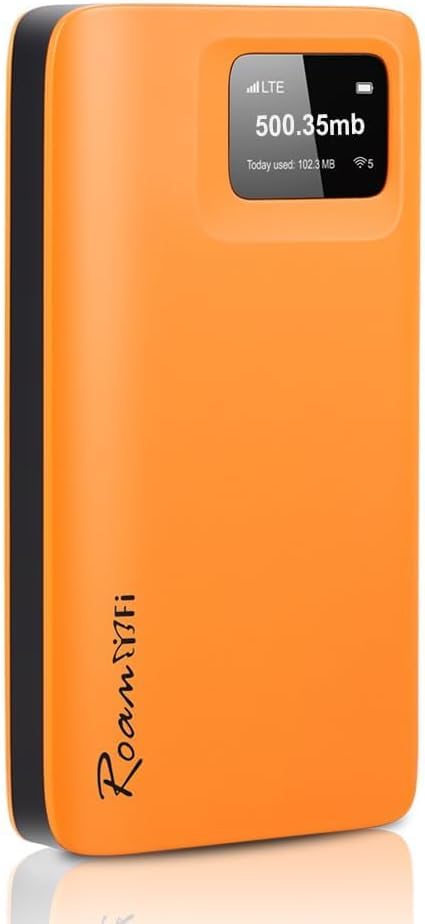
Image: The compact orange RoamWiFi Portable Hotspot device, displaying LTE signal and data usage on its screen.
Apa yang ada dalam Kotak
Your RoamWiFi package includes the following items:
- 1 x RoamWiFi Portable Hotspot Device
- 1 x Kabel Data (untuk pengecasan dan pemindahan data)
Panduan Persediaan
- Hidupkan kuasa: Long press the power button for 3 seconds to turn the device on or off. A short press will wake up the device or switch the screen.
- Sambungkan ke Rangkaian: After powering on, the RoamWiFi device will take approximately 2-3 minutes to connect and access the preferred local network. Network details will be displayed on the device screen.
- Surf Internet: With the device on, short press the power button to display the Wi-Fi hotspot name (SSID) and password (PWD). Enter this password on your smartphone or laptop to connect to the RoamWiFi network and begin browsing.

Image: Step-by-step guide on how to power on, connect to the network, and surf the internet using the RoamWiFi device and a smartphone.
Operating Your RoamWiFi Hotspot
Kesambungan Berbilang Peranti
The RoamWiFi hotspot allows you to connect up to 10 devices simultaneously, including smartphones, laptops, tablets, and gaming consoles. This feature is ideal for group travel or sharing internet access with family and friends.

Image: Visual representation of the RoamWiFi device connecting to multiple user devices like phones and laptops.
Data Plan Management
RoamWiFi offers diverse data plans to suit various travel durations and usage needs. You can manage and purchase data packages directly through the RoamWiFi application. The device comes with a built-in 30-day data plan (10GB US + 1GB Global data) upon activation.

Image: A table detailing different data packages available, including daily, weekly, and monthly options with varying data allowances and prices.
Video Produk Rasmi
RoamWiFi Product Overview
Video: Seorang pegawai tamatview of the RoamWiFi 4G LTE Portable Hotspot, demonstrating its features and ease of use. This video is provided by the seller.
Ciri-ciri Utama
Global Seamless Roaming
Enjoy high-speed internet in over 170 countries and regions without the need for SIM card swaps or incurring roaming fees. The device intelligently selects the best available network for optimal connectivity.

Image: The RoamWiFi device held against a backdrop of global landmarks, symbolizing its extensive international coverage.
Super Portable Design
The RoamWiFi hotspot is ultra-compact and lightweight, making it easy to carry in your pocket or bag. Its sleek design ensures convenience for all your adventures, whether for travel, home use, or gaming.

Image: A person demonstrating how easily the compact RoamWiFi device fits into a pocket or bag.
Tahan Hayat Bateri
Equipped with a 5000mAh long-lasting battery, the device provides up to 18 hours of continuous use, minimizing the need for frequent recharging. This ensures you stay connected for extended periods.

Image: A graphic highlighting the 5000mAh battery capacity and 18-hour continuous use time of the RoamWiFi device.
Menyelesaikan masalah
- Q: What should I do if there's no signal?
- A: RoamWiFi operates on AT&T, Verizon, and T-Mobile networks in the US. It can be used wherever these carriers provide coverage. If you experience network connectivity issues, please contact customer support for remote troubleshooting assistance.
- Q: What are the data allowances and validity periods included in the plans?
- A: The device comes with various data package options. For example, a common built-in plan includes 10GB/30 Days US data plus 1GB global data. Other options like 1GB/30 Days US, 50GB/60 Days US + 1GB Global, and 100GB/90 Days US + 1GB Global are available. *Note: GB/Days means whichever comes first when activated by first use.
Spesifikasi Teknikal
| Atribut | Perincian |
|---|---|
| Nombor Model | R10 |
| Dimensi Produk | 2.68 x 0.57 x 4.96 inci |
| Berat Barang | 7.1 auns |
| Bateri | 1 bateri Lithium Polimer diperlukan (termasuk) |
| Pengeluar | RoamFi |
| Negara Asal | China |
| Ciri Khas | WPS |
| Kelas Band Kekerapan | Dwi-Jalur |
| Standard Komunikasi Tanpa Wayar | 802.11ac |
| Peranti Serasi | Any device with WIFI function |
| Kekerapan | 2.4 GHz |
| Penggunaan yang Disyorkan | Business, home, travel, etc. |
Penjagaan dan Penyelenggaraan
- Jauhkan peranti daripada suhu yang melampau dan cahaya matahari langsung.
- Elakkan daripada mendedahkan peranti kepada air atau kelembapan berlebihan.
- Bersihkan peranti dengan kain lembut dan kering. Jangan gunakan pembersih cecair.
- For optimal battery life, avoid fully discharging the device frequently.
Waranti dan Sokongan
For detailed warranty information and technical support, please refer to the official user guide or contact RoamFi customer service.
Muat turun Panduan Pengguna Rasmi (PDF)
For immediate assistance, please contact RoamFi customer support directly through the RoamWiFi application or their official webtapak.