
1. Pengenalan
The RENASSER Raphael 520 is a high-performance touch pen designed for Microsoft Surface devices. It features advanced MPP2.0 technology, offering precise control and a natural writing experience. This manual provides essential information for setting up, operating, and maintaining your Raphael 520 touch pen.
Reka Bentuk Ergonomik
The Raphael 520 features an ergonomic, streamlined aluminum body, designed in Houston and made in Taiwan. With a diameter of just 9.2mm and weighing only 14 grams, it offers a comfortable grip for extended use. The pen's weight is balanced at both ends for optimal handling.


2. Persediaan
Penggunaan Awal
The Raphael 520 does not require any troublesome settings or Bluetooth connection. Simply touch the screen of your compatible Surface device to begin use.
Lampiran Magnet
The pen features a magnetic attachment function, allowing it to securely attach to compatible Surface devices for convenient storage and portability. This is particularly useful during travel or meetings.
Devices compatible with magnetic attachment:
- Surface Pro 3/Pro 4/Pro 5/Pro 6/Pro 7
- Surface Book / Book 2 / Book3
- Surface 3
- Surface Go / Go 2 /Go3
- Studio Permukaan
- Surface Studio 2
Devices not compatible with magnetic attachment:
- Surface Pro 8/ Pro 9/ Pro X
- Surface Duo/Duo 2
- Laptop 1/Laptop 2/Laptop 3/Laptop 4/Laptop 5/Laptop Studio

3. Arahan Operasi
Pressure Sensitivity and Tilt Detection
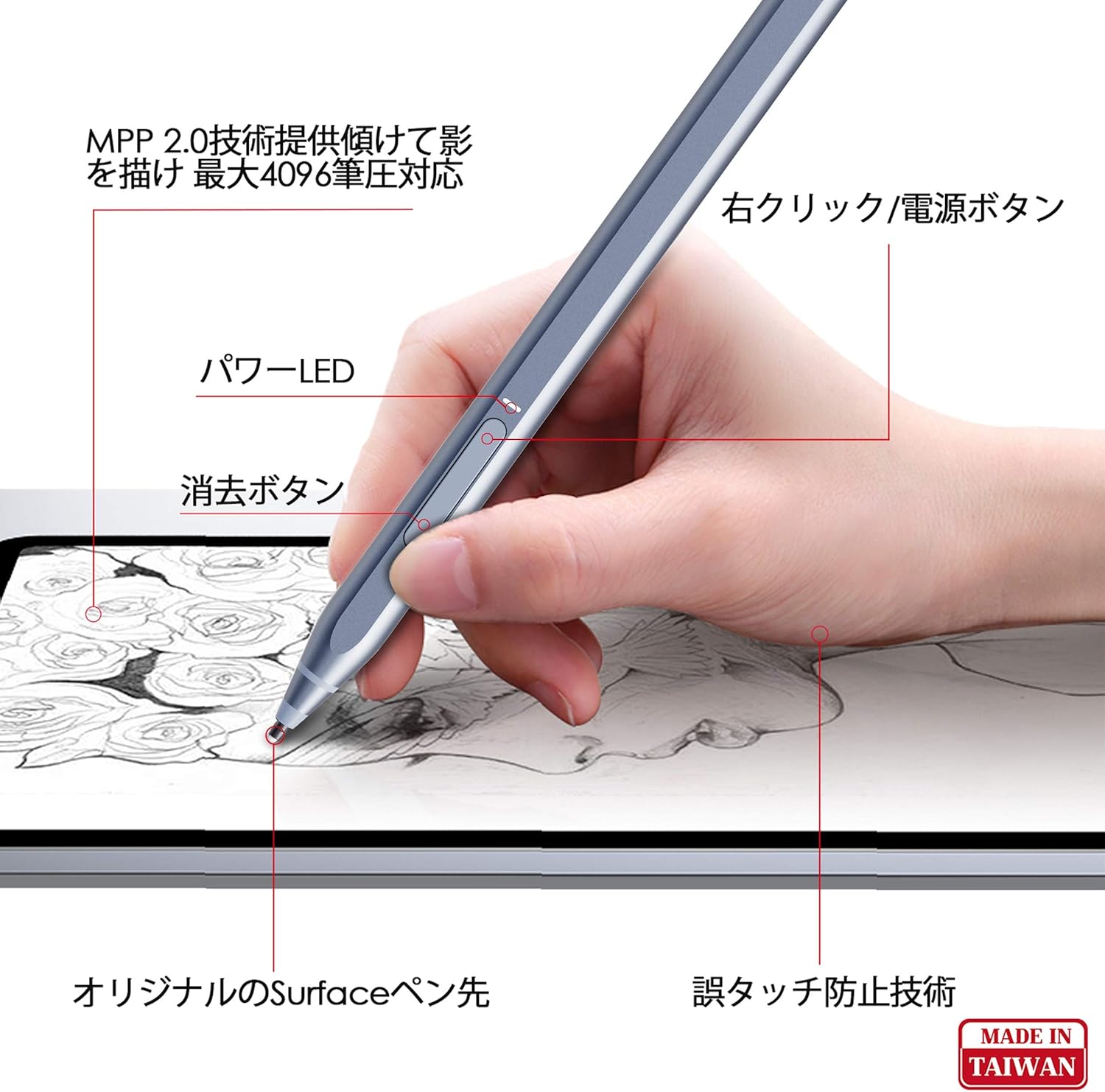
The Raphael 520 utilizes cutting-edge MPP2.0 technology, providing 4,096 levels of pressure sensitivity for accurate sketching and shading. The tilt detection function allows you to create shading effects similar to a real pencil when the pen is angled.
Penolakan Telapak Tangan
Equipped with palm rejection technology, you can comfortably rest your hand on the screen while writing or drawing, just as you would on paper, without needing gloves.

Right-Click and Eraser Functions
For enhanced convenience, the pen includes dedicated buttons for right-click and eraser functions, allowing for quick and efficient interaction with your device.
Video Demonstrasi
Watch this video for a visual demonstration of the pen's features, including pressure sensitivity, tilt for shading, eraser function, right-click function, and magnetic attachment.
4. Penyelenggaraan
Pengecasan Ultra-Pantas
The Raphael 520 features ultra-fast charging, eliminating the need for disposable batteries. A mere 15 minutes of charging provides approximately 70 hours of use, while a full 1-hour charge can last over 100 hours.

Pengurusan Kuasa Pintar
For optimal battery life, the pen is designed with smart power management. If the pen is not used for 10 minutes, it will automatically power off to conserve energy.
5. Penyelesaian masalah
No specific troubleshooting steps are provided in the product information. If you encounter issues, please refer to the general support resources for your Microsoft Surface device or contact RENASSER customer support.
6. Spesifikasi
| Ciri | Perincian |
|---|---|
| Nama Jenama | REAISSER |
| Nombor Model | Rafael 520 |
| warna | Biru |
| Sensitiviti Tekanan | 4096 peringkat |
| Pengesanan Kecondongan | ya |
| Penolakan Telapak Tangan | ya |
| Lampiran Magnet | Yes (for compatible devices) |
| Butang | Right-click, Eraser |
| Mengecas | USB-C (termasuk kabel) |
| Battery Life (15 min charge) | lebih kurang 70 jam |
| Battery Life (1 hour charge) | Lebih 100 jam |
| Auto Matikan | Selepas 10 minit tidak aktif |
| Dimensi Produk | 14.2 x 0.92 x 0.87 cm |
| Berat Produk | 14 g |
| Peranti Serasi | Surface Pro 9, 8, 7+, 7, 6, 5, 4; Surface Duo/Duo 2; Surface Pro X; Surface Go/Go 2/Go 3; Surface Book/Book 2/Book 3; Surface Studio 1st Gen, 2, 2+; Surface Laptop 1, 2, 3, 4, 5; Surface Laptop Studio. |
| Peranti Tidak Serasi | Surface Laptop Go, other Windows 10 touchscreen computers. |
7. Waranti dan Sokongan
Specific warranty and support details are not provided in the product information. Please refer to the product packaging or the manufacturer's official website for warranty information and customer support contacts.