
BuTure BR600
Manual Pengguna Pemula Jump Starter Kereta Mudah Alih BuTure BR600
Model: BR600
1. Produk Lebihview
The BuTure BR600 is a powerful and versatile portable car jump starter designed to provide emergency starting power for 12V vehicles. It also functions as a portable power bank with wireless charging capabilities and a multi-mode LED flashlight. This manual provides essential information for safe and effective use of your device.
Ciri-ciri Utama:
- Permulaan Lompatan yang Berkuasa: Delivers 2500A peak current to start all gasoline engines and up to 8.0L diesel engines.
- Bateri Berkapasiti Tinggi: 27000mAh lithium battery for multiple jump starts and device charging.
- Pengecasan Tanpa Wayar: Integrated 10W wireless charging pad for compatible smartphones.
- Bank Kuasa Mudah Alih: Equipped with USB 1 (Quick Charge 3.0: 5V 3A / 9V 2A / 12V 1.5A), USB 2 (5V 2.4A), and USB-C (5V 3A) outputs for charging various electronic devices.
- Smart Protection Clamps: Features intelligent protection against short circuits, overheating, over-voltage, over-charge, deep discharge, over-current, and reverse polarity.
- Lampu Suluh LED Berbilang Mod: Includes Flashlight, Strobe, SOS, and Warning Light modes for emergencies.
- Reka bentuk tahan lasak: Operates effectively in extreme temperatures, including cold winter conditions.
2. Kandungan Pakej
Sila semak kandungan bungkusan semasa dibuka. Jika ada item yang hilang atau rosak, hubungi sokongan pelanggan.

Image: Contents of the BuTure BR600 package.
- 1 x BuTure BR600 Jump Starter
- 1 x Kabel Pelompat Pintar
- 1 x Kabel USB-C
- 1 x EC5 Cigarette Lighter Adapter
- 1 x Manual Pengguna
- 1 x Kotak Penyimpanan
3. Maklumat Keselamatan Penting
Read all safety warnings and instructions before using this product. Failure to follow these instructions may result in electric shock, fire, and/or serious injury.
- Do not immerse the product in water or expose it to rain.
- Do not open or disassemble the product. There are no user-serviceable parts inside.
- Jauhkan daripada kanak-kanak.
- Gunakan hanya kabel jumper pintar yang disediakan.
- Jangan lompat bateri beku.
- Pastikan sambungan kekutuban yang betul (clamp kepada positif, cl hitamamp kepada negatif).
- Jangan hubungkan cl positif dan negatifampbersama-sama.
- If the product becomes excessively hot during use, discontinue use immediately.
- Simpan produk di tempat yang sejuk dan kering jauh dari cahaya matahari langsung.
- Wear eye protection and gloves when jump starting a vehicle.
- Consult your vehicle's owner's manual for specific jump-starting procedures.

Image: The BuTure BR600 features multiple protection modes for safe operation, including error detection and intelligent indicators.
4. Charging the BuTure BR600
Before first use, fully charge the jump starter. It is recommended to recharge the device every 3-6 months to maintain battery health, even if not in use.
4.1. Charging via USB-C Input
- Connect the provided USB-C cable to the USB-C input port on the jump starter.
- Sambungkan hujung kabel USB-C yang satu lagi ke penyesuai dinding USB (tidak disertakan) atau pengecas kereta.
- The LED indicator lights will illuminate and flash to show the charging status. All four lights will be solid when fully charged.
4.2. Penunjuk Aras Bateri
The LED indicator lights on the device show the remaining battery capacity:
- 4 lights: 75% - 100%
- 3 lights: 50% - 75%
- 2 lights: 25% - 50%
- 1 light: 0% - 25% (Recharge immediately)

Image: The BuTure BR600 features a 27000mAh battery designed for long standby times, up to 12 months.
5. Lompat Memulakan Kenderaan
Ensure the jump starter is at least 50% charged (2 LED lights) before attempting to jump start a vehicle.
- Sediakan Kenderaan: Turn off the vehicle's ignition and all accessories (headlights, radio, air conditioning, etc.). Engage the parking brake.
- Sambungkan Kabel Jumper:
- Insert the blue plug of the smart jumper cables into the 12V jump start port on the BuTure BR600. Ensure a firm connection.
- Sambungkan MERAH positif (+) clamp to the vehicle's positive (+) battery terminal.
- Sambungkan HITAM negatif (-) clamp ke terminal bateri negatif (-) kenderaan.
- cl yang bijakamp indicator light will show the connection status. Refer to the smart clamp manual for specific light indications.
- Mulakan Kenderaan: Sebaik sahaja kelas pintaramp indicator shows a safe connection, start your vehicle's engine. If the vehicle does not start immediately, wait 20-30 seconds before trying again. Do not crank the engine for more than 3 seconds per attempt.
- Tanggalkan Kabel Jumper: As soon as the vehicle starts, disconnect the HITAM negatif (-) clamp pertama, kemudian MERAH positif (+) clamp from the vehicle battery. Finally, unplug the smart jumper cables from the BuTure BR600.
Penting: Jika cl pintaramp indicates an error (e.g., reverse polarity), correct the connection before attempting to start the vehicle.

Image: Illustration of connecting the BuTure BR600 to a car battery for jump starting.
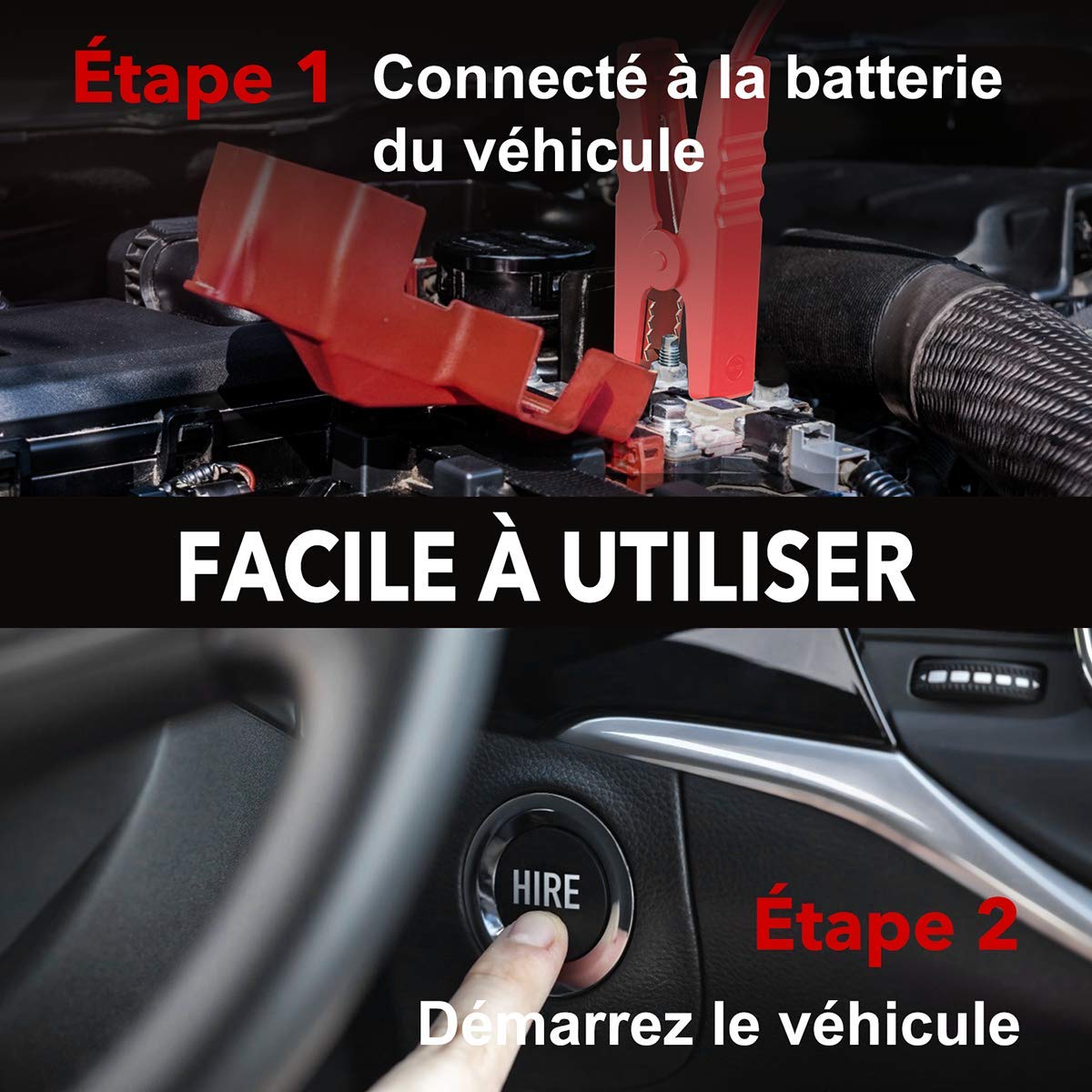
Image: Step-by-step guide showing how to connect the jump starter to the vehicle battery and then start the vehicle.

Image: The BuTure BR600 is designed to perform reliably even in cold winter temperatures down to -20°C.
6. Mengendalikan Fungsi Lain
6.1. Using as a Power Bank (USB Output)
The BuTure BR600 can charge various electronic devices via its USB output ports.
- Connect your device's USB charging cable to either the USB 1 (Quick Charge 3.0) or USB 2 port on the jump starter.
- Pemula lompat akan mula mengecas peranti anda secara automatik.
6.2. Pengecasan Tanpa Wayar
For devices compatible with 10W wireless charging:
- Place your wireless charging compatible device (e.g., smartphone) on the wireless charging pad located on the top surface of the jump starter.
- Pastikan peranti dipusatkan pada pad untuk pengecasan optimum.
- The wireless charging indicator light will illuminate to confirm charging is active.

Image: The BuTure BR600 offers both 10W wireless charging and Quick Charge 3.0 USB output for multiple devices.
6.3. Lampu suluh LED
The built-in LED flashlight has multiple modes for different situations.
- Press and hold the power button for 3 seconds to turn on the flashlight (steady light mode).
- Press the power button again to cycle through modes: Strobe → SOS → Warning Light → Off.
- Press and hold the power button again for 3 seconds to turn off the flashlight from any mode.

Image: The BuTure BR600 features an ultra-bright LED flashlight with Flash, SOS, Strobe, and Warning light modes for various emergencies.
7. Penyelenggaraan
- Pembersihan: Gunakan kain lembut dan kering untuk membersihkan peranti. Jangan gunakan pembersih atau pelarut yang melelas.
- Storan: Store the jump starter in a cool, dry place between 0°C and 45°C (32°F and 113°F). Avoid direct sunlight and high humidity.
- Mengecas semula: Recharge the device every 3-6 months to prevent battery degradation, even if not in use.
- Hayat Bateri: The internal lithium battery is designed for long life, but like all rechargeable batteries, its capacity will decrease over time.
8. Penyelesaian masalah
| Masalah | Kemungkinan Punca | Penyelesaian |
|---|---|---|
| Pemula lompat tidak dihidupkan. | Bateri dinyahcas sepenuhnya. | Charge the jump starter for several hours. |
| Kenderaan tidak bermula. |
|
|
| Pintar clamp penunjuk menunjukkan ralat. | Reverse polarity, short circuit, or other fault. | Putuskan sambungan clamps, check connections, and reconnect ensuring correct polarity (Red to +, Black to -). Refer to smart clamp manual for specific error codes. |
| Pengecasan tanpa wayar tidak berfungsi. |
|
|
9. Spesifikasi
| Model | BR600 |
| Arus Puncak | 2500A |
| Kapasiti Bateri | 27000mAh |
| Mula Voltage | 12V |
| Output USB 1 (QC3.0) | 5V/3A, 9V/2A, 12V/1.5A |
| Keluaran USB 2 | 5V/2.4A |
| Input/Output USB-C | 5V/3A |
| Output Pengecasan Tanpa Wayar | 10W |
| Suhu Operasi | -20°C hingga 60°C (-4°F hingga 140°F) |
| Dimensi (L x W x H) | 24.5 x 15.4 x 9.6 cm |
| Berat badan | 1.21 kg |
| Komposisi Bateri | Lithium Metallic |
10. Waranti dan Sokongan Pelanggan
BuTure products are designed and manufactured to the highest quality standards. This product comes with a standard manufacturer's warranty. For detailed warranty information, product support, or technical assistance, please refer to the warranty card included in your package or visit the official BuTure webtapak.
If you encounter any issues or have questions regarding your BuTure BR600, please contact our customer support team. Provide your model number (BR600) and purchase details for faster service.
Ask a question about this manual
Ask about setup, troubleshooting, compatibility, parts, safety, or missing instructions. Manuals+ will review the question and use this page’s manual context to help answer it.