
pengenalan
The Meike 85mm T2.2 Mini Fixed Prime Cinema Lens is a high-quality manual focus lens designed for Micro Four Thirds (M43) mount cameras and camcorders. This lens offers a short-telephoto/portrait focal length, making it suitable for various cinematic applications. It features a robust construction, precise manual controls, and optical quality optimized for 4K video recording.

Image: The Meike 85mm T2.2 Mini Fixed Prime Cinema Lens, showcasing its compact design and manual control rings.
Kandungan Pakej
Sila sahkan bahawa semua item terdapat dalam pakej:
- 1 x Meike 85mm T2.2 Lens
- 2 x Lens Caps (Front and Rear)
- 1 x Lens Pouch
- 1 x Lens Hood
- 1 x Kain Pembersih Lensa
- 1 x Manual Pengguna
Persediaan
- Prepare Your Camera: For cameras without automatic lens detection, ensure you enable "M mode" or "Release without lens" in your camera's settings. Refer to your camera's instruction manual for specific steps.
- Attach the Lens:
- Remove the rear lens cap from the Meike 85mm T2.2 lens and the body cap from your camera.
- Align the mounting index mark on the lens with the corresponding mark on your camera's lens mount.
- Masukkan kanta ke dalam pelekap kamera dan putarkannya mengikut arah jam sehingga ia berbunyi klik dengan selamat di tempatnya.

Imej: Belakang view of the Meike 85mm T2.2 lens, showing the Micro Four Thirds mount for attachment to compatible cameras.
- Attach the Lens Hood: Align the lens hood with the front of the lens and twist it until it locks into position. The lens hood helps to reduce flare and protect the front element.
- Remove Front Lens Cap: Remove the front lens cap before use.
Arahan Operasi
The Meike 85mm T2.2 is a fully manual lens, requiring manual adjustment for both focus and aperture.
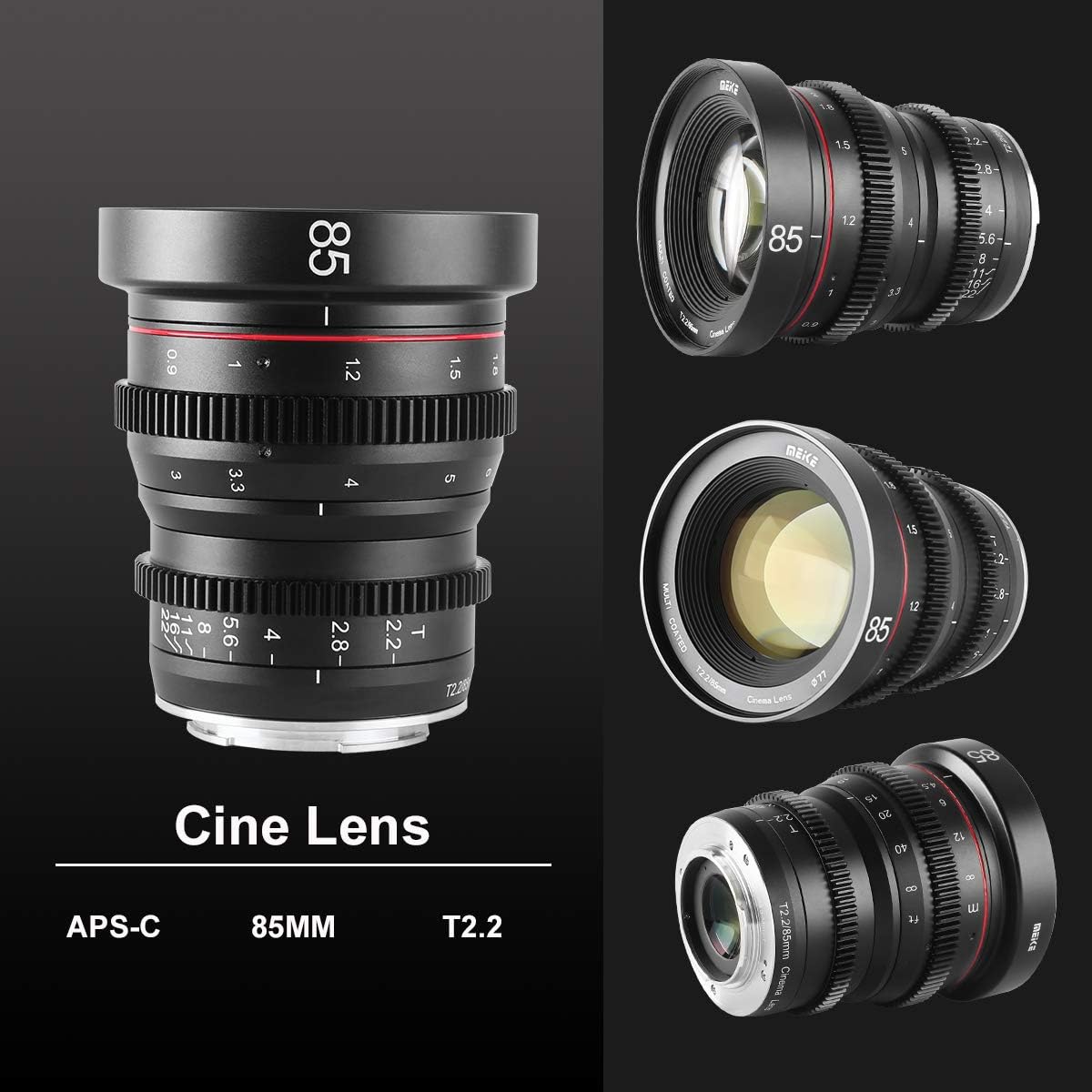
Image: The Meike 85mm T2.2 lens, highlighting the textured focus and aperture rings for precise manual control.
- Melaraskan Fokus:
- Rotate the focus ring (the wider ring closer to the camera body) to achieve sharp focus on your subject.
- The lens features a generous 270° focus rotation, allowing for very precise focus adjustments, which is beneficial for video recording.
- Utilize your camera's focus peaking or magnification features for accurate manual focusing.
- Adjusting Aperture (T-stop):
- Rotate the aperture ring (the narrower ring closer to the front of the lens) to control the amount of light entering the lens and the depth of field.
- The T-stop range is T2.2 to T22. T2.2 is the widest aperture, allowing for shallow depth of field and better low-light performance. T22 is the narrowest, providing greater depth of field.
- The aperture ring is de-clicked for smooth, silent adjustments during video recording.
- Kamera yang serasi: This lens is designed for Micro Four Thirds (M43) mount cameras and camcorders, including models from Olympus (e.g., OM-D E-M5, E-M10), Panasonic Lumix (e.g., GH5, G9), Blackmagic Pocket Cinema Camera (BMPCC 4K), and Z CAM E1/E2/E2C.
Penyelenggaraan
- Membersihkan Lensa: Use the provided lens cleaning cloth or a soft, lint-free cloth specifically designed for optics. Gently wipe the lens surfaces to remove dust and smudges. For stubborn marks, use a small amount of lens cleaning fluid applied to the cloth, not directly to the lens.
- Storan: When not in use, always attach both the front and rear lens caps to protect the lens elements. Store the lens in the included lens pouch or a padded camera bag to prevent scratches and impacts.
- Keadaan Persekitaran: Avoid exposing the lens to extreme temperatures, high humidity, or direct sunlight for extended periods. The recommended operating temperature is -10°C to +50°C.
Menyelesaikan masalah
- Camera displays "Lens Not Attached" or similar error:
- Since this is a manual lens with no electronic contacts, your camera may not detect it. Go into your camera's menu settings and enable "Release without lens" or "Shoot without lens" mode. Refer to your camera's manual for the exact setting location.
- Images are out of focus:
- Ensure you are manually adjusting the focus ring correctly. Use your camera's focus peaking or magnification assist features to confirm sharp focus. Check that the diopter on your camera's viewfinder is adjusted to your eyesight.
- Images are too dark or too bright:
- Adjust the manual aperture ring to control exposure. A wider aperture (lower T-number like T2.2) lets in more light, while a narrower aperture (higher T-number like T22) lets in less light. Also, adjust your camera's ISO and shutter speed settings accordingly.
- Lens feels stiff or difficult to adjust:
- Ensure the lens is clean and free from debris. Avoid forcing the rings. If the issue persists, contact Meike customer support.
Spesifikasi

Image: Diagram illustrating key specifications of the Meike 85mm T2.2 lens, including lens construction and aperture range.
| Ciri | Spesifikasi |
|---|---|
| Nama Model | Mini Prime 85mm T2.2 |
| Panjang Fokus | 85mm |
| Jenis Kanta | Fixed Prime Cinema Lens |
| Jenis Gunung | Micro Four Thirds (M43) |
| Apertur Maksimum | T2.2 |
| Aperture minimum | T22 |
| Jenis Fokus | Fokus Manual |
| Focus Rotation | 270° |
| Jarak Fokus Minimum | 0.6m (23.6 inci) |
| Pembinaan Kanta | 9 elemen dalam 7 kumpulan |
| Saiz Penapis | 77mm |
| Sudut dari View (M43) | Diagonal 15.4°, Mendatar 12.4°, Menegak 9.3° |
| Berat badan | Lebih kurang 640g (1.41 paun) |
| Suhu Operasi | -10°C hingga +50°C (14°F hingga 122°F) |
| Salutan Lensa | Multi-layer anti-reflective coating |
| Tahap Ketahanan Air | Bukan Tahan Air |
Waranti dan Sokongan
Meike products are manufactured to high-quality standards. For warranty information, please refer to the documentation included with your purchase or visit the official Meike website. For technical support, product inquiries, or service, please contact Meike customer service through their official channels.
Anda boleh mendapatkan maklumat lanjut dan butiran hubungan di Meike Store on Amazon.