
AUNA PAS5_Disgobox DVD
auna pro Manual Pengguna Sistem PA Mudah Alih DVD DisGo Box
Model: PAS5_Disgobox DVD
1. Pengenalan
Terima kasih kerana membeliasing the auna pro DisGo Box DVD Mobile PA System. This versatile audio system is designed for karaoke events, presentations, and various mobile sound applications, featuring an integrated DVD player, Bluetooth connectivity, USB/SD slots, and wireless UHF microphones. This manual provides essential information for safe operation, setup, maintenance, and troubleshooting to ensure optimal performance and longevity of your device.
2. Arahan Keselamatan
Please read these safety instructions carefully before operating the device. Keep this manual for future reference.
- Sumber Kuasa: Only connect the device to a power supply as indicated on the rating label. Ensure the voltage serasi.
- Keselamatan Bateri: Do not expose the battery to excessive heat or direct sunlight. Do not short-circuit the battery terminals. Fully charge the battery before first use.
- Pengudaraan: Pastikan pengudaraan yang mencukupi di sekeliling unit. Jangan sekat bukaan pengudaraan.
- Air dan Kelembapan: Do not expose the device to rain, moisture, or dripping/splashing liquids. Do not place objects filled with liquids on the device.
- Pembersihan: Putuskan sambungan kuasa sebelum membersihkan. Gunakan kain kering dan lembut. Jangan gunakan pembersih cecair atau aerosol.
- Servis: Jangan cuba membaiki unit ini sendiri. Rujuk semua servis kepada kakitangan servis yang berkelayakan.
- penempatan: Letakkan unit pada permukaan yang stabil dan rata. Elakkan meletakkannya berhampiran sumber haba atau di bawah cahaya matahari langsung.
- Bateri Mikrofon: Use the correct type and size of batteries for the wireless microphones. Insert batteries with correct polarity.
3. Kandungan Pakej
Sahkan bahawa semua item yang disenaraikan di bawah disertakan dalam pakej anda:
- 1 x PA System Unit
- 1 x Kabel Kuasa
- 2 x Mikrofon Wayarles UHF
- 1 x Alat Kawalan Jauh
- 1 x Manual Pengguna (dokumen ini)

Figure 3.1: The auna pro DisGo Box DVD PA system, showing the main unit, two wireless microphones, and the remote control.
4. Produk Lebihview
Familiarize yourself with the main components and features of your DisGo Box DVD PA system.
4.1 Ciri-ciri Utama
- Bunyi Kuat: Equipped with 2 x 10'' (25.5 cm) subwoofers for robust audio output.
- XMR Bass Technology: Delivers full, deep bass for an immersive sound experience.
- Integrated DVD Player: Supports DVD playback for video content.
- Ketersambungan Serbaguna: Features MP3-compatible USB ports and an SD card slot for diverse music sources.
- Mikrofon tanpa wayar: Includes two UHF wireless microphones for stable, noise-free transmission up to 50 meters.
- Antara Muka Bluetooth: Seamlessly stream music from smartphones or tablets.
- Hayat Bateri yang Panjang: Integrated 7A/12V battery provides approximately 3-5 hours of continuous operation.
- Reka Bentuk Mudah Alih: Features a retractable trolley handle and smooth-running floor rollers for easy transport.

Figure 4.1: The system delivers powerful sound, suitable for karaoke and events.

Figure 4.2: XMR Bass Technology ensures full and deep low frequencies.

Figure 4.3: The integrated battery provides extended operating time.
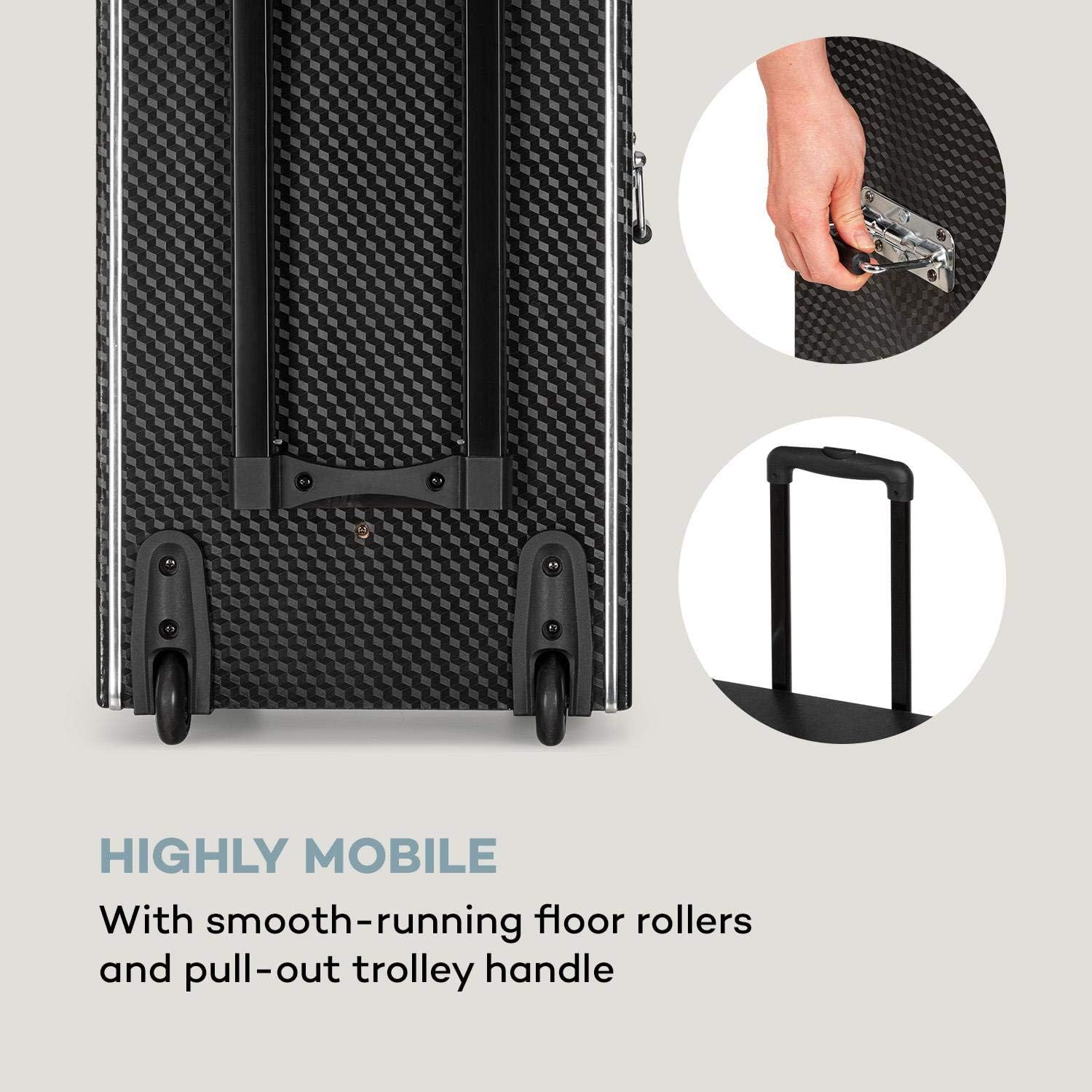
Figure 4.4: The system is highly mobile with smooth-running rollers and a pull-out trolley handle.
4.2 Panel Kawalan dan Sambungan
The control panel provides access to all functions and inputs/outputs.
- Input:
- 1 x 6.3 mm Microphone Input
- 1 x 6.3 mm Guitar Input
- 1 x RCA Line-in
- 3 x USB Ports (MP3 compatible)
- 1 x Slot SD
- Keluaran:
- 1 x RCA DVD-out
- 1 x RCA Video-out
- 1 x Speaker Terminals
- Kawalan:
- Kawalan Kelantangan
- 2-band Equalizer (Bass and Treble)
- Microphone Volume and Echo Controls
- Kawalan Pemain DVD
- Pemilih Input

Figure 4.5: The top control panel with various inputs and sound adjustments.

Figure 4.6: The front panel features the DVD player, USB ports, and SD card slot for diverse media playback.
5. Persediaan
Follow these steps for initial setup of your PA system.
- Membongkar: Keluarkan semua komponen daripada pembungkusan dengan berhati-hati. Simpan pembungkusan untuk pengangkutan atau penyimpanan pada masa hadapan.
- Caj Bateri Permulaan: Before first use, fully charge the integrated battery for 5-8 hours using the provided power cable. The battery indicator will show charging status.
- Bateri Mikrofon: Open the battery compartment of each UHF wireless microphone and insert 2 x 1.5V AA batteries, observing correct polarity.
- penempatan: Position the PA system on a stable, flat surface. Ensure there is sufficient space around the unit for ventilation.
- Sambungan Kuasa: Connect the power cable to the unit and then to a suitable power outlet (220-240 V~ | 50/60 Hz). The unit can operate on mains power or its internal battery.
6. Arahan Operasi
This section details how to operate the various functions of your DisGo Box DVD PA system.
6.1 Hidupkan/Mati Kuasa
Locate the power switch on the unit. Press to turn the system ON or OFF.
6.2 Media Playback (DVD, USB, SD)
- Main balik DVD: Insert a DVD into the DVD slot. Use the remote control or front panel buttons to control playback (Play, Pause, Stop, Skip). Connect the RCA video-out to an external display for video.
- Main balik USB/SD: Insert a USB flash drive into one of the USB ports or an SD card into the SD slot. The system will automatically detect and play compatible MP3 files. Use the control panel or remote for navigation.
6.3 Sambungan Bluetooth
Connect your smartphone or tablet wirelessly via Bluetooth.
- Ensure the PA system is powered on.
- Select the Bluetooth input mode on the PA system.
- Pada peranti mudah alih anda, dayakan Bluetooth dan cari peranti yang tersedia.
- Select "auna pro DisGo Box DVD" (or similar name) from the list to pair.
- Once paired, you can stream audio from your device to the PA system.

Figure 6.1: Easily connect your smartphone or tablet via Bluetooth for wireless audio streaming.
6.4 Using Wireless Microphones
The system includes two UHF wireless microphones for vocal performances.
- Ensure batteries are inserted correctly into the microphones.
- Turn on the microphones using their respective power switches.
- The microphones will automatically connect to the PA system.
- Adjust microphone volume and echo effects using the dedicated controls on the PA system's control panel.

Figure 6.2: The UHF radio microphones provide wireless performance for singing or speaking.
6.5 Pelarasan Bunyi
Use the equalizer controls to fine-tune the audio output.
- Kawalan Bes: Melaraskan output frekuensi rendah.
- Kawalan Treble: Melaraskan output frekuensi tinggi.
- Jumlah Induk: Mengawal jumlah output keseluruhan sistem.
7. Penyelenggaraan
Proper maintenance ensures the longevity and optimal performance of your PA system.
- Pembersihan: Disconnect the power cable before cleaning. Use a soft, dry cloth to wipe the exterior surfaces. Do not use abrasive cleaners, waxes, or solvents.
- Penjagaan Bateri: To maximize battery life, avoid fully discharging the battery frequently. Recharge the battery regularly, even if the unit is not in use for extended periods (e.g., every 3 months). Store the unit in a cool, dry place.
- Storan: When not in use, store the unit in a dust-free environment. If storing for a long time, ensure the battery is partially charged.
8. Penyelesaian masalah
If you encounter issues with your PA system, refer to the following common problems and solutions.
| Masalah | Kemungkinan Punca | Penyelesaian |
|---|---|---|
| Tiada kuasa | Power cable not connected; battery discharged; power switch off. | Ensure power cable is securely connected. Charge the battery. Turn the power switch ON. |
| Tiada keluaran bunyi | Volume too low; incorrect input selected; audio source issue. | Increase master volume. Select the correct input source (DVD, USB, SD, Bluetooth, Line-in). Check audio source device. |
| Mikrofon tidak berfungsi | Microphone batteries low/dead; microphone power off; microphone volume low. | Replace microphone batteries. Turn on microphones. Increase microphone volume on the PA system. |
| Isu sambungan Bluetooth | Device not in pairing mode; previously paired device interfering; distance too far. | Ensure PA system is in Bluetooth pairing mode. Turn off Bluetooth on previously paired devices. Move mobile device closer to the PA system. |
| DVD tidak dimainkan | Disc dirty/scratched; incorrect format; disc inserted incorrectly. | Clean the disc. Ensure the disc format is supported. Re-insert the disc correctly. |
9. Spesifikasi
Detailed technical specifications for the auna pro DisGo Box DVD Mobile PA System.
| Ciri | Spesifikasi |
|---|---|
| Nombor Model | PAS5_Disgobox DVD |
| Jenama | AUNA |
| Output Kuasa | Max. 300 Watt / 150 Watt RMS |
| Saiz Subwufer | 2 x 10'' (25.5 cm) |
| Ketersambungan | Bluetooth, USB, SD, 6.3mm Microphone, 6.3mm Guitar, RCA Line-in |
| Keluaran | RCA DVD-out, RCA Video-out, Speaker Terminals |
| Penyamaan | 2-band (Bass, Treble) |
| Mikrofon Tanpa Wayar | UHF, Handheld type, Range up to 50m |
| Kuasa Mikrofon | 2 x 1.5V AA Battery per microphone |
| Jenis Bateri | 7A 12V (integrated) |
| Masa Jangka Bateri | Approx. 3 - 5 hours (volume dependent) |
| Masa Pengecasan Bateri | 5 - 8 jam |
| Bekalan Kuasa | 220-240 V~ | 50/60 Hz (Mains) or 7A 12V Battery |
| Dimensi (WxHxD) | Lebih kurang 37.5 x 59.5 x 30 cm |
| Dimensions (Trolley Function) | Lebih kurang 37.5 x 89.5 x 30 cm |
| Berat badan | lebih kurang 13.5 kg |
10. Waranti dan Sokongan
For warranty information and technical support, please refer to the warranty card included with your product or contact your retailer or the manufacturer directly. Keep your proof of purchase for any warranty claims.
For further assistance, you may visit the official AUNA webtapak atau hubungi bahagian perkhidmatan pelanggan mereka.
Ask a question about this manual
Ask about setup, troubleshooting, compatibility, parts, safety, or missing instructions. Manuals+ will review the question and use this page’s manual context to help answer it.