
pengenalan
This manual provides detailed instructions for the safe and efficient use of your T-SUN 30W 2000LM Rechargeable LED Work Light. This portable and waterproof COB floodlight is designed for various applications, including emergency lighting, outdoor activities, camping, garage work, and repairs. Please read this manual thoroughly before operation.
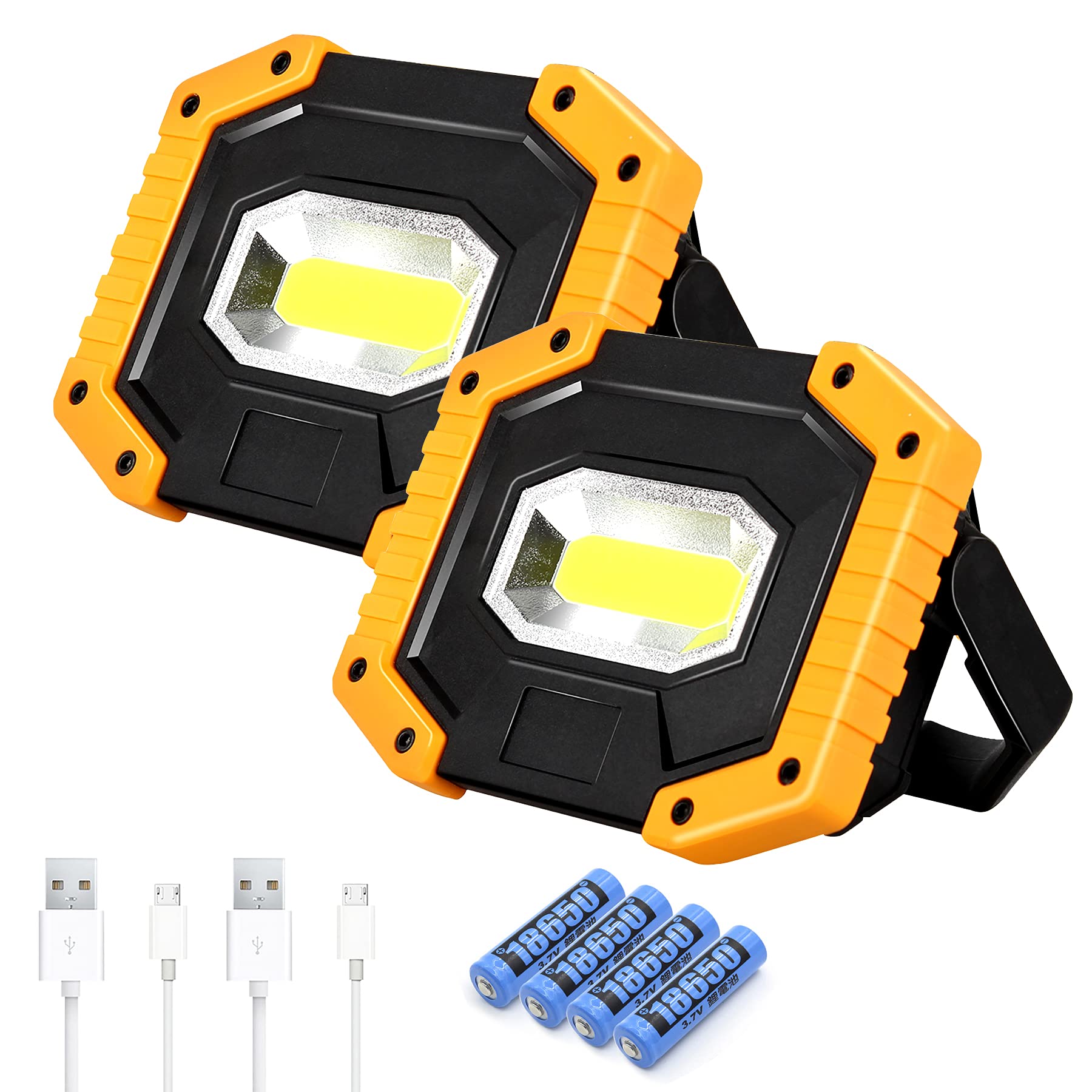
Image: T-SUN 30W 2000LM Rechargeable LED Work Light with its adjustable stand.
Kandungan Pakej
- 2 x T-SUN Rechargeable LED Work Lights
- 2 x Kabel Pengecas USB
- 4 x 18650 Lithium-Ion Batteries (pre-installed)
Persediaan
1. Battery Installation and Preparation
Your T-SUN work light comes with pre-installed 18650 Lithium-Ion batteries. Before first use or charging, it is crucial to remove the white isolating strip from the battery compartment to allow electrical contact.
- Locate the battery compartment cover on the back of the work light.
- Buka penutup dengan berhati-hati.
- Remove the white isolating strip positioned between the battery and the contact point.
- Ensure the batteries are correctly seated according to polarity markings.
- Tutup penutup petak bateri dengan selamat.

Imej: Belakang view of the work light showing the battery compartment and USB ports. The red tab indicates the protective cover for the charging ports.
2. Charging the Work Light
The work light can be charged using the provided USB cable.
- Open the red protective cover on the back of the light to expose the Micro USB charging input port.
- Connect the smaller end of the USB charging cable to the Micro USB input port on the work light.
- Sambungkan hujung kabel USB yang lebih besar kepada penyesuai kuasa USB yang serasi (tidak disertakan) atau port USB komputer.
- Lampu penunjuk pengecasan akan menyala semasa mengecas dan bertukar warna atau mati apabila dicas sepenuhnya.
- Setelah pengecasan selesai, tanggalkan kabel dan tutup penutup pelindung dengan kemas untuk mengekalkan kalis air.
Note: The work light supports two types of batteries: 2 x rechargeable 18650 batteries (included) or 4 x AA batteries (not included). Ensure the correct battery type is used.
Arahan Operasi
1. Mod Hidup/Mati dan Lampu
The work light features three lighting modes: High, Low, and Flash. These modes are controlled by a single power button.
- Press the red power button once to turn on the light in tinggi mod.
- Tekan butang kuasa buat kali kedua untuk beralih ke rendah mod.
- Press the power button a third time to activate the kilat mode (emergency signal).
- Press the power button a fourth time to turn the light Mati.

Image: The T-SUN work light illustrating its three lighting modes: High, Low, and Flash.
2. Adjustable Handle and Positioning
The work light is equipped with a 180° adjustable folding stand, allowing for versatile positioning.
- The handle can be rotated to serve as a stand, allowing the light to be placed on flat surfaces at various angles.
- It can also be used to hang the light from hooks, branches, or other suitable fixtures.
- Reka bentuk yang padat menjadikannya mudah dibawa dan disimpan.

Image: The work light demonstrating its 180° rotatable stand for flexible positioning.
3. Fungsi Power Bank
The T-SUN work light can also function as a power bank to charge other devices.
- Open the red protective cover on the back of the light.
- Connect your device's USB charging cable to the USB output port on the work light.
- The work light will begin charging your device.
- Close the protective cover after use to maintain water resistance.

Image: The work light's portable charging ports, illustrating its capability to charge various devices.
4. Senario Penggunaan
The T-SUN work light is suitable for a wide range of applications:
- Kecemasan: Sesuai untuk kuasa outages, hurricane weather, or roadside emergencies.
- Aktiviti Luar: Sesuai untuk camping, fishing, hiking, and other outdoor adventures.
- kerja: Provides bright illumination for workshops, garages, construction sites, and repair tasks.

Image: Work light illuminating a car engine for repairs.

Image: Work light providing illumination for night fishing.

Image: Work light illuminating the interior of a tent during camping.
Penyelenggaraan
1. Pembersihan
To ensure optimal performance and longevity, keep your work light clean.
- Lap bahagian luar lampu dengan kain lembut,amp kain.
- Do not use abrasive cleaners or solvents, as these may damage the finish or internal components.
- Ensure the USB port cover is closed when cleaning to prevent water ingress.
2. Penjagaan Bateri
Proper battery care extends the life of your work light.
- Recharge the batteries regularly, even if the light is not in frequent use, to maintain battery health.
- Avoid fully discharging the batteries before recharging.
- If storing the light for an extended period, charge it to approximately 50% and recharge every 3-6 months.
- If using AA batteries, ensure they are of good quality and replace them as a set.
Menyelesaikan masalah
- Lampu tidak menyala:
- Ensure the white isolating strip has been removed from the battery compartment.
- Periksa sama ada bateri dipasang dan dicas dengan betul.
- If using AA batteries, ensure they are fresh and correctly oriented.
- Cahaya malap atau berkelip-kelip:
- The battery charge may be low. Recharge the unit.
- Pastikan sesentuh bateri bersih dan bebas daripada serpihan.
- Device not charging from power bank function:
- Ensure the work light has sufficient battery charge.
- Verify that the USB cable is securely connected to both the work light and your device.
- Check if your device is compatible with USB charging.
- Water ingress despite IP65 rating:
- Ensure the red protective cover for the USB ports is securely closed.
- The IP65 rating protects against water jets, but not prolonged submersion. Avoid submerging the device.
Spesifikasi
| Ciri | Spesifikasi |
|---|---|
| Jenama | T-SUN |
| Model | 30W |
| Jenis Sumber Cahaya | LED COB |
| Kecerahan | 2000 Lumen |
| Mod Cahaya | High / Low / Flash |
| Sumber Kuasa | Battery Powered (2 x 18650 Lithium-Ion or 4 x AA) |
| Voltage | 5 Volt (DC) |
| Wattage | 30 Watt |
| Penilaian Kalis Air | IP65 |
| bahan | High-quality Plastic Shell |
| Dimensi Produk | 5.31"L x 3.74"W x 1.45"H |
| Ciri Khas | Impact Resistant, Portable, Rechargeable, Power Bank Function |

Image: Detailed dimensions of the T-SUN Rechargeable LED Work Light.

Image: Illustration of the work light's IP65 waterproof rating, indicating resistance to heat, rain, wind, and snow.
Maklumat Keselamatan
- Do not look directly into the LED light when it is on, as it can cause eye damage.
- Jauhkan daripada kanak-kanak.
- Jangan buka atau ubah suai produk.
- Use only specified batteries and charging cables.
- Elakkan mendedahkan produk kepada suhu yang melampau atau cahaya matahari langsung untuk tempoh yang lama.
- Ensure the USB port cover is sealed when not in use to maintain water resistance.
Produk Selesaiview Video
Video: Seorang pegawai tamatview of the T-SUN 30W LED Rechargeable Work Lights, demonstrating its features and functionality.