Boncare GF-MT501 10-Second Digital Thermometer User Manual
Model: GF-MT501 | Brand: Boncare
1. Pengenalan
This manual provides instructions for the safe and effective use of your Boncare GF-MT501 10-Second Digital Thermometer. This device is designed for accurate temperature measurement for individuals of all ages, including infants, children, and adults, and can be used orally, rectally, or axillary (underarm).
Please read this manual thoroughly before using the thermometer and retain it for future reference.
2. Maklumat Keselamatan Penting
Do not boil the thermometer. Clean the probe with medical alcohol or soap and water.
Jangan jatuhkan termometer atau terkena renjatan yang teruk.
Do not store the unit in direct sunlight, at high temperatures, or in high humidity or dust.
Jauhkan termometer daripada kanak-kanak.
Jangan gigit termometer.
If the unit is stored at temperatures below freezing, allow it to warm naturally to room temperature before use.
Consult a physician if you experience a fever, especially in children.
The thermometer tip is waterproof; however, do not immerse the entire device in water.
3. Komponen Produk
The Boncare Digital Thermometer consists of the following parts:
Prob Pengesan Suhu: The flexible tip containing the sensor.
Paparan LCD: Shows temperature readings and indicators.
Butang HIDUP/MATI: Activates and deactivates the device.
Penutup Bateri: Located at the end, for battery access.
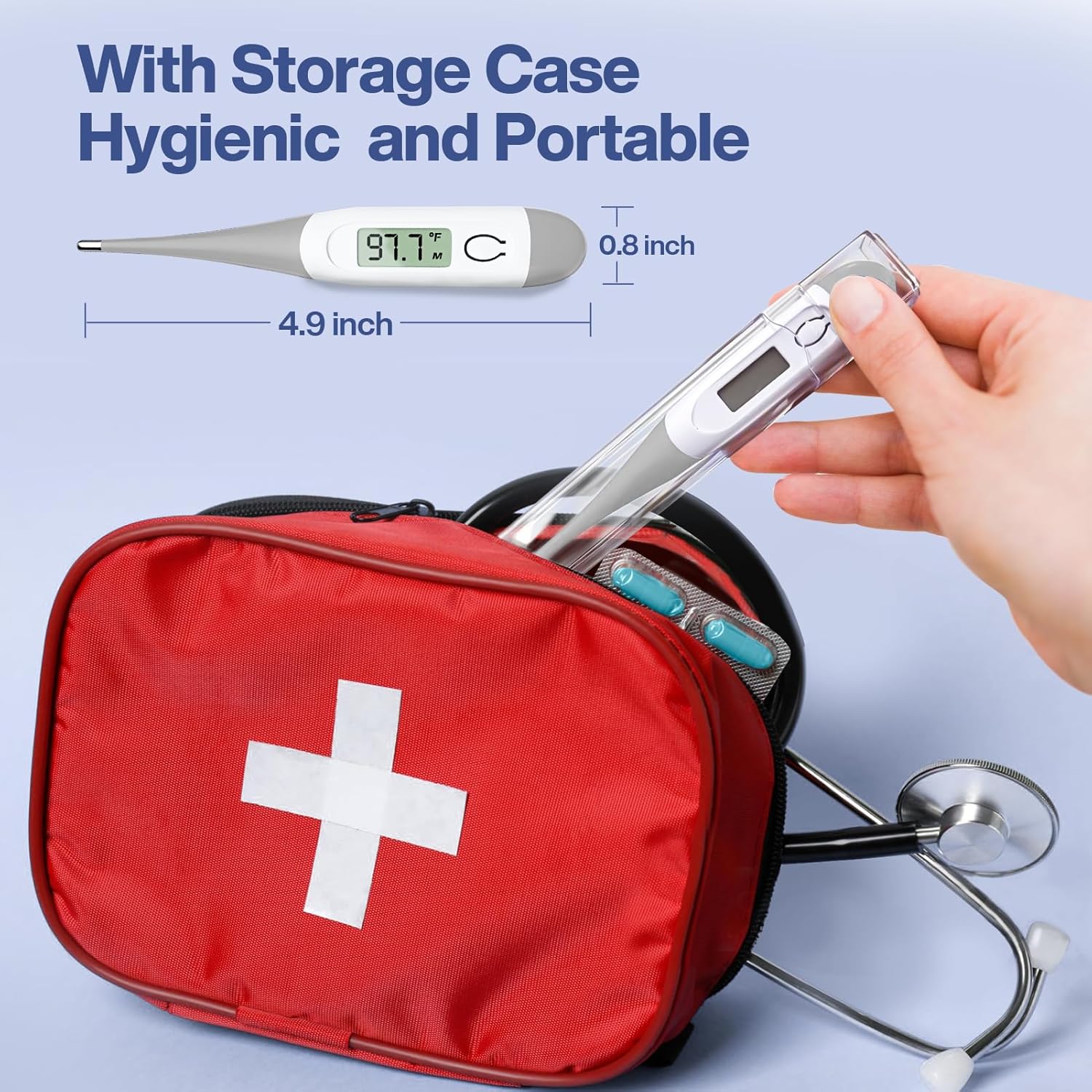
Sarung Penyimpanan: For hygienic storage and portability.
Figure 1: Boncare Digital Thermometer with labeled components including ON/OFF button, battery cap, LCD display, and temperature sensing probe.
Penerangan: This image displays the Boncare Digital Thermometer with its key parts labeled. The flexible tip is the temperature sensing probe. The main body features an ON/OFF button and an LCD display. The opposite end has a battery cap. This visual aid helps users identify each component for proper handling and operation.
4. Persediaan
Penggunaan Awal: The thermometer comes with a pre-installed battery. Remove the protective plastic film from the display if present.
Hidupkan kuasa: Press the ON/OFF button. The display will show "188.8°F" briefly, followed by the last measured temperature, and then "Lo°F" (or "Lo°C"). The "Lo" indicates the thermometer is ready for measurement, not that the battery is low.
Select Temperature Unit (°F/°C): With the thermometer off, press and hold the ON/OFF button for approximately 3 seconds to switch between Fahrenheit (°F) and Celsius (°C). The selected unit will be displayed.
Figure 2: Illustration of switching between Fahrenheit and Celsius temperature units on the thermometer's display.
Penerangan: This image shows the thermometer displaying both Celsius and Fahrenheit, indicating the ability to switch between these units. This feature allows users to select their preferred temperature scale for readings.
5. Arahan Operasi
Ensure the thermometer is clean before each use. Press the ON/OFF button to turn on the device. When "Lo°F" (or "Lo°C") appears, the thermometer is ready for use.
5.1 Oral Measurement
Place the probe tip under the tongue as close as possible to the heat pocket.
Keep the mouth closed during measurement.
The measurement is complete when the thermometer beeps (approximately 10 seconds).
Baca suhu yang dipaparkan pada skrin LCD.
Figure 3: A person demonstrating oral temperature measurement using the Boncare Digital Thermometer.
Penerangan: This image shows an individual taking their temperature orally with the thermometer placed under the tongue. This illustrates the correct positioning for oral temperature readings.
5.2 Rectal Measurement (Recommended for Infants and Young Children)
Apply a water-soluble lubricant to the probe tip.
Gently insert the probe tip no more than 1/2 inch (1.3 cm) into the rectum.
The measurement is complete when the thermometer beeps (approximately 10 seconds).
Baca suhu yang dipaparkan pada skrin LCD.
Figure 4: An adult performing a rectal temperature measurement on a baby using the Boncare Digital Thermometer.
Penerangan: This image depicts a caregiver taking a baby's temperature rectally with the Boncare Digital Thermometer. This demonstrates the appropriate method for rectal temperature measurement in infants.
5.3 Axillary (Underarm) Measurement
Letakkan hujung probe di tengah ketiak.
Hold the arm firmly against the body to ensure the probe is in contact with the skin.
The measurement is complete when the thermometer beeps (this method may take longer than oral or rectal, typically 1-2 minutes).
Baca suhu yang dipaparkan pada skrin LCD.
Figure 5: A child having their temperature taken axillary (underarm) with the Boncare Digital Thermometer.
Penerangan: This image shows a child using the thermometer for an underarm temperature reading, with the device held securely in the armpit. This illustrates the correct technique for axillary temperature measurement.
6. Ciri-ciri Utama
Bacaan Cepat: Menyediakan bacaan suhu dalam kira-kira 10 saat.
Penggera Demam: An audible beep will sound when the measurement is complete, and a rapid series of beeps will indicate a fever (temperature above 100°F / 37.8°C).
Fungsi Memori: Automatically displays the last measured temperature when powered on.
Waterproof Tip: The probe tip is waterproof for easy and hygienic cleaning.
Matikan Auto: The thermometer will automatically turn off after approximately 10 minutes of inactivity to conserve battery life.
Petua Fleksibel: The soft silicone tip ensures comfort and safety during use.
Figure 6: Visual representation of the thermometer displaying a high temperature with a fever alarm icon.
Penerangan: This image highlights the fever alarm feature, showing the thermometer display with a high temperature reading and an alarm symbol, indicating a fever detection.
7. Penyelenggaraan dan Pembersihan
7.1 Pembersihan
After each use, clean the thermometer probe with a soft cloth and 70% isopropyl alcohol or soap and water.
The tip is waterproof, allowing for thorough cleaning. Do not immerse the entire thermometer in water.
Allow the thermometer to air dry or wipe it with a clean, dry cloth.
Figure 7: An illustration showing the waterproof tip of the thermometer being cleaned under running water.
Penerangan: This image visually confirms the waterproof nature of the thermometer's tip, showing it being rinsed under water, emphasizing ease of cleaning.
7.2 Penyimpanan
Store the thermometer in its protective storage case when not in use.
Simpan di tempat yang sejuk dan kering, jauh dari cahaya matahari langsung dan suhu yang melampau.
Figure 8: The Boncare Digital Thermometer shown with its clear plastic storage case, highlighting its portability and protection.
Penerangan: This image displays the thermometer neatly stored within its clear plastic case, demonstrating its compact and protected design for storage and travel.
7.3 Penggantian Bateri
When the battery symbol appears on the lower right corner of the LCD display, the battery needs to be replaced.
Remove the battery cap and replace the old battery with a new 1.5V button cell battery (LR41 or SR41).
Pastikan bateri dimasukkan dengan polariti yang betul.
Figure 9: The thermometer's display showing a low battery indicator, prompting replacement.
Penerangan: This image shows the thermometer's LCD screen with a battery icon in the corner, indicating that the battery level is low and requires replacement.
8. Penyelesaian masalah
Masalah
Kemungkinan Punca
Penyelesaian
"Lo" displayed after power on.
This is normal, indicating the thermometer is ready to measure.
Proceed with temperature measurement.
"Err" displayed.
Measurement error or malfunction.
Ensure proper placement of the probe. If error persists, contact customer support.
Tiada paparan atau paparan malap.
Bateri lemah atau mati.
Gantikan bateri (rujuk Bahagian 7.3).
Bacaan yang tidak tepat.
Improper placement, movement during measurement, or recent consumption of hot/cold liquids (oral).
Ensure correct measurement technique and wait 15-30 minutes after eating/drinking before oral measurement.
Masa Pengukuran: Approximately 10 seconds (oral/rectal)
paparan: LCD
Bateri: 1.5V button cell (LR41 or SR41)
Hayat Bateri: Kira-kira 200 jam operasi berterusan
Matikan Auto: Lebih kurang 10 minit
Dimensi: 4.93 x 0.76 x 0.49 inci
Berat: 0.37 auns
Bahan: Silicone (probe tip)
10. Waranti dan Sokongan
Boncare offers a Waranti Terhad 1 Tahun on this product. For warranty claims, technical support, or any questions regarding your Boncare Digital Thermometer, please contact Boncare Customer Service.
Refer to the product packaging or the official Boncare webtapak untuk maklumat hubungan yang paling terkini.