
1. Pengenalan
Terima kasih kerana membeliasing the YESIDO YSP03 Sports Bluetooth In-Ear Earphones. This manual provides essential information for the safe and efficient use of your new earphones. Please read it thoroughly before use and retain it for future reference.
2. Maklumat Keselamatan
- Do not expose the earphones to extreme temperatures, humidity, or corrosive environments.
- Avoid dropping, impacting, or bending the earphones.
- Do not disassemble or modify the earphones. This may void the warranty and cause damage.
- Jauhkan fon telinga daripada kanak-kanak dan haiwan peliharaan.
- Gunakan hanya kabel pengecasan yang disediakan atau setara yang diperakui.
- Dengar pada tahap kelantangan sederhana untuk mengelakkan kerosakan pendengaran.
- Do not use the earphones while driving or in situations where you need to be aware of your surroundings.
3. Kandungan Pakej
Sila semak pakej untuk item berikut:
- YESIDO YSP03 Sports Bluetooth In-Ear Earphones
- Kabel Pengecas USB
- Manual Pengguna
- Ear tips (various sizes, typically)
4. Produk Lebihview
The YESIDO YSP03 earphones feature an in-ear design with a control unit for easy operation. They support Bluetooth wireless connectivity and also offer direct music playback via an SD card.
Control Unit and Ports
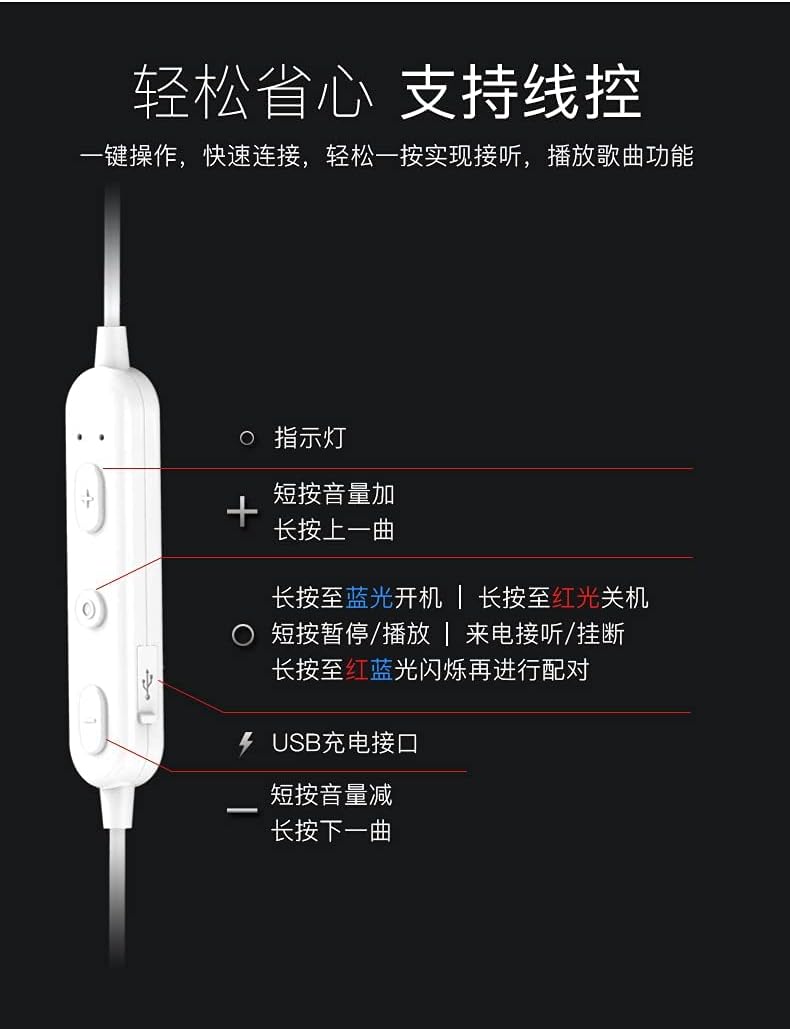
Imej: Terperinci view of the earphone control unit, showing the indicator light, volume/track buttons, multi-function button, and USB charging port.
- Lampu Penunjuk: Memaparkan status (kuasa, berpasangan, mengecas).
- Butang '+': Short press for Volume Up; Long press for Previous Track.
- Butang Pelbagai Fungsi (Tengah): Long press for Power On (blue light) / Power Off (red light); Short press for Play/Pause or Answer/Hang up calls; Long press until red and blue lights flash for Pairing Mode.
- '-' Butang: Short press for Volume Down; Long press for Next Track.
- Port Pengecasan USB: Untuk menyambungkan kabel pengecasan.
Slot Kad SD
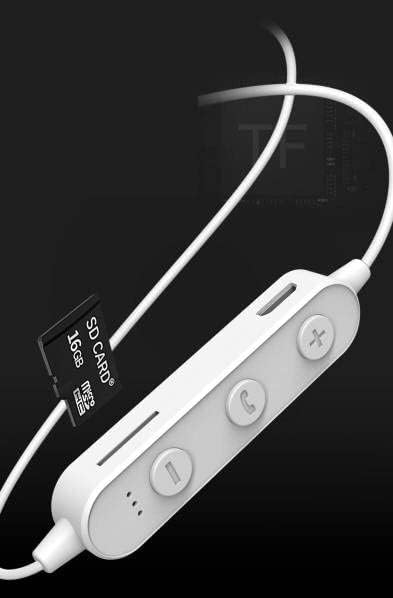
Imej: Close-up of the control unit showing the SD card slot, indicating direct music playback without a phone. A 64GB card can store approximately 15,000 songs.
The earphones feature an integrated SD card slot, allowing you to play music directly from a memory card without needing a connected device. This is ideal for sports or activities where carrying a phone is inconvenient.
5. Persediaan
5.1 Mengecas Fon Telinga
- Connect the USB charging cable to the USB charging port on the earphone control unit.
- Sambungkan hujung kabel USB yang satu lagi ke penyesuai kuasa USB (tidak disertakan) atau port USB komputer.
- The indicator light will typically show a red light during charging and turn off or change color when fully charged.
- Biarkan kira-kira 1-2 jam untuk cas penuh.
5.2 Berpasangan Bluetooth
- Pastikan fon telinga dimatikan.
- Press and hold the Multi-function Button (center button) for approximately 5-7 seconds until the indicator light flashes red and blue alternately. This indicates pairing mode.
- On your mobile phone or Bluetooth-enabled device, go to the Bluetooth settings and turn on Bluetooth.
- Cari untuk available devices. You should see "YESIDO YSP03" or a similar name in the list.
- Select "YESIDO YSP03" to connect. Once successfully paired, the indicator light will typically flash blue slowly or turn off.
- Jika digesa untuk kata laluan, masukkan "0000".
5.3 Memasukkan Kad SD
- Locate the SD card slot on the control unit.
- Gently insert a formatted Micro SD card (TF card) with the metal contacts facing down until it clicks into place.
- The earphones will automatically detect the card and switch to SD card playback mode if no Bluetooth device is connected or if Bluetooth is disconnected.
6. Arahan Operasi
6.1 Hidupkan/Mati Kuasa
- Hidupkan kuasa: Press and hold the Multi-function Button until the blue indicator light appears.
- Matikan: Press and hold the Multi-function Button until the red indicator light appears.
6.2 Main Semula Muzik (Mod Bluetooth)
- Main/Jeda: Tekan sebentar Butang Pelbagai fungsi.
- Kelantangan: Short press the '+' Button.
- Perlahankan suara: Short press the '-' Button.
- Lagu Seterusnya: Long press the '-' Button.
- Trek Sebelumnya: Long press the '+' Button.
6.3 Pengurusan Panggilan
- Jawab/Tamatkan Panggilan: Short press the Multi-function Button when an incoming call is received.
- Tolak Panggilan: Long press the Multi-function Button when an incoming call is received.
- Dail Semula Nombor Terakhir: Tekan dua kali Butang Pelbagai fungsi.
6.4 Main Semula Kad SD
- Once an SD card is inserted and detected, the earphones will automatically begin playing music from the card.
- The same controls for Play/Pause, Volume, Next/Previous Track apply as in Bluetooth mode.
7. Penyelenggaraan
- Pembersihan: Gunakan kain lembut dan kering untuk membersihkan fon telinga. Jangan gunakan bahan kimia yang keras atau bahan yang melelas.
- Storan: Simpan fon telinga di tempat yang sejuk dan kering jauh dari cahaya matahari langsung dan suhu yang melampau.
- Penjagaan Bateri: To prolong battery life, charge the earphones regularly, even if not in frequent use. Avoid fully discharging the battery for extended periods.
8. Penyelesaian masalah
| Masalah | Penyelesaian |
|---|---|
| Earphones won't power on. | Ensure the earphones are fully charged. Press and hold the Multi-function Button for a longer duration. |
| Tidak boleh berpasangan dengan peranti. | Ensure earphones are in pairing mode (red and blue flashing light). Turn off and on Bluetooth on your device. Move closer to the earphones. Forget the device in your phone's Bluetooth settings and try pairing again. |
| Tiada bunyi. | Check volume levels on both earphones and your connected device. Ensure earphones are properly connected via Bluetooth or that the SD card is inserted correctly and contains playable files. |
| Kad SD tidak dimainkan. | Ensure the SD card is inserted correctly and contains compatible audio files (e.g., MP3). Try re-inserting the card. Ensure no Bluetooth device is actively connected, as SD card playback might be prioritized when Bluetooth is disconnected. |
| Kualiti bunyi yang buruk. | Ensure there are no obstructions between the earphones and your device. Move closer to your device. Try a different audio source or file. |
9. Spesifikasi
| Ciri | Perincian |
|---|---|
| Jenama | YESIDO |
| Nombor Model | YSP03 |
| warna | putih |
| Penempatan Telinga | Dalam Telinga |
| Teknologi Ketersambungan | Wayarles (Bluetooth) |
| Kawalan Bunyi | tiada |
| Peranti Serasi | Telefon Bimbit |
| Kegunaan Khusus Untuk Produk | sukan |
| Ciri Kabel | Cable-free |
| Tahap Ketahanan Air | Bukan Tahan Air |
| Jenis Kawalan | Kawalan Suara |
| Kaedah Kawalan | App (Voice Control implies app integration for some functions) |
Prestasi Bateri

Imej: Visual representation of battery performance metrics for the YESIDO YSP03 earphones.
- Masa Main Balik Muzik: Lebih kurang 9 jam
- Headphone Standby Time: Lebih kurang 120 jam
- Tempoh Panggilan: Lebih kurang 7.5 jam
*Note: These data are obtained from YESIDO laboratory tests, and slight deviations may occur due to changes in objective environment and usage patterns.
10. Waranti dan Sokongan
10.1 Maklumat Waranti
This product is provided without an explicit warranty. Please refer to your retailer's return policy for any issues within the applicable return period.
10.2 Sokongan Pelanggan
For further assistance or inquiries, please contact the retailer where you purchased the product. You may also visit the official YESIDO website for general product information and potential support resources.