
PowerPac PPFS212B 2-in-1 Dual-Usage Stand Fan Instruction Manual
Model: PPFS212B
1. Maklumat Keselamatan Penting
Sila baca semua arahan dengan teliti sebelum menggunakan perkakas ini dan simpannya untuk rujukan masa hadapan. Kegagalan mematuhi arahan ini boleh mengakibatkan renjatan elektrik, kebakaran atau kecederaan serius.
- Pastikan voltage yang ditunjukkan pada label penarafan sepadan dengan vol bekalan utama andatage.
- Jangan rendam kipas, palam atau kord di dalam air atau cecair lain.
- Unplug the fan from the power outlet before cleaning, assembling, or disassembling parts.
- Keep fingers, pencils, or any other objects out of the fan grille when it is running.
- Do not operate the fan with a damaged cord or plug. Contact qualified service personnel for repair.
- This appliance is equipped with thermal fuse protection against overheating. If the fan stops working unexpectedly, unplug it and allow it to cool before attempting to restart.
- Perkakas ini tidak dimaksudkan untuk digunakan oleh orang (termasuk kanak-kanak) yang kurang keupayaan fizikal, deria, atau mental, atau kurang pengalaman dan pengetahuan, melainkan mereka telah diberi pengawasan atau arahan mengenai penggunaan perkakas oleh orang yang bertanggungjawab untuk keselamatan mereka .
2. Produk Lebihview
The PowerPac PPFS212B is a versatile 2-in-1 dual-usage stand fan designed for efficient cooling in indoor environments. It features 7 blades for maximum airflow, 3-speed settings, and an oscillation function for wider air distribution. The fan is equipped with thermal fuse protection for enhanced safety.
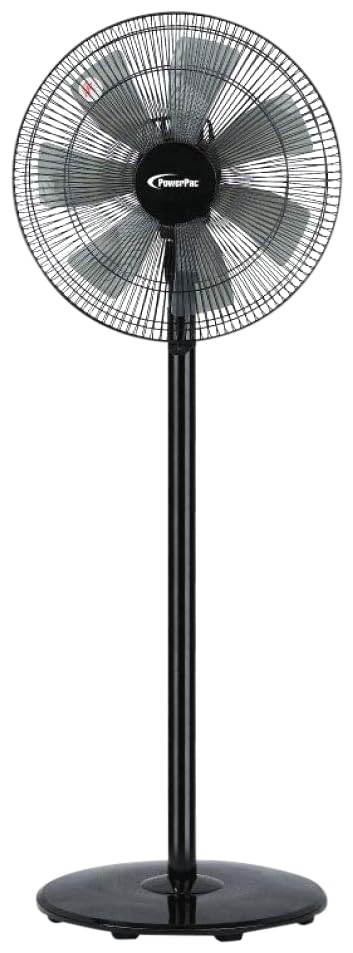
Image: PowerPac PPFS212B 2-in-1 Dual-Usage Stand Fan, showcasing its black finish and stand configuration.
3. Kandungan Pakej
Please check the package contents upon opening to ensure all parts are present and undamaged:
- 1 x PowerPac PPFS212B Stand Fan (includes fan head, stand pole, and base)
4. Arahan Perhimpunan
Follow these steps to assemble your PowerPac PPFS212B fan:
- Buka pembungkusan semua komponen dari pembungkusan dengan berhati-hati.
- Attach the stand pole to the fan base. Ensure it is securely fastened according to the markings or locking mechanism.
- Mount the fan head assembly onto the top of the stand pole. Align the connection points and secure it firmly.
- Ensure all screws and fasteners are tightened to prevent wobbling during operation.
- Place the assembled fan on a stable, flat surface.
Image: Illustrative diagram of the PowerPac PPFS212B fan assembly, showing the base, stand, and fan head components.
5. Arahan Operasi
To operate your PowerPac PPFS212B fan:
- Palamkan kord kuasa ke salur keluar elektrik yang sesuai.
- Hidupkan/Mati Kuasa: Press the 'ON/OFF' button (or corresponding button) on the control panel to turn the fan on or off.
- Pelarasan Kelajuan: Press the 'SPEED' button repeatedly to cycle through the 3 available speed settings (Low, Medium, High).
- Fungsi ayunan: Press the 'OSC' button (or corresponding button) to activate or deactivate the oscillation feature, which allows the fan head to sweep from side to side.
- When finished, press the 'ON/OFF' button to turn off the fan and unplug it from the power outlet.
6. Penyelenggaraan dan Pembersihan
Regular cleaning and maintenance will help ensure optimal performance and longevity of your fan:
- Sentiasa cabut plag kipas daripada bekalan kuasa sebelum membersihkan.
- Gunakan yang lembut, damp cloth to wipe the exterior surfaces of the fan. Do not use abrasive cleaners, solvents, or harsh chemicals.
- To clean the fan blades, carefully remove the front grille (if detachable) according to the product design. Wipe the blades with a soft cloth. Ensure all parts are dry before reassembling.
- Jangan biarkan air menitis ke dalam perumahan motor.
- Simpan kipas di tempat yang sejuk dan kering apabila tidak digunakan untuk tempoh yang lama.
7. Penyelesaian masalah
If you encounter issues with your fan, refer to the following table for common problems and solutions:
| Masalah | Kemungkinan Punca | Penyelesaian |
|---|---|---|
| Kipas tidak dihidupkan. | Tiada bekalan kuasa. Thermal fuse activated. | Periksa sama ada palam dimasukkan dengan selamat ke dalam alur keluar. Pastikan salur keluar kuasa berfungsi. Unplug and allow the fan to cool down for 30 minutes before restarting. |
| Aliran udara lemah atau tiada. | Kelajuan kipas ditetapkan terlalu rendah. Bilah kipas kotor. | Tingkatkan tetapan kelajuan kipas. Unplug the fan and clean the blades as per maintenance instructions. |
| Kipas tidak berayun. | Fungsi ayunan dimatikan. | Press the 'OSC' button to activate oscillation. |
| Bunyi luar biasa semasa operasi. | Bahagian longgar. Halangan. | Unplug the fan and check for any loose components or obstructions around the blades or motor. Tighten any loose parts. |
Jika masalah berterusan selepas mencuba penyelesaian ini, sila hubungi sokongan pelanggan.
8. Spesifikasi
| Ciri | Spesifikasi |
|---|---|
| Jenama | PowerPac |
| Nombor Model | PPFS212B |
| taip | 2-in-1 Dual-Usage Stand Fan |
| Bilangan Bilah | 7 |
| Bilangan Kelajuan | 3 |
| Sumber Kuasa | Elektrik Bertali |
| Wattage | 50 watt |
| Kaedah Kawalan | Butang Tekan |
| Ciri Khas | Oscillating, Thermal Fuse Protection |
| bahan | plastik |
| Penggunaan Dalaman/Luar | Dalaman |
| warna | Hitam |
9. Waranti dan Sokongan
This PowerPac PPFS212B fan comes with a Waranti 2 tahun dari tarikh pembelian. Waranti ini meliputi kecacatan pembuatan di bawah keadaan penggunaan biasa.
For warranty claims, technical support, or any inquiries regarding your product, please contact PowerPac customer service. Keep your proof of purchase for warranty validation.