
1. Produk Lebihview
The Cello C2220FSDE is a compact 22-inch Full HD LED television designed for versatile use. It features an integrated DVD player and a triple tuner (DVBT2/S2) for comprehensive signal reception. Its sleek design makes it suitable for various environments, including guest rooms, motorhomes, caravans, trucks, or boats.
Key features include HDMI and USB inputs for connecting external devices like game consoles and hard drives. The USB functionality also supports recording live television and playing stored media. This TV can also function as a monitor for laptops or desktop computers.

Imej 1.1: The integrated DVD player allows for direct playback of DVDs without additional devices.

Imej 1.2: Experience clear and detailed images with Full HD 1080p resolution.
2. Persediaan dan Pemasangan
2.1 Pembukaan Kotak dan Kandungan
Keluarkan semua komponen dari pembungkusan dengan berhati-hati. Pastikan item berikut ada:
- 1 x Cello 22-inch LED TV
- Kord Kuasa
- Alat Kawalan Jauh
- Panduan Mula Pantas
- 2 x Bateri AAA
- Pendirian TV
2.2 Memasang Stand
Place the TV screen face down on a soft, clean surface to prevent scratches. Align the stand with the mounting holes on the bottom of the TV and secure it using the provided screws.
2.3 Connecting Power and Antenna
- Sambungkan kord kuasa ke input kuasa TV dan kemudian ke saluran keluar dinding.
- Connect your TV aerial cable to the 'TV Aerial' input on the back of the TV.
- For satellite reception, connect a satellite dish cable (not supplied) to the 'DVB-S2' input.

Imej 2.1: belakang view of the TV showing power, antenna, and other connectivity ports.
2.4 Sambungan Peranti Luaran
TV menawarkan pelbagai port untuk menyambungkan peranti luaran:
- HDMI: Connect high-definition devices such as Blu-ray players, game consoles, or set-top boxes.
- USB: Connect USB storage devices for media playback or recording.
- VGA: Sambungkan komputer untuk digunakan sebagai monitor.
- Audio Keluar 3.5mm: Sambungkan fon kepala atau pembesar suara luaran.

Imej 2.2: Illustration of HDMI and USB ports for connecting various devices.

Imej 2.3: The integrated satellite tuner allows connection to a satellite dish for satellite TV reception.
3. Arahan Operasi
3.1 Kuasa Awal Hidup dan Imbasan Saluran
- Masukkan bateri AAA ke dalam alat kawalan jauh.
- Tekan butang kuasa pada alat kawalan jauh atau pada TV untuk menghidupkannya.
- Follow the on-screen instructions for initial setup, including language selection and automatic channel scanning for DVB-T2 (terrestrial) and DVB-S2 (satellite) signals.
3.2 Fungsi Asas TV
- Pemilihan Saluran: Use the 'CH+' / 'CH-' buttons or the numeric keypad on the remote control.
- Kawalan Kelantangan: Use the 'VOL+' / 'VOL-' buttons.
- Pemilihan Sumber: Press the 'SOURCE' button to switch between inputs (TV, HDMI, USB, DVD).
- Navigasi Menu: Use the 'MENU' button to access settings and navigation arrows to browse.
3.3 Integrated DVD Player Operation
- Ensure the TV is powered on and the input source is set to 'DVD'.
- Gently insert a DVD disc into the slot on the side of the TV, label side facing the mirror side (as indicated on the slot).
- The DVD should load automatically. Use the remote control for playback functions (Play, Pause, Stop, Skip).
3.4 USB Recording and Media Playback
- Main balik Media: Insert a USB storage device into the USB port. Select 'USB' as the input source. Navigate through your files (photos, music, videos) using the remote control.
- USB Recording (PVR): While watching live TV, insert a USB storage device. Press the 'RECORD' button on the remote to start recording. You can also use the 'PAUSE' function for time-shifting live TV.
Video 3.1: This video demonstrates the physical controls on the TV and the various input/output ports available on the back and side of the unit, including the DVD slot, USB, HDMI, and antenna connections.
4. Penyelenggaraan
4.1 Membersihkan TV
- Sentiasa cabut plag TV dari salur keluar kuasa sebelum membersihkan.
- Gunakan kain lembut dan kering untuk mengelap skrin dan kabinet. Untuk tanda degil, ringankan dampen kain dengan air atau pembersih skrin yang lembut dan tidak melelas.
- Do not use alcohol, benzene, thinners, or other volatile substances, as they may damage the screen or finish.
4.2 Penjagaan Pemain DVD
- Keep the DVD slot free from dust and debris.
- Only insert clean, undamaged discs.
5. Penyelesaian masalah
If you encounter issues with your Cello TV, refer to the following common problems and solutions:
| Masalah | Kemungkinan Punca | Penyelesaian |
|---|---|---|
| Tiada kuasa | Power cord not connected; power outlet faulty | Check power cord connection; try a different outlet |
| Tiada gambar, tetapi bunyi hadir | Incorrect input source selected; faulty cable connection | Press 'SOURCE' to select correct input; check HDMI/VGA cable connections |
| Tiada bunyi, tetapi ada gambar | Volume too low or muted; external audio device issue | Increase volume; check mute status; ensure external audio devices are connected correctly |
| Poor picture quality (TV channels) | Weak antenna signal; incorrect antenna connection | Adjust antenna position; check antenna cable connection; perform a channel rescan |
| DVD tidak dimainkan | Disc inserted incorrectly; dirty or damaged disc; incorrect source selected | Re-insert disc correctly; clean or replace disc; select 'DVD' source |
| Alat kawalan jauh tidak berfungsi | Batteries depleted or inserted incorrectly; obstruction between remote and TV | Replace batteries; ensure correct polarity; remove obstructions; point remote directly at TV sensor |
For further assistance, please refer to the support section or the full instruction manual available online.
6. Spesifikasi
Below are the detailed technical specifications for the Cello C2220FSDE 22-inch Full HD LED TV:
| Ciri | Spesifikasi |
|---|---|
| Saiz Skrin | 22 Inci (54.6 cm pepenjuru) |
| Jenama | Cello |
| Teknologi Paparan | LED |
| Resolusi | 1080p (HD Penuh, 1920 x 1080 piksel) |
| Kadar Segar Semula | 60 Hz |
| Ciri Khas | Integrated DVD Player |
| Teknologi Ketersambungan | HDMI, USB, VGA |
| Nisbah Aspek | 16:9 |
| Dimensi Produk (D x W x H) | 5P x 50.4W x 34.2H cm |
| Berat Barang | 2.55 Kilogram |
| Nisbah Kontras | 600:1 |
| Kecerahan Maksimum | 180 NIT Coating |
| Sokongan HDR | HDR10 |
| Masa Tindak Balas | 10 milisaat |
| Jenis Penala | DVB-C, DVB-S2, DVB-T2 |
| Mod Keluaran Audio | Stereo |
| Penerangan Penceramah | 2 x 3 W Pitch Perfect Sound |
| Penggunaan Kuasa | 21 kWj |
| Voltage | 230 Volts (100-240 V AC 50-60 Hz) |
| Pemasangan VESA Standard | 100 x 100 mm |
| Tahun Model | 2023 |
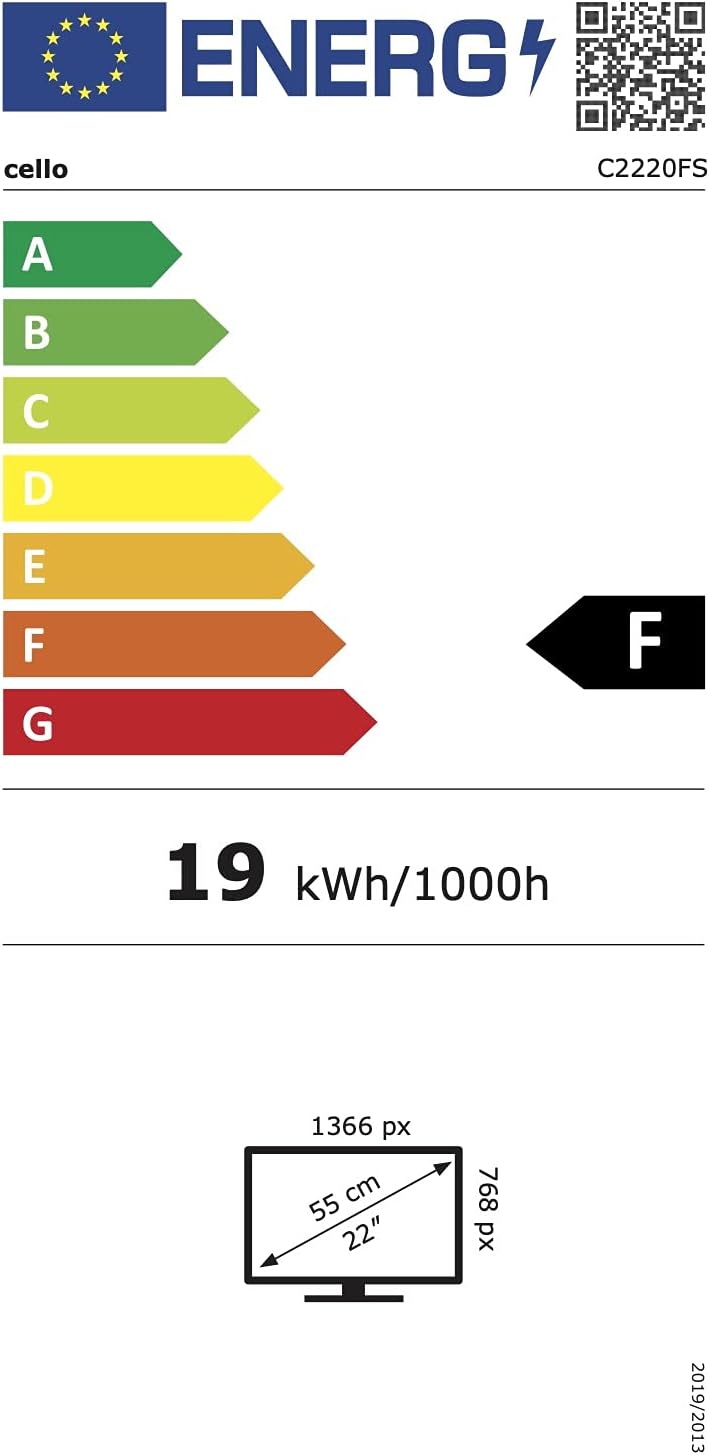
Imej 6.1: Energy efficiency label for the Cello C2220FSDE TV. For more details, visit Pangkalan Data EPREL.

Imej 6.2: Detailed product information sheet. For more details, visit Pangkalan Data EPREL.
7. Waranti dan Sokongan
7.1 Maklumat Waranti
This Cello TV comes with a Waranti terhad 1 tahun. Sila simpan bukti pembelian anda untuk tuntutan waranti.
7.2 Sokongan Pelanggan
For technical support or customer service, please contact Cello Electronics:
- Webtapak: www.celloelectronics.de
- e-mel: consumersupport@celloelectronics.com
- telefon: 03334330312
- Alamat: Dovecot Hills, Bishop Auckland, DL14 6XW Durham, United Kingdom
You can also download the full instruction manual for your device in your preferred language from the official Cello webtapak: https://celloelectronics.de/instruction-books/.