
pengenalan
Welcome to your new Lightbiz LED Closet Lights. This manual provides essential information for safe operation, installation, and maintenance of your Model X200 puck lights. Please read thoroughly before use.
Maklumat Keselamatan
- Baca semua arahan sebelum digunakan.
- Do not expose to water or excessive moisture. This product is for indoor use only.
- Jauhkan daripada kanak-kanak.
- Gunakan hanya kabel pengecas yang disediakan.
- Jangan cuba membuka atau mengubah suai produk.
Kandungan Pakej
- 6 x Lightbiz LED Puck Lights (Model X200)
- 1 x Alat Kawalan Jauh
- 3 x USB Charging Cables (Type-C)
- 6 x Adhesive Metal Sheets
- 1 x Manual Pengguna (dokumen ini)
Ciri-ciri Produk
- Penderia Gerakan: Automatic illumination upon detecting movement within 10ft, auto-off after 20 seconds of no motion.
- Boleh dimalapkan: 4 brightness levels (10%, 40%, 80%, 100%) and stepless dimming via remote control.
- USB boleh dicas semula: Built-in 1000mAh battery, fully charges in approximately 2 hours.
- Pemasangan Mudah: Built-in magnet for direct attachment to metal surfaces or use with adhesive metal sheets for non-metal surfaces.
- Fungsi Masa: Set auto-off timer for 10, 30, 60, or 120 minutes.
- Kawalan Jauh: Manage power, brightness, and timer settings conveniently.
Persediaan dan Pemasangan
- Pengecasan Awal: Before first use, fully charge all puck lights using the provided USB cables. A red indicator light signifies charging, and it will turn green when fully charged.
- Mounting - Method 1 (Magnetic Surface): Directly attach the puck light to any ironwork surface. The built-in magnet will secure it.
- Mounting - Method 2 (Non-Magnetic Surface):
- Clean the desired surface thoroughly to ensure optimal adhesion.
- Peel off the adhesive backing from a metal sheet.
- Stick the metal sheet firmly onto the cleaned surface.
- Attach the puck light magnetically to the installed metal sheet. This allows for easy removal for charging.

Imej: Belakang view of the puck light with its magnetic base and a separate adhesive metal plate for versatile mounting.

Image: Visual guide demonstrating direct magnetic attachment to a metal surface and using an adhesive metal sheet for non-metal surfaces.
Video: Demonstrates the easy installation process of the Lightbiz puck lights, including magnetic attachment and use of adhesive plates.
Arahan Operasi
Mod Kuasa
- Mod HIDUP: The light remains continuously on. Control brightness and timer with the remote.
- Mod MATI: Lampu dimatikan.
- AUTO Mode (Motion Sensor): The light automatically turns on when motion is detected within 10 feet in dark conditions and turns off after approximately 20 seconds of no motion.
Fungsi Kawalan Jauh
- HIDUP/MATI: Hidupkan atau matikan lampu.
- Pelarasan Kecerahan: Use '+' and '-' buttons for stepless dimming. Use preset buttons (10%, 40%, 80%, 100%) for quick brightness selection.
- Tetapan Pemasa: Set auto-off timer for 10, 30, 60, or 120 minutes.

Image: The remote control unit with buttons for power, brightness levels (10%, 40%, 80%, 100%), and timer functions (10, 30, 60, 120 minutes).
Image: Illustration of the motion sensor's 120-degree detection angle and 10-foot range.
Video: Demonstrates the remote control in action, showing dimming and timer functions for the puck lights.
Mengecas
The Lightbiz LED Puck Lights feature a built-in 1000mAh rechargeable battery, offering energy efficiency and long service life.
- Connect the provided USB charging cable to the light's charging port and a compatible USB power source (e.g., computer, USB charger, power bank).
- The indicator light will be red during charging and turn green when fully charged.
- Pengecasan penuh biasanya mengambil masa lebih kurang 2 jam.
- Penting: Avoid charging for more than 12 hours to prolong battery life. Do not use the light while it is charging.
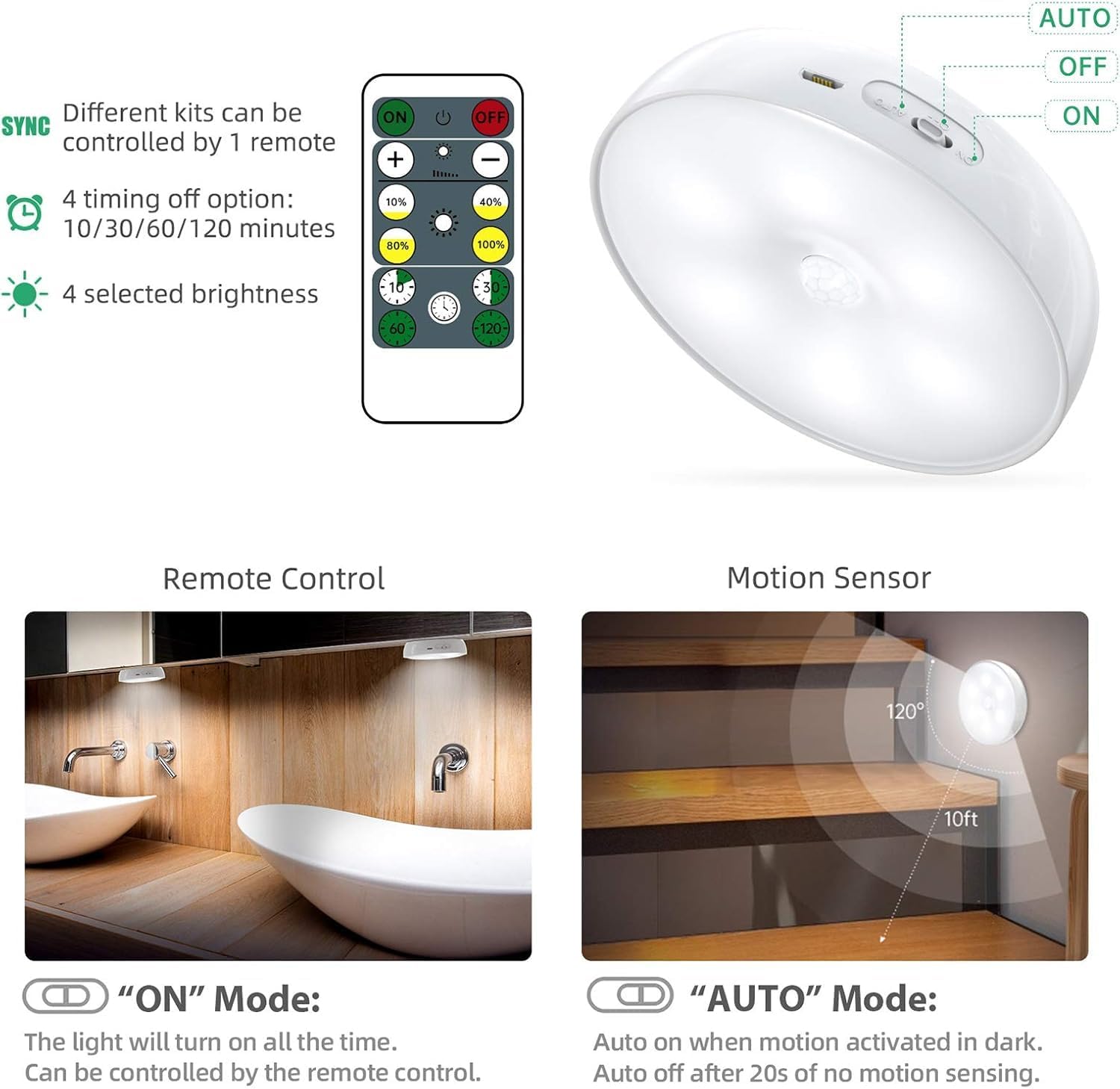
Image: A puck light connected via USB for charging, with a red light indicating the charging status.
Penyelenggaraan
- Clean the light surface with a soft, dry cloth. Do not use abrasive cleaners or solvents.
- Pastikan port pengecasan bebas daripada habuk dan serpihan.
- Simpan di tempat yang sejuk dan kering apabila tidak digunakan untuk tempoh yang lama.
Menyelesaikan masalah
| Masalah | Kemungkinan Punca | Penyelesaian |
|---|---|---|
| Cahaya tidak menyala. | Low battery. Incorrect mode selected. | Charge the light. Ensure the switch is in 'ON' or 'AUTO' position. |
| Sensor gerakan tidak berfungsi. | Insufficient darkness. Obstruction. | Ensure ambient light is low enough for AUTO mode. Check for obstructions blocking the sensor. |
| Alat kawalan jauh tidak bertindak balas. | Remote battery low. Obstruction. | Replace remote battery (CR2032). Ensure clear line of sight to the light. |
| Cahaya jatuh dari permukaan. | Improper adhesive application. | Clean surface thoroughly before applying adhesive. Use a new adhesive metal sheet if necessary. |
Spesifikasi
| Ciri | Perincian |
|---|---|
| Nama Model | X200 |
| Jenis Sumber Cahaya | LED |
| Kecerahan | 120 Lumen |
| Suhu Warna | 6500 Kelvin (Putih Sejuk) |
| Kapasiti Bateri | Polimer Lithium 1000mAh |
| Masa Mengecas | lebih kurang 2 jam |
| Julat Penderia Pergerakan | 10 feet / 120 degrees |
| Auto-off Delay (Motion Mode) | 20 saat |
| Dimensi | 3.34"D x 3.34"W x 0.87"H |
| bahan | Akrilonitril Butadiena Stirena, Logam |
| Jenis Pemasangan | Adhesive and Built-in magnet |
| Penggunaan Dalaman/Luar | Dalaman |
Waranti dan Sokongan
For warranty information or technical support, please refer to the product packaging or contact Lightbiz customer service directly. Contact details can typically be found on the product box or the official Lightbiz webtapak.