
1. Produk Lebihview
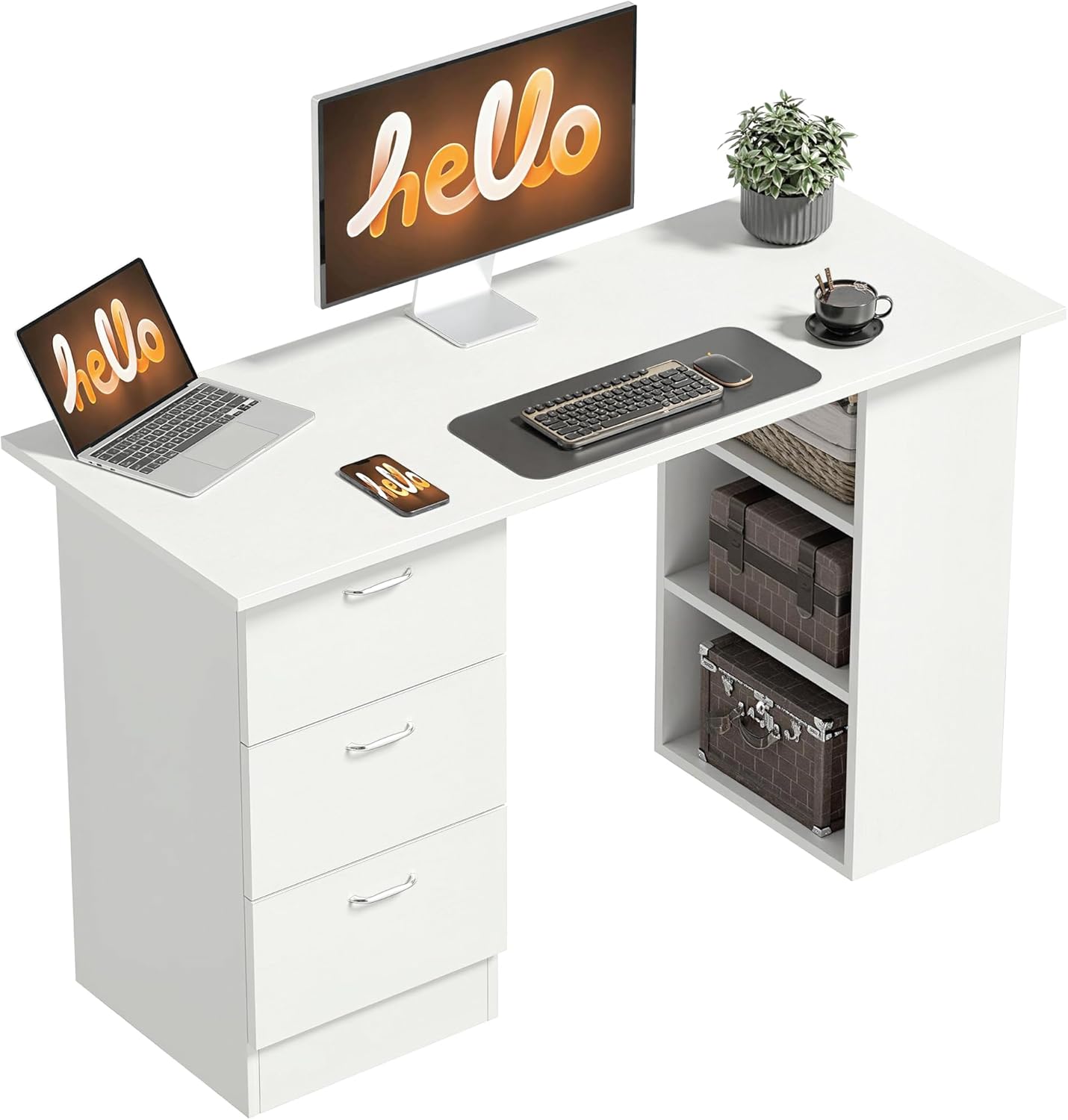
The HOMCOM Computer Desk (Model 836-068WT) is designed to provide a spacious and organized workspace. It features a large tabletop measuring 120L x 49W cm, offering ample room for monitors, keyboards, and other essentials. The desk includes three open shelves and three drawers, providing versatile storage for office supplies, documents, and personal items, thereby enhancing your work efficiency.
A key feature of this desk is its flexible design: the three shelves and three drawers can be installed on either the left or right side, allowing you to customize the setup to suit your dominant hand, available space, or preferred working habits. Constructed from durable MDF, the desk ensures robustness and stability for daily use.
2. Maklumat Keselamatan
To ensure safe use of your HOMCOM Computer Desk, please adhere to the following guidelines:
- Do not exceed the maximum recommended load capacity of 20 kg (44 lbs) on the tabletop.
- Ensure the desk is assembled and used on a stable, level, and safe working surface to prevent tipping.
- Jauhkan bahagian kecil dan perkakasan pemasangan daripada capaian kanak-kanak.
- Avoid placing hot items directly on the desk surface without protective padding.
- Jangan berdiri atau duduk di atas meja.
3. Kandungan Pakej
Before beginning assembly, please verify that all components are present and undamaged. The package typically includes:
- Meja meja
- Side panels and support panels
- 3 Drawer units
- 2 Shelf units
- All necessary assembly hardware (screws, dowels, drawer slides, handles)
- Manual arahan pemasangan
Jika mana-mana bahagian hilang atau rosak, sila hubungi khidmat pelanggan HOMCOM.

4. Arahan Perhimpunan
Assembly of the HOMCOM Computer Desk is required. It is recommended that one person performs the assembly. Please follow the detailed instructions provided in the included assembly manual. The general steps are outlined below:
- Sediakan Ruang Kerja: Kosongkan kawasan yang luas dan susun atur semua komponen dan perkakasan.
- Pasang Unit Laci: Follow the instructions to construct the three individual drawer units, including attaching the drawer slides and handles.
- Assemble Shelf Units: Construct the two open shelf units.
- Lampirkan Panel Sisi: Secure the main side panels to the tabletop.
- Integrate Storage Units: Decide whether to place the drawer unit and shelf unit on the left or right side of the desk. Attach these units to the main desk structure according to your preferred configuration.
- Pelarasan Akhir: Ensure all screws are tightened and the desk is stable.


5. Operating Your Desk
Your HOMCOM Computer Desk is designed for versatile use in various settings, including home offices, bedrooms, or study areas. Its features are straightforward to use:
- Meja yang luas: Utilize the 120 cm wide surface for your computer, books, and other work essentials.
- Laci: The three drawers glide smoothly on ball-bearing slides, providing enclosed storage for documents, stationery, and personal items.
- Rak Terbuka: The three open shelves offer easy access storage for books, decorative items, or small electronic devices.
- Reka Bentuk Boleh Balik: Remember that the drawer and shelf units can be positioned on either the left or right side of the desk during assembly, allowing for optimal ergonomic setup and space utilization.

6. Penjagaan dan Penyelenggaraan
To maintain the appearance and longevity of your HOMCOM Computer Desk, follow these simple care instructions:
- Pembersihan: Lap permukaan meja dengan lembut, damp kain. Elakkan menggunakan bahan kimia yang keras atau pembersih yang kasar, yang boleh merosakkan kemasan berlamina.
- Tumpahan: Clean up spills immediately to prevent staining or damage to the wood engineering material.
- Perlindungan: Gunakan alas gelas untuk minuman dan alas pelindung di bawah barang panas atau objek tajam untuk mengelakkan kesan dan calar.
- Pemeriksaan: Periksa semua skru dan pengikat secara berkala untuk memastikan ia kekal ketat. Ketatkan semula jika perlu untuk mengekalkan kestabilan.
7. Penyelesaian masalah
If you encounter any issues with your HOMCOM Computer Desk, consider the following common troubleshooting steps:
- Meja goyang: Ensure the desk is placed on a level surface. Check that all assembly screws are securely tightened. If the floor is uneven, use furniture pads or shims under the legs to stabilize.
- Laci Stick: Verify that the drawer slides are correctly installed and free from obstructions. Ensure the drawer contents are not overloaded. Lubricate slides with a silicone spray if necessary.
- Bahagian yang hilang: Refer to the package contents list. If parts are genuinely missing, contact customer support with your purchase details.
8. Spesifikasi Produk
| Ciri | Spesifikasi |
|---|---|
| Jenama | HOMCOM |
| Nombor Model | 836-068WT |
| warna | putih |
| Dimensi Keseluruhan (L x W x H) | 120 x 49 x 72 cm (47.2 x 19.3 x 28.3 inci) |
| bahan | Kayu Kejuruteraan (MDF) |
| Bilangan Laci | 3 |
| Bilangan Rak Terbuka | 3 |
| Ketinggian Rak | 21.5 cm (8.5 inci) |
| Maks. Muatan yang Disyorkan | 20 kg (44 lbs) |
| Perhimpunan Diperlukan | ya |
| Berat Barang | 25 kg (55 lbs) |
9. Waranti dan Sokongan
Waranti: This HOMCOM Computer Desk comes with a 2-year manufacturer's warranty, covering defects in materials and workmanship under normal use. Please retain your proof of purchase for warranty claims.
Sokongan Pelanggan: For any questions, assistance with assembly, or to report missing/damaged parts, please contact HOMCOM customer service. You can find more information and contact details on the official HOMCOM brand store: HOMCOM Brand Store.