
Yenkee YSP 2025
Yenkee YSP 2025 2.0 PC Speaker System User Manual
Model: YSP 2025
1. Pengenalan
Terima kasih kerana membeliasing the Yenkee YSP 2025 2.0 PC Speaker System. This manual provides detailed instructions for setting up, operating, and maintaining your new speakers. Please read this manual thoroughly before use to ensure proper operation and to maximize the lifespan of your product.
The Yenkee YSP 2025 speaker system is designed to enhance your multimedia audio experience with powerful and clear sound. It features versatile connectivity options including Bluetooth 5.0, 3.5mm audio input, TF card reader, and USB port for various audio sources.
2. Maklumat Keselamatan
Untuk memastikan operasi yang selamat dan mengelakkan kerosakan, sila patuhi langkah berjaga-jaga keselamatan berikut:
- Do not expose the speakers to water, moisture, or extreme temperatures.
- Do not place the speakers near heat sources such as radiators, heat registers, stoves, or other apparatus (including amppenghidup) yang menghasilkan haba.
- Gunakan hanya lampiran/aksesori yang ditentukan oleh pengilang.
- Cabut plag radas ini semasa ribut petir atau apabila tidak digunakan untuk jangka masa yang lama.
- Rujuk semua servis kepada kakitangan perkhidmatan yang berkelayakan. Servis diperlukan apabila radas telah rosak dalam apa jua cara, seperti kord bekalan kuasa atau palam rosak, cecair telah tertumpah atau objek jatuh ke dalam radas, radas telah terdedah kepada hujan atau lembapan, tidak beroperasi seperti biasa. , atau telah digugurkan.
- Jangan sekat sebarang bukaan pengudaraan. Pasang mengikut arahan pengilang.
- Lindungi kord kuasa daripada berjalan atau tersepit, terutamanya pada palam, bekas kemudahan dan tempat keluar dari radas.
3. Kandungan Pakej
Sila semak kandungan bungkusan semasa membuka bungkusan. Jika terdapat barang yang hilang atau rosak, hubungi peruncit anda.
- Yenkee YSP 2025 2.0 PC Speaker System (2 speakers)
- Alat Kawalan Jauh
- Kabel Audio 3.5mm
- Kabel Kuasa
- Manual Pengguna
4. Produk Lebihview
Familiarize yourself with the components and controls of your Yenkee YSP 2025 speaker system.

Rajah 4.1: Depan view of the Yenkee YSP 2025 speakers, showing the main speaker with control panel on the side and the secondary speaker.
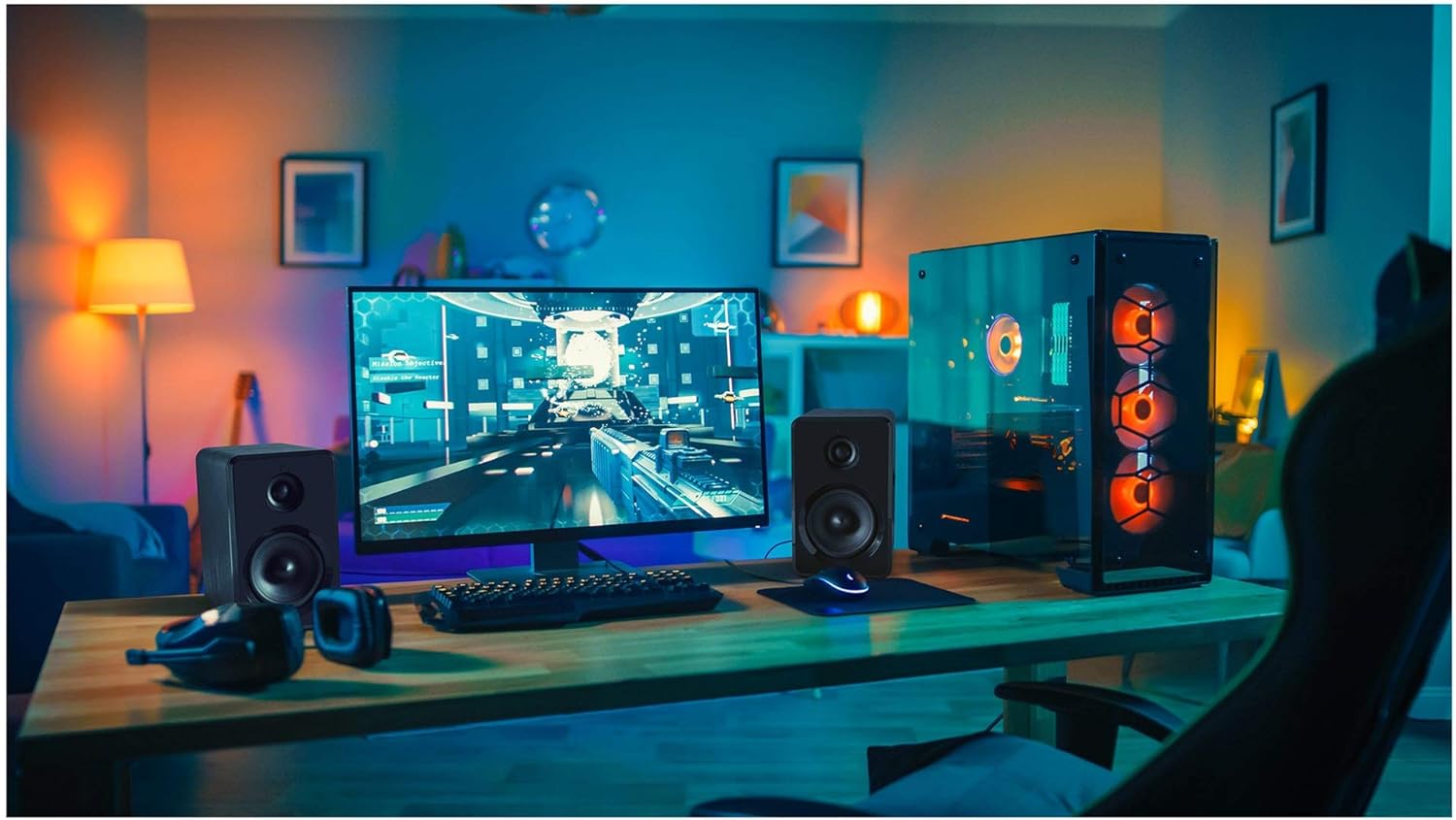
Rajah 4.2: Yenkee YSP 2025 speakers integrated into a typical desktop computer setup, demonstrating their compact size and placement beside a monitor.

Rajah 4.3: The retail packaging for the Yenkee YSP 2025 speakers, highlighting key features and including an image of the remote control.
4.1 Main Speaker Controls and Ports
The main speaker houses the primary controls and connectivity ports:
- Tombol Kelantangan: Melaraskan kelantangan keseluruhan.
- Butang Mod: Cycles through input modes (Bluetooth, AUX, USB, TF).
- Butang Main/Jeda: Controls playback in Bluetooth, USB, and TF modes.
- Butang Trek Sebelumnya/Seterusnya: Navigates tracks in Bluetooth, USB, and TF modes.
- Port USB: Untuk main balik pemacu kilat USB.
- Slot Kad TF: Untuk main balik kad TF (microSD).
- Input AUX (3.5mm): Untuk menyambungkan peranti audio luaran melalui kabel.
- Input Kuasa: Menyambung kepada penyesuai kuasa.
- Output pembesar suara: Menyambung kepada pembesar suara sekunder.
4.2 Alat Kawalan Jauh
Alat kawalan jauh yang disertakan menyediakan akses mudah kepada pelbagai fungsi:
- Hidupkan/Mati Kuasa
- Pemilihan Mod
- Kelantangan Naik/Turun
- bisu
- Main/Jeda
- Trek Sebelumnya / Seterusnya
- Pratetap EQ (jika ada)
5. Persediaan
5.1 Penempatan Pembesar Suara
For optimal sound quality, place the speakers on a stable, flat surface. Position them equidistant from your listening position, forming an equilateral triangle for the best stereo imaging. Ensure there is adequate ventilation around the speakers.
5.2 Menyambung Pembesar Suara
- Connect the cable from the secondary speaker to the "Speaker Output" port on the main speaker.
- Connect the power cable to the "Power Input" on the main speaker, then plug the other end into a standard wall outlet (100-240V).
5.3 Menyambungkan Sumber Audio
5.3.1 Sambungan AUX
Use the included 3.5mm audio cable to connect your device (e.g., computer, smartphone, MP3 player) to the "AUX Input" port on the main speaker.
5.3.2 USB/TF Card Connection
Insert a USB flash drive or TF (microSD) card into the respective port on the main speaker. The system will automatically switch to USB/TF mode and begin playing supported audio files.
6. Arahan Operasi
6.1 Hidupkan/Mati Kuasa
Press the Power button on the remote control or the main speaker to turn the speakers on or off.
6.2 Pemilihan Mod
Press the "MODE" button on the main speaker or the remote control to cycle through the available input modes: Bluetooth, AUX, USB, and TF.
6.3 Kawalan Kelantangan
Rotate the volume knob on the main speaker clockwise to increase volume and counter-clockwise to decrease. Alternatively, use the Volume Up/Down buttons on the remote control.
6.4 Berpasangan Bluetooth
- Switch the speaker system to Bluetooth mode. The indicator light will flash, indicating it's ready for pairing.
- On your Bluetooth-enabled device (e.g., smartphone, tablet, computer), enable Bluetooth and search for available devices.
- Select "Yenkee YSP 2025" from the list of devices.
- Once paired, the indicator light will stop flashing and remain solid. You can now play audio wirelessly from your device.
6.5 USB/TF Playback
When a USB flash drive or TF card is inserted, the speakers will automatically switch to the corresponding mode and begin playing audio files. Use the Play/Pause and Previous/Next Track buttons on the main speaker or remote control to manage playback.
7. Penyelenggaraan
Penyelenggaraan yang betul memastikan ketahanan dan prestasi pembesar suara anda:
- Pembersihan: Use a soft, dry cloth to clean the speaker surfaces. Do not use abrasive cleaners, waxes, or solvents.
- Storan: If storing the speakers for an extended period, unplug them from the power outlet and store them in a cool, dry place, away from direct sunlight and extreme temperatures.
- Pengudaraan: Pastikan bukaan pengudaraan tidak disekat untuk mengelakkan terlalu panas.
8. Penyelesaian masalah
If you encounter issues with your Yenkee YSP 2025 speakers, refer to the following common problems and solutions:
| Masalah | Kemungkinan Punca | Penyelesaian |
|---|---|---|
| Tiada bunyi |
|
|
| Bunyi herot |
|
|
| Isu berpasangan Bluetooth |
|
|
| Kad USB/TF tidak dimainkan |
|
|
9. Spesifikasi
Detailed technical specifications for the Yenkee YSP 2025 speaker system:
| Nombor Model | YSP 2025 |
| Jenis Pembesar Suara | 2.0 PC Speaker System |
| Kuasa Output (RMS) | 40 W |
| Respons Kekerapan | 60 Hz - 20 kHz |
| Versi Bluetooth | 5.0 |
| Pilihan Kesambungan | Bluetooth, 3.5mm AUX, USB, TF Card |
| Dimensi (setiap pembesar suara) | 115 x 185 x 159 mm (P x H x D) |
| Jumlah Berat | 2.5 kg |
| Bekalan Kuasa | AC 100-240V |
| Kaedah Kawalan | Butang Tekan, Alat Kawalan Jauh |
| warna | Hitam |
10. Waranti dan Sokongan
Yenkee products are manufactured to the highest quality standards. For information regarding warranty terms and conditions, please refer to the warranty card included with your product or contact your local retailer. Keep your purchase receipt as proof of purchase.
For technical support or service inquiries, please contact the retailer where you purchased the product or visit the official Yenkee webtapak untuk maklumat hubungan.
Ask a question about this manual
Ask about setup, troubleshooting, compatibility, parts, safety, or missing instructions. Manuals+ will review the question and use this page’s manual context to help answer it.