
pengenalan
This manual provides instructions for the proper setup, operation, and maintenance of your TeknoGame N64 Controller. Please read this manual thoroughly before use to ensure optimal performance and longevity of your device.
Model Produk: VGA-0625-R
warna: Clear Purple
Kandungan Pakej
Pastikan semua item ada dalam pakej:
- 1 x TeknoGame N64 Controller (Clear Purple)
- 1 x Manual Pengguna (dokumen ini)
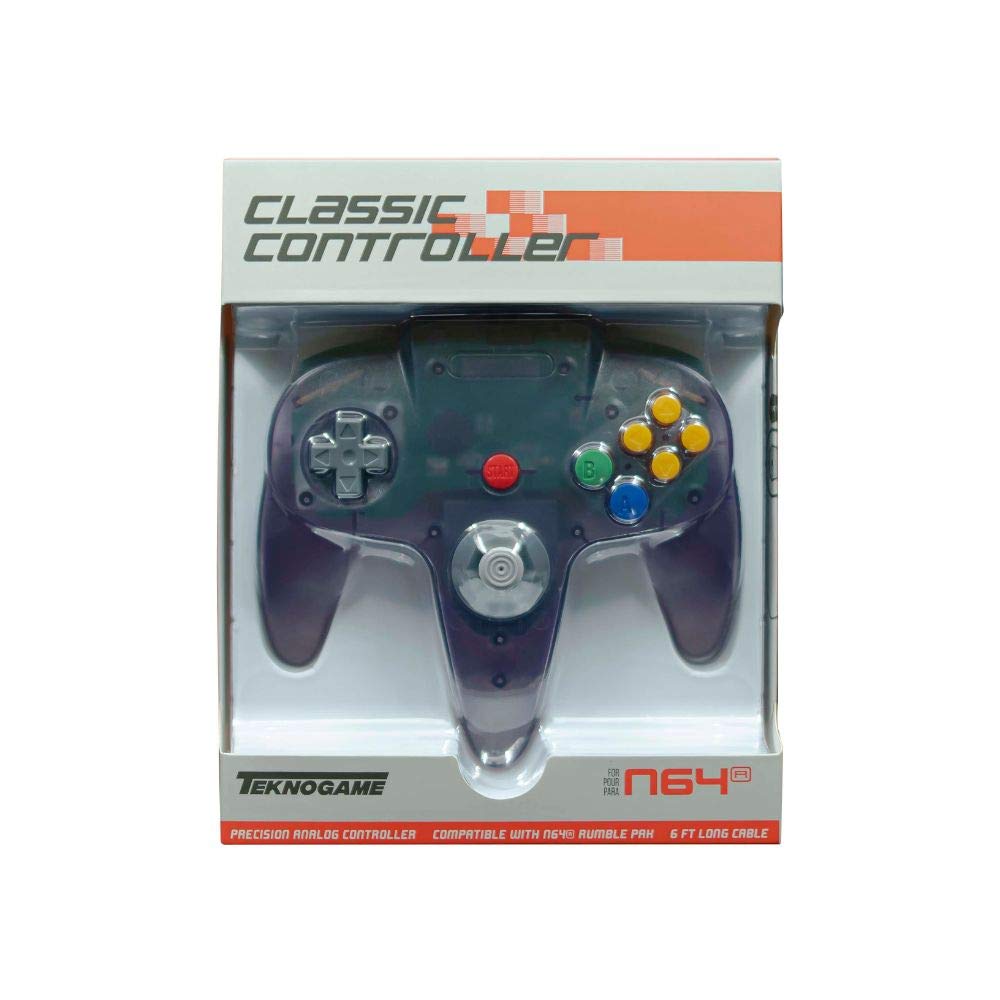
Image: The TeknoGame N64 Controller in Clear Purple. This image displays the front view of the controller, highlighting its transparent purple casing dan susun atur butang.
Susun atur Pengawal
Familiarize yourself with the buttons and controls of your TeknoGame N64 Controller:
- Kayu Analog: Untuk pergerakan 360 darjah yang tepat.
- D-Pad: For directional input in games that support it.
- Butang: Butang tindakan utama.
- Butang B: Butang tindakan sekunder.
- C Buttons (Yellow): Four directional buttons for camera control or specific in-game actions.
- Butang Mula: Menjeda permainan atau mengesahkan pilihan.
- Butang L: Left shoulder button.
- Butang R: Right shoulder button.
- Z Trigger: Located on the underside of the central handle.
- Wayar USB: For connecting to your console or PC.
Arahan Persediaan
Connecting to Nintendo 64 Console
- Ensure your Nintendo 64 console is powered off.
- Locate an available controller port on the front of your Nintendo 64 console.
- Insert the controller's connector firmly into the chosen port.
- Power on your Nintendo 64 console. The controller is now ready for use.
Menyambung ke PC Windows
- Cari port USB yang tersedia pada PC Windows anda.
- Plug the controller's USB cable into the USB port.
- Your Windows PC should automatically detect and install the necessary drivers. This may take a few moments.
- Once drivers are installed, the controller will be recognized as a standard gamepad. You may need to configure controller settings within your game or emulator software.
Nota: For optimal performance on PC, ensure your operating system is up to date. Some games or emulators may require manual button mapping.
Arahan Operasi
The TeknoGame N64 Controller functions identically to the original Nintendo 64 controller, providing a familiar gaming experience.
- Kayu Analog: Use for movement and precise control in 3D environments.
- D-Pad: Primarily used for menu navigation or specific 2D game controls.
- A & B Buttons: Perform primary and secondary actions as defined by the game.
- C Buttons: Often used for camera control, item selection, or specific character abilities.
- Butang Mula: Typically used to pause the game, access menus, or confirm selections.
- L & R Buttons: Shoulder buttons for various in-game actions like strafing or targeting.
- Z Trigger: Commonly used for aiming, crouching, or other context-sensitive actions.
The controller features a rumble function for enhanced immersion in supported games. This feature is automatically activated when supported by the game or emulator.
Penyelenggaraan dan Penjagaan
Penjagaan yang betul akan memanjangkan hayat pengawal anda:
- Pembersihan: Gunakan kain lembut dan kering untuk mengelap permukaan alat kawalan. Untuk kotoran degil, lap sedikitampen kain dengan air. Elakkan bahan kimia yang keras atau pembersih yang kasar.
- Storan: Simpan alat kawalan di tempat yang sejuk dan kering, jauh daripada cahaya matahari langsung dan suhu yang melampau. Elakkan daripada melilit kabel dengan ketat di sekeliling alat kawalan untuk mengelakkan kerosakan.
- Pengendalian: Do not drop the controller or subject it to strong impacts. Avoid pulling the cable forcefully when disconnecting.
- Pendedahan Cecair: Keep the controller away from liquids. If liquid enters the controller, disconnect it immediately and allow it to dry completely before attempting to use it again.
Menyelesaikan masalah
| Masalah | Kemungkinan Punca | Penyelesaian |
|---|---|---|
| Controller not responding on N64. | Loose connection; Console off. | Ensure the controller is firmly plugged into the N64 port. Verify the N64 console is powered on. |
| Controller not recognized on PC. | Loose USB connection; Driver issue; Faulty USB port. | Try a different USB port. Restart your PC. Check Device Manager for driver status. Ensure your operating system is updated. |
| Buttons or analog stick not working correctly. | Dirt or debris; Software calibration issue; Physical damage. | Clean around the affected buttons/stick. For PC, check game/emulator controller settings for calibration. If on N64, try another game. |
| Rumble feature not working. | Game/emulator does not support rumble; Rumble feature disabled in settings. | Verify the game or emulator supports rumble. Check in-game or emulator settings to ensure rumble is enabled. |
If you continue to experience issues, please contact TeknoGame customer support.
Spesifikasi
- model: VGA-0625-R
- Jenama: TeknoGame
- warna: Clear Purple
- Ketersambungan: USB (Elektrik Bertali)
- Jenis Pengawal: Pad permainan
- Peranti Serasi: Nintendo 64, Windows PC
- ciri-ciri: Ergonomic design, Rumble feedback
- Button Quantity: 10
- UPC: 722267833718
Maklumat Waranti
TeknoGame warrants this product against defects in materials and workmanship for a period of [Insert Warranty Period, e.g., one year] from the original date of purchase. This warranty does not cover damage caused by accident, misuse, abuse, modification, improper installation, or normal wear and tear.
To make a warranty claim, please retain your proof of purchase and contact TeknoGame customer support.
Sokongan
For technical support, troubleshooting assistance, or warranty inquiries, please contact TeknoGame customer service:
- Webtapak: www.teknogame.com/support (Examppautan le, gantikan dengan yang sebenar jika ada)
- e-mel: support@teknogame.com (Example email, replace with actual if available)
- telefon: [Insert Phone Number, if available]
Please have your product model number (VGA-0625-R) and proof of purchase ready when contacting support.