
1. Arahan Keselamatan Penting
Baca semua amaran keselamatan, arahan, ilustrasi dan spesifikasi yang disediakan dengan alat kuasa ini. Kegagalan mematuhi semua arahan yang disenaraikan di bawah boleh mengakibatkan renjatan elektrik, kebakaran dan/atau kecederaan serius.
Amaran Keselamatan Alat Kuasa Am
- Keselamatan Kawasan Kerja: Pastikan kawasan kerja bersih dan terang. Kawasan yang berselerak atau gelap mengundang kemalangan. Jangan kendalikan alat kuasa dalam atmosfera mudah meletup, seperti di hadapan cecair, gas atau habuk mudah terbakar. Alat kuasa menghasilkan percikan api yang boleh menyalakan habuk atau asap. Jauhkan kanak-kanak dan orang ramai semasa mengendalikan alat kuasa. Gangguan boleh menyebabkan anda hilang kawalan.
- Keselamatan Elektrik: Power tool plugs must match the outlet. Never modify the plug in any way. Do not use any adapter plugs with earthed (grounded) power tools. Unmodified plugs and matching outlets will reduce risk of electric shock. Avoid body contact with earthed or grounded surfaces, such as pipes, radiators, ranges, and refrigerators. There is an increased risk of electric shock if your body is earthed or grounded. Do not expose power tools to rain or wet conditions. Water entering a power tool will increase the risk of electric shock. Do not abuse the cord. Never use the cord for carrying, pulling, or unplugging the power tool. Keep cord away from heat, oil, sharp edges, or moving parts. Damaged or entangled cords increase the risk of electric shock. When operating a power tool outdoors, use an extension cord suitable for outdoor use. Use of a cord suitable for outdoor use reduces the risk of electric shock. If operating a power tool in a damp lokasi tidak dapat dielakkan, gunakan bekalan terlindung peranti arus sisa (RCD). Penggunaan RCD mengurangkan risiko kejutan elektrik.
- Keselamatan Diri: Stay alert, watch what you are doing, and use common sense when operating a power tool. Do not use a power tool while you are tired or under the influence of drugs, alcohol, or medication. A moment of inattention while operating power tools may result in serious personal injury. Use personal protective equipment. Always wear eye protection. Protective equipment such as a dust mask, non-skid safety shoes, hard hat, or hearing protection used for appropriate conditions will reduce personal injuries. Prevent unintentional starting. Ensure the switch is in the off-position before connecting to power source and/or battery pack, picking up or carrying the tool. Carrying power tools with your finger on the switch or energizing power tools that have the switch on invites accidents. Remove any adjusting key or wrench before turning the power tool on. A wrench or a key left attached to a rotating part of the power tool may result in personal injury. Do not overreach. Keep proper footing and balance at all times. This enables better control of the power tool in unexpected situations. Dress properly. Do not wear loose clothing or jewelry. Keep your hair and clothing away from moving parts. Loose clothes, jewelry, or long hair can be caught in moving parts. If devices are provided for the connection of dust extraction and collection facilities, ensure these are connected and properly used. Use of dust collection can reduce dust-related hazards. Do not let familiarity gained from frequent use of tools allow you to become complacent and ignore tool safety principles. A careless action can cause severe injury within a fraction of a second.
- Penggunaan dan Penjagaan Alat Kuasa: Do not force the power tool. Use the correct power tool for your application. The correct power tool will do the job better and safer at the rate for which it was designed. Do not use the power tool if the switch does not turn it on and off. Any power tool that cannot be controlled with the switch is dangerous and must be repaired. Disconnect the plug from the power source and/or remove the battery pack, if detachable, from the power tool before making any adjustments, changing accessories, or storing power tools. Such preventative safety measures reduce the risk of starting the power tool accidentally. Store idle power tools out of the reach of children and do not allow persons unfamiliar with the power tool or these instructions to operate the power tool. Power tools are dangerous in the hands of untrained users. Maintain power tools and accessories. Check for misalignment or binding of moving parts, breakage of parts, and any other condition that may affect the power tool’s operation. If damaged, have the power tool repaired before use. Many accidents are caused by poorly maintained power tools. Keep cutting tools sharp and clean. Properly maintained cutting tools with sharp cutting edges are less likely to bind and are easier to control. Use the power tool, accessories, and tool bits, etc. in accordance with these instructions, taking into account the working conditions and the work to be performed. Use of the power tool for operations different from those intended could result in a hazardous situation. Keep handles and grasping surfaces dry, clean, and free from oil and grease. Slippery handles and grasping surfaces do not allow for safe handling and control of the tool in unexpected situations.
- Penggunaan dan Penjagaan Alat Bateri: Recharge only with the charger specified by the manufacturer. A charger that is suitable for one type of battery pack may create a risk of fire when used with another battery pack. Use power tools only with specifically designated battery packs. Use of any other battery packs may create a risk of injury and fire. When battery pack is not in use, keep it away from other metal objects, like paper clips, coins, keys, nails, screws, or other small metal objects, that can make a connection from one terminal to another. Shorting the battery terminals together may cause burns or a fire. Under abusive conditions, liquid may be ejected from the battery; avoid contact. If contact accidentally occurs, flush with water. If liquid contacts eyes, additionally seek medical help. Liquid ejected from the battery may cause irritation or burns. Do not use a battery pack or tool that is damaged or modified. Damaged or modified batteries may exhibit unpredictable behavior resulting in fire, explosion, or risk of injury. Do not expose a battery pack or tool to fire or excessive temperature. Exposure to fire or temperature above 130 °C (265 °F) may cause explosion. Follow all charging instructions and do not charge the battery pack or tool outside the temperature range specified in the instructions. Charging improperly or at temperatures outside the specified range may damage the battery and increase the risk of fire.
- Perkhidmatan: Minta alat kuasa anda diservis oleh pembaikan bertauliah dengan hanya menggunakan alat ganti yang sama. Ini akan memastikan bahawa keselamatan alat kuasa dikekalkan. Jangan sesekali servis pek bateri yang rosak. Servis pek bateri hanya boleh dilakukan oleh pengilang atau pembekal perkhidmatan yang dibenarkan.
2. Kandungan Pakej
Buang semua barang dengan berhati-hati dan pastikan anda telah menerima yang berikut:
- 1 x WORKPRO 20V Cordless Drill Driver
- 1 x WORKPRO 20V Cordless Impact Driver
- 2 x 20V 2.0Ah Bateri Litium-ion
- 1 x Fast Charger (2.4A)
- 10 x Pemutar Skru
- 6 x Twist Drills
- 2 x Belt Hooks
- 1 x Manual Arahan

Image: The complete WORKPRO 20V Cordless Drill and Impact Driver Combo Kit, including both tools, two batteries, a charger, and various drill and screwdriver bits.
3. Produk Lebihview
The WORKPRO 20V Cordless Drill and Impact Driver Combo Kit provides versatile solutions for drilling and fastening tasks. This kit includes a drill driver with adjustable torque and a powerful impact driver, both powered by 20V lithium-ion batteries.
Ciri-ciri Utama
- Pemacu Gerudi Tanpa Kord 20V: Features 18+1 torque settings and two speed ranges (0-360 RPM and 0-1300 RPM) for various drilling and screwing applications. Equipped with a 10mm keyless chuck for easy accessory changes.
- 20V Cordless Impact Driver: Delivers up to 130Nm of torque with a maximum speed of 2600 RPM and an impact frequency of 0-3500 IPM. Features a 6.35mm (1/4") hexagonal quick-release chuck for rapid bit changes.
- 2.0Ah Lithium-ion Batteries: Two rechargeable 20V 2.0Ah batteries provide extended runtime. Integrated indicator lights display remaining battery capacity.
- Pengecas Cepat: A 2.4A fast charger allows for a full battery charge in approximately 60 minutes.
- Reka bentuk ergonomik: Soft rubber non-slip handles ensure comfortable use during prolonged operation.
- Lampu LED Bersepadu: Both tools feature LED work lights to illuminate the work area, enhancing visibility and safety in dark conditions.
- Belt Hooks: Included belt hooks allow for convenient carrying and storage of the tools.

Imej: Satu dalaman view highlighting the powerful 20-volt motor in both the drill driver (25 Nm max torque) and the impact driver (130 Nm max torque).
4. Persediaan
4.1 Pengecasan Bateri
- Connect the fast charger to a standard power outlet.
- Slide the 20V 2.0Ah Lithium-ion battery into the charger until it clicks into place.
- The charger's indicator light will show the charging status. A full charge typically takes about 60 minutes.
- Setelah dicas sepenuhnya, keluarkan bateri daripada pengecas.

Image: A WORKPRO 20V 2.0Ah Lithium-ion battery being charged on the 2.4A fast charger, illustrating the 1-hour fast charging capability.
4.2 Memasang dan Melepaskan Bateri
- Untuk Memasang: Align the battery with the base of the tool handle and slide it in until it locks securely.
- Untuk Alih Keluar: Press the battery release button (located on the side of the battery) and slide the battery out of the tool.
4.3 Installing and Removing Drill Bits (Drill Driver)
- Pastikan alat dimatikan dan bateri ditanggalkan untuk keselamatan.
- Rotate the 10mm keyless chuck counter-clockwise to open the jaws.
- Masukkan mata gerudi ke dalam chuck, pastikan ia berada di tengah.
- Putar chuck mengikut arah jam untuk mengetatkan rahang dengan kuat di sekeliling mata gerudi.
- Untuk Alih Keluar: Rotate the chuck counter-clockwise to loosen and remove the bit.

Image: Visual guide demonstrating how to quickly change bits on the drill driver by rotating the chuck to loosen and tighten.
4.4 Installing and Removing Screwdriver Bits (Impact Driver)
- Pastikan alat dimatikan dan bateri ditanggalkan untuk keselamatan.
- Pull the quick-release collar of the 6.35mm (1/4") hexagonal chuck forward.
- Insert the screwdriver bit into the chuck.
- Release the collar to lock the bit in place. Pull on the bit to ensure it is secure.
- Untuk Alih Keluar: Pull the quick-release collar forward and pull the bit out.

Imej: Dari dekat view showing the 10mm keyless chuck of the drill driver and the 6.5mm (1/4") hexagonal chuck of the impact driver, along with their bright LED lights for visibility.
4.5 Adjusting Torque (Drill Driver)
The drill driver features an 18+1 position torque adjustment ring. Rotate the ring to select the desired torque setting. Lower settings are for driving small screws or working with soft materials, while higher settings are for larger screws or harder materials. The 'drill' symbol setting is for drilling applications, providing maximum torque.
4.6 Selecting Speed (Both Tools)
Both the drill driver and impact driver feature a 2-speed transmission switch, typically located on top of the tool. Position 1 (low speed) is for higher torque applications and controlled drilling/driving. Position 2 (high speed) is for faster drilling or driving with less torque.
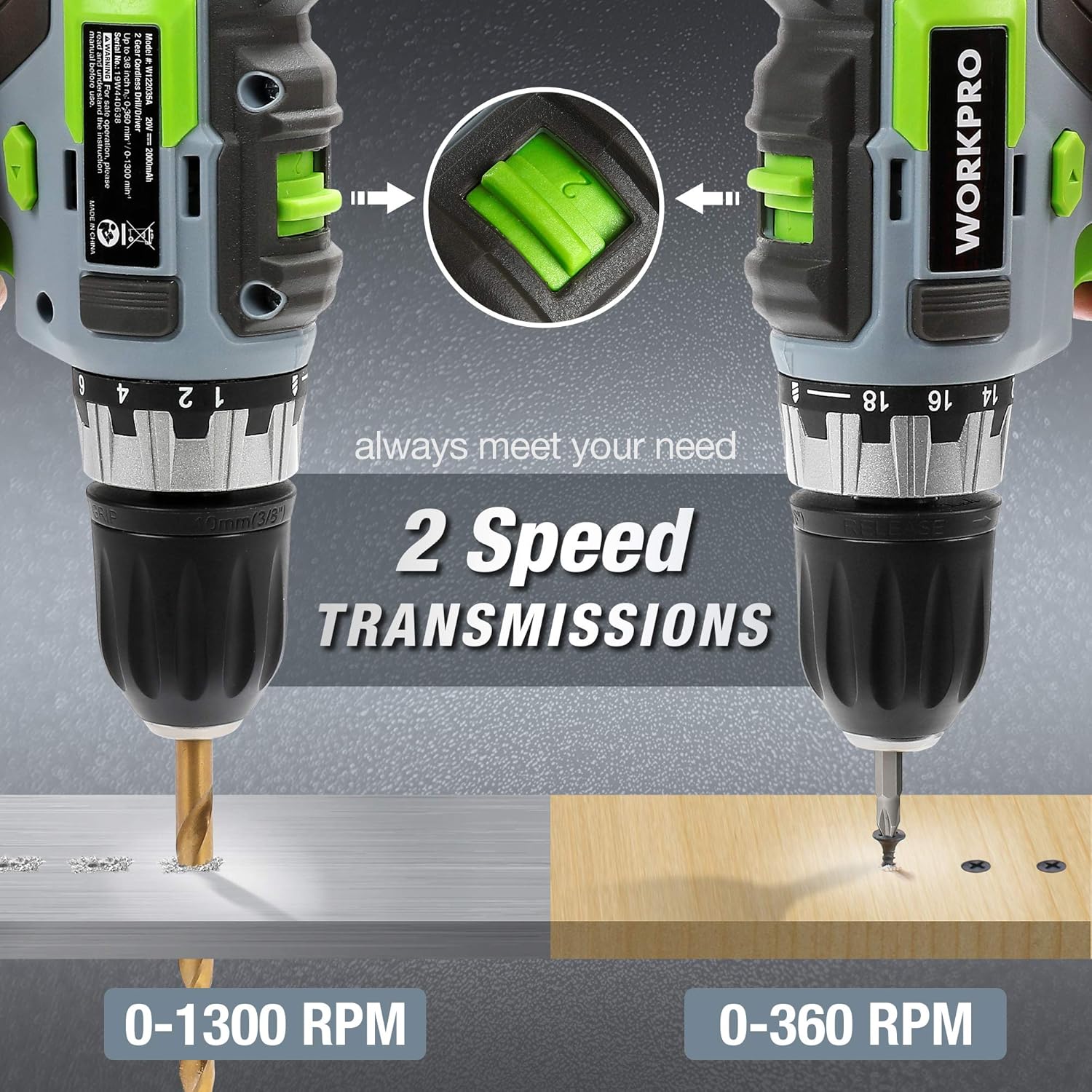
Image: Both the WORKPRO drill driver and impact driver illustrating their 2-speed transmission settings, with the drill driver operating at 0-1300 RPM and the impact driver at 0-360 RPM for different tasks.
5. Operasi
5.1 Menghidupkan/Mematikan
To start the tool, press the trigger switch. The tool speed is variable depending on how far the trigger is pressed. To stop the tool, release the trigger switch.
5.2 Suis Hadapan/Undur
A forward/reverse selector switch is located above the trigger. Push the lever to the left for forward rotation (drilling and screwing). Push the lever to the right for reverse rotation (removing screws or freeing a stuck drill bit). Center the switch for the lock position, which prevents accidental starting.

Image: A diagram illustrating the forward, reverse, and lock positions of the rotation control switch on the WORKPRO drill driver, with instructions for each setting.
5.3 Menggunakan Lampu Kerja LED
Both tools are equipped with an LED work light that activates when the trigger is pressed, illuminating the work surface for improved visibility in dimly lit areas.

Image: The WORKPRO impact driver in use, with its integrated LED work light brightly illuminating the fastening point, demonstrating its utility in dark environments.
5.4 Teknik Penggerudian
- Always secure the workpiece to prevent movement.
- Select the appropriate drill bit and speed setting for the material.
- Start drilling at a low speed to create a pilot hole, then increase speed as needed.
- Sapukan tekanan yang mantap, sekata. Jangan paksa gerudi.
- For deep holes, periodically withdraw the bit to clear debris.
5.5 Screwing Techniques
- Select the correct screwdriver bit for the screw head.
- For the drill driver, adjust the torque setting to prevent over-tightening or stripping screws.
- For the impact driver, its high torque is suitable for driving long or stubborn screws.
- Apply firm, steady pressure to keep the bit engaged with the screw head.

Image: A collage showing the WORKPRO drill driver and impact driver being used in various applications, including drilling into wood and metal, and driving screws.
5.6 Using the Belt Hook
The included belt hooks can be attached to either tool for convenient temporary storage on a belt or workbench edge, allowing for hands-free movement between tasks.

Image: Demonstrates the 1-hour fast charging of the 2.0Ah Li-ion battery and the convenient belt hook feature for carrying the tool.
6. Penyelenggaraan
Penyelenggaraan tetap memastikan prestasi optimum dan memanjangkan jangka hayat alatan anda.
6.1 Pembersihan
- Sentiasa putuskan sambungan bateri sebelum membersihkan.
- Gunakan yang lembut, damp kain untuk mengelap bahagian luar alat. Jangan gunakan bahan kimia yang keras atau pembersih yang kasar.
- Clear any dust or debris from the ventilation openings using compressed air or a soft brush.
- Keep the chucks clean and free of debris to ensure proper bit retention.
6.2 Penjagaan Bateri
- Simpan bateri di tempat yang sejuk dan kering jauh dari cahaya matahari langsung dan suhu yang melampau.
- Jangan simpan bateri dalam keadaan dinyahcas untuk tempoh yang lama. Cas semula bateri secara berkala jika tidak digunakan.
- Avoid dropping or physically damaging batteries.
6.3 Penyimpanan
- Store the tools and batteries in a secure, dry location, out of reach of children.
- Ensure batteries are removed from the tools before storage.
7. Penyelesaian masalah
If you encounter issues with your WORKPRO tools, refer to the following common problems and solutions:
| Masalah | Kemungkinan Punca | Penyelesaian |
|---|---|---|
| Alat tidak bermula | Battery not charged or improperly installed; Forward/Reverse switch in lock position; Faulty switch. | Charge battery and ensure it is securely installed; Move switch out of lock position; Contact customer support for switch replacement. |
| Kehilangan kuasa semasa operasi | Battery low; Overload protection activated. | Recharge battery; Reduce load on the tool, allow it to cool down. |
| Bit slips or wobbles in chuck | Chuck not tightened properly; Bit shank is dirty or damaged; Incorrect bit size. | Retighten chuck firmly; Clean or replace bit; Use correct bit size. |
| Bateri tidak dicas | Charger not plugged in; Faulty battery or charger; Battery too hot/cold. | Ensure charger is plugged in; Try another battery/charger if available; Allow battery to reach room temperature before charging. Contact customer support if problem persists. |
8. Spesifikasi
| Ciri | Spesifikasi |
|---|---|
| Jenama | WORKPRO |
| Nombor Model | W004578A |
| Voltage | 20 Volt (DC) |
| Jenis Bateri | Litium-ion |
| Kapasiti Bateri | 2.0 Ah (x2 included) |
| Pengecas Amppemadam | 2.4 A (Fast Charger) |
| Drill Driver Torque | 25 Nm (18+1 settings) |
| Drill Driver Speed | 0-360 RPM / 0-1300 RPM |
| Drill Driver Chuck Size | Chuck Tanpa Kunci 10mm |
| Tork Pemacu Impak | 130 Nm |
| Impact Driver Speed | 0-2600 RPM |
| Impact Driver Impact Frequency | 0-3500 IPM |
| Impact Driver Chuck Size | 6.35mm (1/4") Hexagonal Quick-Release Chuck |
| Dimensi Produk (L x W x H) | 22.5 x 17 x 6 cm |
| Berat Barang | 4 Kilogram |
| bahan | plastik |
| UPC | 820909766186 |
9. Waranti dan Sokongan
WORKPRO products are manufactured to high-quality standards. For warranty information, technical support, or service inquiries, please refer to the warranty card included with your purchase or visit the official WORKPRO webtapak. Sila simpan bukti pembelian anda untuk sebarang tuntutan waranti.