
pengenalan
This manual provides detailed instructions for the setup, operation, and maintenance of your AcuRite Iris 5-in-1 Wireless Weather Station (Model 01536M) and the AcuRite Iris 06003 PRO+ Upgrade for 5-in-1 Weather Sensor (Model 06003M). Please read this manual thoroughly before installation and use to ensure proper functionality and longevity of your devices.
Produk Selesaiview
AcuRite Iris 5-in-1 Wireless Weather Station (Model 01536M)
The AcuRite Iris 5-in-1 Wireless Weather Station provides comprehensive environmental monitoring. It accurately measures indoor and outdoor temperature, humidity, rainfall, wind speed, and wind direction. The system includes a color display unit with a weather ticker for real-time information and connectivity to the My AcuRite app for remote monitoring via smartphone, tablet, or computer. A USB port allows for data storage, tracking, and analysis, with options to share data with communities like Weather Underground.
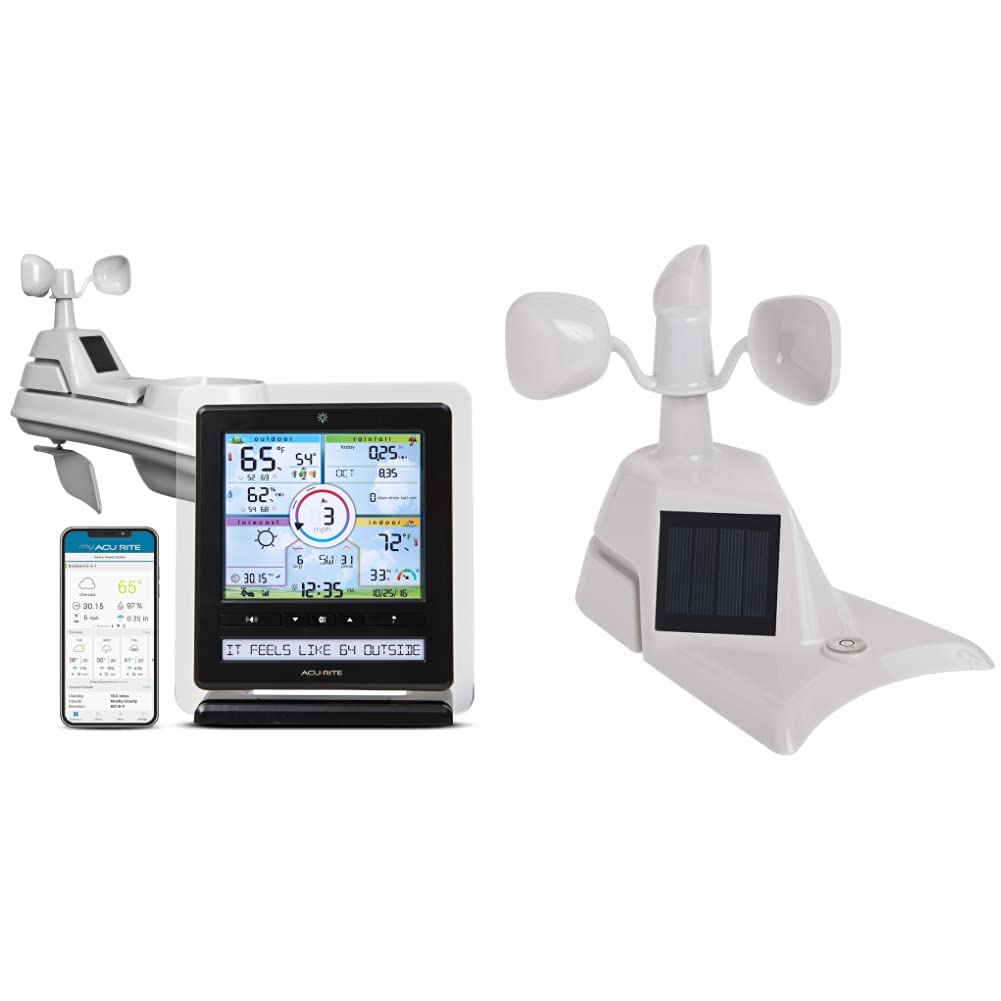
Image: The AcuRite Iris 5-in-1 Wireless Weather Station, showing the outdoor sensor, indoor color display, and the My AcuRite mobile application interface.

Image: Key features of the AcuRite Iris 5-in-1 Weather Station, including indoor/outdoor temperature and humidity, wind speed/direction/rainfall monitoring, visual readouts, and a real-time weather ticker, alongside the mobile app.

Image: The AcuRite Iris 5-in-1 Weather Station display, highlighting its ability to accurately measure indoor and outdoor temperature and humidity, monitor wind speed, direction, and rainfall, provide a visual readout of current weather conditions, and offer a real-time weather ticker.

Image: A close-up of the AcuRite Iris 5-in-1 Weather Station display, illustrating its presentation of weather, humidity, and wind information with trend indicators, barometer readings, future forecasts, and the current date and time.
AcuRite Iris 06003 PRO+ Upgrade for 5-in-1 Weather Sensor (Model 06003M)
The PRO+ Upgrade is designed to enhance the performance of your existing AcuRite 5-in-1 weather sensor. It features dual solar panels to maximize sun exposure and power a solar-powered aspirating fan. This fan improves internal airflow within the sensor, leading to more accurate ambient temperature readings throughout the day. The upgrade is a replacement assembly for the standard solar panel component of the 5-in-1 sensor.

Imej: Atas view of the AcuRite 06003 PRO+ Upgrade for the 5-in-1 Weather Sensor, showing the dual solar panels and wind cups.

Imej: Sisi view of the AcuRite 06003 PRO+ Upgrade for the 5-in-1 Weather Sensor, highlighting the solar panel and overall design.

Imej: Dalaman view of the AcuRite 06003 PRO+ Upgrade for the 5-in-1 Weather Sensor, showing the aspirating fan component designed to improve temperature accuracy.
Kandungan Pakej
AcuRite Iris 5-in-1 Wireless Weather Station (01536M)
- Sensor Luar 5-dalam-1
- Color Display Unit
- Penyesuai Kuasa untuk Unit Paparan
- Mounting Hardware for Sensor
- Manual Arahan (dokumen ini)
AcuRite Iris 06003 PRO+ Upgrade (06003M)
- PRO+ Upgrade Assembly (with dual solar panels and aspirating fan)
- Installation Guide for PRO+ Upgrade
Persediaan
1. Install Batteries in 5-in-1 Sensor
- Cari petak bateri di bahagian bawah sensor 5-dalam-1.
- Tanggalkan penutup petak bateri.
- Insert 4 AA alkaline or lithium batteries (not included) according to the polarity markings. Bateri litium disyorkan untuk suhu di bawah -4°F (-20°C).
- Gantikan penutup petak bateri dengan selamat.
2. Install the 5-in-1 Sensor
Proper placement of the 5-in-1 sensor is crucial for accurate readings.
- lokasi: Choose an open location at least 5 feet (1.5 meters) off the ground, away from heat sources (e.g., exhaust vents, engines) and reflective surfaces (e.g., large windows, concrete). Ensure clear access to wind and rain.
- Pemasangan: Use the included mounting hardware to secure the sensor to a post or pole. Ensure the sensor is level for accurate rain collection. The wind cups should be able to spin freely.
3. Install the PRO+ Upgrade (06003M)
This section applies if you are upgrading your existing 5-in-1 sensor with the PRO+ assembly.
- Alat yang Diperlukan: Small Phillips head screwdriver.
- Remove Existing Assembly: Carefully detach the existing solar panel and fan assembly from your 5-in-1 sensor. This usually involves unscrewing a few small screws. Refer to the PRO+ Upgrade Installation Guide for specific steps.
- Install PRO+ Assembly: Align the PRO+ Upgrade assembly with the mounting points on your 5-in-1 sensor. Secure it in place using the screws. Ensure the aspirating fan is correctly positioned and can rotate freely.
4. Setup the Color Display Unit
- Hidupkan kuasa: Plug the power adapter into the display unit and then into a standard electrical outlet.
- Konfigurasi Awal: The display will power on. Follow the on-screen prompts to set the time, date, and measurement units (Fahrenheit/Celsius, mph/kmh, etc.).
- Sambungan Sensor: The display unit will automatically search for and connect to your 5-in-1 sensor. This may take a few minutes. Once connected, outdoor readings will appear on the display.
- My AcuRite App (Optional): Download the My AcuRite app from your device's app store. Follow the in-app instructions to create an account and connect your display unit for remote monitoring. You will need your display unit's Device ID, typically found on a sticker on the back or bottom of the unit.
Operasi
Color Display Unit Features
The color display unit provides a wealth of information at a glance:
- Keadaan Luar: Current temperature, humidity, wind speed, wind direction, and rainfall.
- Keadaan Dalaman: Current indoor temperature and humidity.
- Ramalan cuaca: A 12 to 24-hour weather forecast based on barometric pressure changes.
- Ticker Cuaca: Scrolls through real-time weather information and alerts.
- Data Sejarah: View daily, weekly, or monthly highs and lows for various measurements.
- Alarms: Set customizable alarms for specific weather conditions (e.g., high wind, low temperature).
My AcuRite App
The My AcuRite app extends the functionality of your weather station:
- Pemantauan Jauh: View your weather data from anywhere using your smartphone or tablet.
- Makluman Tersuai: Receive push notifications or email alerts when conditions exceed your preset ranges.
- Sejarah Data: Access detailed historical data and charts.
- Perkongsian: Share your weather data with friends, family, or online weather communities like Weather Underground.
Fungsi Port USB
The display unit includes a USB port for connecting to a computer. This allows you to:
- Store and archive weather data.
- Analyze long-term weather trends.
- Export data for use in other applications.
Penyelenggaraan
Membersihkan Sensor 5-dalam-1
Periodically clean the sensor to ensure accurate readings:
- Pengumpul Hujan: Remove any debris (leaves, insects) from the rain collector funnel.
- Wind Cups/Vane: Ensure the wind cups and wind vane rotate freely. Clean any obstructions.
- Luaran: Lap bahagian luar dengan iklanamp kain. Elakkan pembersih yang kasar.
Penggantian Bateri
Replace batteries in the 5-in-1 sensor approximately every 12-24 months, or when the low battery indicator appears on the display unit. Always replace all batteries at once with fresh ones.
Penentukuran semula
If you suspect inaccurate readings, refer to the AcuRite support website for instructions on recalibrating specific sensors (e.g., rain gauge, temperature offset).
Menyelesaikan masalah
| Masalah | Penyelesaian yang Mungkin |
|---|---|
| Tiada data luar dipaparkan |
|
| Suhu/kelembapan yang tidak tepat |
|
| Hujan yang tidak tepat |
|
| Kelajuan/arah angin yang tidak tepat |
|
| My AcuRite app not connecting |
|
Spesifikasi
- Jenama: AcuRite
- model: 01536M (Weather Station), 06003M (PRO+ Upgrade)
- Power Source (5-in-1 Sensor): 4 x AA batteries (not included), Solar Powered (for internal fan/aspirator)
- Power Source (Display Unit): Penyesuai Kuasa AC
- Teknologi Ketersambungan: Wireless (sensor to display), USB Port (display to PC), Wi-Fi (for My AcuRite app, if applicable)
- Ketepatan Suhu: ±1°C (±2°F)
- Jenis Paparan: Paparan Warna
- Sensor Technology (PRO+ Upgrade): Aspirating Fan, Dual Solar Panels
- Julat Tanpa Wayar: Sehingga 330 kaki (100 meter)
Waranti & Sokongan
Waranti Terhad
Your AcuRite Iris 5-in-1 Wireless Weather Station and PRO+ Upgrade are covered by a one-year limited warranty from the date of purchase. This warranty covers defects in materials and workmanship. For full warranty details, please refer to the official AcuRite webtapak atau hubungi sokongan pelanggan.
Sokongan Pelanggan
For technical assistance, troubleshooting, or warranty claims, please visit the official AcuRite support website or contact their customer service department. Contact information can typically be found on the AcuRite webtapak atau dalam pembungkusan produk asal.