
pengenalan
This manual provides essential instructions for the safe and efficient use of your Otech rechargeable battery, specifically designed for the Sennheiser HDI 550 wireless headset. Please read this manual thoroughly before installation and operation.
Produk Selesaiview
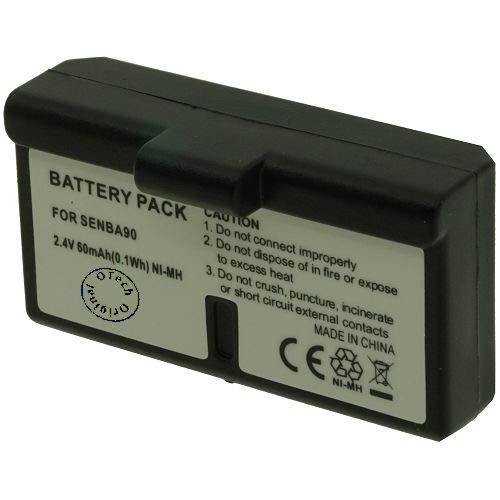
Rajah 1: The Otech rechargeable battery, model 2SNH02-13106668, designed for Sennheiser HDI 550 wireless headsets. This image shows the compact black casing with visible battery cells and the 'Otech Original' logo.
The Otech battery (Model: 2SNH02-13106668) is a 2.4 Volt rechargeable power source intended as a replacement or spare for the Sennheiser HDI 550 wireless headset. It is designed to provide reliable power for extended listening sessions.
Persediaan dan Pemasangan
- Power Off Headset: Ensure your Sennheiser HDI 550 wireless headset is completely powered off before attempting battery installation or removal.
- Cari Petak Bateri: Refer to your Sennheiser HDI 550 headset's original manual to locate and open the battery compartment. This is typically found on one of the earcups.
- Keluarkan Bateri Lama (jika berkenaan): Carefully remove the existing battery, noting its orientation.
- Masukkan Bateri Baharu: Insert the Otech battery into the compartment, ensuring the polarity (+ and - terminals) matches the indicators inside the compartment. Do not force the battery.
- Tutup Petak: Tutup penutup petak bateri dengan selamat.
- Caj Permulaan: It is recommended to fully charge the new battery before its first use. Place the headset on its charging base or connect it to its charger as per the Sennheiser HDI 550 instructions.
Penting: Always handle batteries with care. Do not short-circuit, puncture, or expose the battery to extreme temperatures.
Arahan Operasi
Mengecas Bateri
- Use only the original Sennheiser HDI 550 charging base or charger.
- Place the headset on the charging base. Ensure the charging indicator on your headset or base illuminates, indicating proper connection and charging.
- A full charge typically takes several hours. Refer to your headset's manual for specific charging times and indicator meanings.
- Avoid overcharging by removing the headset from the charger once fully charged, especially for prolonged periods.
Hayat dan Penggunaan Bateri
- The battery provides power for your wireless headset. Actual operating time varies based on usage volume, distance from the transmitter, and other environmental factors.
- When the headset indicates low battery, recharge it promptly to avoid interruption of use.
Penyelenggaraan dan Penjagaan
- Storan: If storing the battery for an extended period, ensure it is partially charged (around 50%) and stored in a cool, dry place. Avoid full discharge or full charge during long-term storage.
- Pembersihan: Keep the battery contacts clean and dry. Use a soft, dry cloth to wipe away any dust or debris.
- Suhu: Avoid exposing the battery to extreme temperatures (hot or cold), as this can degrade performance and shorten its lifespan.
- Pelupusan: Dispose of old or damaged batteries responsibly according to local regulations. Do not dispose of batteries in household waste.
Menyelesaikan masalah
| Masalah | Kemungkinan Punca | Penyelesaian |
|---|---|---|
| Headset not powering on after battery installation. | Battery not inserted correctly; Battery not charged; Faulty battery. |
|
| Bateri tidak dicas. | Improper connection to charging base; Dirty contacts; Faulty charging base/cable; Faulty battery. |
|
| Hayat bateri pendek. | Battery not fully charged; Battery nearing end of lifespan; High volume usage. |
|
Spesifikasi
- Jenama: Otech
- Nombor Model: 2SNH02-13106668
- Keserasian: Sennheiser HDI 550 Wireless Headset
- Voltage: 2.4 Volt
- Bilangan Item: 1
- ASIN: B08C7583K9
- Pertama Tersedia: 25 September 2021
Waranti dan Sokongan
Untuk maklumat jaminan dan sokongan teknikal, sila rujuk dokumentasi yang disediakan bersama pembelian anda atau hubungi peruncit/pengilang secara langsung. Simpan bukti pembelian anda untuk tuntutan jaminan.