
pengenalan
Thank you for choosing the BEAST PLAYFOUR Bluetooth Gamepad. This manual provides detailed instructions for setting up, operating, and maintaining your wireless controller. Please read this manual carefully before use to ensure optimal performance and longevity of your device.
Produk Selesaiview
Ciri-ciri Utama
- Kesambungan Bluetooth Wayarles: Seamless connection for gaming.
- Maklum Balas Getaran: Enhances immersion with tactile responses.
- Gravity Sensor (6-axis motion): Provides precise motion control for compatible games.
- Penceramah Bersepadu: Delivers additional audio cues directly from the controller.
- Jack Audio: Allows connection of a headset for private audio.
- Pad sentuh: Offers new interaction possibilities in games.
- Bar Cahaya: Provides visual feedback and player identification.
Susun atur Pengawal
The BEAST PLAYFOUR Gamepad features a standard layout with ergonomic grips for comfortable gameplay. Familiarize yourself with the buttons and features shown below.
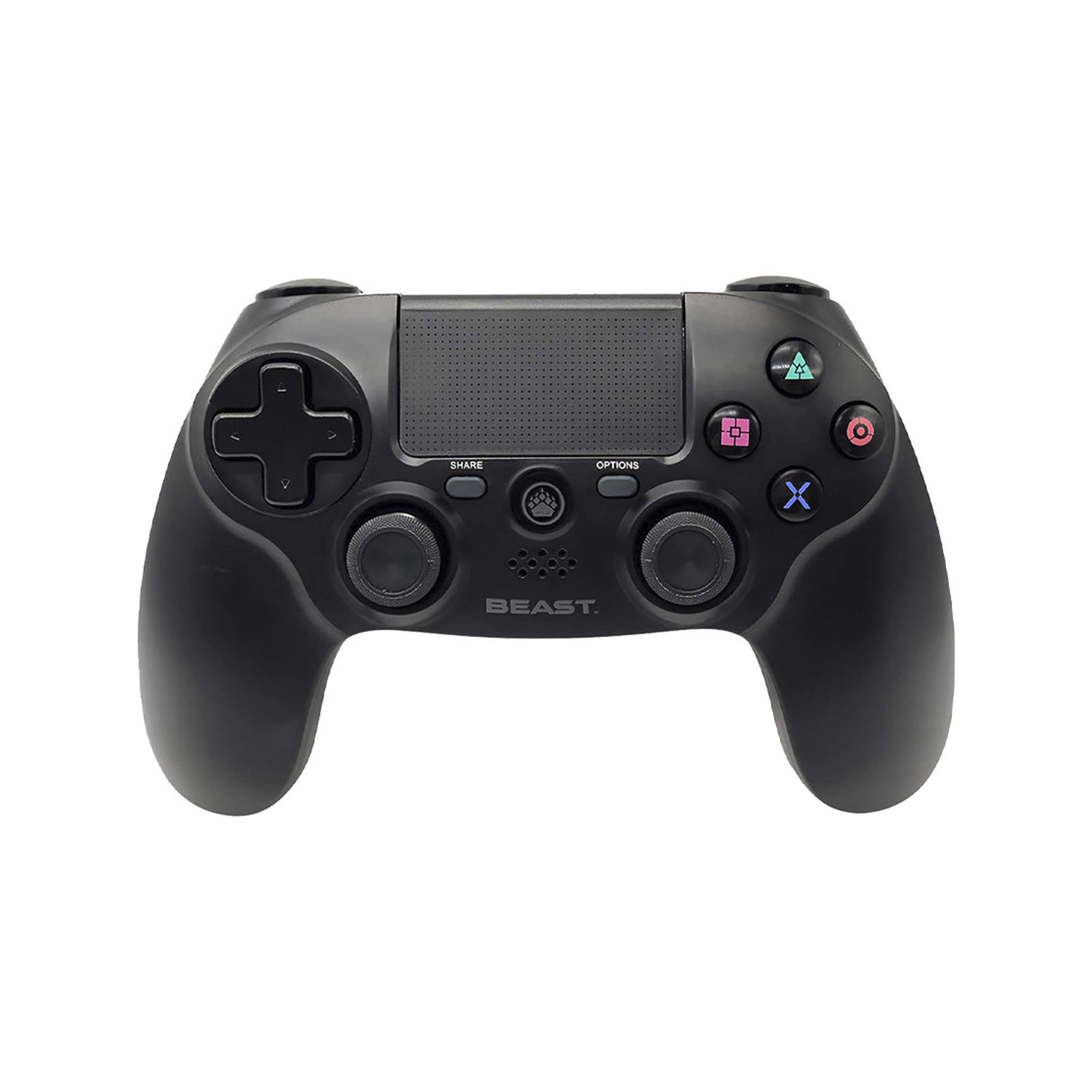
Imej 1: Atas-depan view of the BEAST PLAYFOUR Bluetooth Gamepad. This image highlights the dual analog sticks, D-pad, action buttons (Triangle, Circle, Cross, Square), Share button, Options button, and the central touchpad.

Imej 2: Depan view of the BEAST PLAYFOUR Bluetooth Gamepad. This view clearly shows the face buttons, the central touchpad, the PlayStation button, and the light bar located at the top edge.
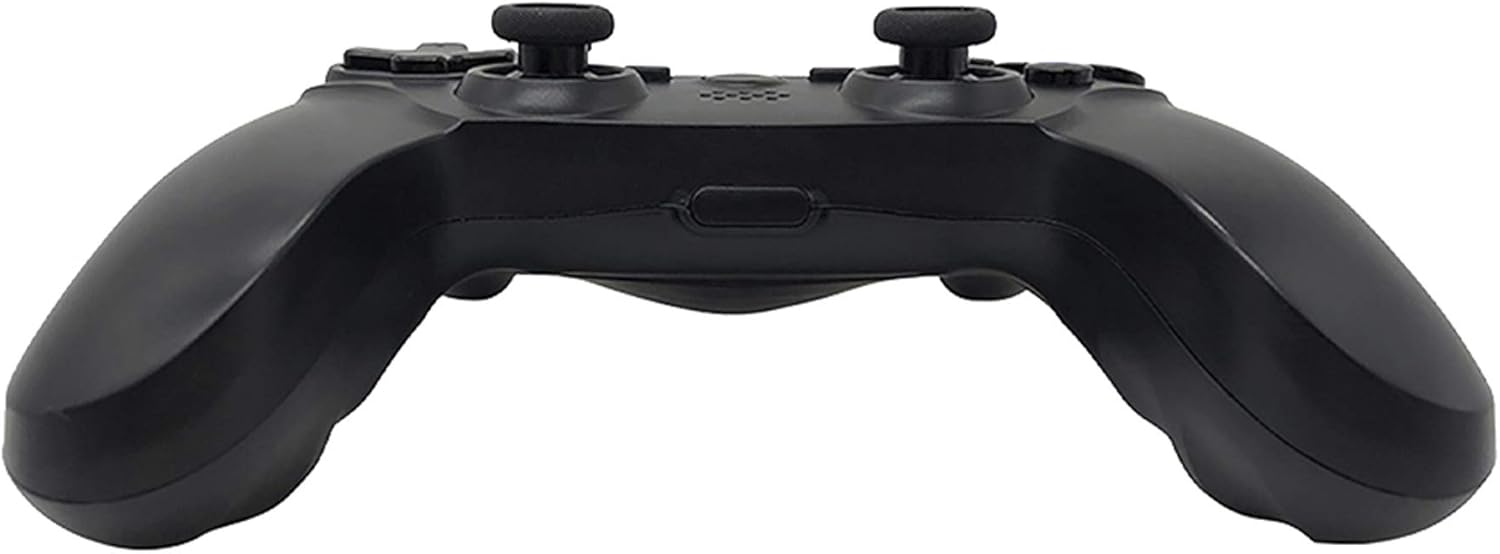
Imej 3: belakang view of the BEAST PLAYFOUR Bluetooth Gamepad. This image displays the L1, L2, R1, and R2 trigger buttons, as well as the USB charging port and the EXT port.

Imej 4: sebelah view of the BEAST PLAYFOUR Bluetooth Gamepad. This perspective highlights the ergonomic grip design of the controller.
Persediaan
Mengecas Pengawal
Before first use, fully charge the controller. Use the provided USB cable to connect the controller to a USB port on your console or a compatible USB charger.
- Connect the small end of the USB cable to the charging port on the rear of the controller.
- Connect the large end of the USB cable to a powered USB port.
- The light bar on the controller will slowly pulse orange while charging.
- The light bar will turn off when charging is complete.
Berpasangan melalui Bluetooth
To connect your BEAST PLAYFOUR Gamepad to your console or device, follow these steps:
- Pastikan konsol anda dihidupkan.
- Tekan dan tahan butang Butang PS (located between the analog sticks) and the Butang kongsi (located to the left of the touchpad) simultaneously for approximately 3-5 seconds.
- The light bar will begin to flash rapidly, indicating the controller is in pairing mode.
- On your console, navigate to the Bluetooth device settings.
- Select the BEAST PLAYFOUR Gamepad from the list of available devices.
- Once successfully paired, the light bar will stop flashing and glow a solid color, indicating the player number.
- To connect to a PC, ensure your PC has Bluetooth capabilities. Go to Bluetooth settings, select 'Add Bluetooth or other device', then 'Bluetooth', and select the controller when it appears.
Arahan Operasi
Kawalan Asas
- Kayu Analog: Used for movement and camera control.
- D-Pad: Untuk input arah, selalunya digunakan dalam menu atau untuk tindakan permainan tertentu.
- Butang Tindakan (Segitiga, Bulatan, Palang, Petak): Perform in-game actions as assigned by the game.
- Butang L1/R1: Shoulder buttons for various in-game functions.
- Pencetus L2/R2: Analog triggers for precise input, such as acceleration or aiming.
- Butang PS: Powers on the controller, accesses the console's home menu, or turns off the controller (hold for 10 seconds).
- Butang Kongsi: Used to share gameplay content (screenshots, video clips).
- Butang Pilihan: Typically functions as a pause or menu button in games.
Ciri Khas
- Pad sentuh: Functions as a clickable surface for navigation or specific game interactions.
- Penceramah Bersepadu: Some games utilize the speaker for immersive sound effects.
- Maklum Balas Getaran: Dual motors provide haptic feedback for in-game events.
- 6-Axis Motion Sensor: Combines a gyroscope and accelerometer for motion-sensing gameplay.
- Bar Cahaya: Changes color to indicate player number, health status, or other in-game information.
Penyelenggaraan
Proper care will extend the life of your gamepad.
- Pembersihan: Gunakan kain lembut dan kering untuk mengelap pengawal. Untuk kotoran degil, sedikit dampLap kain dengan air. Jangan gunakan bahan kimia yang keras atau pembersih yang kasar.
- Storan: Simpan pengawal di tempat yang sejuk dan kering jauh dari cahaya matahari langsung dan suhu yang melampau.
- Penjagaan Bateri: Avoid fully discharging the battery frequently. Charge the controller regularly, even if not in use for extended periods, to maintain battery health.
Menyelesaikan masalah
If you encounter issues with your BEAST PLAYFOUR Gamepad, refer to the following common solutions:
| Masalah | Penyelesaian |
|---|---|
| Pengawal tidak dihidupkan. | Pastikan pengawal dicas. Sambungkannya ke sumber kuasa menggunakan kabel USB. |
| Pengawal tidak berpasangan. | Make sure the controller is in pairing mode (flashing light bar). Delete previous pairings from your console's Bluetooth settings and try pairing again. Ensure no other Bluetooth devices are interfering. |
| Input lag atau putus sambungan. | Ensure the controller is within range of the console/device. Reduce interference by moving away from other wireless devices. Recharge the controller if the battery is low. |
| Butang atau kayu analog tidak bertindak balas. | Try resetting the controller. Locate the small reset button on the back (often inside a small hole) and press it with a thin object (like a paperclip) for 3-5 seconds. Then re-pair the controller. |
| Vibration or speaker not working. | Check in-game settings to ensure vibration and speaker output are enabled. Some games may not support these features. |
Spesifikasi
| Ciri | Perincian |
|---|---|
| Ketersambungan | Wayarles Bluetooth |
| Penderia Pergerakan | 6-axis (Gyroscope, Accelerometer) |
| Maklum balas | Vibration, Integrated Speaker, Light Bar |
| Input | Dual Analog Sticks, D-Pad, Action Buttons, Shoulder Buttons, Triggers, Touchpad |
| Audio | Bicu Alat dengar 3.5mm |
| Dimensi Pakej | 19 x 16.6 x 6.4 cm |
| Berat Pakej | 340 g |
| ASIN | B08BSSX288 |
Waranti dan Sokongan
For warranty information or technical support, please refer to the documentation included with your purchase or contact BEAST customer service through their official webtapak. Simpan bukti pembelian anda untuk tuntutan waranti.