
pengenalan
This manual provides essential information for the safe assembly, operation, and maintenance of your HyperMotion 5-in-1 Convertible Scooter Tricycle. Please read it thoroughly before first use and retain it for future reference. This product is designed for children aged 1 to 5 years.
Maklumat Keselamatan
- Sentiasa mengawasi kanak-kanak semasa digunakan.
- Pastikan semua komponen diikat dengan selamat sebelum setiap penggunaan.
- Children must wear appropriate safety gear, including a helmet, knee pads, and elbow pads.
- Jangan gunakan di jalan awam, berhampiran kenderaan bermotor atau di lereng curam.
- The maximum weight limit for this product is 50 kg (110 lbs).
- Regularly check for wear and tear on wheels, brakes, and frame. Replace damaged parts immediately.
- The product is not intended for stunts or extreme riding.
Komponen Produk
The HyperMotion 5-in-1 Convertible Scooter Tricycle includes the following main components:
- Main Scooter Frame with Deck
- Jalur Pemegang Boleh Laras
- Tempat duduk boleh tanggal
- Removable Push Handle
- Roda Depan (2)
- Rear Wheel with Foot Brake

Image: HyperMotion 5-in-1 Convertible Scooter Tricycle showing its various components.
Persediaan dan Perhimpunan
The scooter is designed for easy, tool-free assembly. Follow these steps to configure the product into its desired mode:
- Membongkar: Keluarkan semua komponen dari pembungkusan dengan berhati-hati.
- Memasang Bar Hendal: Insert the handlebar into the designated slot on the main frame until it clicks securely into place. Adjust the height as needed by pressing the release button and sliding the handlebar up or down.
- Installing the Seat (Tricycle/Balance Bike Mode): If using the seat, align it with the mounting points on the frame and push down firmly until it locks. Ensure it is stable.
- Attaching the Push Handle (Tricycle with Push Handle Mode): For younger children, attach the push handle to the rear of the seat or frame, ensuring it is securely locked.
- Converting to Scooter Mode: To convert from tricycle/balance bike mode to scooter mode, remove the seat and push handle. Ensure the handlebar is at an appropriate height for standing.

Image: Visual guide illustrating the 5-in-1 modular configurations, including scooter, balance bike, and tricycle modes.
Arahan Operasi
1. Balance Bike / Tricycle Mode (with seat)
- Child sits comfortably on the seat.
- Child uses their feet to push off the ground and propel the tricycle forward.
- The push handle can be used by an adult to assist or guide the child.
- Steering is achieved by leaning and turning the handlebars.
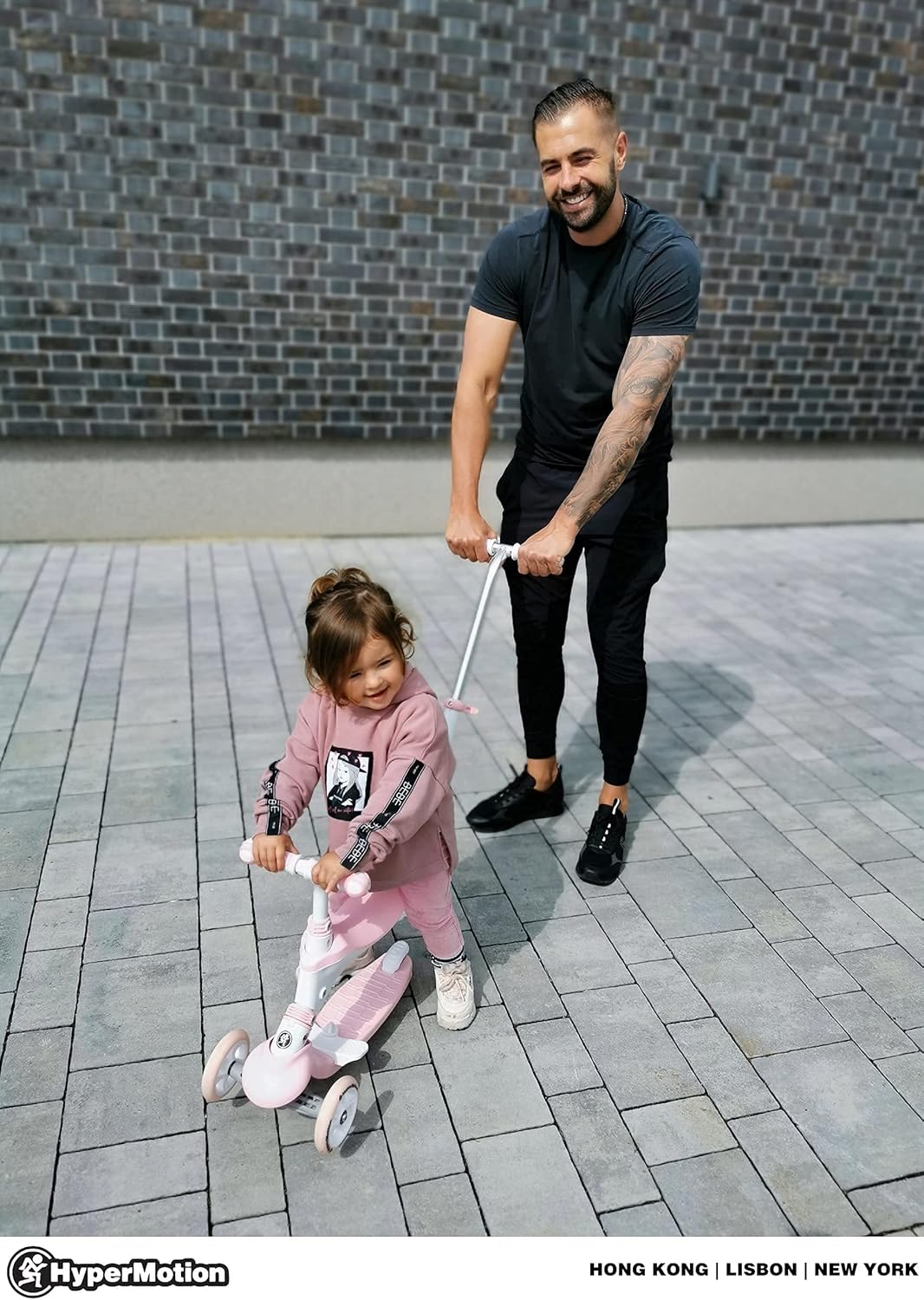
Image: An adult guiding a child on the scooter tricycle using the push handle.
2. Scooter Mode (without seat)
- Child stands on the deck with one foot, using the other foot to push off the ground.
- Steering is performed by leaning the body, which causes the front wheels to turn. This mechanism helps develop balance and coordination.
- To stop, press down on the rear foot brake located above the rear wheel.

Image: A child enjoying the scooter in its standing mode, demonstrating the lean-to-steer mechanism.
Penyelenggaraan
- Pembersihan: Lap produk dengan iklanamp kain dan sabun lembut. Jangan gunakan pembersih atau pelarut yang melelas.
- Storan: Simpan skuter di tempat yang kering, jauh daripada cahaya matahari langsung dan suhu yang melampau, untuk mengelakkan degradasi bahan.
- Pemeriksaan Roda: Regularly check the rubber wheels for damage, cracks, or excessive wear. Ensure they spin freely.
- Pemeriksaan Brek: Verify that the rear foot brake functions effectively.
- Pemeriksaan Pengikat: Periodically inspect all screws, bolts, and locking mechanisms to ensure they are tight and secure.
Menyelesaikan masalah
| Masalah | Kemungkinan Punca | Penyelesaian |
|---|---|---|
| Wheels do not turn smoothly or are stiff. | Dirt or debris in bearings; worn wheels. | Clean wheels and bearings. If worn, consider replacing wheels. |
| Stereng sukar atau tidak responsif. | Handlebar not fully engaged; steering mechanism obstructed. | Ensure handlebar is securely locked. Check for any obstructions around the steering column. |
| Brek tidak berkesan. | Brake pad worn; debris under brake. | Inspect brake pad for wear. Clean any debris from the brake area. |
| Product feels unstable. | Sambungan longgar; perhimpunan yang salah. | Re-check all assembly steps and ensure all parts are securely fastened. |
Spesifikasi
- Jenama: HyperMotion
- Nama Model: Evolutive 50 Kg Max Modulable 5 en 1
- warna: Rose (Pink)
- Julat Umur: Child (1 to 5 years)
- Ciri Khas: Tempat duduk boleh tanggal
- Had Berat: 50 Kilogram (110 lbs)
- Bilangan Roda: 3
- Bahan Roda: Getah
- Bahan Bingkai: Keluli Aloi
- Berat Barang: 4.6 Kilogram (10.14 lbs)
- Handlebar Type: Boleh laras
- Jenis Brek: Brek Belakang
- Tinggi pemegang: Up to 90 Centimeters (35.4 inches)
- Saiz Roda: 12 Sentimeter (4.7 inci)
- Penggunaan yang Disyorkan: Outdoor play, physical skill development, entertainment
- Negara Asal: China
Waranti dan Sokongan
Waranti: This product comes with a 2-year limited warranty. Please retain your proof of purchase for warranty claims.
Ketersediaan Alat Ganti: Spare parts are available for 1 year from the date of purchase.
Pengeluar: HyperMotion
Untuk Sokongan: For any questions, technical assistance, or warranty claims, please contact HyperMotion directly through their official channels or the retailer where the product was purchased. You can visit the HyperMotion Brand Store untuk maklumat lanjut.