
1. Produk Lebihview
The Bewinner 2X2 Video Wall Controller is a high-performance device designed to split a single HDMI high-definition image into four distinct blocks, distributing them across four video display units. This allows for the creation of a large, dynamic image screen, ideal for various applications such as digital signage, home theaters, and control rooms. It supports 1 HDMI input and 4 HDMI outputs, delivering a resolution of up to 1920 x 1080P@60Hz.

Image: The Bewinner 2x2 Video Wall Controller shown with an example of a single image split across four displays.
2. Ciri-ciri Utama
- Large Screen Splicing: Supports 1 HDMI input and 4 HDMI outputs to divide a complete HDMI high-definition image into 4 blocks for display on multiple units, creating a large dynamic image screen.
- 1080P HD Output: Supports HDMI1.3 input and 4 HDMI outputs with a maximum resolution of 1920 x 1080P@60Hz. Compatible with 1920 x 1080P 24/30/50/60Hz and below input resolutions.
- Variety of Splicing Methods: Offers flexible splicing options including 2x1, 3x1, 4x1, 1x2, 1x3, 1x4, and 2x2 configurations. Note: Image rotation for vertical display is not supported; use a vertically oriented source.
- Prestasi Teguh: Constructed from metal for anti-interference and durability, featuring dense heat dissipation holes for improved performance and longevity. Powered by a stable 12V supply.
- Operasi mudah: Plug and play functionality with convenient control via the device's buttons or the included remote control.

Image: Visual representation of the controller's key features, such as 1080P HD support and plug-and-play functionality.
3. Kandungan Pakej
Sila sahkan bahawa semua item ada dan dalam keadaan baik semasa membuka bungkusan:
- Bewinner 2X2 Video Wall Controller Unit
- Alat Kawalan Jauh (memerlukan 2x bateri AAA, tidak termasuk)
- Penyesuai Kuasa 12V
- Manual Pengguna (dokumen ini)

Image: The main components included in the package: the video wall controller, its remote, and the power adapter.
4. Arahan Persediaan
- Sambungkan Sumber Input: Connect your HDMI input source (e.g., computer, media player) to the "HDMI INPUT" port on the video wall controller using a high-quality HDMI cable.
- Sambungkan Paparan: Connect your four HDMI display units (e.g., TVs, monitors) to the four "HDMI OUTPUT" ports on the controller using HDMI cables. Ensure each display is powered on.
- Sambungkan Kuasa: Plug the 12V power adapter into the "DC/12V" port on the controller, then connect the adapter to a power outlet. Penting: Ensure the 12V power adapter is connected to prevent voltage instability and potential screen flickering issues.
- Hidupkan kuasa: The controller will power on automatically once connected to power.
- Konfigurasi Awal: Use the "MODE" button on the controller or the remote control to select the desired splicing mode (e.g., 2x2, 1x4). Refer to the "Operating Instructions" section for more details on mode selection.

Image: The rear panel of the controller, highlighting the HDMI input, four HDMI output ports, and the DC 12V power connection.
5. Arahan Operasi
5.1. Kawalan Panel Hadapan
- IR: Penerima inframerah untuk alat kawalan jauh.
- Dipimpin: Power/Status indicator light.
- Audio: Button to cycle through audio modes or settings.
- Mod: Button to cycle through different splicing modes (e.g., 2x2, 1x4).
- Butang Kuasa: Untuk menghidupkan atau mematikan peranti.
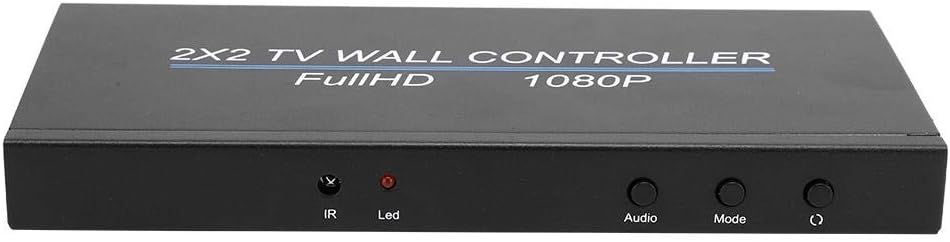
Image: The front panel of the controller, displaying the IR receiver, LED indicator, and control buttons.
5.2. Operasi Alat Kawalan Jauh
The included remote control provides convenient access to all functions. Ensure 2x AAA batteries are installed correctly before use.
- Kuasa: Menghidupkan / mematikan unit.
- Audio: Melaraskan tetapan audio.
- Mode Buttons (e.g., 2X2, 1X4, 3X1): Directly select desired splicing configurations.
- ATTR+/- and VAL+/-: Used for fine-tuning image attributes and values (e.g., brightness, contrast).
- Tetapkan semula: Menetapkan semula tetapan kepada lalai.

Image: A hand demonstrating the use of the remote control, highlighting its various buttons for mode selection and adjustments.
5.3. Splicing Modes
The controller supports various display configurations:
| Mod | Penerangan | Example Use Case |
|---|---|---|
| 2x2 | Splits the image into 4 equal parts, displayed on a 2x2 grid of screens. | Standard video wall, home theater. |
| 2x1 | Splits the image across 2 screens horizontally. | Extended desktop, narrow display. |
| 3x1 | Splits the image across 3 screens horizontally. | Panoramic display, information board. |
| 4x1 | Splits the image across 4 screens horizontally. | Ultra-wide display, digital signage. |
| 1x2 | Splits the image across 2 screens vertically. | Vertical signage, portrait mode content. |
| 1x3 | Splits the image across 3 screens vertically. | Tall information displays. |
| 1x4 | Splits the image across 4 screens vertically. | Full-height digital posters. |
To select a mode, press the corresponding button on the remote control or cycle through modes using the "Mode" button on the front panel. Nota: This device does not support image rotation. For vertical displays (1x2, 1x3, 1x4), ensure your input source provides content already oriented for portrait mode.

Image: Illustrations of different video wall configurations supported by the controller, such as horizontal and vertical multi-screen setups.
6. Penyelesaian masalah
| Masalah | Kemungkinan Punca | Penyelesaian |
|---|---|---|
| No signal on displays / Black screen | Loose HDMI cables, incorrect input selection, power issue. |
|
| Skrin berkelip atau imej tidak stabil | Insufficient power, faulty cable, incompatible resolution. |
|
| Alat kawalan jauh tidak berfungsi | Dead batteries, IR sensor blocked, remote malfunction. |
|
| Incorrect splicing mode / Image distortion | Wrong mode selected, input resolution mismatch. |
|
| Blue tint or incorrect colors | Cable issue, display settings, unit malfunction. |
|
7. Spesifikasi
| Ciri | Perincian |
|---|---|
| Jenama | Pemenang1 |
| Nombor Model | Bewinneryhxuge6g5c-11 |
| Port Input | 1 x HDMI 1.3 |
| Port Output | 4 x HDMI |
| Sokongan Resolusi Input | 1920 x 1080P @ 24/30/50/60Hz and below |
| Sokongan Resolusi Output | 1920 x 1080P @ 60Hz |
| Supported Splicing Modes | 2x1, 3x1, 4x1, 1x2, 1x3, 1x4, 2x2 |
| Bekalan Kuasa | DC 12V |
| bahan | logam |
| Berat Barang | 1.58 paun (lebih kurang 0.72 kg) |
8. Penyelenggaraan
To ensure the longevity and optimal performance of your Bewinner Video Wall Controller, please follow these maintenance guidelines:
- Pembersihan: Use a soft, dry cloth to clean the exterior of the device. Do not use liquid cleaners or aerosol sprays, as they may damage the unit.
- Pengudaraan: Ensure the device is placed in a well-ventilated area. Do not block the heat dissipation holes on the sides of the unit.
- Persekitaran: Elakkan mendedahkan peranti kepada suhu, kelembapan, habuk atau cahaya matahari langsung yang melampau.
- Kuasa: Always use the provided 12V power adapter. Disconnect power during electrical storms or when the unit will be unused for extended periods.
9. Waranti dan Sokongan
Bewinner is committed to providing quality products and excellent customer service. If you encounter any issues or have questions regarding your Bewinner LED Video Wall Controller, please contact our professional customer service team.
For support, please refer to the contact information provided with your purchase or visit the official Bewinner website. Our team is available to assist you with troubleshooting and any other product-related inquiries.
We strive to resolve any problems promptly and ensure a satisfactory experience.