
1. Pengenalan
This manual provides essential information for the safe and efficient operation of your Smart Tech 55UA10V3 55-inch 4K Smart TV. Please read these instructions thoroughly before using the television and retain them for future reference. This television features a 55-inch 4K display, integrated Wi-Fi, LAN connectivity, and DVB-T2/S2/C tuners for a comprehensive entertainment experience.
2. Maklumat Keselamatan
- Bekalan Kuasa: Pastikan TV disambungkan kepada bekalan kuasa dalam volum yang ditentukantagjulat e. Jangan bebankan soket kuasa secara berlebihan.
- Pengudaraan: Jangan sekat bukaan pengudaraan. Benarkan ruang yang mencukupi di sekeliling TV untuk aliran udara yang betul untuk mengelakkan terlalu panas.
- Air dan Kelembapan: Jangan dedahkan TV kepada hujan atau lembapan. Jangan letakkan objek yang diisi dengan cecair, seperti pasu, di TV.
- Pembersihan: Cabut plag TV sebelum membersihkan. Gunakan kain lembut dan kering. Jangan gunakan pembersih cecair atau pembersih aerosol.
- penempatan: Letakkan TV pada permukaan yang stabil dan rata. Elakkan meletakkannya di bawah cahaya matahari langsung atau berhampiran sumber haba.
- Servis: Jangan cuba servis TV sendiri. Rujuk semua servis kepada kakitangan perkhidmatan yang berkelayakan.
3. Kandungan Pakej
Please check that the following items are included in your TV package:
- Smart Tech 55UA10V3 55-inch 4K Smart TV
- Alat Kawalan Jauh
- Stand TV (jika berkenaan)
- Kabel Kuasa
- Manual Pengguna (dokumen ini)

Imej 1: Depan view of the Smart Tech 55UA10V3 TV, showing its dimensions and the included remote control. The screen displays a smart TV interface with various app icons.
4. Persediaan
4.1. Installing the TV Stand or Wall Mounting
Carefully place the TV face down on a soft, flat surface. Attach the stand according to the instructions provided with the stand components. Ensure all screws are securely fastened. If wall mounting, follow the instructions of your wall mount bracket and ensure it is suitable for the TV's weight and VESA pattern.
4.2. Menyambung Peranti Luaran
Connect your external devices (e.g., cable box, Blu-ray player, game console) to the appropriate ports on the TV. The TV features:
- 3 HDMI Ports: Untuk audio dan video definisi tinggi.
- 2 Port USB: Untuk main balik media daripada pemacu USB.
- 1 Port VGA: Untuk sambungan PC.
- Port LAN: Untuk sambungan internet berwayar.
- Input Antena: For DVB-T2/S2/C signals.
- Slot Antara Muka Biasa (CI): For conditional access modules.
- Audio Digital Keluar: Untuk menyambung ke sistem audio luaran.
- Output Fon Kepala 3.5mm: Untuk mendengar secara peribadi.
4.3. Hidupkan Kuasa dan Persediaan Awal
- Sambungkan kabel kuasa ke TV dan kemudian ke saluran keluar dinding.
- Tekan butang kuasa pada alat kawalan jauh atau pada TV.
- Follow the on-screen instructions to complete the initial setup, including language selection, network connection (Wi-Fi or LAN), and channel scanning for DVB-T2/S2/C signals.
5. Beroperasi
5.1. Fungsi Alat Kawalan Jauh
Alat kawalan jauh membolehkan anda menavigasi ciri-ciri TV. Butang biasa termasuk:
- Kuasa: Menghidupkan atau mematikan TV.
- Sumber: Selects input source (HDMI, USB, TV).
- Jilid +/-: Melaraskan kelantangan.
- Saluran +/-: Menukar saluran TV.
- Butang Navigasi (Atas/Bawah/Kiri/Kanan) & OK: Untuk navigasi dan pemilihan menu.
- Belakang/Keluar: Kembali ke skrin sebelumnya atau keluar dari menu.
- TV Pintar/Rumah: Mengakses antara muka TV Pintar.
5.2. Ciri TV Pintar
Your Smart Tech TV offers a range of smart features:
- Kesambungan Internet: Connect to the internet via integrated Wi-Fi or the LAN port to access online content.
- Permohonan: Access pre-installed applications and download more from the app store (if available).
- Web pelayar: Semak imbas internet terus pada TV anda.
- Google Home Compatibility: Integrate your TV with Google Home for voice control (requires compatible Google Home device).
5.3. DVB-T2/S2/C Tuner Operation
The TV includes integrated tuners for digital terrestrial (DVB-T2), satellite (DVB-S2), and cable (DVB-C) broadcasts. After initial channel scanning, you can switch between these sources using the 'Source' button on your remote control.
5.4. HDR Functionality
This TV supports HDR (High Dynamic Range), providing enhanced contrast and a wider range of colors for compatible content. Ensure your content source and settings are configured for HDR to experience its full benefits.
6. Penyelenggaraan
- Pembersihan Skrin: Lap skrin perlahan-lahan dengan kain lembut yang tidak berbulu. Untuk tanda degil, sedikit dampbilas kain dengan air atau pembersih skrin khusus (sapukan pada kain, bukan terus pada skrin).
- Pembersihan Kabinet: Gunakan kain lembut dan kering untuk membersihkan kabinet TV.
- Berhabuk: Regularly dust the ventilation openings to prevent dust buildup.
- Kord Kuasa: Periodically check the power cord for any damage. If damaged, replace it with an approved cord.
7. Penyelesaian masalah
| Masalah | Kemungkinan Punca | Penyelesaian |
|---|---|---|
| Tiada kuasa | Power cord not connected; power outlet not working. | Pastikan kord kuasa dipasang dengan selamat. Uji alur keluar dengan peranti lain. |
| Tiada gambar, tetapi bunyi hadir | Sumber input yang salah dipilih; isu lampu latar. | Press the 'Source' button on the remote to select the correct input. |
| Tiada bunyi, tetapi ada gambar | Kelantangan diredam atau terlalu rendah; isu sistem audio luaran. | Nyahredamkan TV atau tingkatkan kelantangan. Semak sambungan ke peranti audio luaran. |
| Tidak dapat menyambung ke Wi-Fi | Incorrect password; router too far; router issue. | Verify Wi-Fi password. Move TV closer to router or use LAN cable. Restart router. |
| Alat kawalan jauh tidak berfungsi | Bateri berkurangan; halangan antara alat kawalan jauh dan TV. | Replace batteries. Remove any obstructions. |
8. Spesifikasi
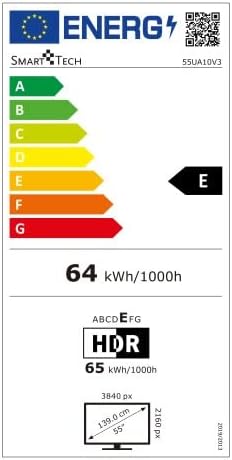
Imej 2: Energy efficiency label for the Smart Tech 55UA10V3 television, indicating an energy class of E and a power consumption of 64 kWh per 1000 hours for standard dynamic range content, and 65 kWh per 1000 hours for HDR content.
- Jenama: Smart Tech
- Nombor Model: 55UA10V3
- Saiz Paparan: 55 inci
- Resolusi: 4K (3840x2160)
- Teknologi Paparan: LED (Full LED/Direct LED)
- HDR Function: ya
- Penala TV: DVB-T2, DVB-S2, DVB-C
- Wi-Fi: Bersepadu
- LAN: ya
- Port HDMI: 3
- Port USB: 2
- Port VGA: 1
- Output Fon Kepala (3.5mm): 1
- Output Audio Digital: 1
- Common Interface (CI): ya
- Bluetooth: Tidak
- Kuasa Output Audio: 16 W (2 pembesar suara)
- Mod Audio: Keliling
- Keserasian Rumah Pintar: Laman Utama Google
- Dimensions with Stand (W x H x D): 122.85 cm x 75.13 cm x 27.2 cm
- Dimensions without Stand (W x H x D): 122.85 cm x 71.07 cm x 7.68 cm
- Berat produk: 10.6 kg
9. Waranti dan Sokongan
Information regarding product warranty and specific support contacts is not available in the provided product details. Please refer to the warranty card included with your product or contact your retailer for details on warranty coverage and technical support.