
1. Pengenalan
The Axxess AXDIS-FD1 Data Interface is designed to integrate an aftermarket radio into select Ford, Lincoln, Mazda, and Mercury vehicles from 2007 and up. This interface provides essential features such as accessory power, retention of Retained Accessory Power (R.A.P.), and outputs for navigation functions (parking brake, reverse, speed sense). It also facilitates the retention of factory steering wheel controls (SWC) and rear seat entertainment systems where applicable.
This manual provides detailed instructions for the proper installation and operation of your AXDIS-FD1 Data Interface. Please read it thoroughly before beginning the installation process.
2. Produk Lebihview dan Ciri
The AXDIS-FD1 Data Interface offers the following functionalities:
- Provides a 12-volt 10-amp accessory power output.
- Retains Retained Accessory Power (R.A.P.) functionality.
- Offers navigation outputs: parking brake, reverse, and speed sense.
- Retains factory steering wheel controls (SWC).
- Retains factory rear seat entertainment (RSE) where equipped.
- Compatible with both non-ampdilantik dan amplified factory systems, including Sony/THX systems.
- Supports a wide range of Ford, Lincoln, Mazda, and Mercury vehicles from 2007 and newer.
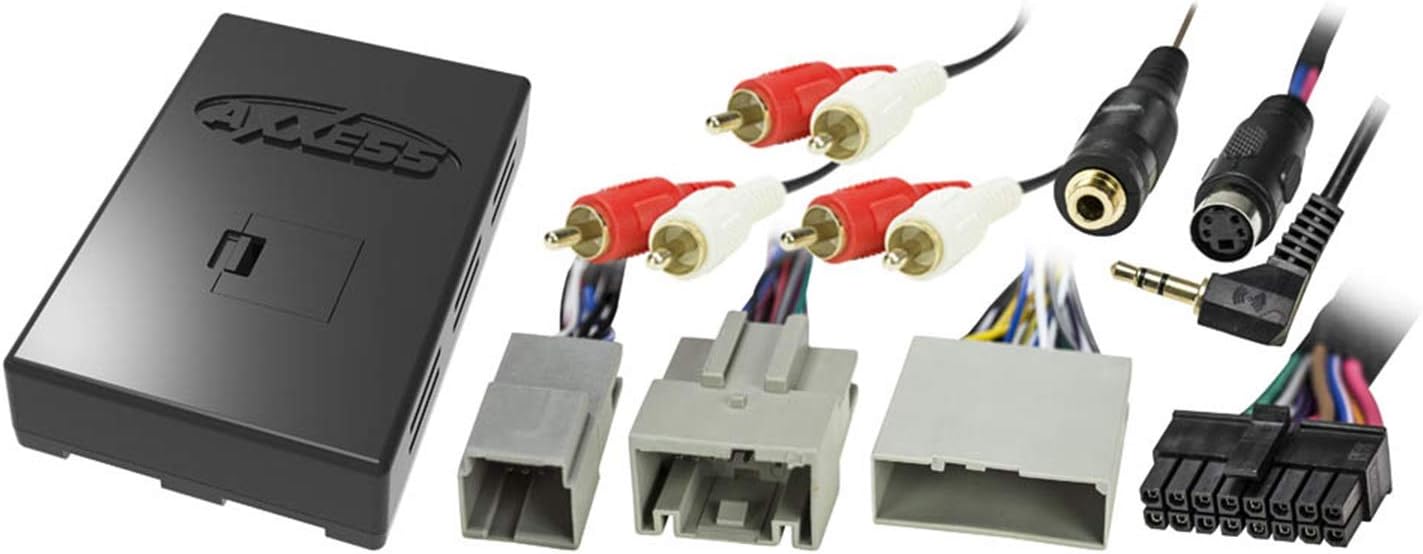
Image 1: The Axxess AXDIS-FD1 Data Interface module shown alongside its accompanying wiring harnesses, including RCA connectors, vehicle-specific connectors, and a 3.5mm jack/mini-DIN connector for steering wheel control integration.
3. Apa yang ada di dalam Kotak
Upon opening the product packaging, verify that the following items are included:
- Axxess AXDIS-FD1 Data Interface Module
- Vehicle-specific wiring harnesses
- Manual Arahan (dokumen ini)
4. Persediaan dan Pemasangan
Professional installation is recommended. Before beginning, ensure the vehicle's battery is disconnected to prevent electrical damage. Refer to your aftermarket radio's installation manual for specific wiring instructions.
4.1 Sambungan Pendawaian
Match the wires from the AXDIS-FD1 harness to the corresponding wires on your aftermarket radio's harness. Solder all connections and insulate them with heat shrink tubing or electrical tape for reliability.
- Red (Accessory 12V+): Connect to the aftermarket radio's accessory wire.
- Yellow (Constant 12V+): Connect to the aftermarket radio's constant power wire.
- Hitam (Ground): Connect to the aftermarket radio's ground wire.
- Orange/White (Illumination): Connect to the aftermarket radio's illumination wire (if applicable).
- Speaker Wires (Green, Green/Black, Purple, Purple/Black, White, White/Black, Gray, Gray/Black): Connect to the corresponding speaker wires of the aftermarket radio.
- Blue/White (Amplifier Turn-On): Connect to the aftermarket radio's amplifier turn-on wire (if using an external amplifier or retaining factory amplified system).
- Light Green (Parking Brake): Connect to the aftermarket radio's parking brake input.
- Green/Purple (Reverse): Connect to the aftermarket radio's reverse gear input.
- Pink (Speed Sense): Connect to the aftermarket radio's speed sense input.
- 3.5mm Jack / Mini-DIN Connector: Connect to the aftermarket radio's steering wheel control input. Refer to your radio's manual for specific connection type.
4.2 Konfigurasi Modul
The AXDIS-FD1 module typically auto-detects the vehicle and radio type. However, some aftermarket radios may require specific programming steps for steering wheel controls. Consult the Axxess website or the included quick reference guide for any specific dip switch settings or programming procedures for your vehicle and radio model.
4.3 Pengujian
After all connections are made and the module is configured, reconnect the vehicle's battery. Test all functions of the aftermarket radio, including:
- Accessory power (radio turns on/off with ignition).
- Audio output from all speakers.
- Steering wheel control functionality (volume, track, mode).
- Navigation outputs (parking brake, reverse, speed sense) if connected to a navigation-equipped radio.
- Retained Accessory Power (R.A.P.) functionality.
- Rear seat entertainment (if applicable).
5. Arahan Operasi
Once installed, the Axxess AXDIS-FD1 Data Interface operates automatically, providing the necessary data conversions for your aftermarket radio to function seamlessly with your vehicle's factory systems.
- Steering Wheel Controls (SWC): The interface translates the vehicle's SWC signals into commands understood by your aftermarket radio. Functionality typically includes volume up/down, track up/down, and mode/source selection. Specific button assignments may vary based on the aftermarket radio and vehicle.
- Retained Accessory Power (R.A.P.): This feature allows the radio to remain on for a short period after the ignition is turned off, until a door is opened, mimicking the factory behavior.
- Output Navigasi: The parking brake, reverse, and speed sense outputs provide critical data to aftermarket navigation systems, enabling features like destination entry while parked, automatic camera switching, and accurate GPS tracking.
Refer to your aftermarket radio's user manual for detailed instructions on operating its features, as the AXDIS-FD1 primarily acts as an integration bridge.
6. Penyelesaian masalah
If you encounter issues after installation, review langkah penyelesaian masalah biasa berikut:
- No Power to Radio:
- Check all power and ground connections (Yellow, Red, Black wires).
- Verify vehicle fuses are intact.
- Ensure the AXDIS-FD1 module is properly connected to the vehicle's data bus.
- Tiada Bunyi daripada Pembesar Suara:
- Confirm all speaker wires are correctly connected and insulated.
- If using a factory amplified system, ensure the Blue/White ampWayar hidupkan lampu telah disambungkan.
- Check the aftermarket radio's fader/balance settings.
- Steering Wheel Controls Not Functioning or Malfunctioning:
- Verify the 3.5mm jack or Mini-DIN connector is securely plugged into the aftermarket radio's SWC input.
- Check the aftermarket radio's settings for SWC programming. Some radios require manual programming or a specific setting.
- Ensure the AXDIS-FD1 module's dip switches (if any) are set correctly for your specific radio and vehicle.
- If controls are erratic (e.g., volume button changes station), re-verify the SWC connection and programming. This can sometimes indicate a conflict in how the radio interprets the signals.
- Navigation Outputs (Parking Brake, Reverse, Speed Sense) Not Working:
- Confirm these wires are correctly connected to the aftermarket navigation radio's inputs.
- Check the navigation radio's settings to ensure these inputs are enabled and recognized.
If problems persist, contact Axxess technical support for further assistance.
7. Spesifikasi
| Nombor Model | AXDIS-FD1 |
| Dimensi Produk | 7.5 x 4 x 2.5 inci |
| Berat Barang | 12.8 auns |
| Output Kuasa Aksesori | 12-volt, 10-amp |
| Keserasian | Select Ford, Lincoln, Mazda, Mercury vehicles (2007 and up) |
8. Waranti dan Sokongan
For warranty information and technical support, please refer to the official Axxess webtapak atau hubungi bahagian perkhidmatan pelanggan mereka. Simpan resit pembelian anda sebagai bukti pembelian untuk sebarang tuntutan waranti.
Axxess is a brand of Metra Electronics Corp.