
1. Pengenalan
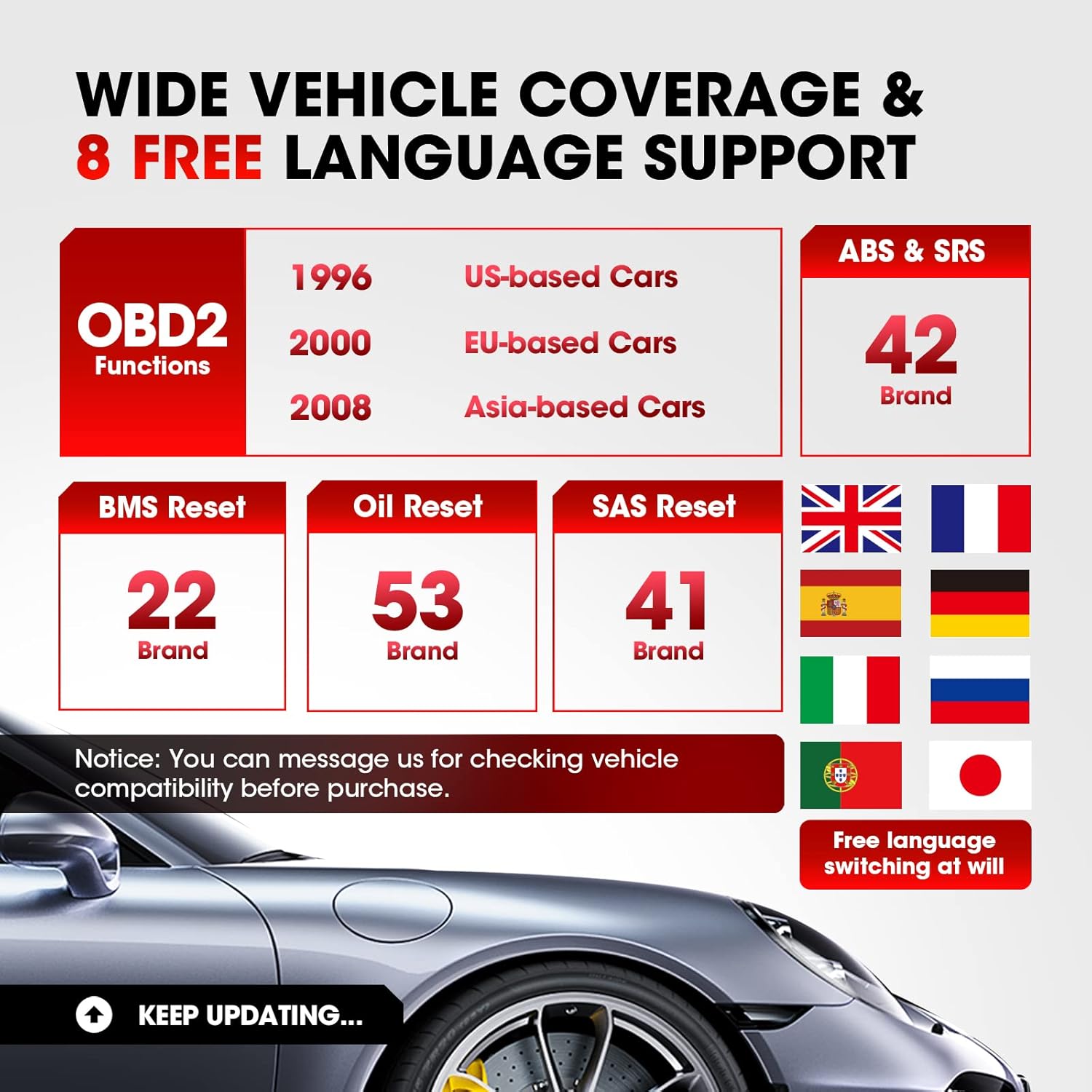
The LAUNCH CR629 is an advanced automotive diagnostic tool designed to assist in vehicle maintenance and troubleshooting. It provides comprehensive diagnostic functions for ABS (Anti-lock Braking System) and SRS (Supplemental Restraint System), including active tests, along with full OBD2 functions and three essential reset services: Oil Reset, Steering Angle Sensor (SAS) Reset, and Battery Management System (BMS) Reset. This manual provides detailed instructions for setting up, operating, and maintaining your CR629 device.
2. Maklumat Keselamatan
- Sentiasa lakukan ujian automotif di kawasan yang mempunyai pengudaraan yang baik.
- Wear safety eye protection and clothing that meets safety standards.
- Pastikan peranti kering dan bersih. Jangan dedahkannya kepada suhu atau kelembapan yang melampau.
- Elakkan sentuhan dengan bahagian enjin yang panas atau komponen yang bergerak.
- Do not connect or disconnect the device while the vehicle's ignition is on, unless instructed otherwise.
- Refer to the vehicle's service manual for specific service procedures and precautions.
3. Persediaan
3.1 Menyambung ke Kenderaan
- Cari Penyambung Pautan Data (DLC) 16-pin kenderaan. Ini biasanya terletak di bawah papan pemuka di sebelah pemandu.
- Pastikan penyalaan kenderaan dalam keadaan MATI.
- Plug the CR629's diagnostic cable into the vehicle's DLC. Ensure a secure connection.
- Turn the vehicle's ignition to the ON position (engine off). The CR629 will power on automatically.
3.2 Pemilihan Kuasa dan Bahasa Awal
Upon first use, the device may prompt you to select your preferred language. Use the navigation buttons to select your language and press the 'OK' button to confirm.
3.3 Software Update Process
It is recommended to update the device software regularly to ensure compatibility with the latest vehicle models and diagnostic functions. The CR629 offers lifetime free updates.
- Download and install the update tool on your PC from the official LAUNCH webtapak.
- Connect the CR629 scanner to your PC using the provided USB cable.
- Follow the on-screen instructions on the update tool to register your scanner and download the latest software package.
- Copy the update package to the memory card (if applicable) or directly to the device as prompted.
- Disconnect the device safely from the PC and restart it to complete the update.
4. Arahan Operasi
4.1 ABS & SRS Diagnostics with Active Test
The CR629 can diagnose issues within the Anti-lock Braking System (ABS) and Supplemental Restraint System (SRS), including performing active tests to pinpoint problems.
- Baca/Kosongkan DTC: Access the 'Scan' menu, select 'ABS/SRS', then choose 'Read Codes' to view diagnostic trouble codes or 'Erase Codes' to clear them.
- View Strim Data Langsung: From the 'Scan' menu, select 'ABS/SRS', then 'Data Stream' to view real-time sensor data in graphical or text format.
- Perform Active Test: Within the 'ABS/SRS' menu, select 'Active Test' to command specific components on and off, verifying their functionality. Note: Active tests are supported for 20 car brands.

4.2 3 Reset Services
The CR629 offers three common reset functions to assist with routine maintenance tasks.
- Set Semula Minyak: Resets the oil life monitoring system after an oil change. Navigate to 'Service' > 'Oil Reset' and follow the prompts.
- Tetapan Semula SAS (Sensor Sudut Stereng): Calibrates the steering angle sensor after suspension or steering component replacement. Access 'Service' > 'SAS Reset' and follow the instructions.
- Tetapan Semula BMS (Sistem Pengurusan Bateri): Re-matches the battery control module and monitoring sensor after battery replacement. Select 'Service' > 'BMS Reset' and proceed as guided.

4.3 Fungsi OBD2 Penuh
The device supports all 10 modes of OBD2 tests for most post-1996 OBD2/CAN compliant vehicles.
- Baca Kod: Mendapatkan kod generik (P0, P2, P3 dan U0) dan kod khusus pengilang (P1, P3 dan U1).
- Padamkan Kod: Clears Diagnostic Trouble Codes (DTCs) and resets monitors.
- Kesediaan Saya / M: Memeriksa kesediaan sistem pemantauan pelepasan.
- Aliran Data: Displays live data from the vehicle's sensors.
- Bingkai pegun: Menunjukkan syot kilat keadaan operasi pada masa kerosakan berkaitan pelepasan.
- Ujian Sensor O2: Mendapatkan semula keputusan ujian monitor sensor O2.
- Pemantauan Atas Kapal: Mendapatkan keputusan ujian untuk komponen dan sistem powertrain berkaitan emisi.
- Ujian Komponen: Membolehkan pengujian komponen atau sistem tertentu.
- Maklumat Kenderaan: Mendapatkan nombor pengenalan kenderaan (VIN), ID penentukuran (CALID) dan nombor pengesahan penentukuran (CVN).
4.4 Ciri Mesra Pengguna
- 3.5-inch LCD Color Display: Provides clear and easy-to-read diagnostic information.
- Hotkeys (F1/F2/F3): Quick access to frequently used functions directly from the main menu.
- Carian DTC: Built-in library to quickly identify the meaning of diagnostic trouble codes without needing external resources.
- PC Printing: Allows printing of diagnostic reports by connecting the device to a PC.
- Review Data: Access historical DTCs, data streams, and freeze frame data for later analysis.


5. Penyelenggaraan
5.1 Membersihkan Peranti
To maintain the device's performance and appearance, clean it regularly with a soft, damp kain. Jangan gunakan pembersih atau pelarut yang melelas.
5.2 Kemas Kini Perisian
Regular software updates ensure your CR629 remains compatible with the latest vehicle models and diagnostic protocols. Refer to section 3.3 for detailed update instructions. Updates are free for the lifetime of the product.
6. Penyelesaian masalah
If you encounter issues with your LAUNCH CR629, refer to the following common problems and solutions:
- Peranti tidak dihidupkan: Ensure the diagnostic cable is securely connected to the vehicle's DLC and the vehicle's ignition is ON. Check the vehicle's battery voltage.
- Masalah komunikasi: Verify the vehicle is OBD2 compliant. Check for loose connections. Turn the ignition off and then on again. Try the device on another vehicle to rule out a vehicle-specific issue.
- No fault codes found: If the Check Engine Light (MIL) is not illuminated, there may be no current fault codes. Check I/M Readiness status for pending codes.
- Isu kemas kini: Ensure a stable internet connection and follow the update instructions precisely. Contact customer support if problems persist.
7. Spesifikasi
| Ciri | Perincian |
|---|---|
| Jenama | PELANCARAN |
| Nombor Model | CR629 |
| Sumber Kuasa | Battery Powered (via OBD2 port) |
| Dimensi Produk | 4.49"L x 1.36"W x 8.46"H |
| Saiz Skrin | 3.5 Inci |
| Resolusi Asli | 320 x 480 |
| Sistem Operasi | Windows 7 (for PC connection/updates) |
| Bahasa yang Disokong | English, French, German, Spanish, Portuguese, Russian, Japanese, Italian |
8. Waranti dan Sokongan
The LAUNCH CR629 comes with a 5-year warranty from the manufacturer. For any technical assistance, warranty claims, or product inquiries, please contact LAUNCH customer service.
- Telefon Perkhidmatan Pelanggan: 1-888-756-2936 (Mon-Fri 9:00 AM–6:00 PM EST)
- E-mel Perkhidmatan Pelanggan: launch-aftersales@outlook.com
- Return & Replacement Policy: Tersedia dalam tempoh 60 hari dari tarikh pembelian.