
1. Pengenalan
Terima kasih kerana membeliasing the WSTER WS-201BT Bluetooth Speaker. This manual provides important information regarding the setup, operation, and maintenance of your device. Please read it thoroughly before use and retain it for future reference.
Kandungan Pakej
- WSTER WS-201BT Bluetooth Speaker
- Kabel Pengecasan
- Manual Pengguna
2. Maklumat Keselamatan
- Jangan dedahkan pembesar suara kepada suhu yang melampau, cahaya matahari langsung atau kelembapan yang tinggi.
- Elakkan daripada menjatuhkan atau menundukkan pembesar suara kepada impak yang kuat.
- Do not disassemble or attempt to repair the speaker yourself. Contact qualified service personnel.
- Keep the speaker away from water and other liquids. This product is not water-resistant.
- Gunakan hanya kabel pengecasan yang disediakan atau setara yang diperakui.
3. Produk Lebihview
The WSTER WS-201BT is a compact, square-shaped portable Bluetooth speaker designed for wireless audio playback. It features intuitive controls and multiple connectivity options.
Rajah 1: Depan view of the WSTER WS-201BT Bluetooth Speaker, showing the speaker grille and control buttons (MODE, Volume Down, Volume Up, Play/Pause).
Control Buttons and Ports
- Butang MOD: Switches between available input modes (e.g., Bluetooth, USB).
- VOL- / Previous Track: Tekan pendek untuk mengurangkan kelantangan, tekan lama untuk pergi ke trek sebelumnya.
- VOL+ / Next Track: Tekan pendek untuk meningkatkan kelantangan, tekan lama untuk pergi ke trek seterusnya.
- Butang Main/Jeda: Plays or pauses audio playback. Also used for answering/ending calls in Bluetooth mode.
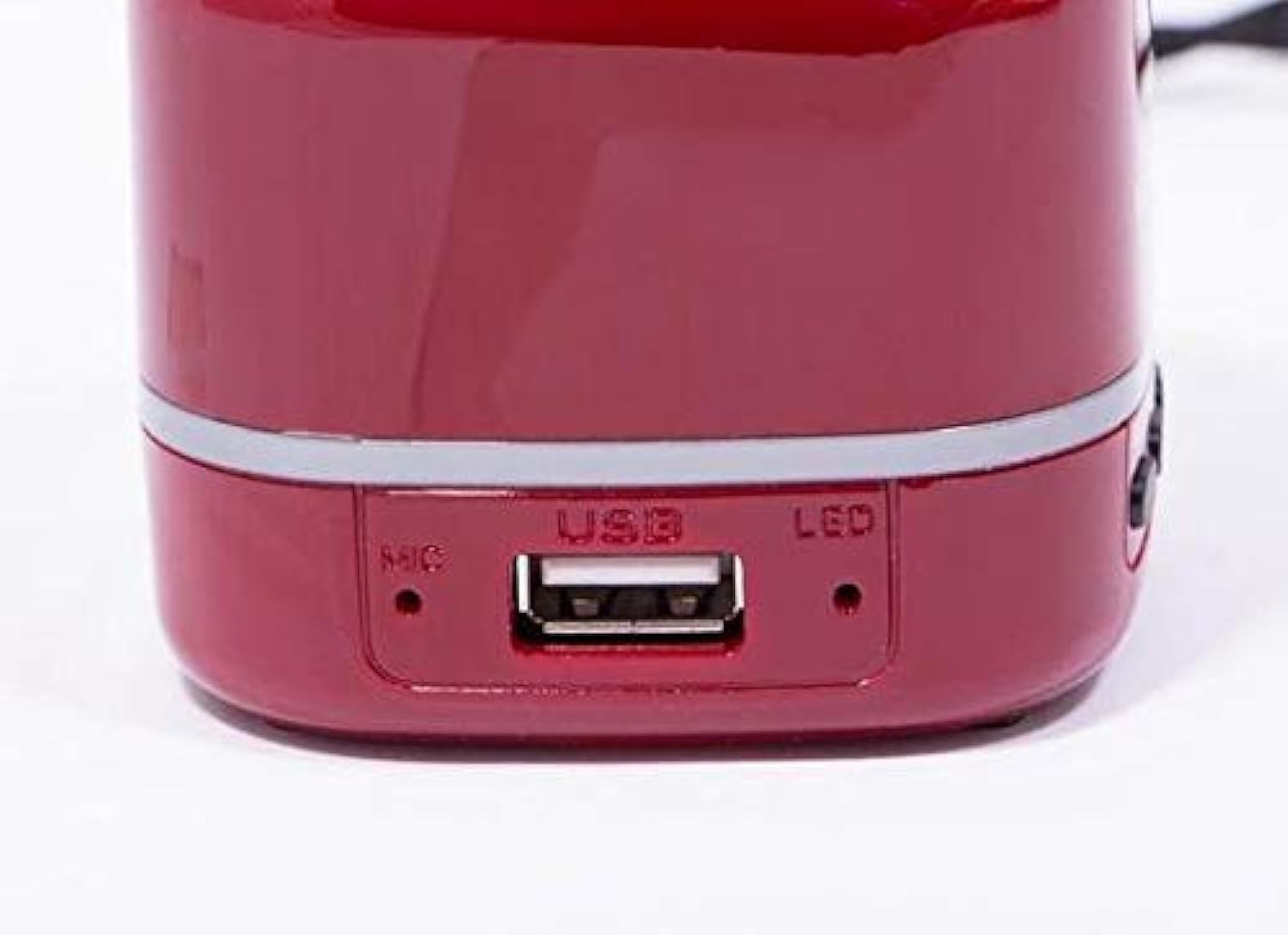
- Port USB: For connecting USB flash drives for audio playback or for charging the device.
- MIC: Mikrofon terbina dalam untuk panggilan bebas tangan.
- Penunjuk LED: Shows charging status and Bluetooth connection status.

Rajah 2: Sisi view of the WSTER WS-201BT Bluetooth Speaker, highlighting the USB port, microphone (MIC), and LED indicator.
4. Persediaan
4.1 Mengecas Speaker
- Connect the charging cable to the USB port on the speaker.
- Sambungkan hujung kabel pengecas yang satu lagi ke penyesuai kuasa USB (tidak disertakan) atau port USB komputer.
- Penunjuk LED akan menyala semasa pengecasan dan padam atau bertukar warna apabila dicas sepenuhnya.
4.2 Menghidupkan/Mematikan
- To power on, press and hold the Power button (often integrated with the Play/Pause button or a separate switch, refer to device for exact location) until the LED indicator lights up.
- Untuk mematikan kuasa, tekan dan tahan butang Kuasa sekali lagi sehingga penunjuk LED padam.
5. Arahan Operasi
5.1 Berpasangan Bluetooth
- Ensure the speaker is powered on and in Bluetooth mode. The LED indicator will typically flash rapidly, indicating it is ready for pairing.
- Pada peranti mudah alih anda (telefon pintar, tablet, komputer riba), dayakan Bluetooth dan cari peranti yang tersedia.
- Pilih "WS-201BT" daripada senarai peranti yang ditemui.
- Setelah dipasangkan, pembesar suara akan mengeluarkan bunyi pengesahan dan penunjuk LED akan berhenti berkelip dan kekal kukuh.
5.2 Penukaran Mod
Tekan ke MODE button repeatedly to cycle through available input modes:
- Mod Bluetooth: For wireless audio streaming from paired devices.
- Mod USB: Untuk memainkan audio files directly from a USB flash drive inserted into the USB port.
5.3 Kawalan Main Semula
- Main/Jeda: Tekan butang Main/Jeda untuk memainkan atau menjeda trek semasa.
- Pelarasan Kelantangan: Tekan pendek VOL+ untuk meningkatkan kelantangan, tekan pendek vol- untuk mengurangkan volum.
- Navigasi Trek: Tekan lama VOL+ to skip to the next track, long press vol- untuk pergi ke trek sebelumnya.
6. Penyelenggaraan
- Bersihkan pembesar suara dengan kain lembut dan kering. Jangan gunakan pembersih atau pelarut yang melelas.
- Simpan pembesar suara di tempat yang sejuk dan kering apabila tidak digunakan.
- Elakkan daripada menyekat gril pembesar suara untuk memastikan kualiti bunyi yang optimum.
7. Penyelesaian masalah
| Masalah | Kemungkinan Punca | Penyelesaian |
|---|---|---|
| Speaker tidak dihidupkan. | Bateri habis. | Cas pembesar suara sepenuhnya. |
| Tiada bunyi. | Volume is too low or muted. Device not paired. Incorrect mode selected. | Increase volume. Ensure device is paired. Switch to correct input mode. |
| Tidak boleh berpasangan melalui Bluetooth. | Speaker not in pairing mode. Device too far. Bluetooth disabled on source. | Ensure speaker is in pairing mode. Move device closer. Enable Bluetooth on source device. |
| Kualiti bunyi yang buruk. | Low battery. Obstructions. Source audio quality. | Charge speaker. Remove obstructions. Try different audio source. |
8. Spesifikasi
| Ciri | Spesifikasi |
|---|---|
| Jenama | WSTER |
| Nama Model | WS-201BT |
| warna | merah |
| Jenis Pembesar Suara | Pembesar Suara Bluetooth |
| Bilangan Speaker | 1 |
| Teknologi Ketersambungan | Wireless (Bluetooth) / Wired (USB) |
| Teknologi Komunikasi Tanpa Wayar | Bluetooth |
| Mod Keluaran Audio | Stereo |
| Konfigurasi Saluran Bunyi Sekeliling | 1.0 |
| Ciri Khas | Bluetooth, Wayarles |
| Kaedah Kawalan | Integrated Buttons (Remote control also listed in source data) |
| Sumber Kuasa | Elektrik Bertali (untuk mengecas) |
| Tahan Air | Tidak |
| Jenis Pemasangan | Atas meja |
| Berat Produk | Lebih kurang 22.3 gram |
| Dimensi Penghantaran | 6.38 x 3.66 x 2.52 cm; 0.42 kg (approx.) |
| Peranti Serasi | Tablet, Laptop, Smartphone |
| Penggunaan yang Disyorkan | Portable audio playback, compatible with various devices |
9. Waranti dan Sokongan
For warranty information and customer support, please refer to the documentation included with your product packaging or contact the retailer where you purchased the WSTER WS-201BT speaker. Keep your proof of purchase for warranty claims.