
pengenalan
This manual provides comprehensive instructions for the safe and efficient operation, maintenance, and troubleshooting of your CROWNFUL Automatic Bread Machine, Model FGen. Please read this manual thoroughly before first use and retain it for future reference.
Perlindungan Penting
Apabila menggunakan peralatan elektrik, langkah berjaga-jaga keselamatan asas hendaklah sentiasa diikuti untuk mengurangkan risiko kebakaran, renjatan elektrik dan kecederaan kepada orang, termasuk yang berikut:
- Baca semua arahan sebelum mengendalikan mesin roti.
- Jangan sentuh permukaan panas. Gunakan pemegang atau tombol.
- Untuk melindungi daripada renjatan elektrik, jangan rendam kord, palam, atau perkakas di dalam air atau cecair lain.
- Pengawasan rapi diperlukan apabila sebarang perkakas digunakan oleh atau berhampiran kanak-kanak.
- Cabut plag dari soket apabila tidak digunakan dan sebelum membersihkan. Biarkan sejuk sebelum memakai atau menanggalkan bahagian.
- Jangan kendalikan sebarang perkakas dengan kord atau palam yang rosak, atau selepas perkakas tidak berfungsi atau rosak dalam apa jua cara.
- Penggunaan lampiran aksesori yang tidak disyorkan oleh pengilang perkakas boleh menyebabkan kecederaan.
- Jangan gunakan di luar rumah.
- Jangan biarkan kord tergantung di tepi meja atau kaunter, atau menyentuh permukaan panas.
- Jangan letakkan pada atau berhampiran gas panas atau penunu elektrik, atau dalam ketuhar yang dipanaskan.
- Berhati-hati yang melampau mesti digunakan apabila menggerakkan perkakas yang mengandungi minyak panas atau cecair panas lain.
- Untuk memutuskan sambungan, matikan mana-mana kawalan kepada "mati", kemudian tanggalkan palam dari alur keluar dinding.
- Jangan gunakan perkakas untuk kegunaan selain daripada yang dimaksudkan.
- Elakkan sentuhan dengan bahagian yang bergerak.
- Do not place the bread machine against a wall or other appliances. Leave at least 10 cm free space on all sides.
- Do not cover the bread machine with a towel or other materials as heat and steam must be able to escape freely.
Produk Selesaiview dan Komponen
Familiarize yourself with the parts of your CROWNFUL Automatic Bread Machine.

Image: The CROWNFUL Automatic Bread Machine FGen, black with a silver top, shown alongside freshly sliced bread and strawberries.
Aksesori yang disertakan:

Image: A visual representation of the accessories included with the bread machine, such as the bread pan, bread hook, stirring rod, measuring spoon, measuring cup, user manual, and recipe book.
- Kuali Roti
- Bread Hook
- Stirring Rod (Kneading Paddle)
- Sudu Pengukur
- Cawan Pengukur
- Manual Pengguna (dokumen ini)
- Buku Resipi
Ciri-ciri Utama:
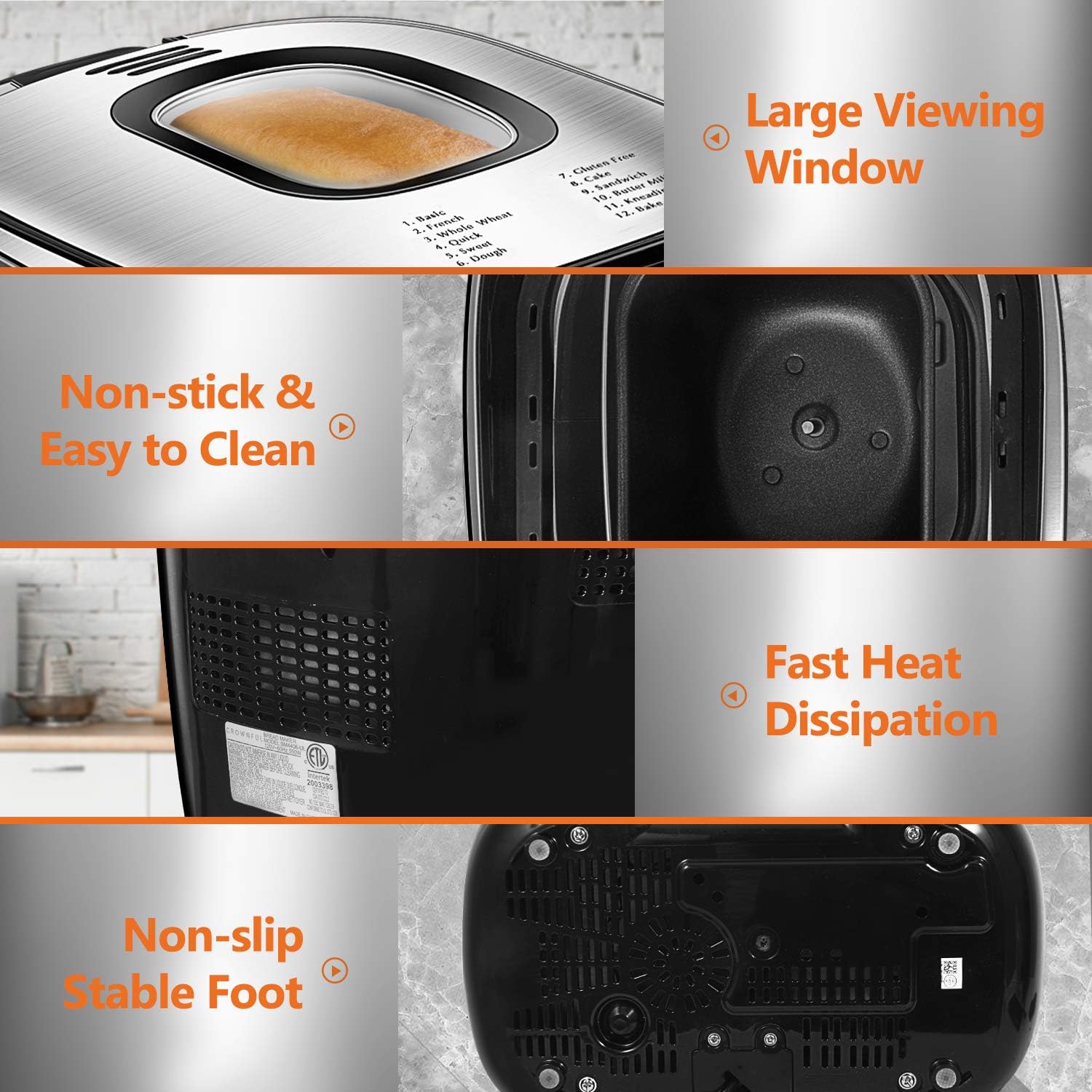
Imej: Terperinci views highlighting the bread machine's large viewing window, non-stick bread pan, fast heat dissipation vents, and non-slip feet for stability.
- Large Transparent ViewTetingkap
- Non-stick Bread Pan for easy cleaning
- Fast Heat Dissipation System
- Non-slip Stable Feet
- LCD Digital Control Panel
Before First Use (Setup)
- Membongkar: Carefully remove the bread machine and all accessories from the packaging.
- Pembersihan: Wash the bread pan and kneading paddle with warm, soapy water. Rinse thoroughly and dry all parts. Wipe the exterior of the appliance with a damp kain. Jangan rendam unit utama dalam air.
- penempatan: Place the bread machine on a stable, flat, heat-resistant surface, ensuring adequate ventilation around the unit. Keep it away from walls or other appliances (at least 10 cm clearance).
- Kitaran Pembakaran Awal (Pilihan): To eliminate any manufacturing odors, you may run a short "Bake" cycle (Program 12) without ingredients. Ensure the area is well-ventilated.
Arahan Operasi
Langkah Operasi Asas:

Image: A visual guide showing the three main steps: adding ingredients to the bread pan, selecting a program on the control panel, and the final baked bread.
- Masukkan Pengayuh Uli: Place the kneading paddle onto the shaft inside the bread pan.
- Tambah Bahan: Masukkan bahan-bahan ke dalam loyang roti mengikut susunan yang dinyatakan dalam resipi anda (biasanya bahan cecair dahulu, kemudian bahan kering, dan terakhir sekali yis). Pastikan bahan-bahan berada pada suhu bilik.
- Letakkan Loyang Roti: Insert the bread pan into the bread machine and turn it clockwise until it clicks into place. Close the lid.
- Pasangkan: Connect the power cord to a grounded electrical outlet. The machine will beep, and the display will show the default program.
- Pilih Program: Tekan ke MENU button to cycle through the 12 available programs until your desired program is selected.
- Pilih Saiz Roti: Tekan ke PINJAMAN button to choose between 1.5 LB or 2.0 LB loaf sizes.
- Pilih Warna Kerak: Tekan ke WARNA butang untuk memilih Kerak Cahaya, Sederhana atau Gelap.
- Mula Membakar: Tekan ke MULA/BERHENTI button to begin the program. The machine will start kneading.
- Adding Fruits/Nuts: For programs that allow it, the machine will beep during the kneading cycle to indicate when to add fruits, nuts, or other additional ingredients. Open the lid carefully and add them.
- Akhir Kitaran: Once the program is complete, the machine will beep and automatically enter the "Keep Warm" phase for 60 minutes.
- Keluarkan Roti: Tekan dan tahan butang MULA/BERHENTI button for a few seconds to stop the "Keep Warm" function. Unplug the machine. Using oven mitts, carefully remove the bread pan by turning it counter-clockwise and lifting it out. Invert the pan to release the bread. If the kneading paddle remains in the bread, use the bread hook to remove it.
- penyejukan: Biarkan roti sejuk di atas rak dawai selama sekurang-kurangnya 15-20 minit sebelum dihiris.
Program Menu Options:

Image: The control panel displaying the 12 pre-programmed menu options, with examples of baked goods like basic bread, gluten-free bread, pizza dough, and cake.
- 1. Asas: For white and mixed breads, mainly consisting of wheat flour.
- 2. French: Untuk roti ringan yang diperbuat daripada tepung halus.
- 3. Whole Wheat: For breads with a high percentage tepung gandum.
- 4. Quick: For quick bread recipes that use baking powder or soda.
- 5. Sweet: Untuk roti dengan gula tinggi, lemak, dan protein.
- 6. Dough: For preparing dough for rolls, pizza, or other baked goods that will be baked in a conventional oven.
- 7. Gluten-Free: For gluten-free bread recipes.
- 8. Cake: Untuk mengadun dan membakar kek.
- 9. Sandwich: Untuk roti sandwic yang ringan dan gebu.
- 10. Butter Milk Bread: Specific program for buttermilk bread.
- 11. Kneading: For kneading dough only.
- 12. Bakar: For baking only, useful for additional baking time or pre-baked dough.
Loaf Size and Crust Color:
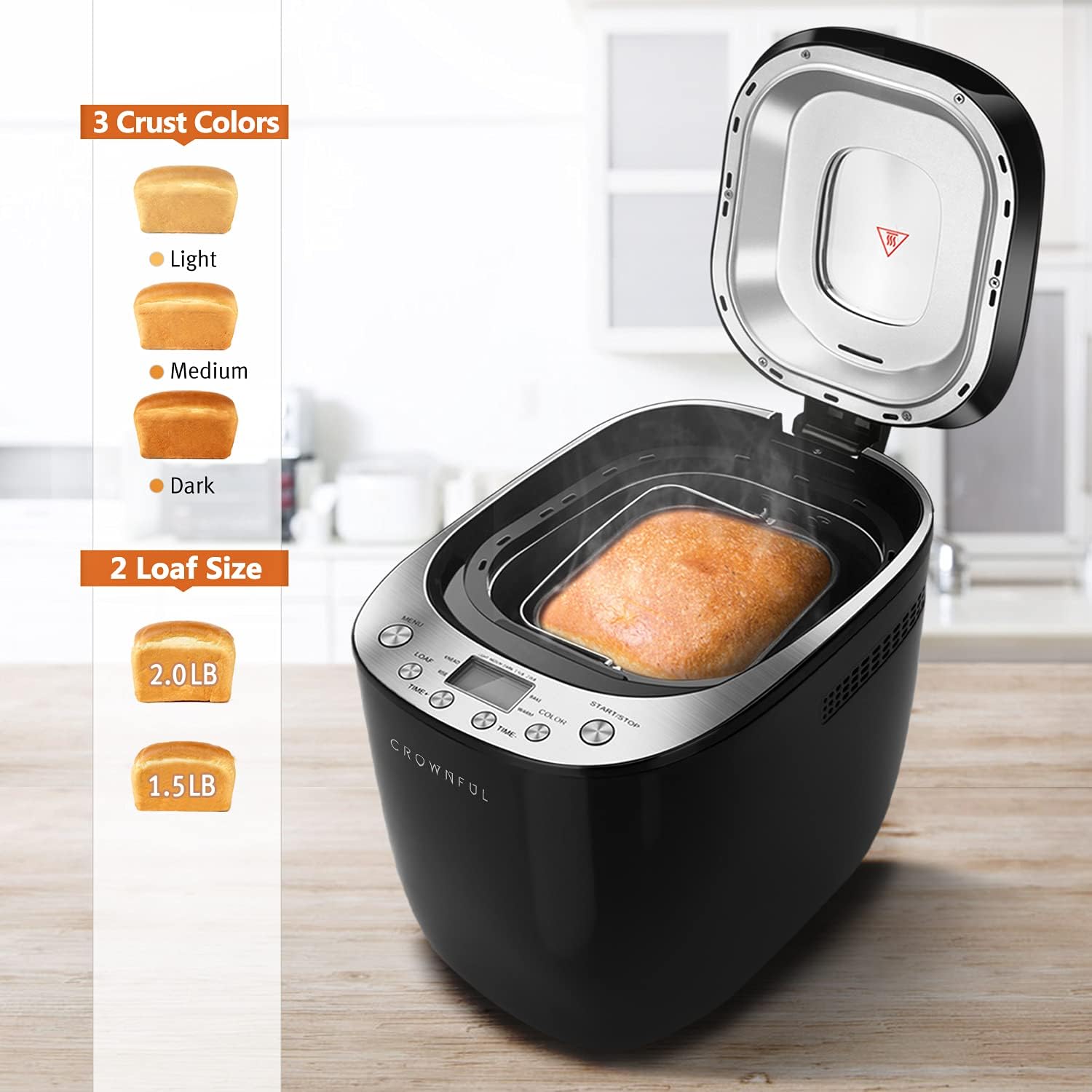
Image: A visual guide illustrating the three crust color options (light, medium, dark) and two loaf size options (1.5 lb and 2.0 lb) available on the bread machine.
- Saiz Roti: Choose between 1.5 LB and 2.0 LB depending on your recipe and desired yield.
- Warna Kerak: Select Light, Medium, or Dark to achieve your preferred crust crispness and color.
Delay Timer and Keep Warm Function:

Image: An infographic highlighting key features such as 360-degree surrounding baking, a 13-hour delay timer, 10-minute memory keeping, a 1-hour keep warm function, and low noise operation (65 dB).
- Delay Timer (up to 13 hours): Gunakan MASA+ dan MASA- buttons to set a delayed start time. This allows you to add ingredients and have fresh bread ready at a later time.
- Keep Warm (1 hour): After the baking cycle finishes, the bread machine automatically enters a 60-minute "Keep Warm" phase to maintain the bread's temperature.
- Power Interruption Recovery (10 minutes): The machine has a built-in memory function that can recover from power interruptions lasting up to 10 minutes, ensuring your baking process continues without significant disruption.
Penyelenggaraan dan Pembersihan
Proper cleaning and maintenance will extend the life of your bread machine.
- Sebelum Pembersihan: Sentiasa cabut plag perkakas dan biarkan ia sejuk sepenuhnya sebelum dibersihkan.
- Kuali Roti dan Dayung Uli: Remove the bread pan and kneading paddle. Wash them with warm, soapy water. The bread pan is non-stick and can be cleaned easily. The product care instructions state "Dishwasher Safe" for the pan, but hand washing is recommended to preserve the non-stick coating.
- Luaran: Wipe the exterior of the bread machine with a soft, damp kain. Jangan gunakan pembersih yang melelas atau rendam unit utama dalam air.
- Dalaman: Lap bahagian dalam ruang pembakar denganamp cloth. Remove any crumbs or residue.
- Tudung: Clean the lid, especially the viewtingkap, dengan iklanamp kain.
- Storan: Ensure all parts are completely dry before storing the bread machine in a cool, dry place.
Menyelesaikan masalah
Jika anda menghadapi masalah dengan mesin roti anda, rujuk masalah dan penyelesaian biasa berikut:
| Masalah | Kemungkinan Punca | Penyelesaian |
|---|---|---|
| Roti tidak naik | Expired yeast, incorrect water temperature, too much salt, not enough sugar. | Check yeast expiration date. Use lukewarm water (38-43°C). Ensure correct ingredient measurements. |
| Roti terlalu pekat | Terlalu banyak tepung, tidak cukup cecair, yis lama. | Measure ingredients precisely. Ensure yeast is fresh. |
| Bread collapses in the middle | Too much liquid, too much yeast, high humidity. | Reduce liquid slightly. Reduce yeast slightly. Adjust recipe for humid conditions. |
| Uli dayung tersangkut dalam roti | Kejadian biasa. | Use the provided bread hook to carefully remove the paddle after the bread has cooled slightly. |
| Machine beeps and displays error code | Overheating, ingredient imbalance, mechanical issue. | Unplug and let the machine cool down. Check for obstructions. Consult the full user manual for specific error codes. |
For further assistance, please refer to the comprehensive troubleshooting section in the full user manual or contact CROWNFUL customer support.
Spesifikasi
| Ciri | Perincian |
|---|---|
| Jenama | MENGEJUTKAN |
| Nombor Model | FGen |
| warna | Hitam |
| Dimensi Produk | 37.08 x 25.02 x 27.94 cm (14.6 x 9.85 x 11 inci) |
| Berat Barang | 4.54 kg (10 paun) |
| Kapasiti | 2 Liters (supports 1.5 LB and 2.0 LB loaf sizes) |
| Kuasa/Wattage | 550 watt |
| Voltage | 120 Volt |
| bahan | plastik |
| Automatikan | ya |
| Bilangan Program | 12 |
| Crust Colors | Terang, Sederhana, Gelap |
| Pemasa Kelewatan | Sehingga 13 jam |
| Fungsi Kekal Panas | 1 jam |
| Power Interruption Recovery | 10 minit |
Waranti dan Sokongan
Your CROWNFUL Automatic Bread Machine Model FGen comes with a Waranti 1 Tahun for all parts and accessories. CROWNFUL also provides sokongan seumur hidup untuk produknya.
For any concerns, questions, or technical assistance regarding your product, please contact CROWNFUL customer support. Customer satisfaction is a top priority.
Sila rujuk kad waranti yang disertakan bersama produk anda untuk terma dan syarat tertentu.