
Znewtech ZNT-ZT-X2P
Znewtech Hexagon Productivity Timer User Manual
Model: ZNT-ZT-X2P | Brand: Znewtech
pengenalan
Welcome to the Znewtech Hexagon Productivity Timer user manual. This innovative digital timer and alarm clock is designed to enhance your time management, whether for work, study, cooking, or exercise. Its intuitive design allows for quick and easy setup of preset countdowns, helping you stay focused and productive.

Image: Znewtech Hexagon Productivity Timer promotional banner.
Ciri-ciri Utama
- Operasi Intuitif: Start and stop countdowns by simply rotating the timer to the desired preset time.
- Paparan Digital: Clear LCD screen displays countdown time remaining and current clock time.
- Kelantangan Boleh Laras: Four volume levels (High, Mid, Low, Silent) to suit any environment.
- Makluman Visual: Flashing LCD backlit visual alert for silent mode or additional notification.
- Masa Pratetap: Includes common preset durations for quick use (5, 10, 15, 20, 30 minutes for this model).
Panduan Persediaan
1. Pemasangan Bateri
The Znewtech Hexagon Productivity Timer requires 2 AAA batteries (not included). Follow these steps to install them:
- Locate the battery compartment cover on the underside of the timer.
- Gelongsor atau buka klip penutup perlahan-lahan untuk membuka petak.
- Masukkan dua bateri AAA, pastikan kekutuban (+ dan -) betul seperti yang ditunjukkan di dalam petak.
- Gantikan penutup petak bateri sehingga ia terkunci pada tempatnya.
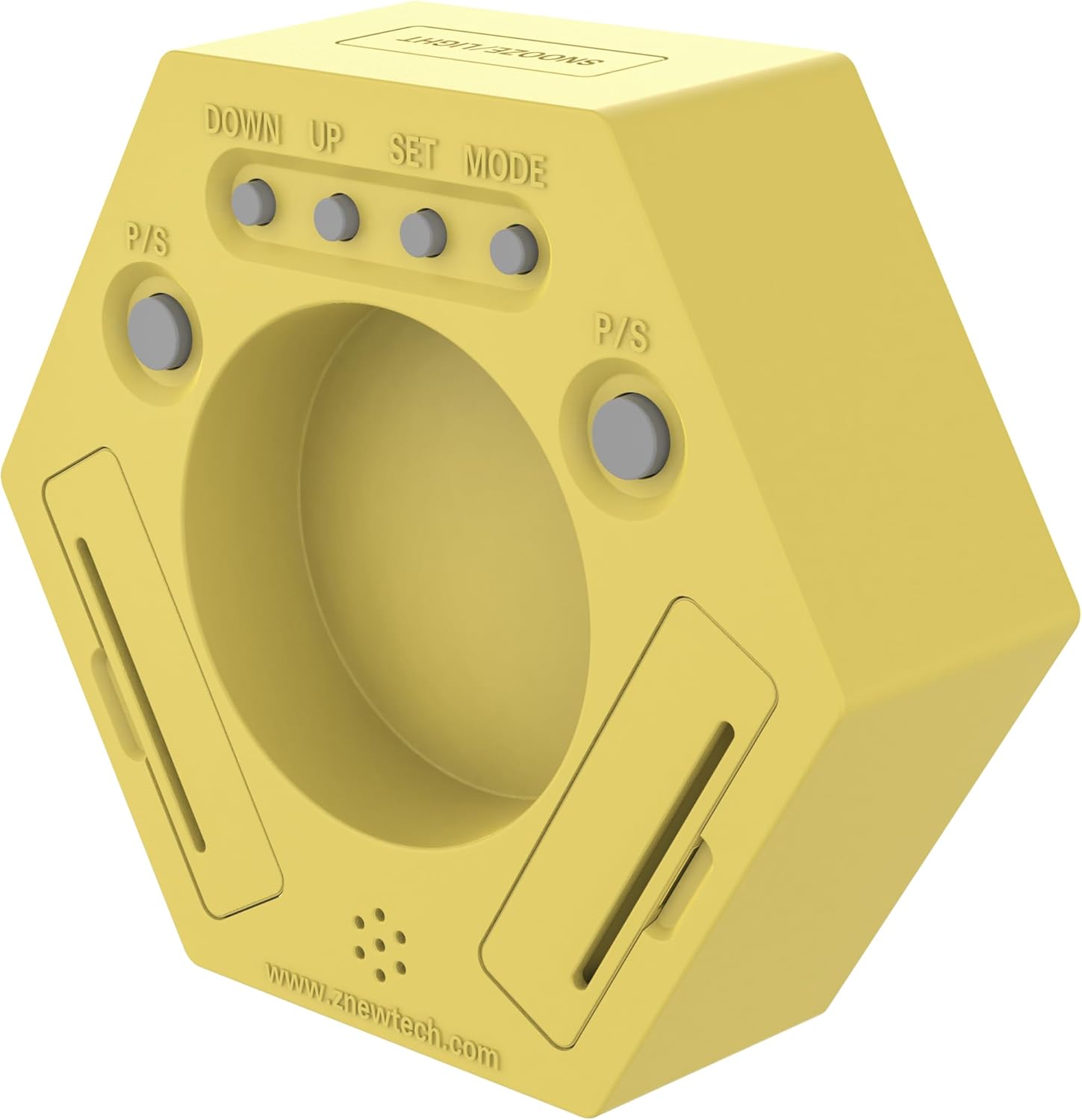
Imej: Belakang view of the timer, highlighting the battery compartment and control buttons.
2. Initial Power-On and Clock Setting
Upon successful battery installation, the timer will power on and display the current time (default 12:00 AM). To set the correct time:
- Ensure the timer is in 'Clock' mode (the side with the 'Clock' icon facing up).
- On the back of the timer, locate the 'SET' button. Press and hold it until the hour digits begin to flash.
- Use the 'UP' and 'DOWN' buttons to adjust the hour. Press 'SET' again to confirm and move to minutes.
- Adjust the minutes using 'UP' and 'DOWN'. Press 'SET' one more time to save the time.
Arahan Operasi
Menggunakan Pemasa Undur
The Znewtech Hexagon Productivity Timer features pre-set countdown times on each of its six sides. To activate a timer:
- Identify the desired preset time (5, 10, 15, 20, or 30 minutes) on one of the timer's sides.
- Rotate the timer so that the desired time is facing directly upwards. The timer will automatically begin counting down from that preset.
- When the countdown reaches zero, the alarm will sound (if not in silent mode) and the LCD will flash.
- To stop the alarm, simply rotate the timer to any other side, or press the 'SNOOZE/LIGHT' button on top.

Imej: Depan view of the timer, showing the digital display and preset time labels on each side.
Fungsi Jeda/Sambung Sambung
During an active countdown, you can pause and resume the timer:
- To pause: Press the 'P/S' (Pause/Start) button located on the back of the timer. The countdown will freeze.
- To resume: Press the 'P/S' button again. The countdown will continue from where it left off.
Pelarasan Kelantangan
Adjust the alarm volume to High, Mid, Low, or Silent:
- Locate the 'Volume' button on the back of the timer.
- Press the 'Volume' button repeatedly to cycle through the four volume levels. The current volume level will be indicated on the display.
Fungsi Tunda/Ringan
The button on the top of the timer serves two purposes:
- Tunda: When the alarm sounds, press this button to activate snooze (if applicable, typically 5-10 minutes).
- Lampu latar: Press this button at any time to briefly illuminate the LCD display for better visibility in low light conditions.
Penyelenggaraan
Pembersihan
Lap pemasa dengan kain lembut dan kering. Jangan gunakan pembersih yang melelas atau rendam peranti di dalam air.
Penggantian Bateri
When the display dims or the timer functions become erratic, it's time to replace the batteries. Follow the 'Battery Installation' steps in the Setup Guide.
Menyelesaikan masalah
| Masalah | Kemungkinan Punca | Penyelesaian |
|---|---|---|
| Timer not turning on/display is blank. | Bateri mati atau tidak dipasang dengan betul. | Gantikan bateri, pastikan polariti yang betul. |
| Timer not starting countdown when rotated. | Timer is not placed on a flat, stable surface; internal mechanism issue. | Ensure the timer is on a flat surface. If issue persists, contact customer support. |
| Alarm is too loud/quiet or not sounding. | Tetapan kelantangan tidak betul. | Press the 'Volume' button on the back to adjust the sound level. Check if it's set to 'Silent'. |
| Paparan malap atau sukar dibaca. | Low battery power or viewsudut ing. | Replace batteries. Adjust viewing angle or use the 'SNOOZE/LIGHT' button for temporary illumination. |
Spesifikasi
- Jenama: Znewtech
- model: ZNT-ZT-X2P
- warna: kuning
- Bahan: plastik
- Dimensi Produk: 1.5"D x 4.75"W x 4.25"H
- Berat Barang: 11.4 auns (322 Gram)
- Bilangan Tetapan: 5 (5, 10, 15, 20, 30 Minute Presets)
- Saiz Skrin: 2.25 Inci
- Bateri: 2 bateri AAA diperlukan (tidak termasuk)
- Negara Asal: China
Waranti dan Sokongan
For warranty information or technical support, please refer to the documentation included with your product packaging or visit the official Znewtech webtapak. Butiran hubungan untuk perkhidmatan pelanggan biasanya disediakan pada pengilang website or within the product's retail packaging.
Ask a question about this manual
Ask about setup, troubleshooting, compatibility, parts, safety, or missing instructions. Manuals+ will review the question and use this page’s manual context to help answer it.