
Easytry123 AR-RY12
User Manual for Easytry123 Replacement Remote Control
Model: AR-RY12
pengenalan
This manual provides comprehensive instructions for the Easytry123 replacement remote control, designed for various Fujitsu Air Conditioner models including AUYG18LVLB, ASYG07LUCA, ASYG09LUCA, RSB09LDC, RSB18LDC, RSB24LDC, RGV09LA, ASHA09LEC, ASHA12LEC, ASHA18LEC, ASHA12LGC, and ASHA14LGC. This remote control is an infrared (IR) device intended to replace your original unit, offering essential functions for your air conditioning system.

Rajah 1: Depan view of the Easytry123 replacement remote control, showing the display and various control buttons.
Persediaan
Pemasangan Bateri
The remote control requires two AAA batteries (not included). Follow these steps to install them correctly:
- Cari penutup petak bateri di belakang alat kawalan jauh.
- Slide the cover downwards or press the "OPEN" tab and lift to remove it.
- Insert two AAA batteries, ensuring the positive (+) and negative (-) polarities align correctly with the markings inside the compartment.
- Gantikan penutup petak bateri dengan menggelongsorkannya semula ke tempatnya sehingga ia berbunyi dengan selamat.
Penting: Do not mix old and new batteries, or batteries of different types. Incorrect battery installation can prevent the remote from functioning or cause damage.
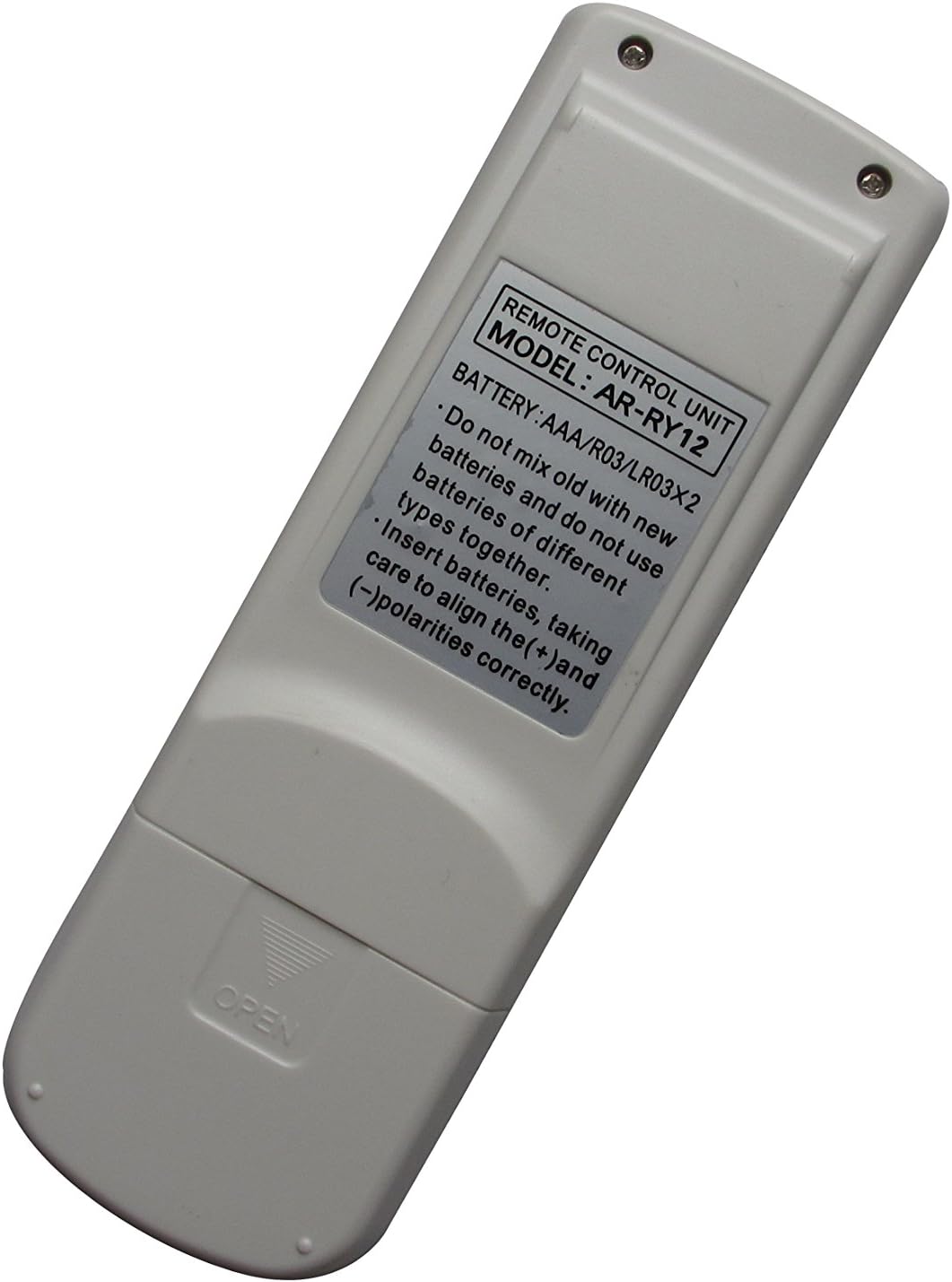

Rajah 2: belakang view of the remote control (left) indicating the battery compartment, and (right) the compartment open for battery insertion.
Arahan Operasi
This remote control features an ergonomic design with clearly labeled buttons for easy operation of your Fujitsu Air Conditioner. Point the remote control directly at the air conditioner's receiver when operating.
Fungsi Utama:
- KAWALAN MASTER: Likely cycles through main operating modes (e.g., Cool, Heat, Fan, Dry, Auto).
- MULAI / BERHENTI: Powers the air conditioner On or Off. This button is typically highlighted (e.g., yellow).
- KAWALAN KIPAS: Melaraskan kelajuan kipas (cth., Auto, Rendah, Sederhana, Tinggi).
- BERSIH UDARA: Activates or deactivates the air purification function, if available on your AC unit.
- COIL DRY: Initiates a coil drying function to prevent mold and odors.
- TIDUR: Activates sleep mode, which typically adjusts temperature and fan speed for comfortable sleep.
- TETAPKAN SUHU ▲ / ▼: Meningkatkan atau mengurangkan tetapan suhu yang dikehendaki.
- SET ▲ / ▼ (Right side): Used for setting timer or other specific parameters.
- HAYUN: Controls the louver swing direction for air distribution.
- MOD PEMASA: Mengakses tetapan pemasa untuk operasi berjadual.
- PEMASA + / -: Adjusts timer settings (e.g., On/Off time).
- PELARASAN JAM: Menetapkan masa semasa pada paparan alat kawalan jauh.
- TEST RUN: For service or diagnostic purposes; typically not for regular user operation.
- TETAP SEMULA: Resets the remote control to default settings. Use a pointed object (like a paperclip) to press this recessed button.
Note: Not all functions may be supported by every Fujitsu Air Conditioner model. Refer to your air conditioner's original manual for specific feature compatibility.
Penyelenggaraan
Penjagaan yang betul memastikan jangka hayat dan operasi alat kawalan jauh anda yang boleh dipercayai.
- Pembersihan: Wipe the remote control with a soft, dry cloth. Do not use liquid cleaners, sprays, or abrasive materials, as these can damage the remote.
- Penggantian Bateri: Replace batteries when the remote's response becomes sluggish or the display dims. If the remote will not be used for an extended period, remove the batteries to prevent leakage and corrosion.
- Storan: Simpan alat kawalan jauh di tempat yang sejuk dan kering jauh dari cahaya matahari langsung dan suhu yang melampau.
Menyelesaikan masalah
Jika anda mengalami masalah dengan alat kawalan jauh anda, cuba penyelesaian berikut:
| Masalah | Kemungkinan Punca / Penyelesaian |
|---|---|
| Alat kawalan jauh tidak berfungsi. |
|
| Sesetengah fungsi tidak berfungsi. |
|
| Paparan malap atau kosong. |
|
Spesifikasi
- model: AR-RY12
- Jenama: Easytry123
- Peranti Serasi: Fujitsu Air Conditioners (various models)
- Teknologi Ketersambungan: Inframerah (IR)
- Jenis Pengawal: Kawalan Butang
- Ciri Khas: Reka bentuk ergonomik
- Sumber Kuasa: 2 x Bateri AAA (tidak termasuk)
Waranti dan Sokongan
For information regarding warranty, returns, or technical support, please refer to the seller's policy on the platform where the product was purchased. As this is a replacement remote, specific warranty details may vary.
For further assistance, you may contact the seller directly through the online marketplace.
Ask a question about this manual
Ask about setup, troubleshooting, compatibility, parts, safety, or missing instructions. Manuals+ will review the question and use this page’s manual context to help answer it.