
1. Pengenalan
Thank you for choosing the JISULIFE Portable Neck Fan FA14. This innovative, hands-free, bladeless fan is designed to provide personal cooling comfort wherever you go. Its lightweight and ergonomic design makes it ideal for various activities, from outdoor sports to indoor work. This manual provides essential information for the safe and efficient use of your new neck fan.
2. Produk Lebihview & Ciri-ciri utama
The JISULIFE Portable Neck Fan FA14 is engineered for comfort and performance. Below are its primary features:
- Reka Bentuk Tanpa Bilah: Ensures safety for all users, including children and the elderly, by eliminating exposed blades.
- 78 Air Outlets: Provides comprehensive 360-degree airflow around the entire face and neck area.
- Bebas Tangan & Boleh Dipakai: Designed like a headphone for convenient, hands-free operation.
- 5 Kelajuan Boleh Laras: Customize your cooling experience with five distinct fan speed settings.
- Bateri Tahan Lama: Equipped with a 4000mAh battery, offering 4-16 hours of operation depending on the speed setting.
- Operasi Bunyi Rendah: Modified motor design generates noise levels as low as 25 dB for quiet use.
- Comfortable & Durable: Made from anti-greasy ABS and silicone for a soft, comfortable, and robust build.
- Padat & Ringan: Weighs approximately 9.1 ounces, reducing strain on the neck.
- Fleksibel & Boleh Laras: Can be twisted and adjusted to fit various neck sizes and preferences.
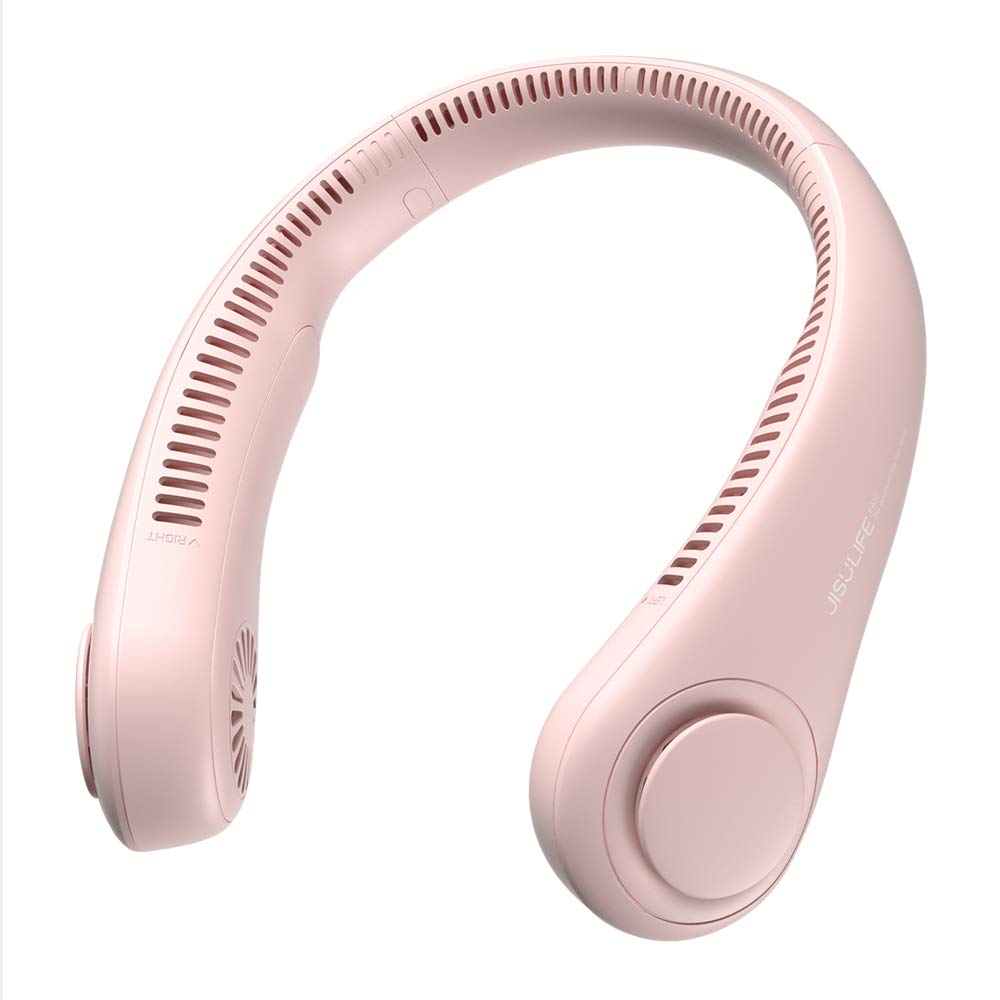
Figure 1: The JISULIFE Portable Neck Fan FA14 in Pink, showcasing its ergonomic, wearable design.

Figure 2: Illustrates the lightweight and comfortable design of the JISULIFE Neck Fan Life3, comparing its dimensions and weight to standard headphones.

Figure 3: Visual representation of the upgraded 5-gear speed settings, highlighting the fan's powerful brushless motor for 360-degree cooling.
3. Arahan Keselamatan
Sila baca dan patuhi garis panduan keselamatan ini untuk mengelakkan kecederaan atau kerosakan pada produk:
- Do not insert fingers or foreign objects into the fan outlets.
- Jauhkan daripada air dan kelembapan berlebihan.
- Do not disassemble, repair, or modify the device. Contact customer support if service is required.
- Elakkan mendedahkan kipas kepada suhu yang melampau atau cahaya matahari langsung untuk tempoh yang lama.
- Gunakan hanya kabel USB-C yang disediakan untuk mengecas.
- Jauhkan daripada kanak-kanak kecil apabila tidak digunakan.
- Do not use if the device is damaged or malfunctioning.
4. Persediaan
Before first use, ensure your JISULIFE Portable Neck Fan is fully charged.
- Bongkar: Carefully remove the neck fan and the USB-C charging cable from its packaging.
- Caj Permulaan: Connect the USB-C cable to the charging port on the fan and the other end to a compatible USB power source (e.g., wall adapter, computer USB port, power bank).
- Penunjuk Pengecasan: The indicator light will show the charging status. Refer to the 'Charging' section for details on light indications.
- Caj Penuh: Allow the fan to charge completely before its first use to optimize battery life.

Figure 4: Illustrates the 4000mAh long-lasting battery and the USB-C charging port for convenient power replenishment.
5. Arahan Operasi
Using your JISULIFE Portable Neck Fan is simple and intuitive:
- Wear the Fan: Place the neck fan around your neck, ensuring the air outlets are positioned comfortably towards your face and neck. The flexible design allows for easy adjustment.
- Hidupkan/Mati Kuasa: Locate the power button (usually a single button on one side of the fan). Press and hold the button for a few seconds to turn the fan ON or OFF.
- Laraskan Kelajuan: Once the fan is ON, short press the power button repeatedly to cycle through the 5 available speed settings (Speed 1 to Speed 5). Each press will increase the fan speed.
- Kedudukan Optimum: Adjust the flexible arms of the fan to direct airflow precisely where you need it most.

Figure 5: Highlights the multiple air outlets for comprehensive cooling and the simple one-button control for effortless operation.

Figure 6: Shows the fan's flexible and adjustable design, allowing it to be twisted for a customized fit and optimal airflow direction.
6. Mengecas
To charge your neck fan:
- Connect the provided USB-C cable to the charging port on the fan.
- Plug the other end of the USB-C cable into a 5V/1A or 5V/2A USB power adapter.
- The indicator light will typically show red while charging and turn off or change color (e.g., blue/green) when fully charged.
- Pengecasan penuh biasanya mengambil masa kira-kira 3-4 jam.
- Battery life ranges from 4 hours (on highest speed) to 16 hours (on lowest speed).
7. Penyelenggaraan
Proper maintenance ensures the longevity and performance of your fan:
- Pembersihan: Use a soft, dry cloth to wipe the surface of the fan. Do not use harsh chemicals or abrasive materials. Ensure the fan is OFF before cleaning.
- Saluran Udara: Gently clean any dust or debris from the air outlets using a soft brush or compressed air.
- Storan: Store the fan in a cool, dry place away from direct sunlight and extreme temperatures when not in use.
- Penjagaan Bateri: To maintain battery health, charge the fan at least once every three months if not used regularly.
8. Penyelesaian masalah
Jika anda menghadapi sebarang masalah, rujuk kepada penyelesaian biasa berikut:
| Masalah | Kemungkinan Punca | Penyelesaian |
|---|---|---|
| Kipas tidak dihidupkan. | Bateri lemah atau tiada cas. | Charge the fan fully using the provided USB-C cable. |
| Aliran udara yang lemah. | Low speed setting or obstructed air outlets. | Increase the fan speed. Check and clean air outlets for any blockages. |
| Kipas berhenti secara tiba-tiba. | Bateri habis. | Cas semula kipas. |
| Penunjuk pengecasan tidak berfungsi. | Kabel atau penyesuai kuasa rosak. | Cuba kabel USB-C atau penyesuai kuasa yang lain. Pastikan sambungannya selamat. |
If the problem persists, please contact JISULIFE customer support.
9. Spesifikasi
| Ciri | Perincian |
|---|---|
| Jenama | JISULIFE |
| Nama Model | Nyawa Kipas Leher3 |
| Nombor Model | FA14 |
| warna | Merah jambu |
| Reka Bentuk Kipas Elektrik | Kipas Boleh Pakai |
| Sumber Kuasa | Dikuasakan Bateri |
| Kapasiti Bateri | 4000 mAh |
| Waktu Berjalan | 4-16 jam (bergantung pada kelajuan) |
| Bilangan Kelajuan | 5 |
| Tahap Kebisingan | 40 Decibels (as low as 25 dB) |
| Dimensi Produk (D x W x H) | 7.7"D x 7.7"W x 2.3"H |
| Berat Barang | 0.56 Pounds (approx. 9.1 oz) |
| bahan | Akrilonitril Butadiene Styrene (ABS), Silikon |
| Bahan Bilah | Plastik (Reka bentuk tanpa bilah) |
| Jenis Penyambung | USB Jenis C |
| Komponen yang Disertakan | Kabel USB C |
10. Waranti dan Sokongan
JISULIFE products are designed for quality and reliability. For specific warranty information, please refer to the warranty card included with your product or visit the official JISULIFE website. If you have any questions, require technical assistance, or need to report an issue, please contact JISULIFE customer support through their official channels.

Figure 7: Demonstrates the versatility of the JISULIFE neck fan, suitable for diverse activities and environments.