
Delock 11477
Delock 11477 HDMI/USB-C™ KVM Switch User Manual
Model: 11477
1. Pengenalan
This user manual provides detailed instructions for the installation, operation, and maintenance of the Delock HDMI/USB-C™ KVM Switch 4K 60Hz with USB 2.0, Model 11477. Please read this manual thoroughly before using the device to ensure proper functionality and to prevent damage.
2. Maklumat Keselamatan
To ensure safe operation and prolong the life of your device, please observe the following safety precautions:
- Jangan dedahkan peranti kepada kelembapan, suhu melampau atau cahaya matahari langsung.
- Jangan buka atau ubah suai peranti. Ini akan membatalkan jaminan dan boleh menyebabkan kerosakan.
- Use only the specified power adapter (if applicable) and cables.
- Jauhkan peranti daripada medan elektromagnet yang kuat.
- Pastikan pengudaraan yang betul di sekeliling peranti semasa operasi.
3. Kandungan Pakej
Please check the package contents upon unpacking. If any items are missing or damaged, contact your vendor immediately.
- Delock HDMI/USB-C™ KVM Switch 4K 60Hz (Model 11477)
- USB-C™ to USB-C™ cable
- Kabel USB-A ke USB-B
- Manual Pengguna

Figure 3.1: Delock KVM Switch with included USB-C to USB-C and USB-A to USB-B cables.
4. Produk Lebihview
The Delock KVM Switch allows you to control two computers (one with HDMI/USB-A, one with USB-C) from a single set of console peripherals (monitor, keyboard, mouse).
4.1 Front/Top Panel

Rajah 4.1: Atas view of the Delock KVM Switch.
- Console USB Ports (Keyboard/Mouse): Two USB 2.0 Type-A ports for connecting your keyboard and mouse.
- PC 2 USB-C™ Port: Connects to a computer with a USB-C™ port for video and USB data.
- PC 1 USB Port: Connects to a computer's USB-A port for USB data.
- PC 1 HDMI Port: Connects to a computer's HDMI output for video.
- Butang Tukar: Press to switch between PC 1 and PC 2.
- Penunjuk LED: Indicate the currently active PC (PC 1 or PC 2).
4.2 Panel Belakang
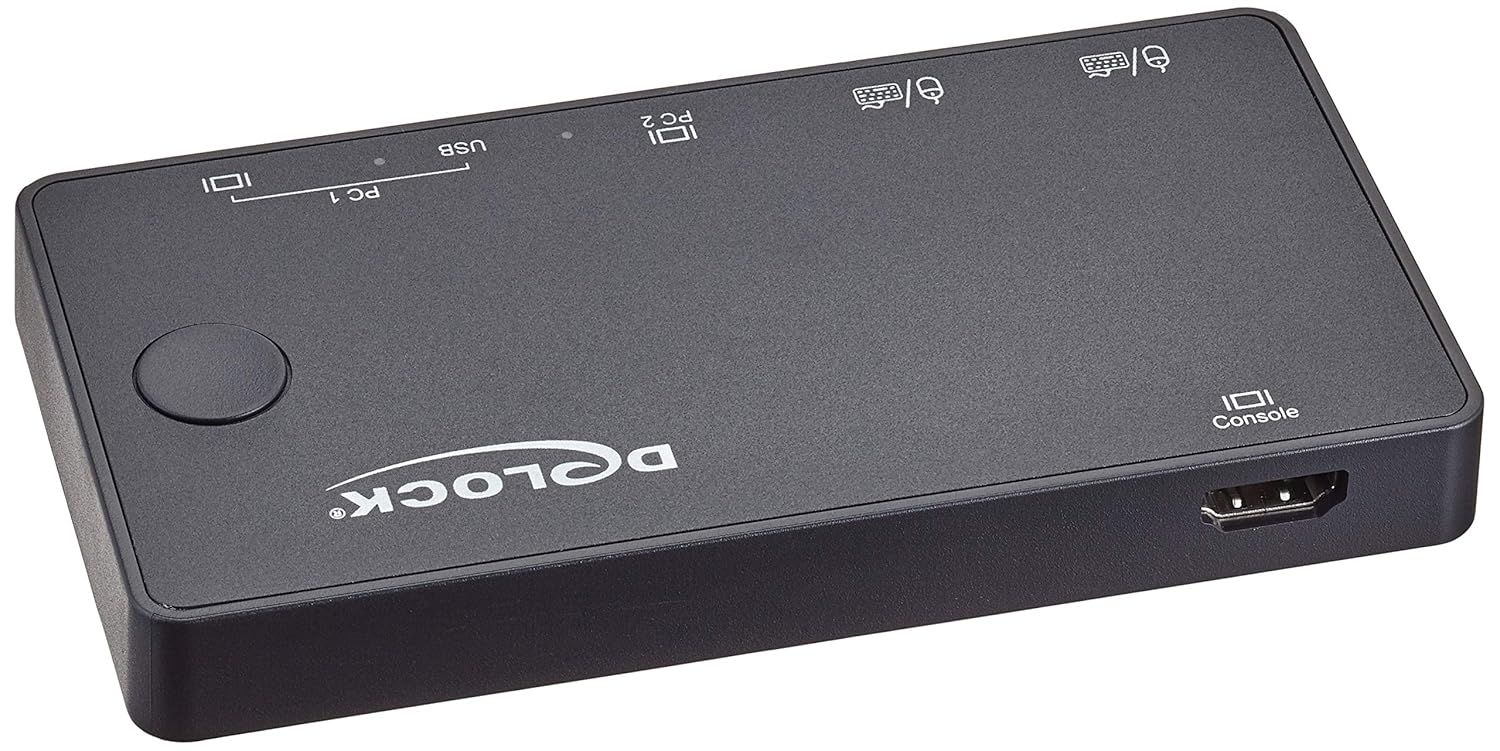
Rajah 4.2: Belakang view of the Delock KVM Switch.
- Console HDMI Port: Menyambung ke monitor anda.
5. Persediaan dan Pemasangan
Follow these steps to set up your Delock KVM Switch:
- Sambung Peranti Konsol:
- Connect your HDMI monitor to the "Console HDMI" port on the rear of the KVM switch.
- Connect your USB keyboard and mouse to the "Console USB" ports on the front of the KVM switch.
- Connect PC 1:
- Connect an HDMI cable from your PC 1's HDMI output to the "PC 1 HDMI" input on the KVM switch.
- Connect the included USB-A to USB-B cable from your PC 1's USB-A port to the "PC 1 USB" input on the KVM switch.
- Connect PC 2:
- Connect the included USB-C™ to USB-C™ cable from your PC 2's USB-C™ port (which supports DisplayPort Alternate Mode and USB data) to the "PC 2 USB-C™" input on the KVM switch.
- Hidupkan kuasa:
The KVM switch is typically powered via the USB connections from the connected computers. Ensure both PCs are powered on for stable operation.
Once all connections are made, the KVM switch should automatically detect the active computer. The LED indicator will show which PC is currently selected.
6. Arahan Operasi
The Delock KVM Switch offers simple operation to switch between connected computers.
6.1 Bertukar Antara Komputer
To switch between PC 1 and PC 2, simply press the "Switch Button" located on the top panel of the KVM switch. The corresponding LED indicator will illuminate to show the active computer.
Nota: Ensure both computers are powered on and sending a video signal for seamless switching.
7. Penyelesaian masalah
If you encounter issues with your Delock KVM Switch, please refer to the following common problems and solutions:
| Masalah | Kemungkinan Punca / Penyelesaian |
|---|---|
| Tiada output video pada monitor. |
|
| Papan kekunci/Tetikus tidak bertindak balas. |
|
| Cannot switch between PCs. |
|
| Video resolution/refresh rate issues. |
|
8. Spesifikasi
The following are the technical specifications for the Delock KVM Switch 11477:
- model: 11477
- Fungsi: HDMI / USB-C™ KVM Switch
- Resolusi Video: Sehingga 4K (3840 x 2160) @ 60Hz
- Standard USB: USB 2.0 (for keyboard/mouse), USB-C™ (for PC 2 data/video)
- Pelabuhan Input:
- PC 1: 1 x HDMI, 1 x USB-B
- PC 2: 1 x USB-C™ (DisplayPort Alt Mode)
- Output Ports (Console):
- 1 x HDMI
- 2 x USB-A (for keyboard/mouse)
- Kaedah Penukaran: Tekan butang
- Dimensi (LxWxH): 3.6 x 1.72 x 2.25 inci (lebih kurang 91.44 x 43.69 x 57.15 mm)
- Berat: 11.29 auns (lebih kurang 320 gram)
- Mod Operasi: Manual
- Pengeluar: Delock
9. Penyelenggaraan
The Delock KVM Switch requires minimal maintenance. Follow these guidelines to keep your device in optimal condition:
- Pembersihan: Gunakan kain lembut dan kering untuk membersihkan bahagian luar peranti. Jangan gunakan pembersih cecair atau aerosol.
- Storan: Apabila tidak digunakan untuk tempoh yang lama, simpan peranti di tempat yang sejuk dan kering jauh dari cahaya matahari langsung dan suhu yang melampau.
- Pengudaraan: Pastikan bukaan pengudaraan peranti tidak disekat untuk mengelakkan terlalu panas.
10. Waranti dan Sokongan
For warranty information and technical support, please refer to the documentation provided with your purchase or visit the official Delock webtapak. Simpan bukti pembelian anda untuk tuntutan waranti.
Delock Official Webtapak: www.delock.com
Ask a question about this manual
Ask about setup, troubleshooting, compatibility, parts, safety, or missing instructions. Manuals+ will review the question and use this page’s manual context to help answer it.