
1. Pengenalan
This manual provides detailed instructions for the proper use, setup, operation, and maintenance of your Other HF-Q3 Wireless Bluetooth 2.1 Multifunction Sub-woofer Speaker. Please read this manual thoroughly before operating the device to ensure optimal performance and longevity.
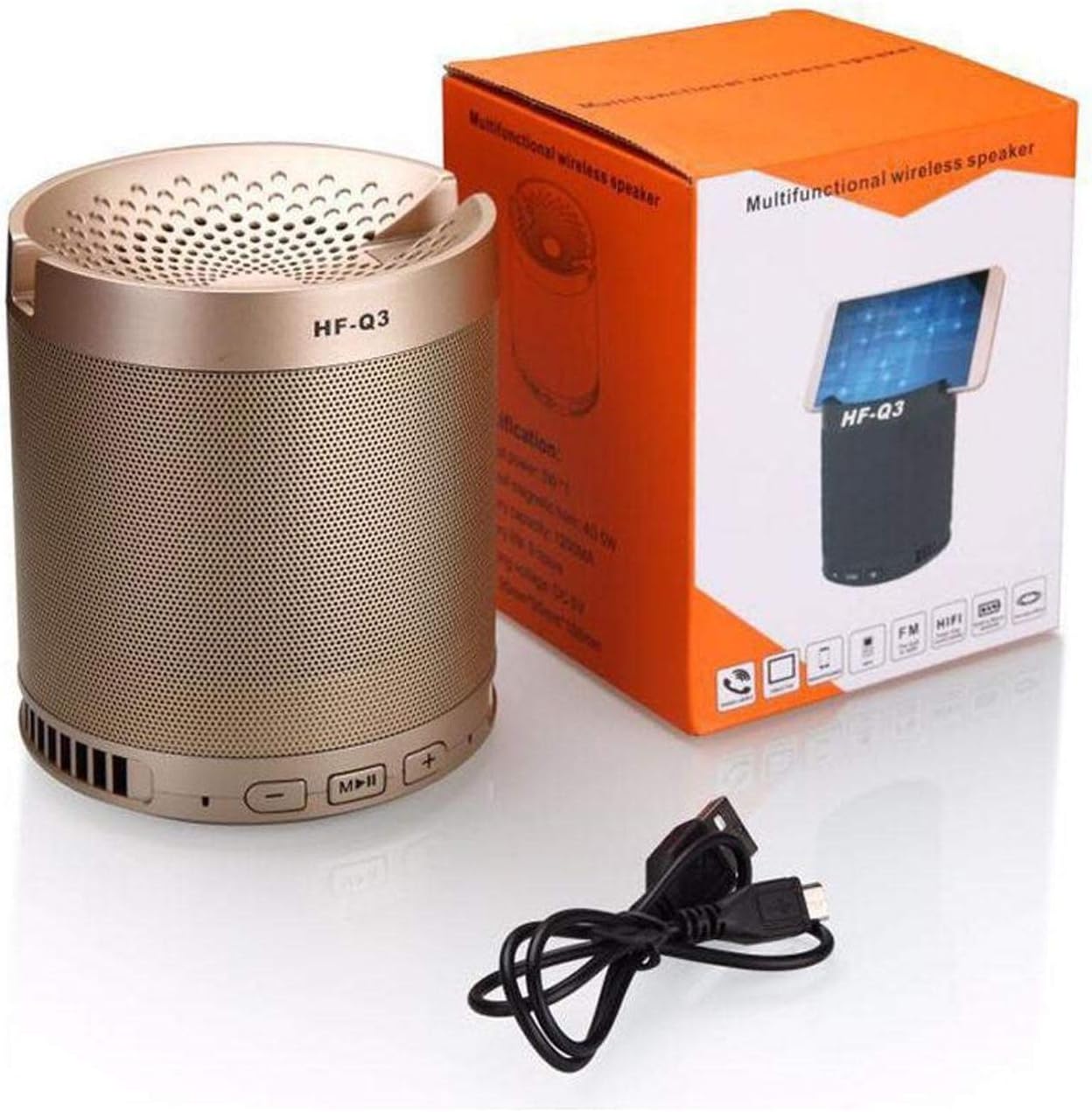
Rajah 1.1: The HF-Q3 Wireless Bluetooth Speaker, its retail packaging, and a USB charging cable. This image illustrates the product as it appears when unboxed, highlighting its compact cylindrical design and included accessories.
2. Ciri-ciri Produk
- Kesambungan Tanpa Wayar: Bluetooth for seamless audio streaming.
- Reka Bentuk Pelbagai Fungsi: Combines speaker functionality with a built-in phone stand.
- Sub-woofer Speaker: Designed to deliver enhanced bass audio.
- mudah alih: Padat dan ringan untuk pengangkutan yang mudah.
- Input Audio: Supports Audio Jack (AUX) connection.
- Output Kuasa: Nominal output of 40-50 Watts.

Rajah 2.1: The HF-Q3 speaker demonstrating its integrated phone stand feature. A smartphone is shown resting securely in the top groove of the speaker, illustrating its dual functionality.
3. Kandungan Pakej
Sila semak pakej untuk item berikut:
- HF-Q3 Wireless Bluetooth Speaker
- Kabel Pengecas USB
- Manual Pengguna (dokumen ini)
4. Persediaan
4.1 Mengecas Speaker
- Connect the small end of the provided USB charging cable to the charging port on the speaker.
- Sambungkan hujung kabel USB yang lebih besar ke penyesuai kuasa USB (tidak disertakan) atau port USB komputer.
- The charging indicator light (if present) will illuminate, typically red, during charging.
- Once fully charged, the indicator light may change color (e.g., turn off or turn blue/green). Disconnect the speaker from the charger.
4.2 Menghidupkan/Mematikan
- Untuk Menghidupkan: Press and hold the Power button (often integrated with the Play/Pause button) for a few seconds until you hear an audible prompt or see an indicator light.
- Untuk Mematikan: Press and hold the Power button again for a few seconds until you hear an audible prompt or the indicator light turns off.
5. Arahan Operasi

Rajah 5.1: A terperinci view of the control panel located on the top edge of the HF-Q3 speaker. Buttons for volume control (- and +) and media playback (Play/Pause/Mode) are clearly visible, indicating their positions for user interaction.
5.1 Berpasangan Bluetooth
- Ensure the speaker is powered on and in Bluetooth pairing mode. An indicator light (often blue) will flash rapidly, and you may hear an audible prompt.
- Pada telefon pintar, tablet atau peranti lain yang didayakan Bluetooth anda, navigasi ke tetapan Bluetooth.
- Scan for available devices. You should see "HF-Q3" or a similar name appear in the list.
- Select "HF-Q3" to initiate pairing.
- Once paired, the speaker will emit an audible confirmation, and the Bluetooth indicator light will typically stop flashing and remain solid.
5.2 Menggunakan Butang Kawalan
- Play/Pause Button (M/||):
- Press once to Play or Pause audio.
- Press and hold to switch between modes (Bluetooth, AUX, FM Radio if available).
- Butang Kelantangan Kurang / Trek Sebelumnya (-):
- Tekan sekali untuk mengurangkan kelantangan.
- Tekan dan tahan untuk pergi ke trek sebelumnya.
- Butang Naikkan Kelantangan / Trek Seterusnya (+):
- Tekan sekali untuk meningkatkan kelantangan.
- Tekan dan tahan untuk pergi ke trek seterusnya.
5.3 Mod Input AUX
- Sambungkan satu hujung kabel audio 3.5mm (tidak disertakan) ke port AUX pada pembesar suara.
- Connect the other end of the audio cable to the audio output jack of your device (e.g., smartphone, MP3 player).
- The speaker should automatically switch to AUX mode, or you may need to press the Mode button (often the Play/Pause button) to select AUX.

Rajah 5.2: The underside of the HF-Q3 speaker, revealing the charging port and the AUX input port. This view is crucial for understanding how to connect power and external audio sources to the device.
6. Penyelenggaraan
- Pembersihan: Gunakan kain lembut dan kering untuk mengelap permukaan pembesar suara. Jangan gunakan pembersih atau pelarut yang kasar.
- Storan: Simpan pembesar suara di tempat yang sejuk dan kering jauh dari cahaya matahari langsung dan suhu yang melampau.
- Penjagaan Bateri: Untuk memanjangkan hayat bateri, elakkan daripada menyahcas sepenuhnya pembesar suara dengan kerap. Mengecasnya dengan kerap, walaupun tidak digunakan untuk tempoh yang lama.
- Pendedahan Air: Pembesar suara ini tidak kalis air. Elakkan pendedahan kepada air atau kelembapan yang tinggi.
7. Penyelesaian masalah
| Masalah | Kemungkinan Punca | Penyelesaian |
|---|---|---|
| Speaker tidak dihidupkan. | Bateri lemah atau tiada cas. | Cas pembesar suara menggunakan kabel USB yang disediakan. |
| Tiada suara dari pembesar suara. | Kelantangan terlalu rendah, mod salah atau peranti tidak disambungkan. | Increase speaker and device volume. Ensure correct mode (Bluetooth/AUX) is selected. Re-pair Bluetooth or re-connect AUX cable. |
| Tidak boleh berpasangan melalui Bluetooth. | Speaker not in pairing mode, device Bluetooth off, or too far away. | Ensure speaker is in pairing mode (flashing indicator). Turn Bluetooth on your device. Move device closer to the speaker (within 10 meters). |
| Kualiti audio yang lemah. | Interference, low battery, or source audio quality. | Move speaker closer to the source device. Charge the speaker. Try a different audio source or file. |
8. Spesifikasi
| Nama Model: | HF-Q3 |
| Jenama: | Lain-lain |
| Jenis pembesar suara: | Bluetooth Speakers, Sub-woofer |
| Teknologi Ketersambungan: | Wireless (Bluetooth), Wired (Audio Jack) |
| Keluaran Nominal: | 40 - 50 Watt |
| Mod Output Audio: | Stereo |
| Peranti Serasi: | Telefon Pintar, Tablet, Komputer Riba, Televisyen |
| bentuk: | silinder |
| Berat produk: | Kira-kira 1.16 lbs |
9. Waranti dan Sokongan
Untuk maklumat waranti dan sokongan pelanggan, sila rujuk dokumentasi yang diberikan semasa pembelian atau hubungi peruncit anda. Simpan bukti pembelian anda untuk sebarang tuntutan waranti.
For further assistance, please visit the manufacturer's webtapak atau hubungi bahagian perkhidmatan pelanggan mereka.