
pengenalan
This manual provides detailed instructions for the proper use and maintenance of your Casio G-Shock DW-5610SU-3 digital watch. Designed for durability and functionality, this watch features shock resistance, 200-meter water resistance, an electro-luminescent backlight, and various timekeeping functions.

Imej: Depan view of the Casio G-Shock DW-5610SU-3 digital watch, showcasing its square case and digital display.
Fungsi Butang
Your G-Shock watch has four buttons, typically labeled as follows:
- LARAS (Kiri Atas): Digunakan untuk masuk dan keluar dari mod tetapan, dan untuk mengesahkan tetapan.
- MOD (Kiri Bawah): Used to cycle through the watch's various modes (Timekeeping, Stopwatch, Countdown Timer, Alarm).
- CAHAYA (Atas Kanan): Activates the electro-luminescent backlight.
- START/STOP (Bottom Right): Used to start/stop stopwatch operations, change selections in setting modes, and activate the flash alert.

Imej: Sisi view of the watch, highlighting the top left (ADJUST) and bottom left (MODE) buttons.

Imej: Sebelah bertentangan view of the watch, showing the top right (LIGHT) and bottom right (START/STOP) buttons.
Setup: Setting Time and Date
- Dalam Mod Penjagaan Masa, tekan dan tahan SESUAIKAN butang sehingga kod bandar mula berkelip, menunjukkan skrin tetapan.
- Gunakan MULA/BERHENTI button to cycle through the settings (City Code, DST, 12/24-hour format, Seconds, Hour, Minute, Year, Month, Day).
- Gunakan CAHAYA button to increase a value or the MULA/BERHENTI button to decrease a value (for time/date settings).
- Setelah semua tetapan dikonfigurasikan, tekan butang SESUAIKAN butang untuk keluar dari mod tetapan.
Arahan Operasi
Navigating Modes
Tekan ke MODE butang untuk kitaran melalui mod berikut:
- Timekeeping Mode (current time, date, day)
- Mod Jam Randik
- Mod Pemasa Kiraan Balik
- Mod Penggera
- HourlMod Isyarat Masa y
Menggunakan Jam Randik
- Masuk ke Mod Jam Rangup dengan menekan butang MODE butang.
- Tekan ke MULA/BERHENTI butang untuk memulakan jam randik.
- Tekan ke MULA/BERHENTI button again to stop it.
- Tekan ke SESUAIKAN butang untuk menetapkan semula jam randik kepada sifar.
- The stopwatch measures up to 23 hours, 59 minutes, 59.99 seconds.
Menggunakan Pemasa Undur
- Masuk ke Mod Pemasa Undur dengan menekan butang MODE butang.
- Tekan dan tahan butang SESUAIKAN button until the hour setting flashes.
- Gunakan CAHAYA dan MULA/BERHENTI butang untuk menetapkan masa undur yang diingini (sehingga 24 jam).
- Tekan SESUAIKAN untuk mengesahkan dan keluar dari mod tetapan.
- Tekan MULA/BERHENTI untuk memulakan kira detik.
- Tekan MULA/BERHENTI sekali lagi untuk menjeda/menyambung semula.
- Apabila undur mencapai sifar, penggera akan berbunyi. Tekan sebarang butang untuk menghentikan penggera.
Menetapkan Penggera
- Masuk ke Mod Penggera dengan menekan butang MODE butang.
- Tekan dan tahan butang SESUAIKAN button until the hour setting flashes.
- Gunakan CAHAYA dan MULA/BERHENTI buttons to set the alarm hour and minute.
- Tekan SESUAIKAN untuk mengesahkan dan keluar dari mod tetapan.
- Tekan ke MULA/BERHENTI button to toggle the alarm ON/OFF. An indicator will show when the alarm is active.
Electro-luminescent Backlight
Tekan ke CAHAYA butang untuk menerangi paparan dengan mudah viewing in low-light conditions. The backlight duration is typically a few seconds.
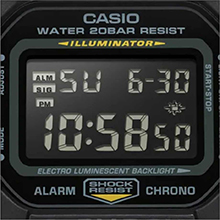
Image: Close-up of the watch display showing the electro-luminescent backlight active, illuminating the time and date.
Penyelenggaraan
Pembersihan
Lap jam tangan dengan kain lembut dan kering. Untuk kotoran degil, gunakan kain lembutampened with water and a mild neutral detergent, then wipe dry. Avoid using volatile agents like thinner or benzine.
Tahan Air
This watch is water resistant to 200 meters. It is suitable for showering, swimming, and shallow diving. Do not operate buttons while the watch is wet or submerged to prevent water ingress.

Image: The Casio G-Shock DW-5610SU-3 watch partially submerged in water, illustrating its 200-meter water resistance.
Penggantian Bateri
The watch uses one CR2016 battery with an approximate life of 2 years. When the display becomes dim or functions malfunction, it may be time for a battery replacement. It is recommended to have the battery replaced by an authorized service center to ensure water resistance is maintained.
Menyelesaikan masalah
- Paparan kosong atau malap: Bateri mungkin lemah. Gantikan bateri.
- Butang tidak bertindak balas: Ensure the watch is not in a locked mode (if applicable, though this model typically doesn't have a lock). If issues persist, a full reset might be needed (consult service center).
- Masa tidak tepat: Re-set the time and date as per the "Setting Time and Date" section. If inaccuracy continues, the watch may require servicing.
- Air di dalam jam tangan: Immediately take the watch to an authorized service center. Do not attempt to open it yourself.
Spesifikasi
| Ciri | Spesifikasi |
|---|---|
| Nombor Model | DW-5610SU-3 |
| Case/Bezel Material | damar |
| Bahan Band | damar |
| Jenis Kaca | Kaca Mineral |
| Tahan Air | 200 meter (20 BAR) |
| Rintangan Kejutan | ya |
| Lampu latar | Electro-luminescent backlight with Afterglow |
| Jam randik | 1/100-second, measuring capacity 23:59'59.99" |
| Pemasa Undur | Measuring unit 1 second, range 24 hours, auto-repeat |
| Penggera | Multi-function alarm, Hourlisyarat masa y |
| Kalendar | Kalendar automatik penuh (hingga tahun 2099) |
| Format Masa | Format 12/24 jam |
| Ketepatan | ±15 saat sebulan |
| Jenis Bateri | CR2016 |
| lebih kurang Hayat Bateri | 2 tahun |
| Case Dimensions (H×W×D) | 48.9 × 43.8 × 13.5 mm |
| Jumlah Berat | 52 g |

Image: Diagram showing the dimensions of the Casio G-Shock DW-5610SU-3 watch, with a credit card for scale, indicating a case height of 48.9 mm and width of 43.8 mm.
Waranti dan Sokongan
Your Casio G-Shock DW-5610SU-3 watch comes with a Limited Warranty. For warranty claims, service, or technical support, please contact Casio India Co Pvt Ltd.
Manufacturer/Importer Contact:
Casio India Co Pvt Ltd
A-41, 1st Floor, MCIE, Mathura Road,
New Delhi-110044, India
For additional information and support, please visit the official Casio website or an authorized service center.