
1. Pengenalan
This manual provides essential instructions for the safe and efficient operation of your Multilaser MINI TORRE 900W SP380 audio system. Please read this manual thoroughly before using the product and retain it for future reference. Proper use will ensure optimal performance and extend the lifespan of your device.
2. Arahan Keselamatan
- Sumber Kuasa: Pastikan bekalan kuasa sepadan dengan voltage keperluan yang dinyatakan pada label produk.
- Pengudaraan: Do not block ventilation openings. Maintain adequate space around the unit for proper airflow.
- Air dan Kelembapan: Keep the device away from water, rain, and excessive humidity. Do not operate with wet hands.
- Sumber Haba: Elakkan meletakkan unit berhampiran sumber haba seperti radiator, dapur atau peralatan penghasil haba yang lain.
- Pembersihan: Disconnect the power before cleaning. Use a dry, soft cloth. Do not use liquid cleaners or aerosol sprays.
- Servis: Jangan cuba membaiki unit ini sendiri. Rujuk semua servis kepada kakitangan servis yang berkelayakan.
- Kanak-kanak: Jauhkan peranti dan aksesorinya daripada kanak-kanak.
- penempatan: Letakkan unit pada permukaan yang stabil dan rata untuk mengelakkannya daripada jatuh.
3. Produk Lebihview
The Multilaser MINI TORRE 900W SP380 is a powerful audio system designed for versatile sound reproduction. It features dual speakers, LED lighting, and multiple connectivity options.
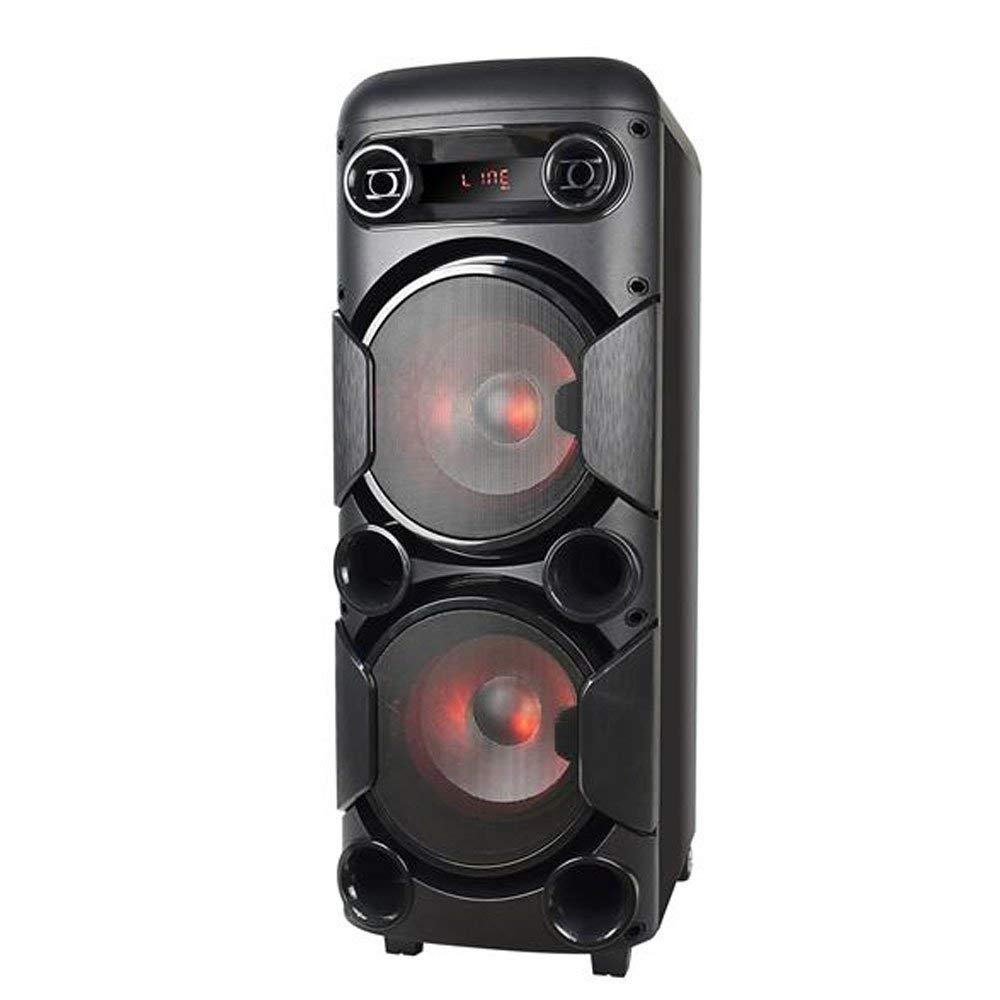
Rajah 3.1: Depan view of the Multilaser MINI TORRE 900W SP380, showcasing its dual speaker design and illuminated LED woofers.
The control panel, located on the top of the unit, provides access to all functions and inputs.

Rajah 3.2: Terperinci view of the control panel, including volume knob, equalizer sliders, input ports (USB, TF/Memory Card, Line, Mic 1, Mic 2), and control buttons for mode, light, and playback.
4. Persediaan
- Membongkar: Carefully remove the MINI TORRE from its packaging. Retain the packaging for future transport or storage.
- penempatan: Position the speaker on a flat, stable surface. Ensure there is adequate space around the unit for ventilation. The integrated wheels facilitate easy transport.
- Sambungan Kuasa: Connect the power cable to the AC input on the unit and then to a suitable power outlet. The device supports bivolt automatic voltage.
- Kuasa Awal Hidup: Flip the power switch (usually located on the control panel) to the "ON" position. The display will illuminate.
5. Arahan Operasi
5.1. Hidupkan/Mati Kuasa
To power on the device, locate the power switch on the control panel and set it to the "ON" position. To power off, set the switch to "OFF".
5.2. Kawalan Kelantangan
Adjust the main volume using the large central JILID knob on the control panel. Turn clockwise to increase volume and counter-clockwise to decrease.
5.3. Pemilihan Mod
Tekan ke MODE button repeatedly to cycle through available input modes: Bluetooth (BT), FM Radio, USB, Memory Card (TF), and Auxiliary (LINE).
5.4. Lampu LED
Tekan ke CAHAYA button to toggle the LED lighting effects on the speakers. Multiple light modes may be available.
5.5. Input Mikrofon
Connect a microphone to either the MIC 1 or MIC 2 input. Adjust the microphone volume using the MIC.VOL slider and add echo effect with the ECHO peluncur.
5.6. Sound Equalization
Gunakan TREBLE dan BASS sliders to adjust the high and low frequencies of the audio output, respectively, to suit your preference.
6. Ketersambungan
6.1. Berpasangan Bluetooth
- Turn on the MINI TORRE and select Bluetooth (BT) mod menggunakan MODE button. The display will show "BT" and a pairing indicator.
- Dayakan Bluetooth pada telefon pintar, tablet anda atau peranti lain yang serasi.
- Cari untuk available devices and select "MULTILASER SP380" (or similar name) from the list.
- Setelah dipasangkan, peranti akan mengesahkan sambungan dan anda boleh mula memainkan audio secara wayarles.
6.2. USB / Memory Card Playback
Masukkan pemacu kilat USB ke dalam USB port or a TF (MicroSD) card into the TF / USB slot. The unit will automatically switch to USB or TF mode and begin playing compatible audio files. Use the playback control buttons (MAIN/JEDA, SEBELUMNYA, SETERUSNYA) to manage your music.
6.3. Auxiliary Input (LINE IN)
Sambungkan peranti audio luaran (cth, pemain MP3, komputer riba) ke TALIAN input using a 3.5mm audio cable. Select TALIAN mod dengan MODE button. Audio will play from the connected device.
6.4. Radio FM
Tukar kepada FM mod menggunakan MODE butang. Tekan dan tahan MAIN/JEDA button to initiate an automatic scan for FM stations. The unit will save detected stations. Use the SEBELUMNYA dan SETERUSNYA butang untuk menavigasi stesen yang disimpan.
7. Penyelenggaraan
- Pembersihan: Before cleaning, ensure the device is powered off and unplugged. Use a soft, dry, lint-free cloth to wipe the exterior surfaces. Do not use abrasive cleaners, waxes, or solvents.
- Storan: Jika menyimpan unit ini untuk tempoh yang lama, cabut plagnya dari soket kuasa dan simpan di tempat yang sejuk dan kering, jauh daripada cahaya matahari langsung dan suhu yang melampau.
- Elakkan halangan: Regularly check that the speaker grilles and ventilation openings are free from dust and debris.
8. Penyelesaian masalah
| Masalah | Kemungkinan Punca | Penyelesaian |
|---|---|---|
| Tiada kuasa | Kabel kuasa tidak disambungkan; Soket kuasa tidak berfungsi; Suis kuasa dimatikan. | Ensure power cable is securely connected. Test the outlet with another device. Turn the power switch to "ON". |
| Tiada bunyi | Volume too low; Incorrect input mode selected; External device not playing. | Tingkatkan kelantangan. Tekan MODE to select the correct input. Ensure the external device is playing and its volume is up. |
| Bluetooth tidak berpasangan | Device too far; Bluetooth not enabled on external device; Incorrect mode. | Move devices closer. Ensure Bluetooth is enabled on your external device. Select BT mode on the speaker. |
| Kad USB/TF tidak dimainkan | Kad/pemacu tidak dimasukkan dengan betul; Tidak serasi file format; Incorrect mode. | Reinsert the USB drive or TF card. Ensure audio files are in a compatible format (e.g., MP3). Select USB or TF mod. |
| Radio FM statik | Weak signal; No antenna connected (if applicable). | Reposition the unit or extend the antenna (if present). Perform an auto-scan for stations again. |
9. Spesifikasi
Below are the technical specifications for the Multilaser MINI TORRE 900W SP380:

Rajah 9.1: Packaging of the Multilaser MINI TORRE 900W SP380, highlighting its main features and technical specifications.
| Ciri | Perincian |
|---|---|
| Jenama | Multilaser |
| Model | SP380 |
| Kuasa Output Pembesar Suara Maksimum | 900 Watt RMS |
| Teknologi Ketersambungan | Auxiliary, Bluetooth 5.0 |
| Jenis Pembesar Suara | Tower (2x 8" drivers) |
| Ciri Khas | USB Port, LED Lighting, Microphone Input, Memory Card Slot, FM Radio, Bass Boost, Transport Wheels |
| Dimensi Item (D x W x H) | 33 cm x 37 cm x 82 cm |
| Berat Barang | 11.95 Kilogram |
| Peranti Serasi | Notebook, Smartphone, Tablet |
| Sumber Kuasa | Bivolt automatic (AC) |
| Respons Kekerapan | 60Hz-20KHz |
| Sensitiviti | 89 dB |
| Impedans | 4 ohm |
| Komponen Termasuk | 1x Mini Torre 900W SP380, 1x Cable Set, 1x User Manual |
10. Waranti dan Sokongan
The Multilaser MINI TORRE 900W SP380 comes with a Waranti 1 tahun dari tarikh pembelian. Waranti ini meliputi kecacatan pembuatan di bawah keadaan penggunaan biasa.
For warranty claims, technical support, or service inquiries, please contact Multilaser customer support through their official channels. Please have your proof of purchase and product model number (SP380) ready when contacting support.
Nota: Waranti ini tidak meliputi kerosakan yang disebabkan oleh penyalahgunaan, kemalangan, pengubahsuaian tanpa kebenaran atau kegagalan untuk mematuhi arahan dalam manual ini.


