
1. Pengenalan
This manual provides instructions for the Yunir AKB69680403 Universal TV Remote Control. This remote is designed as a replacement and is compatible with most LG LCD, LED, and Plasma televisions. It offers stable performance and includes all essential functions of an original remote without requiring any programming or setup.

Image 1.1: The Yunir AKB69680403 remote control in hand, demonstrating its ergonomic design.
The remote control features a compact size and an easy-to-grip design, ensuring comfortable use. Its dedicated menu navigation keys and direct channel access simplify TV operation.
2. Persediaan
2.1 Pemasangan Bateri
The AKB69680403 remote control requires AAA batteries (not included) for operation. Follow these steps to install the batteries:
- Cari penutup petak bateri di belakang alat kawalan jauh.
- Tekan ke bawah pada selak dan luncurkan penutupnya.
- Masukkan dua (2) bateri AAA, pastikan terminal positif (+) dan negatif (-) sejajar dengan tanda di dalam petak.
- Luncurkan penutup petak bateri kembali ke tempatnya sehingga ia berbunyi dengan selamat.
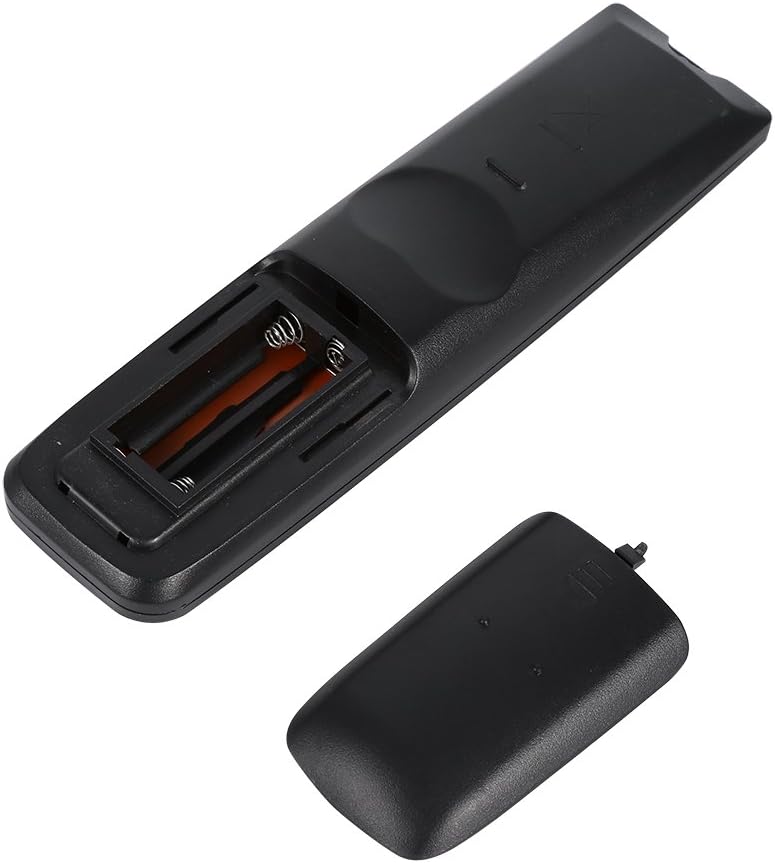
Imej 2.1: View of the remote control's open battery compartment, ready for AAA battery insertion.
Nota:
- Always use new batteries of the same type.
- Jangan campurkan bateri lama dan baharu, atau jenis bateri yang berlainan.
- Tanggalkan bateri jika alat kawalan jauh tidak akan digunakan untuk tempoh yang lama untuk mengelakkan kebocoran.
3. Arahan Operasi
The Yunir AKB69680403 remote control is designed for immediate use with compatible LG TVs without any prior programming. Simply point the remote at your television and begin operation.

Imej 3.1: Selesaiview of the remote control's buttons and layout.
3.1 Fungsi Butang
- KUASA: Menghidupkan atau mematikan TV.
- MASUKKAN: Memilih sumber input (HDMI, AV, dsb.).
- PENJIMATAN TENAGA: Activates or deactivates energy-saving modes.
- TV/RAD: Beralih antara mod TV dan Radio.
- AV MODE: Selects audio/video modes.
- Butang Nombor (0-9): Memilih saluran secara langsung.
- SENARAI: Memaparkan senarai saluran.
- Q.VIEW: Berbalik kepada sebelumnya viewsaluran ed.
- VOL +/-: Melaraskan tahap kelantangan.
- CH +/-: Menukar saluran ke atas atau ke bawah.
- MATI: Membisukan atau menyahredamkan bunyi TV.
- PAGE ^/v: Navigates through pages in menus or lists.
- Directional Pad (Up, Down, Left, Right) & OK: Menavigasi menu dan mengesahkan pilihan.
- MENU: Opens the main TV menu.
- TEKS: Mengakses perkhidmatan teleteks.
- T.OPT: Teletext options.
- MAKLUMAT: Memaparkan maklumat tentang program atau input semasa.
- PANDUAN: Membuka panduan program elektronik.
- MARK/FAV: Marks content or accesses favorite channels.
- KEMBALI/KELUAR: Kembali ke skrin sebelumnya atau keluar dari menu.
- Butang Berwarna (Merah, Hijau, Kuning, Biru): Used for specific functions within menus or applications, as indicated on the TV screen.
Some buttons, such as the number buttons, are fluorescent to assist with operation in low-light conditions.
4. Penyelenggaraan
4.1 Pembersihan
Untuk mengekalkan rupa dan fungsi alat kawalan jauh:
- Lap alat kawalan jauh dengan kain lembut dan kering.
- Untuk kotoran degil, sedikit dampLap kain dengan air atau larutan pembersih lembut, kemudian lap hingga kering dengan segera.
- Do not use abrasive cleaners, alcohol, or solvents, as these can damage the surface or internal components.
4.2 Penjagaan Bateri
- Gantikan bateri apabila tindak balas alat kawalan jauh menjadi lembap atau tidak konsisten.
- Buang bateri terpakai secara bertanggungjawab mengikut peraturan tempatan.
5. Penyelesaian masalah
Jika anda menghadapi masalah dengan alat kawalan jauh anda, rujuk masalah dan penyelesaian biasa berikut:
- Remote control is not responding:
- Periksa sama ada bateri dimasukkan dengan betul dengan polariti yang betul.
- Gantikan bateri dengan yang baru.
- Pastikan tiada halangan antara alat kawalan jauh dan penderia inframerah TV.
- Pastikan anda berada dalam julat pengendalian yang berkesan dan halakan alat kawalan jauh terus ke TV.
- Some functions do not work:
- While this remote is broadly compatible, some specific advanced functions of your original TV remote might not be supported.
- Verify that your TV model is an LG LCD, LED, or Plasma TV.
6. Spesifikasi
| Ciri | Perincian |
|---|---|
| Nama Produk | TV Remote Controller |
| Model | AKB69680403 |
| Keserasian | Most LG LCD, LED, or Plasma TVs |
| Sumber Kuasa | 2 x Bateri AAA (tidak termasuk) |
| bahan | ABS |
| warna | Hitam |
| Dimensi (L x W x H) | 17.9 x 4.7 x 2 cm (7.05 x 1.85 x 0.79 inci) |
| Berat Barang | 2.46 auns |
| Pengeluar | Tonysa |

Image 6.1: The remote control displaying its physical dimensions.
7. Waranti dan Sokongan
Specific warranty information for this product is not provided in the available data. For any product-related inquiries, technical support, or warranty claims, please contact the retailer or manufacturer directly. Keep your purchase receipt as proof of purchase.