pengenalan
The VIJIM VL120 LED Video Light is a compact and versatile lighting solution designed for photographers and videographers. It features 120 high-quality LED beads, adjustable bi-color temperature (3200K-6500K), and dimmable brightness, making it suitable for various shooting environments. This manual provides detailed instructions for the proper setup, operation, and maintenance of your VL120 LED Video Light.
Apa yang ada dalam Kotak
- Lampu Video LED
- Penutup Silikon
- Color Paper (6 pieces)
- Pangkalan Pemasangan
- Kabel Pengecasan Jenis-C

Ciri-ciri Produk
- Manik LED CRI Tinggi: Equipped with 120 high-quality LED beads, offering a Color Rendering Index (CRI) of 95+ for accurate color reproduction and up to 1250 Lux maximum brightness.
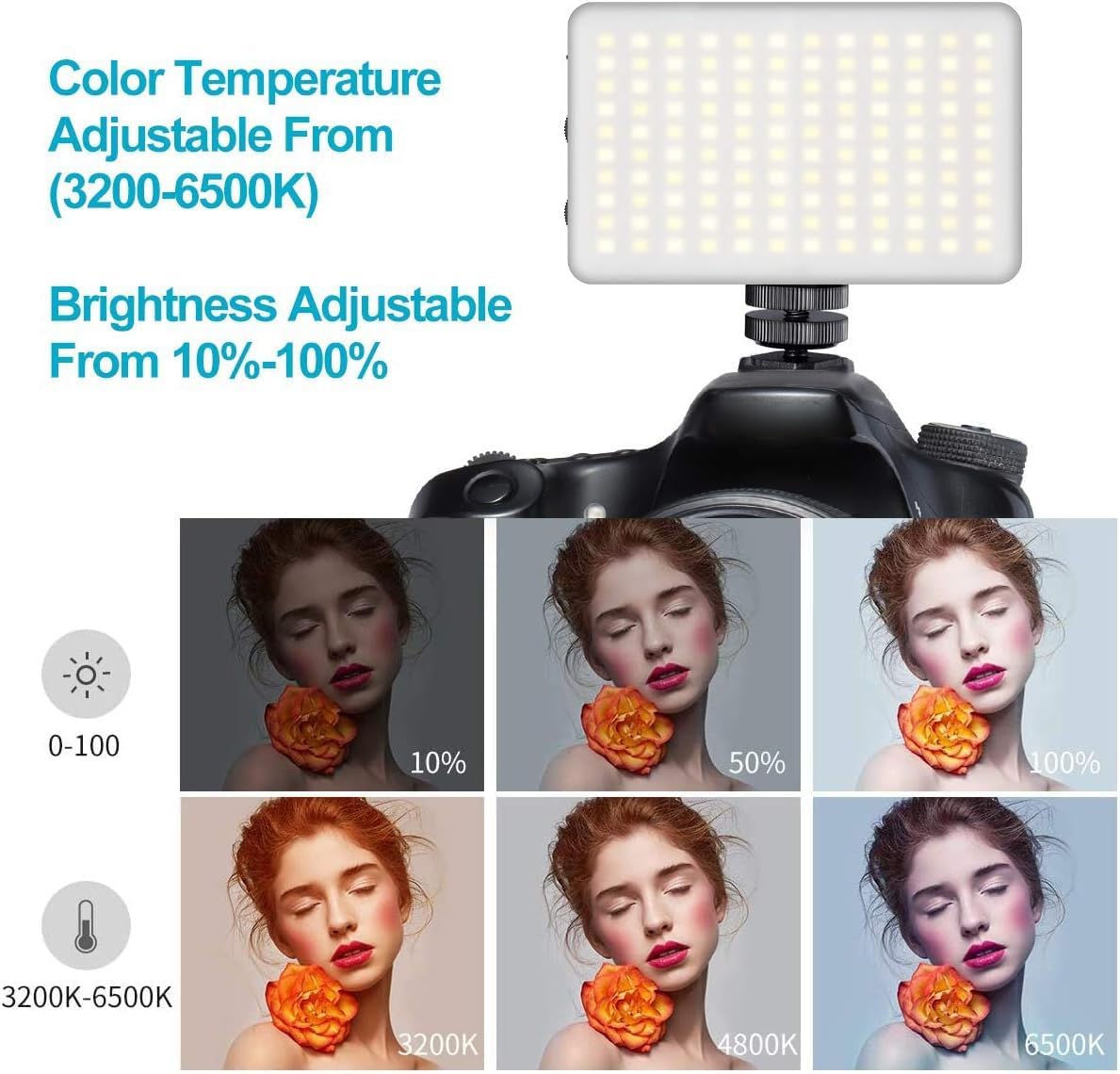
- Suhu Dwi Warna: Steplessly adjustable color temperature from 3200K (warm) to 6500K (cool) to match various lighting conditions.
- Kecerahan Boleh Dimalapkan: Brightness is adjustable from 10% to 100% using a single switch, providing precise control over light output.
- Resapan Cahaya Lembut: Includes a silicone cover to soften the light output, protecting eyes and creating a more natural illumination.
- Penapis Warna: Six color filters (pink, red, yellow, purple, green, blue) are provided to create diverse lighting effects and moods.
- Bateri Boleh Dicas Semula Terbina dalam: Features a 3100mAh lithium battery, offering 120-150 minutes of continuous use at maximum power.
- Pengecasan Jenis-C: Convenient Type-C charging port allows for charging while in use.
- Padat dan Mudah Alih: Lightweight and durable construction for easy portability.

Persediaan
- Cas Peranti: Before first use, fully charge the VL120 using the provided Type-C charging cable. The battery indicator lights will show the charging status.
- Pasang Tapak Pemasangan: Screw the cold shoe mounting base into the 1/4-inch screw hole at the bottom of the light.
- Lekapkan pada Kamera/Tripod: Slide the cold shoe mount into your camera's hot shoe or attach it to a compatible tripod.
- Apply Silicone Cover (Optional): For softer light, slide the silicone diffuser cover over the LED panel.
- Insert Color Gels (Optional): If using color filters, place the desired color paper inside the silicone cover before attaching it to the light.

Arahan Operasi
- Hidupkan/Mati Kuasa: Slide the "OFF/ON" switch to turn the light on or off.
- Laraskan Kecerahan: Use the "DIM +/-" knob to increase or decrease the brightness from 10% to 100%.
- Laraskan Suhu Warna: Use the "CT +/-" knob to change the color temperature from 3200K (warm) to 6500K (cool).
- Bateri Pantau: The LED indicator lights on the side of the unit display the remaining battery charge.

Video: Demonstrates the features of the VIJIM VL120 LED Video Light, including its soft light cover and color gels. This video is provided by the seller.
Penyelenggaraan
- Pastikan peranti kering dan bersih.
- Elakkan daripada mendedahkan cahaya kepada suhu yang melampau atau cahaya matahari langsung untuk tempoh yang lama.
- Clean the LED panel and body with a soft, dry cloth. Do not use harsh chemicals or abrasive materials.
- Simpan cahaya di tempat yang sejuk dan kering apabila tidak digunakan.
Menyelesaikan masalah
Lampu tidak menyala:
- Pastikan suis kuasa berada dalam kedudukan "ON".
- Check the battery level. If low, charge the device using the Type-C cable.
Brightness/Color Temperature cannot be adjusted:
- Verify that the respective adjustment knobs are being turned correctly.
- Pastikan peranti dihidupkan.
Hayat bateri pendek:
- Battery life is shorter at maximum brightness. Reduce brightness for extended use.
- Pastikan bateri dicas sepenuhnya sebelum digunakan.
Spesifikasi
| Nombor Model | VL120 |
| Dimensi Produk | 4.2 x 2.6 x 0.6 inci (10.67 x 6.6 x 1.52 cm) |
| Berat Barang | 11.3 auns (320 gram) |
| Manik LED | 120 pcs |
| Max Brightness Illuminance | Sehingga 1250 Lux |
| Indeks Paparan Warna (CRI) | 95+ |
| Suhu Warna | 3200K-6500K (Bi-Color, Steplessly Dimmable) |
| Pelarasan Kecerahan | 10%-100% |
| Kapasiti Bateri | 3100mAh Litium Ion |
| Battery Life (Max Power) | 120-150 minutes (approx. 2-2.5 hours) |
| Port Pengecasan | USB Jenis-C |
| Antara Muka Perkakasan | USB Jenis C |
Waranti dan Sokongan
For warranty information or technical support, please refer to the product packaging or contact VIJIM customer service directly. Specific warranty terms may vary by region and retailer.