
pengenalan
Thank you for choosing the Waykar 296 Pints Commercial Dehumidifier. This manual provides essential information for the safe operation, installation, maintenance, and troubleshooting of your dehumidifier. Please read it thoroughly before use and retain it for future reference.
This commercial-grade dehumidifier is designed for large spaces up to 9,000 square feet, effectively removing up to 296 pints (37 gallons) of moisture per day. It is suitable for basements, industrial or commercial spaces, garages, cellars, workshops, libraries, laboratories, and flood restoration.
Maklumat Keselamatan Penting
Untuk mengurangkan risiko kebakaran, kejutan elektrik atau kecederaan, sentiasa ikuti langkah berjaga-jaga asas ini:
- Baca semua arahan sebelum menggunakan perkakas.
- Pastikan bekalan kuasa sepadan dengan label penarafan pada unit.
- Jangan kendalikan penyahlembap dengan kord atau palam yang rosak.
- Sentiasa cabut plag unit sebelum membersihkan atau menservis.
- Jangan sekat saluran masuk atau alur keluar udara.
- Keep the unit on a level surface to prevent water leakage.
- Perkakas ini tidak dimaksudkan untuk digunakan oleh orang (termasuk kanak-kanak) yang kurang keupayaan fizikal, deria atau mental, atau kurang pengalaman dan pengetahuan, melainkan mereka telah diberi pengawasan atau arahan mengenai penggunaan perkakas oleh orang yang bertanggungjawab untuk keselamatan mereka.
Produk Selesaiview
Komponen dan Ciri
The Waykar 296 Pints Commercial Dehumidifier features a robust design with intelligent controls for efficient moisture removal.
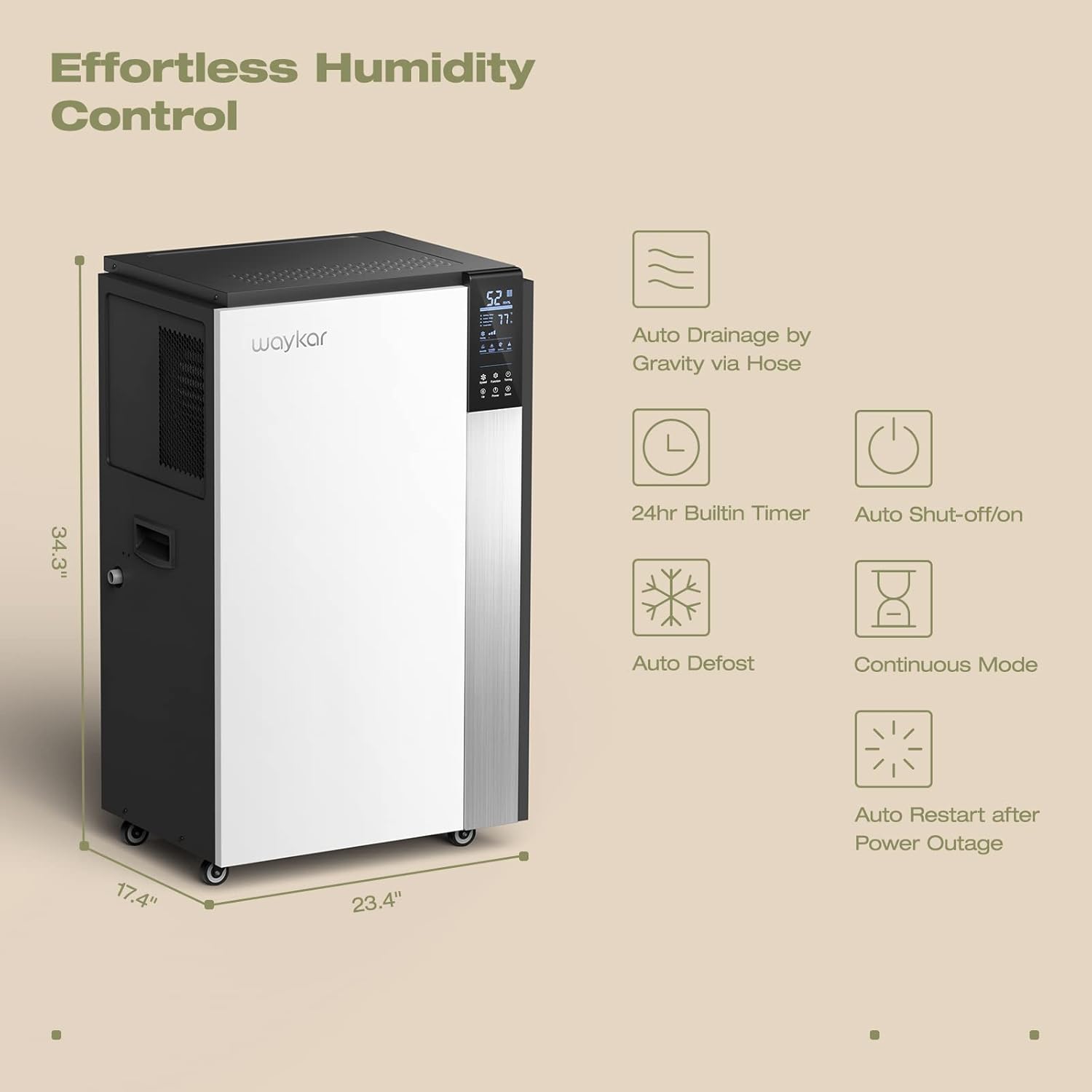
Figure 1: Intelligent Touch Control Panel
Displays humidity, temperature, and allows setting adjustments.

Figure 2: Dehumidifier Dimensions and Key Features
Illustrates the unit's dimensions (34.3" H x 23.4" W x 17.4" D) and highlights features like auto drainage, 24hr timer, auto shut-off/on, auto defrost, continuous mode, and auto restart after power outage.
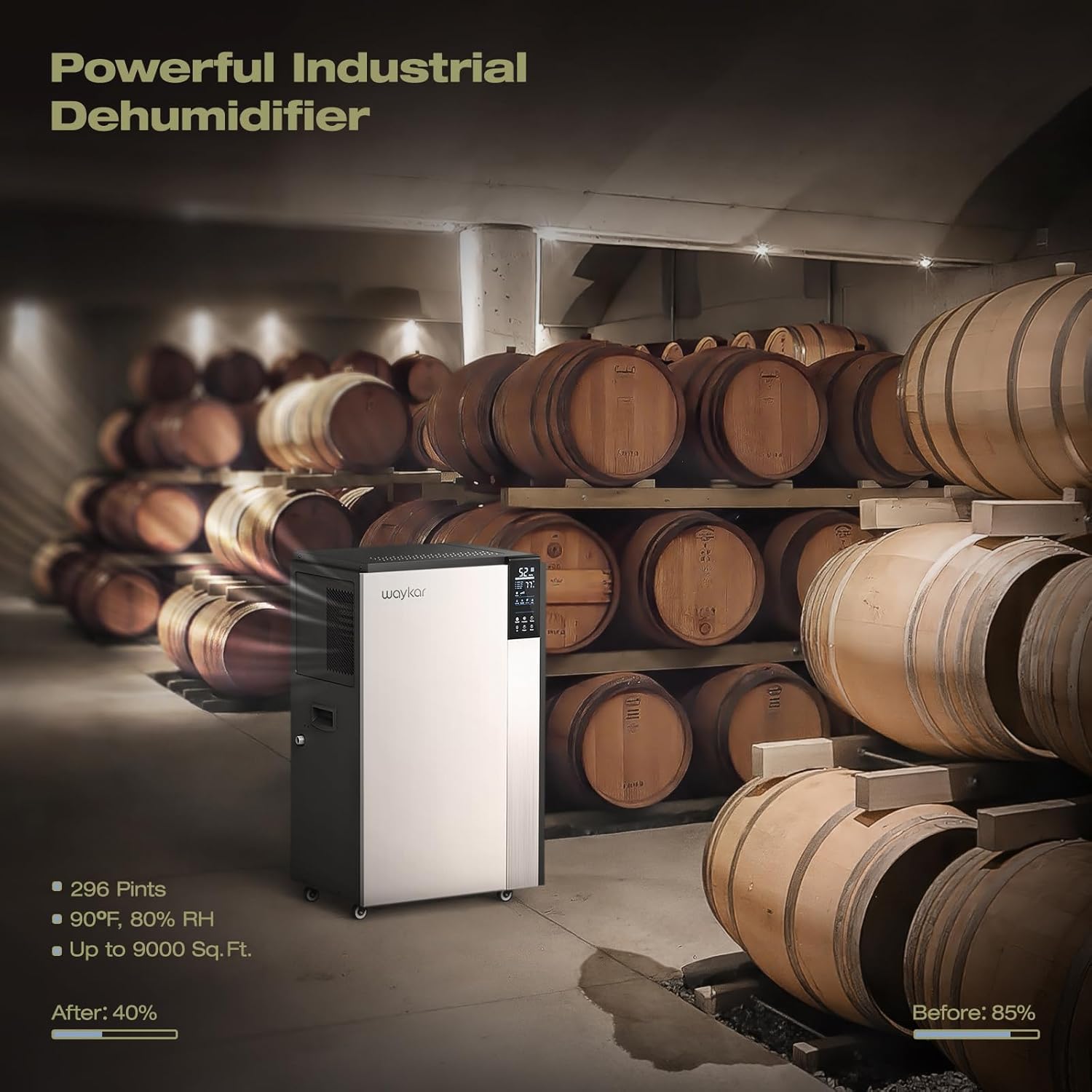
Figure 3: Continuous Drainage Setup and Detachable Filter
Shows the connection for the continuous drain hose and the location of the washable air filter.
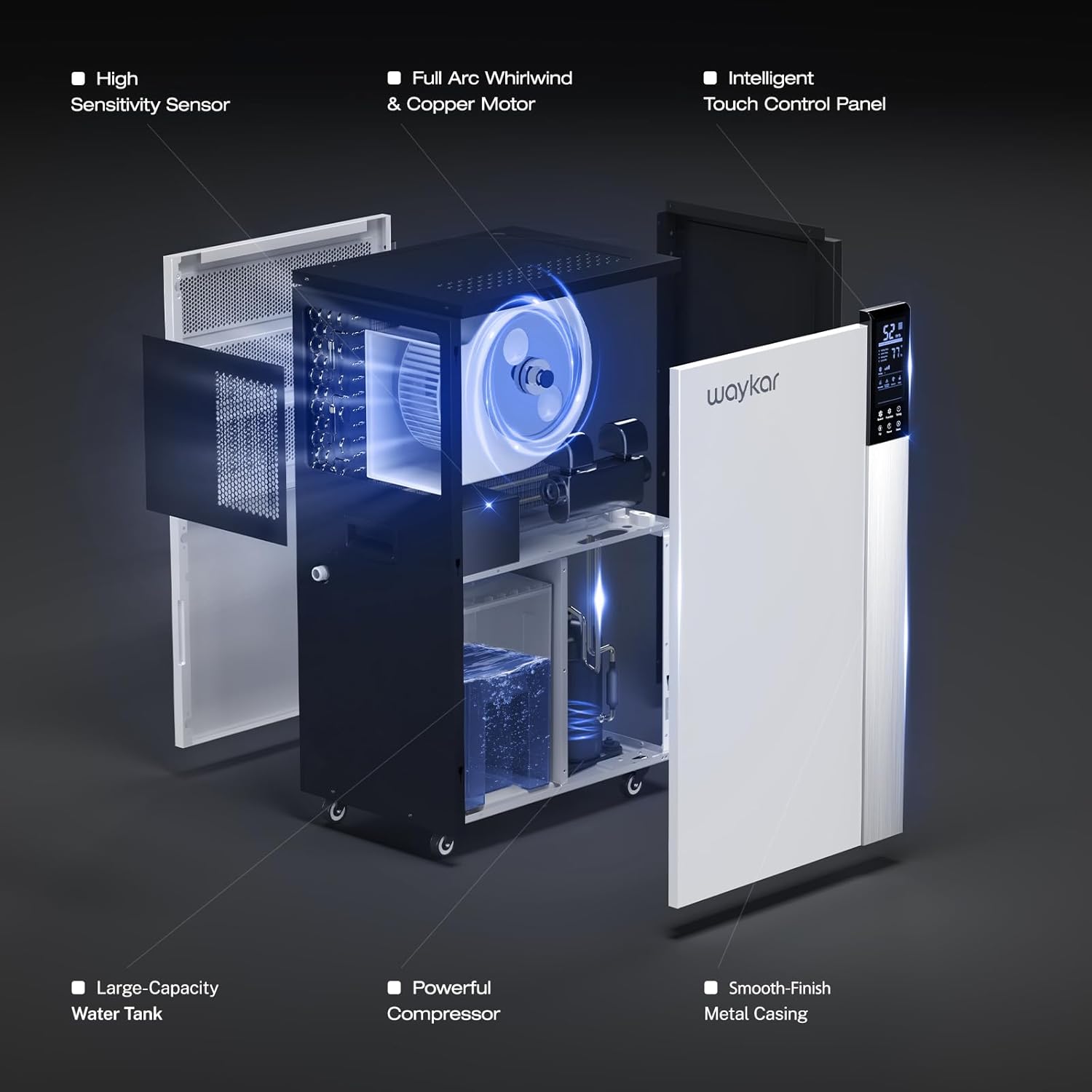
Figure 4: Internal Structure and Components
Sebuah meletup view showing the high sensitivity sensor, full arc whirlwind & copper motor, intelligent touch control panel, large-capacity water tank, powerful compressor, and smooth-finish metal casing.
Arahan Persediaan
- Membongkar: Carefully remove the dehumidifier from its packaging. Inspect for any shipping damage.
- penempatan: Position the dehumidifier on a level, stable surface in the desired area. Ensure there is at least 8 inches (20 cm) of space around the unit for proper airflow. The unit is equipped with four universal wheels and two ergonomically placed handles for easy movement.
- Siaga Awal: Selepas pengangkutan, biarkan unit berdiri tegak selama sekurang-kurangnya 24 jam sebelum memasangnya. Ini membolehkan bahan pendingin mendap.
- Sambungan Kuasa: Pasangkan kord kuasa ke soket elektrik yang dibumikan dengan volum yang betultage (refer to the rating label).
- Persediaan Saliran:
- Continuous Drainage (Recommended): For continuous operation without manual emptying, connect the included 40-inch (100 cm) drain hose to the drainage port on the unit. Ensure the hose is sloped downwards to allow gravity drainage to a suitable floor drain or container.
- Water Bucket (Internal): If continuous drainage is not used, the unit will collect water in its internal bucket. The unit will automatically shut off when the bucket is full.
Arahan Operasi
Fungsi Panel Kawalan
The intelligent touch control panel allows for easy operation and monitoring.
- Butang Kuasa: Tekan untuk menghidupkan atau MATI unit.
- Humidity Setting (Up/Down Buttons): Adjust the desired humidity level between 10% and 90% Relative Humidity (RH). The unit will automatically operate to maintain this level.
- Butang Kelajuan Kipas: Pilih antara kelajuan kipas Tinggi dan Rendah.
- Butang Pemasa: Tetapkan pemasa 24 jam untuk operasi HIDUP/MATI automatik.
- paparan: Shows current room humidity, set humidity, and operating temperature.
Mod Pengendalian
- Kawalan Kelembapan Automatik: Set your desired humidity level. The dehumidifier will sense the room's humidity and automatically turn on or off to maintain the pre-set level.
- Mod Berterusan: For maximum dehumidification, select continuous mode. The unit will run continuously regardless of the humidity level. This mode is typically used with continuous drainage.
- Auto Nyahbeku: The unit features an automatic defrost function that activates when frost builds up on the evaporator coils, ensuring efficient operation in low-temperature environments.
- Mulakan semula Auto: Sekiranya berlaku kuasa outage, unit akan dimulakan semula secara automatik dengan tetapan sebelumnya setelah kuasa dipulihkan.
Penyelenggaraan
Penyelenggaraan tetap memastikan prestasi optimum dan memanjangkan jangka hayat penyahlembap anda.
- Membersihkan Penapis Udara:
- The unit has a "Clean Reminder" feature for the filter.
- Matikan dan cabut plag penyahlembap.
- Remove the detachable air filter (refer to Figure 3 for location).
- Wash the filter with warm, soapy water. Rinse thoroughly and allow it to air dry completely before reinstalling.
- Bersihkan penapis setiap dua minggu atau lebih kerap bergantung pada penggunaan dan kualiti udara.
- Membersihkan Bahagian Luar Unit:
- Lap bahagian luar dengan lembut, damp kain. Jangan gunakan bahan kimia yang keras atau pembersih yang kasar.
- Drainage System Check:
- Periodically check the drain hose for kinks, blockages, or algae growth if using continuous drainage.
- If using the internal water bucket, empty and clean it regularly to prevent mold and mildew growth.
- Storan:
- If storing the unit for an extended period, ensure it is clean and dry.
- Drain any remaining water from the internal bucket and hose.
- Store the unit upright in a cool, dry place. The back housing can be opened to store the drain hose and other accessories inside.
Panduan Penyelesaian Masalah
Sebelum menghubungi sokongan pelanggan, sila rujuk isu dan penyelesaian biasa berikut:
| Masalah | Kemungkinan Punca | Penyelesaian |
|---|---|---|
| Dehumidifier tidak dihidupkan. | No power, power cord loose, full water bucket. | Check power connection, ensure outlet is functional. Empty water bucket if full. |
| Unit runs but does not remove moisture. | Air filter clogged, room temperature too low, humidity setting too high. | Clean air filter. Ensure room temperature is above 5°C (41°F). Lower the desired humidity setting. |
| Air bocor dari unit. | Unit not level, drain hose kinked or blocked, drain hose not properly connected. | Place unit on a level surface. Check and clear drain hose. Ensure hose connection is secure. |
| Unit bising. | Air filter clogged, unit not on a stable surface, internal component issue. | Clean air filter. Ensure unit is on a firm, level surface. If noise persists, contact customer support. |
| Kod Ralat E6 (seperti yang dinyatakan dalamviews). | Defrost sensor issue or other internal fault. | Refer to specific troubleshooting steps provided by Waykar customer service, potentially involving disconnecting a low voltage wire. Contact customer support for guidance. |
Spesifikasi
| Ciri | Perincian |
|---|---|
| Model | Waykar 296 Pints Commercial Dehumidifier |
| Kapasiti Penyingkiran Lembapan | 296 Pints (37 Gallons) per day |
| Kawasan Liputan | Sehingga 9,000 Sq. Ft. |
| Berat Barang | 50.8 kg |
| warna | putih |
| Ciri Khas | Portable, Intelligent Touch Control, Auto Defrost, 24H Timer, Auto Shut-off/on, Auto Restart, Continuous Drainage |
| Komponen yang Disertakan | Waykar 296 Pints Dehumidifier x 1, Drain Hose |
| Panjang Hos Saliran | 40 inci (100 cm) |
Waranti dan Sokongan Pelanggan
Waykar stands behind its products with comprehensive warranty and support services:
- Jaminan Wang Dikembalikan: 30-Days Money Back if you are not satisfied with the product.
- Waranti: 1-year warranty, with an option for a 2nd-year warranty extension.
- Sokongan Teknikal: Lifetime expert technical support is available.
- Hubungi: For any questions or issues, please contact Waykar customer support. They aim to reply within 12 hours to assist with problem resolution.