
1. Pengenalan
Thank you for choosing the COMICA BoomX-D D2 2.4G Wireless Microphone System. This manual provides detailed instructions for the proper setup, operation, and maintenance of your new wireless microphone system. Please read this manual thoroughly before use to ensure optimal performance and to prevent damage to the device. Keep this manual for future reference.
2. Produk Lebihview
2.1 Ciri-ciri Utama
- 2.4G Digital Wireless Technology: Ensures stable and reliable audio transmission.
- Dual Transmitters, One Receiver: Allows simultaneous recording from two sources.
- Visual Power & Audio Dynamic Monitor: Real-time display of battery status and audio levels.
- Internal & External MIC Input Modes: Flexibility to use built-in microphone or external lavalier.
- Mono/Stereo Switchable Output: Adaptable for various recording needs.
- Broadcasting-Quality Audio: Delivers clear and crisp sound.
- Latensi Rendah: Less than 20ms for synchronized audio and video.
- Julat Kerja: Up to 50 meters (164 feet) in open areas.
- Multi-functional Belt Clip: For easy attachment and portability.
- Reka bentuk padat dan ringan: Ideal for on-the-go recording.
- Pengecasan USB-C: Pengecasan yang mudah dan universal.
2.2 Komponen yang Disertakan
The COMICA BoomX-D D2 system typically includes the following components:
- 1 x Penerima (RX)
- 2 x Pemancar (TX)
- 2 x 3.5mm TRS Lavalier Microphones
- 2 x Wind Muffs for Lavalier Microphones
- 1 x 3.5mm TRS-TRS Audio Cable (for cameras)
- 1 x 3.5mm TRS-TRRS Audio Cable (for smartphones)
- 1 x USB-C to USB-A Charging Cable (may include multiple for simultaneous charging)
- 1 x Manual Pengguna
- 1 x Storage Case (or packaging)
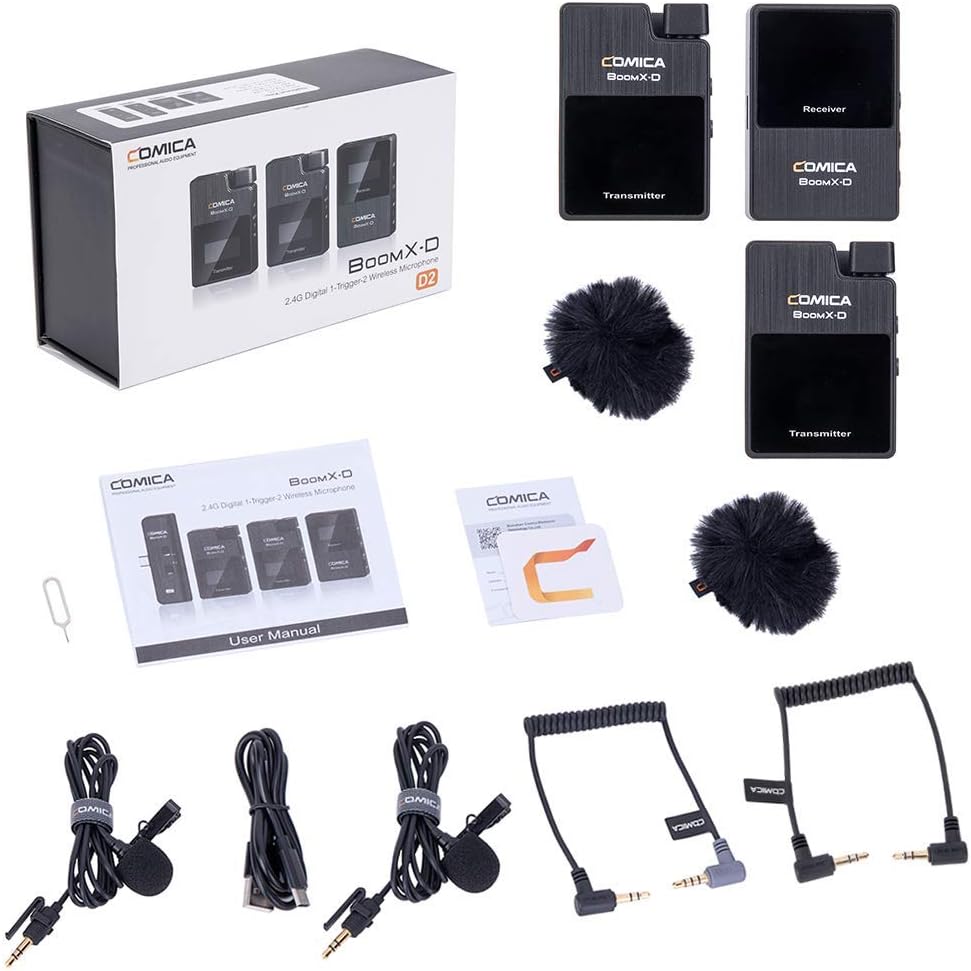
Figure 1: Complete contents of the COMICA BoomX-D D2 package, showing the receiver, two transmitters, lavalier microphones, wind muffs, various audio cables, and charging cable.
3. Panduan Persediaan
3.1 Mengecas Peranti
Before initial use, fully charge the receiver and both transmitters using the provided USB-C charging cable. Connect the USB-C end to the device and the USB-A end to a compatible USB power adapter (not included) or a computer USB port.
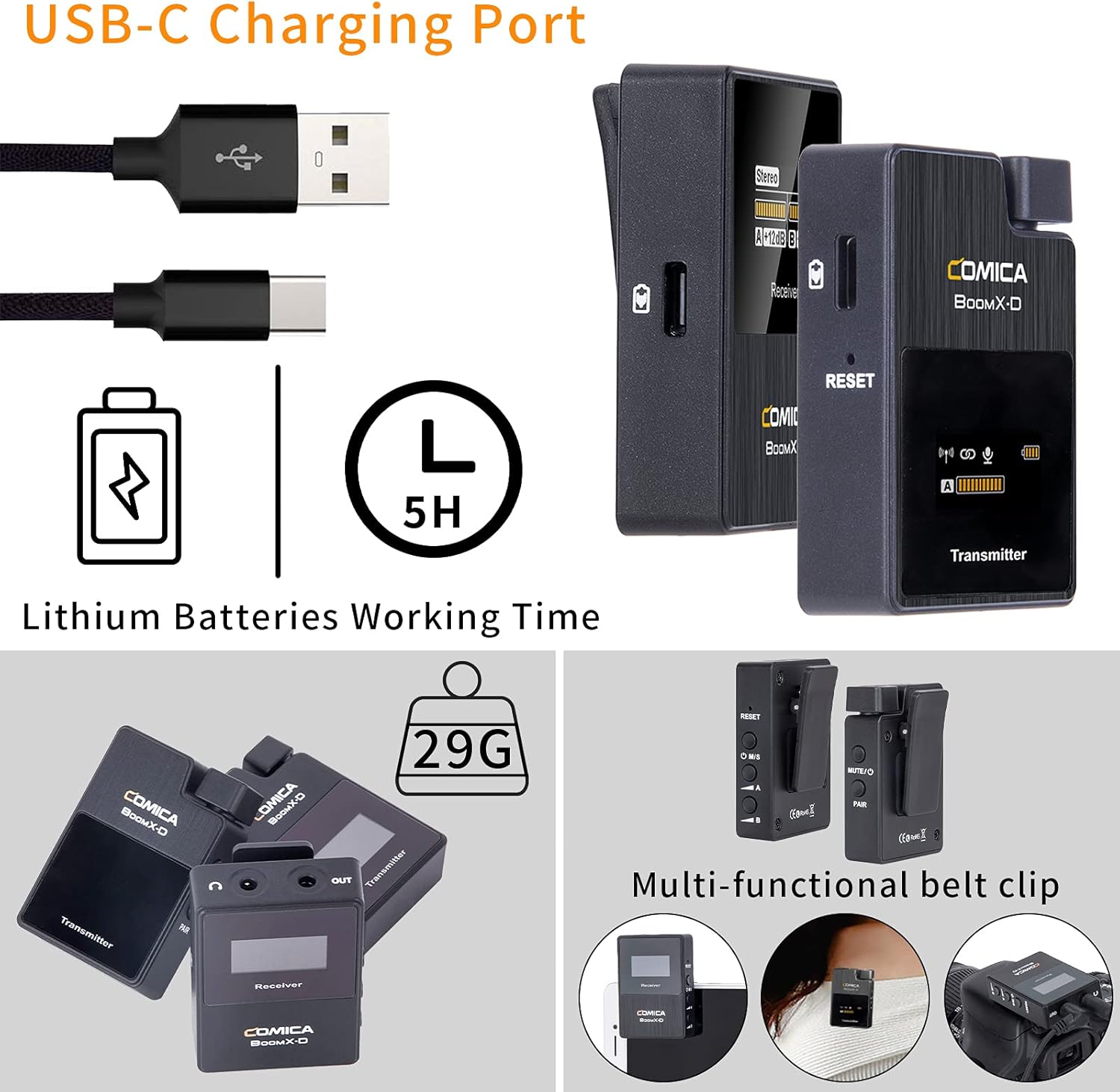
Figure 2: Illustration of the USB-C charging port on the COMICA BoomX-D D2 units, highlighting the charging process and battery life indication.
3.2 Powering On/Off and Pairing
- Hidupkan kuasa: Press and hold the power button on both the receiver and transmitters until the screen illuminates.
- Berpasangan automatik: The units are designed to pair automatically upon power-on. Observe the screens for connection indicators. If pairing fails, refer to the troubleshooting section or the seller video for manual pairing instructions.
Video 1: A seller-provided video demonstrating the setup and pairing process of the COMICA BoomX-D D2 wireless microphone system, including how to connect to various devices.
3.3 Menyambung ke Peranti Rakaman
Use the appropriate audio cable to connect the receiver to your recording device (camera, smartphone, etc.).
- Untuk Kamera (DSLR/Tanpa Cermin): Use the 3.5mm TRS-TRS audio cable. Connect one end to the receiver's output and the other to your camera's microphone input.
- Untuk Telefon Pintar/Tablet: Use the 3.5mm TRS-TRRS audio cable. Connect one end to the receiver's output and the other to your smartphone's headphone/microphone jack. For devices without a 3.5mm jack, an appropriate adapter (e.g., USB-C to 3.5mm or Lightning to 3.5mm) may be required (not included).

Figure 3: The COMICA BoomX-D D2 receiver connected to a smartphone, illustrating its use for mobile video recording with low latency and a 50-meter range.

Figure 4: A visual guide to the compatibility of the COMICA BoomX-D D2 with various devices, including Canon, Nikon, Sony, Panasonic, Fujifilm cameras, and iPhone, Huawei, Samsung smartphones, using different audio cables.
4. Arahan Operasi
4.1 Using the Lavalier Microphone or Built-in Mic
Each transmitter has a built-in omnidirectional microphone. For discreet placement or improved audio quality, you can connect the included 3.5mm TRS lavalier microphone to the transmitter's MIC input port.
- With Lavalier Mic: Plug the lavalier microphone into the 3.5mm MIC input on the transmitter. Clip the lavalier mic to clothing, approximately 6-8 inches from the speaker's mouth.
- Without Lavalier Mic (Built-in): Ensure no external microphone is plugged in. Clip the transmitter directly onto clothing, ensuring the built-in microphone faces the sound source.

Figure 5: Demonstrates the flexibility of the COMICA BoomX-D D2, allowing users to choose between the external lavalier microphone or the built-in microphone on the transmitter, depending on their recording needs.
4.2 Mono/Stereo Output Switching
The receiver allows you to switch between mono and stereo output modes. This is useful for post-production flexibility or specific recording scenarios.
- Mod Mono: Combines audio from both transmitters into a single mono track.
- Mod Stereo: Records audio from each transmitter to separate left and right channels.
Refer to the receiver's display and control buttons to switch between these modes. The display will clearly indicate the selected mode.
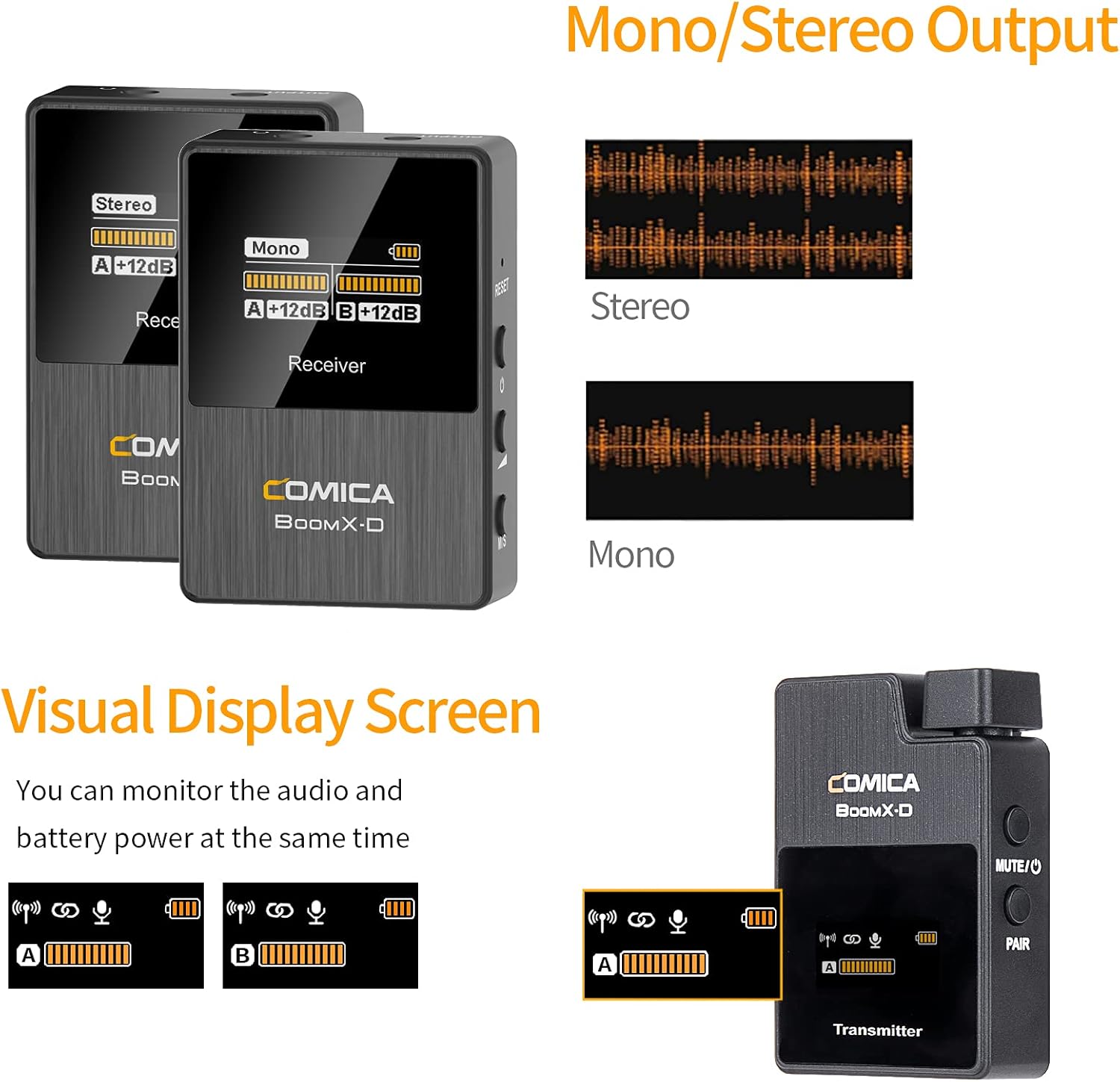
Figure 6: The visual display screen of the COMICA BoomX-D D2 receiver, showing options for Mono/Stereo output and real-time monitoring of audio levels and battery status for both transmitters.
4.3 Real-time Audio Monitoring
Connect headphones to the receiver's 3.5mm headphone output jack to monitor your audio in real-time. This ensures that your audio is being recorded correctly and helps identify any potential issues during recording.

Figure 7: A user monitoring real-time audio through headphones connected to the COMICA BoomX-D D2 receiver, which is mounted on a camera, ensuring sound quality during recording.
5. Penyelenggaraan
- Pembersihan: Use a soft, dry cloth to clean the devices. Do not use harsh chemicals or abrasive materials.
- Storan: Simpan sistem mikrofon di tempat yang sejuk dan kering, jauh daripada cahaya matahari langsung dan suhu yang melampau.
- Penjagaan Bateri: For optimal battery life, avoid fully discharging the devices frequently. Charge them regularly, even if not in use for extended periods.
- Elakkan Kelembapan: Keep the devices away from water and high humidity to prevent damage.
6. Penyelesaian masalah
| Masalah | Kemungkinan Punca | Penyelesaian |
|---|---|---|
| Tiada Keluaran Bunyi | Low battery; Incorrect cable connection; Unpaired devices; Muted microphone. | Charge devices; Ensure cables are securely connected; Re-pair transmitter and receiver; Check if transmitter is muted. |
| Gangguan/Kualiti Bunyi yang Lemah | Obstructions between TX/RX; Too far from receiver; Strong electromagnetic interference. | Reduce distance between TX/RX; Ensure clear line of sight; Move away from other wireless devices; Check external microphone connection. |
| Devices Not Pairing | Out of range; Pairing mode not activated. | Bring devices closer; Follow manual pairing instructions (if automatic fails); Ensure both are powered on. |
| Hayat Bateri Pendek | Old battery; Frequent full discharge. | Ensure full charge before use; Avoid frequent full discharge; Consider battery replacement if significantly degraded. |
7. Spesifikasi
- Jenama: KOMIKA
- Nombor Model: D2
- Teknologi Ketersambungan: USB, Wireless (2.4G Digital)
- Jenis Penyambung: USB-C, 3.5mm (TRS/TRRS)
- Ciri Khas: Clip-on design
- Corak kutub: Omnidirectional
- Kepekaan Audio: 86 Desibel
- Faktor Bentuk Mikrofon: Sistem Mikrofon
- Sumber Kuasa: USB-C
- Nisbah Signal-to-Noise: 86 dB
- Bilangan Saluran: 2
- Julat Kerja: Sehingga 50m (164 kaki)
- Latensi: <20ms
8. Waranti dan Sokongan
COMICA products are covered by a limited warranty against defects in materials and workmanship. For specific warranty terms, registration, and technical support, please visit the official COMICA webtapak atau hubungi perkhidmatan pelanggan mereka. Simpan resit pembelian anda sebagai bukti pembelian untuk tuntutan waranti.
rasmi Webtapak: www.comica-audio.com