
OnePlus IN2015
Manual Pengguna Telefon Pintar OnePlus 8 Glacial Green (Model IN2015)
Official instructions for your OnePlus 8 device.
1. Pengenalan
The OnePlus 8 Glacial Green (Model IN2015) is an advanced Android smartphone designed for high performance and a smooth user experience. It features a 90Hz Fluid AMOLED display, a powerful Qualcomm Snapdragon 865 processor with 5G connectivity, and a versatile triple camera system.
This manual provides essential information for setting up, operating, maintaining, and troubleshooting your device.
2. Apa yang ada di dalam Kotak
Upon unboxing your OnePlus 8, verify that all the following items are included:
- OnePlus 8 Glacial Green Smartphone
- Warp Charge 30 Power Adapter
- Warp Type-C Cable (Supports USB 2.0)
- Panduan Mula Pantas
- Surat Aluan
- Maklumat Keselamatan dan Kad Waranti
- LOGO Sticker
- Pelindung Skrin (pra-pakai)
- Ejector Dulang SIM
3. Peranti Lebihview

Rajah 1: Depan dan Belakang view of the OnePlus 8 Glacial Green smartphone.
3.1 Dimensi dan Berat Fizikal
- Dimensi: 6.31 x 2.87 x 0.31 inci
- Berat: 6.3 auns (180 gram)
- warna: Glacial Green
3.2 Butang dan Port

Rajah 2: Bawah view showing the USB-C port, speaker, and SIM tray.
- Sebelah Kanan: Power button, Alert Slider (for Ring/Vibrate/Silent modes).
- Bahagian Kiri: Volume rocker.
- Bawah: USB-C port, single SIM card tray, primary microphone, bottom-firing speaker.
- Atas: Mikrofon sekunder.
- No dedicated 3.5mm audio jack.
3.3 Sistem Kamera
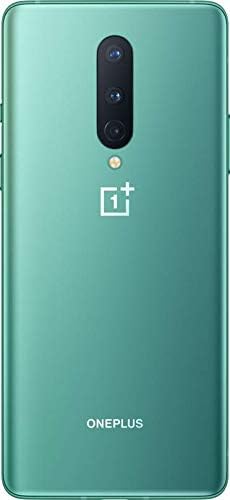
Rajah 3: Belakang view highlighting the triple camera setup.
- Kamera Belakang: Triple camera setup including a 48MP main sensor, a 16MP ultra-wide angle lens, and a 2MP macro lens. Features include Nightscape 2.0, Studio Lighting, Super Slow Motion (up to 460 FPS), RAW image capture, and AI Scene Detection.
- Kamera Depan: Kamera hadapan 16MP.
4. Persediaan
4.1 Memasukkan Kad SIM
- Cari dulang SIM di tepi bawah peranti.
- Masukkan alat ejektor SIM ke dalam lubang kecil pada dulang SIM.
- Tolak perlahan-lahan sehingga dulang terkeluar.
- Place your Nano-SIM card into the tray with the gold contacts facing down. This model supports a single SIM card.
- Masukkan semula dulang SIM ke dalam peranti dengan berhati-hati.
4.2 Menghidupkan/Mematikan
- Untuk Menghidupkan: Press and hold the Power button on the right side until the OnePlus logo appears.
- Untuk Mematikan: Press and hold the Power button, then tap
Ask a question about this manual
Ask about setup, troubleshooting, compatibility, parts, safety, or missing instructions. Manuals+ will review the question and use this page’s manual context to help answer it.